
Podcast Episode 1

Episode 001 29 min

Anand Ganesh, Founding Software Architect at Hammerspace: Data-as-a-Service solves traditional security problems

with Anand Ganesh · Hammerspace

0:00 / 29:00

Also on Spotify, Apple Podcasts, YouTube, Podbean, Player FM

Episode 1 of The Security Podcast of Silicon Valley, published May 6, 2021, the show's first. Host Jon McLachlan talks with Anand Ganesh, the founding software architect at Hammerspace, about storageless data: one namespace for files on any storage, managed through metadata. Anand explains the Anvil metadata server and the DSX data services, why the platform stays out of the I/O path with the pNFS Flex Files protocol, the upside-down management of traditional storage, why every copy makes permissions harder and quarantine breaks lineage, bringing your own keys, share-level snapshots across storage systems, backup versus snapshot and the mobility replay log, undelete, active-active disaster recovery, functions that derive metadata for security, and deleting data by removing what decrypts it. About 30 minutes.

Episode notes

In the very first episode of The Security Podcast of Silicon Valley, Anand Ganesh, Founding Software Architect at Hammerspace, makes the case that storageless, data-as-a-service architecture solves security problems that traditional B2B storage never could.

The conversation covers encryption at rest, disaster recovery without failover, share-level snapshots that span storage systems, permission models, intelligent data classification, ransomware recovery, what it means to trust the major cloud providers, and how crypto-shredding makes secure deletion real in distributed systems.

Hosted by Jon McLachlan — co-founder of YSecurity.

The deep dive

A file is a file is a file

Anand Ganesh, the founding software architect at Hammerspace, on the very first episode: storageless data, a metadata server that stays out of the data path, why every copy makes permissions harder, snapshots that span storage systems, active-active disaster recovery, functions that scan your data, keys from your own HSM, and deleting data by deleting what decrypts it.

The first episode of The Security Podcast of Silicon Valley aired on May 6, 2021, with Jon McLachlan hosting alone. His guest was Anand Ganesh, the founding software architect at Hammerspace, a company building what it then called storageless data: one namespace for your files, wherever the bytes happen to sit, managed through metadata. Most of the half hour went to what that design does for security, from permissions and recovery to encryption keys and deletion.

“in Hammerspace, a file is a file is a file. There’s only one file.”

Anand Ganesh, at 6:24

Listen · Anand on episode 1, from 6:20
About 15 seconds: Anand on why one file, rendered on every site, solves the problems that copies create. The clip stops on its own. Read the full transcript.

Hammerspace lists 2018 as its founding year and Redwood City, California, as its home (LinkedIn). Its co-founder and chief executive, David Flynn, founded Fusion-io, the flash memory company that SanDisk acquired in 2014 (Hammerspace, Wikipedia). Today the company calls its product a data platform for AI, one that unifies unstructured data across data centers, clouds and edge sites into a global namespace without copying or migrating it (Hammerspace). The word also has a life in cartoons. Hammerspace is “an imaginary extradimensional and instantly accessible storage area,” the place characters pull hammers and anvils from (Wikipedia). The company’s metadata server, fittingly, is called the Anvil.

Jon was then running Peacemakr, the company he co-founded in 2019 (LinkedIn), and Anand tied the conversation back to it twice, once on bringing your own keys and once on encrypting data inside the application. Five years on, most of what he described is still the shape of the problem: data spread across many systems, permissions copied by hand, recovery that depends on which box you snapshotted, and keys held by someone other than you.

This page is the rest of it: a section for each part of the conversation with the sources beside it, twelve figures, twenty-seven clips from the tape, the full transcript, and four tools: a quiz, a scorecard for how much of your data a recovery and a deletion would really reach, a calculator for what keeping copies in step costs you, and a timeline from a 1943 cartoon to Hammerspace’s validated cryptography.

Storageless data

Jon started at the beginning and asked what storageless data means. Anand borrowed the idea from compute.

“the intent is to evoke in the mind of the listener the same benefits that they have probably experienced and know about with the serverless compute, which is that at the end of the day, you don’t care about where the compute resource resides”

Anand Ganesh, at 0:41

Serverless computing is a cloud model where the customer doesn’t provision, deploy or manage the hardware or software underneath, only the code or the data (Wikipedia). Storageless data applies the same promise to files: you say what you want to happen to them, and the platform decides where they live.

“we are building technology that allows you to serve data on any site, on any infrastructure”

Anand Ganesh, at 1:04

From there, he said, you orchestrate your data “just using intent at a file granular level.”
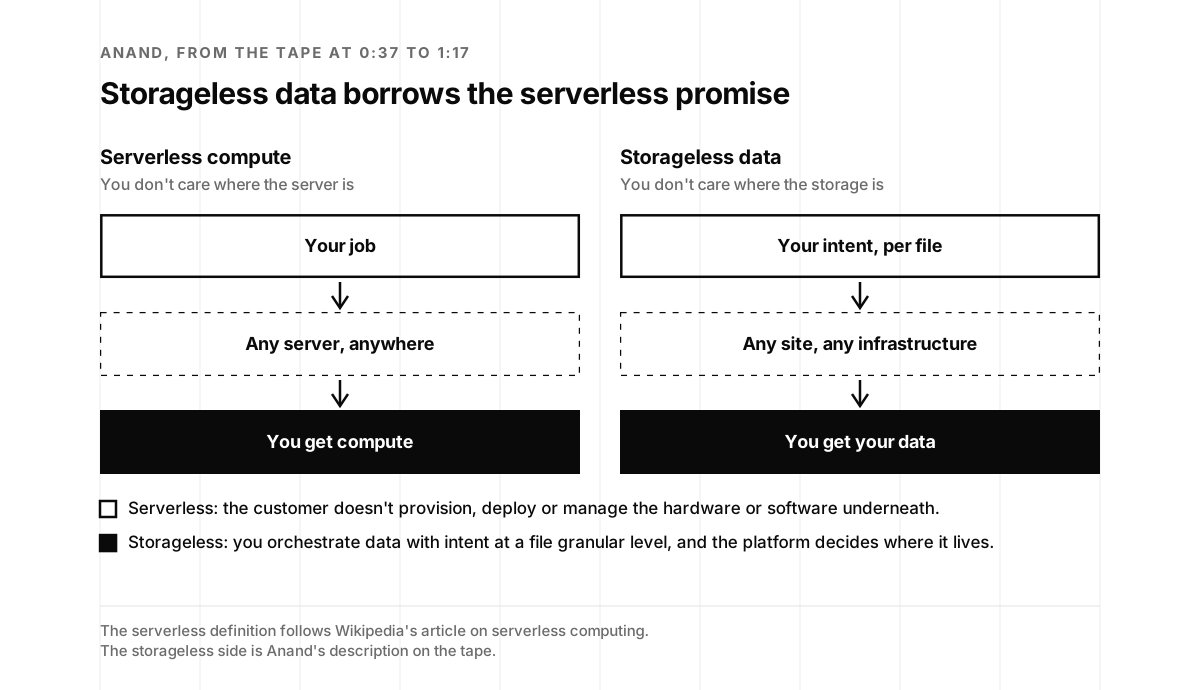
Listen · Anand on episode 1, from 0:37
About 25 seconds: Anand on storageless data and the serverless idea it borrows from. The clip stops on its own. Read the full transcript.
Two columns. Serverless compute, where you don't care where the server is: your job, then any server anywhere, then you get compute. Storageless data, where you don't care where the storage is: your intent per file, then any site and any infrastructure, then you get your data. Two notes: with serverless, the customer doesn't provision, deploy or manage the hardware or software underneath. With storageless data, you orchestrate data with intent at a file granular level, and the platform decides where it lives.
Storageless data borrows its promise from serverless compute.

Where Hammerspace sits

Anand placed the product against the storage most listeners already run. On one side, file storage: network-attached storage from vendors like NetApp or Isilon. On the other, object storage in AWS, Azure and Google Cloud, or on premises with a product like Scality. Hammerspace sits on top of all of it.

“Hammerspace is really a platform that allows you to disaggregate metadata and data.”

Anand Ganesh, at 1:40

That one sentence is the whole design. The file system’s metadata (names, folders, permissions, tags) lives in one place, and the data itself can live on any of those systems underneath.

The Anvil and the DSX

The platform has two parts.

“One is what we call the Anvil, and the other one is the DSX. And the Anvil is our metadata server, and DSX is really the data services component.”

Anand Ganesh, at 1:53

Listen · Anand on episode 1, from 1:52
About 25 seconds: Anand on the Anvil, the DSX, and how clients find their data. The clip stops on its own. Read the full transcript.

A question Anand said he gets a lot is whether a layer like this adds a hop. His answer was that it stays out of the way.

“there are technologies that’ll sit in the I/O path, but we sort of sit on the side, if you will, where we just allow your clients to talk directly to the data server.”

Anand Ganesh, at 2:22

The trick is an open standard. Version 4.1 of the Network File System protocol, published in 2010, added parallel NFS, which separates the file system’s metadata from the location of the file’s data, so a client asks one metadata server where the data is and then reads and writes it on the data servers directly (Wikipedia). The flavor Anand named, the pNFS Flex Files layout, is RFC 8435, published in August 2018 by two authors listed at Hammerspace, and it lets pNFS use storage devices that need “only a limited degree of interaction with the metadata server” (RFC Editor).

“It’s built on an open protocol, the pNFS Flex Files protocol. There’s an RFC for it. And so you don’t have to install anything proprietary on your Linux clients. They just talk pNFS.”

Anand Ganesh, at 2:31
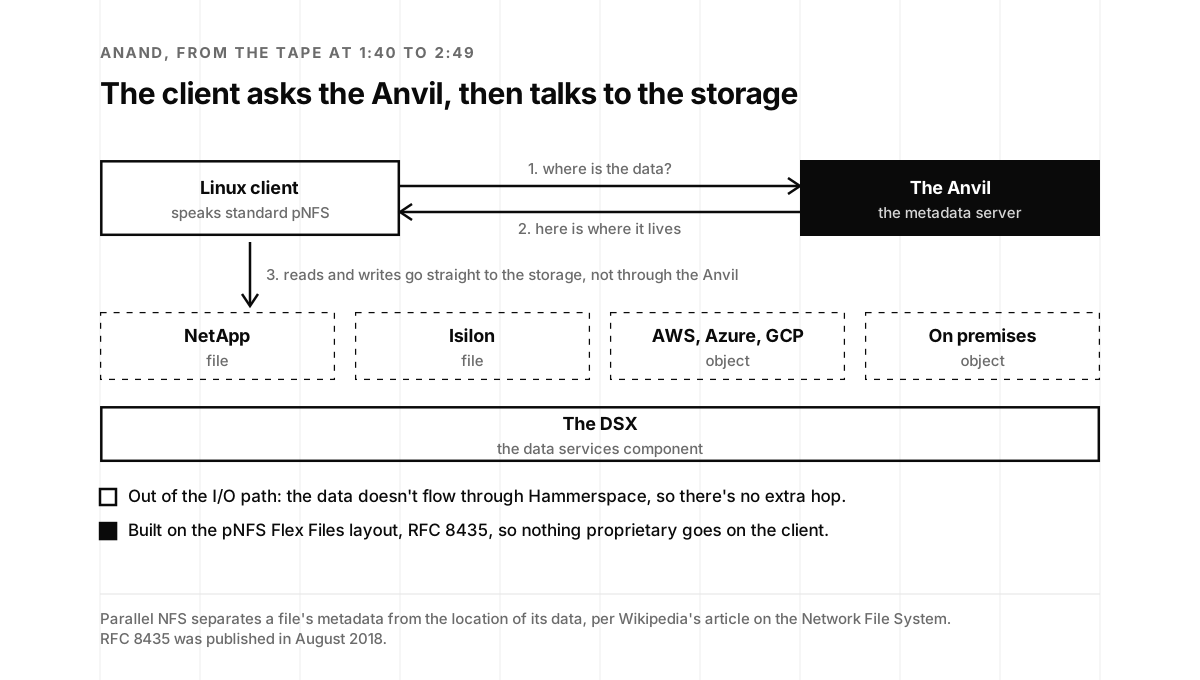
Listen · Anand on episode 1, from 2:17
About 30 seconds: Anand on staying out of the I/O path with pNFS. The clip stops on its own. Read the full transcript.
An outlined box, a Linux client that speaks standard pNFS, and a filled box, the Anvil, the metadata server. An arrow from the client to the Anvil asks where the data is, and an arrow back says here is where it lives. A third arrow goes down from the client straight to four dashed storage boxes, NetApp and Isilon for file, AWS, Azure and GCP and on-premises systems for object, labeled reads and writes go straight to the storage, not through the Anvil. Below them, an outlined box, the DSX, the data services component. Two notes: the platform stays out of the I/O path, so there's no extra hop. It's built on the pNFS Flex Files layout, RFC 8435, so nothing proprietary goes on the client.
The client asks the Anvil where the data is, then talks to the storage directly.

Jon liked the simplicity and the open standard, and turned to security: with an abstraction layer and someone else managing the service, what do you gain?

Upside-down management

Anand started with the trappings of traditional storage, where the unit of control is the volume and not the file.

“So, when you manage your data through the storage layer, you’re sort of doing upside-down management.”

Anand Ganesh, at 3:22

The directives sit at the volume level, the work is prescriptive, and it’s seldom self-service. A storage administrator does it for the people who use the data, and has to learn the quirks of each vendor’s system along the way.

“even if it’s an open spec like NFSv3, which is three decades old, every vendor will have a certain difference to how they implement the protocol.”

Anand Ganesh, at 4:07

NFS version 3 is RFC 1813, from June 1995 (Wikipedia), so the spec was a little over a quarter century old when this was recorded.

Listen · Anand on episode 1, from 3:21
About 30 seconds: Anand on volume-level directives and upside-down management. The clip stops on its own. Read the full transcript.

Hammerspace flips it, and drives the data through the metadata.

“The metadata layer not just contains your POSIX metadata, but also stuff that you may tag onto it, or you may derive from running some sort of analysis on that data or processing the data, right?”

Anand Ganesh, at 4:42

POSIX metadata is the familiar part: owners, groups, permissions, timestamps. The tags and the derived metadata are what make it useful for security, because once they sit next to every file, a rule can act on them. Anand’s word for those rules was objectives.

“And so you can completely orchestrate the movement of data, or the locking down of access to that data, using metadata.”

Anand Ganesh, at 4:54

Listen · Anand on episode 1, from 4:31
About 30 seconds: Anand on driving data through metadata. The clip stops on its own. Read the full transcript.

Hammerspace’s own documentation now calls them Service Level Objectives, declarative policies the metadata database enforces automatically across data placement, replication and access controls (Hammerspace).

Every copy needs its own lock

Then the first traditional storage problem, permissions.

“you have your permissions model, and you have to make sure you manage and lock down your permissions. And that’s obviously prone to human error, like anything that is done manually.”

Anand Ganesh, at 5:08

Copying the data makes it worse. Each new copy for a new location or project lands on storage provisioned for it, and its permissions have to be set again, correctly, over there.

“And think about this at the multi-site global level. Like, you have data between, let’s say, Australia, Europe and the United States, and you’re doing this across time zones and whatnot, which becomes a complete nightmare.”

Anand Ganesh, at 5:35
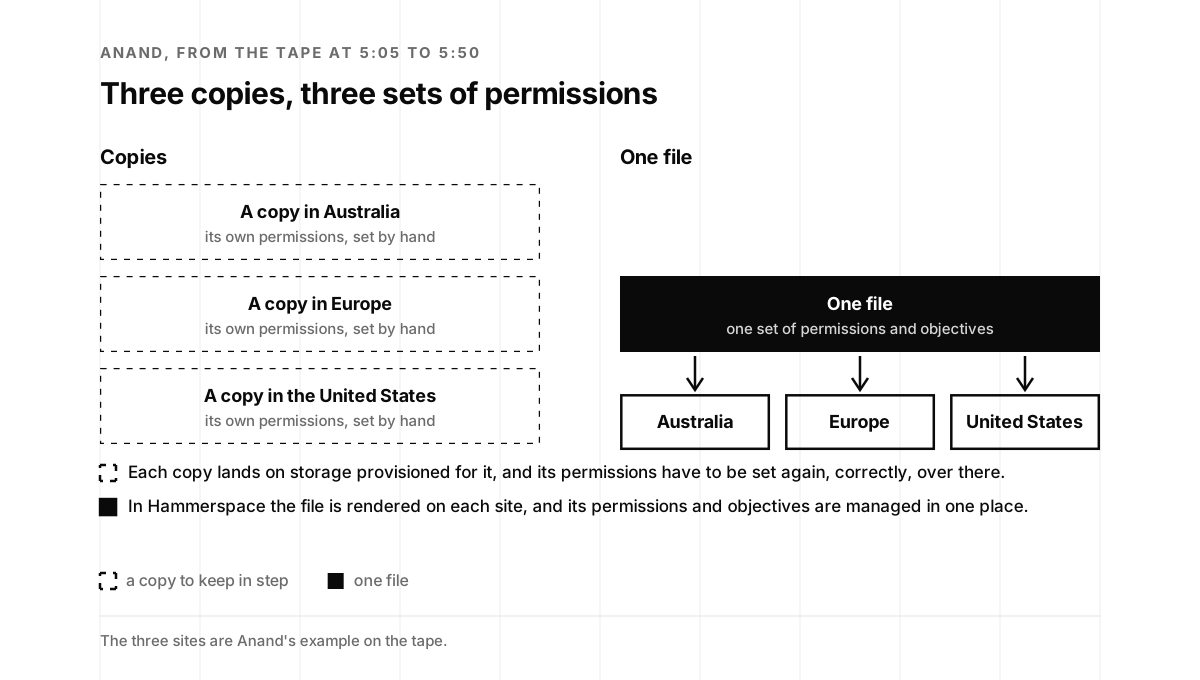
Listen · Anand on episode 1, from 5:17
About 35 seconds: Anand on how every copy multiplies the permissions work. The clip stops on its own. Read the full transcript.
Two columns. On the left, copies: three dashed boxes, a copy in Australia, a copy in Europe and a copy in the United States, each with its own permissions set by hand. On the right, one filled box, one file with one set of permissions and objectives, with arrows down to three outlined boxes for Australia, Europe and the United States where it is rendered. Two notes: each copy lands on storage provisioned for it, and its permissions have to be set again, correctly, over there. In Hammerspace the file is rendered on each site, and its permissions and objectives are managed in one place.
Three copies mean three sets of permissions to keep in step. One file means one.

The calculator below runs that arithmetic on your own numbers.

Quarantine loses the lineage

The second problem shows up when something goes wrong. Say a scan finds a file with proprietary information out in the open, unencrypted. The usual fix is to move it somewhere safe.

“a lot of the remediation workflows cause you to move the data to a quarantine server. Now you’ve made the problem even worse, because you’ve lost lineage”

Anand Ganesh, at 6:02

The file now sits on a different system under a different export. Jon echoed the word, and Anand finished the thought.

“Yeah, you’ve lost ownership. Like, you don’t know who owns the file anymore.”

Anand Ganesh, at 6:15

Listen · Anand on episode 1, from 5:50
About 30 seconds: Anand on quarantine servers, lineage and ownership. The clip stops on its own. Read the full transcript.

Data lineage is the process of “tracking how data is generated, transformed, transmitted and used across systems over time” (Wikipedia). Breaking it in the middle of an incident is the worst time, because lineage is how you answer who had the file and where it went.
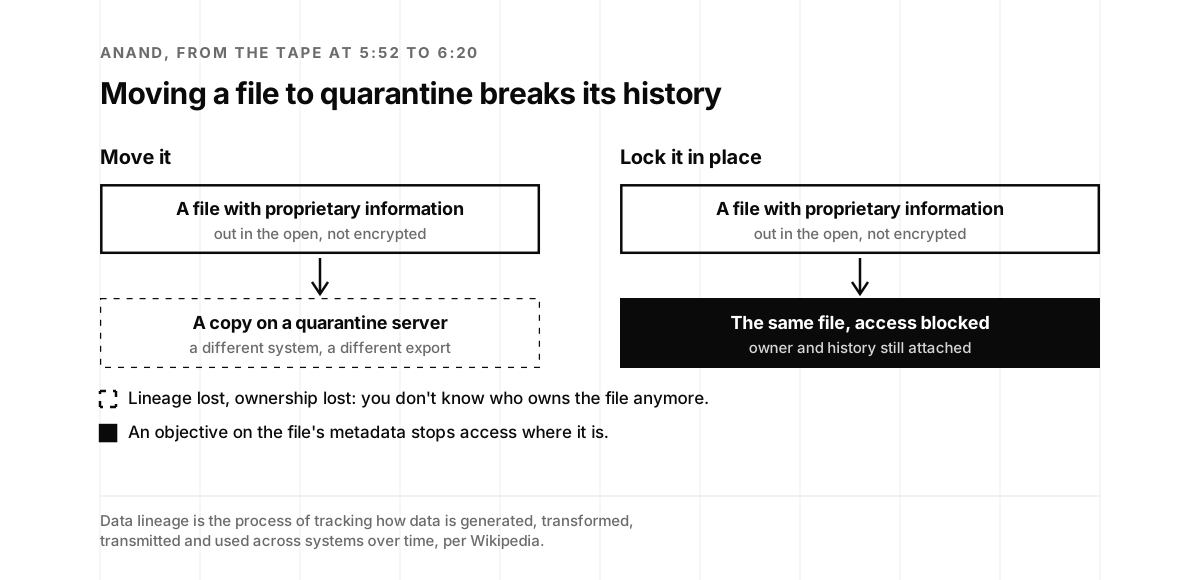
Two columns. Move it: an outlined box, a file with proprietary information out in the open and not encrypted, with an arrow down to a dashed box, a copy on a quarantine server on a different system under a different export. Lock it in place: the same outlined box with an arrow down to a filled box, the same file with access blocked, owner and history still attached. Two notes: moving it loses lineage and ownership, so you don't know who owns the file anymore. Locking it in place uses an objective on the file's metadata to stop access where it is.
Moving a file to quarantine breaks its lineage. Locking it in place keeps it.

One file, rendered everywhere

Anand’s answer to both problems was the line in this page’s title. In Hammerspace there is one file, rendered on whichever sites need it and created on the infrastructure there so it can be read locally.

“But all your management for permissions and the objectives you set on it and whatnot can be done in one site.”

Anand Ganesh, at 6:37

Jon summed it up as one place for security, management and access policies.

“no matter who is accessing that data, what client they’re accessing that data from, going to be governed by the same set of rules.”

Jon McLachlan, at 7:08

Bring your own keys

Then Anand turned to something he said Jon would appreciate, given Peacemakr.

“You usually cannot do sort of BYOK, bring your own keys, with traditional storage.”

Anand Ganesh, at 7:25

The reason he gave is data mobility. A platform that can move data from one infrastructure to another without disruption, in the same data center or across the world, can also encrypt it on the way, with keys that come from the customer.

“We can encrypt your data using the keys that are, you know, from your environment, from your key management systems. And that gives you a completely different level of control and power.”

Anand Ganesh, at 7:43

Listen · Anand on episode 1, from 7:25
About 30 seconds: Anand on bringing your own keys to storage you don't own. The clip stops on its own. Read the full transcript.

Jon asked what storage that covers. Any and all, Anand said: AWS, Google, Azure, your own object storage, your own on-premises systems. Jon’s summary was that it gives you “very robust encryption at rest across that entire ecosystem of available storage.” Key management is the part most storage products keep for themselves, which is why the point mattered. Whoever holds the key decides who can read the data.

What data protection means in storage

Jon pointed out that data protection means something specific in the storage world, and different from what security people mean by it. Anand agreed.

“In the storage community, data protection is really, you know, how do you recover your data easily under different failure circumstances, right?”

Anand Ganesh, at 9:01

In that vocabulary, data protection is snapshots, backups, disaster recovery and replication between availability zones. Encryption with your own keys counts as security, not data protection. Jon put it as availability, backups and recovery times.

Listen · Anand on episode 1, from 9:01
About 25 seconds: Anand on what data protection means to storage people. The clip stops on its own. Read the full transcript.

Share-level snapshots

In Hammerspace you export data to clients, SMB or NFS, through a share, and you can snapshot the share. Anand painted the picture before explaining why it matters.

“And your share is really just a container for the metadata. It’s just containing, imagine the namespace, the permissions, any metadata that you’ve tagged on the files and whatnot.”

Anand Ganesh, at 10:16

The data behind that share can be anywhere. Some of it on a NetApp volume, some on an Isilon, some on Pure Storage, some in AWS, some in NetApp StorageGRID.

“And we have share-level snapshots. You can take a snapshot of the share, which means you’re taking a sort of a point-in-time snapshot of all this data across all these storage systems.”

Anand Ganesh, at 10:56

Listen · Anand on episode 1, from 10:36
About 30 seconds: Anand on one snapshot across five kinds of storage. The clip stops on its own. Read the full transcript.

A snapshot is “the state of a system at a particular point in time” (Wikipedia). On traditional storage each system takes its own, on its own schedule, so a consistent recovery point across all of them takes coordination. A snapshot of the share is one point in time for everything under it.
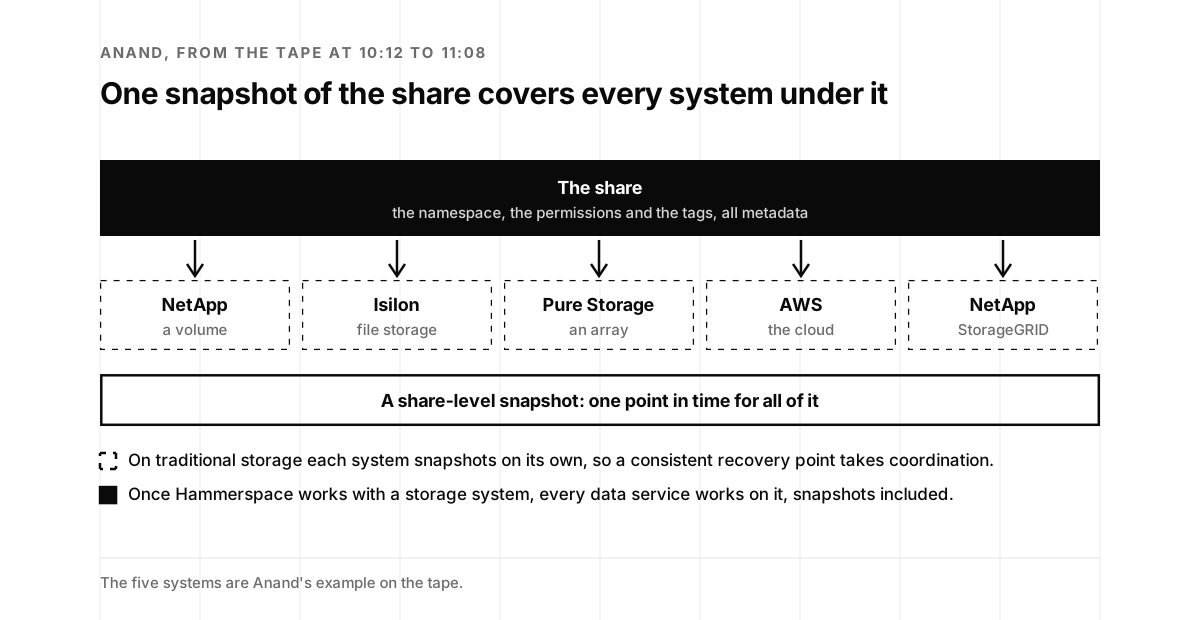
A filled box at the top, the share, which holds the namespace, the permissions and the tags, all metadata. Arrows go down to five dashed boxes for the storage underneath: a NetApp volume, an Isilon, Pure Storage, AWS and NetApp StorageGRID. An outlined band below all five reads a share-level snapshot, one point in time for all of it. Two notes: on traditional storage each system snapshots on its own, so a consistent recovery point takes coordination. Once Hammerspace works with a storage system, every data service works on it, snapshots included.
One snapshot of the share covers the data on every system underneath it.

The second half of the idea is reuse. Once Hammerspace supports a storage system, Anand said, every data service works on it.

Backup versus snapshot

Backup is harder when metadata and data live apart, because you have to decide what you’re backing up. Anand drew the line this way.

“snapshot is really something that you can sort of go back point in time for your metadata and data.”

Anand Ganesh, at 11:40

A snapshot can also be the start of a new share. A backup, in Hammerspace’s terms, is for reinstalling the Anvil and the DSX, the platform itself. It can’t bring back a storage volume you’ve lost, because the data still has to sit on some storage. Snapshots plus replication between availability zones protect the data, and the backup protects the estate.

Listen · Anand on episode 1, from 11:26
About 20 seconds: Anand on what a backup means when metadata and data are disaggregated. The clip stops on its own. Read the full transcript.

Jon played it back.

“So backup is more for just the metadata, all of the data about the data, so to speak.”

Jon McLachlan, at 12:42

Hammerspace’s current white paper on the subject lists five ways the metadata itself is protected: mirroring inside the Anvil, synchronous mirroring between Anvils in a cluster, asynchronous replication between clusters, periodic checkpoints of the metadata database, and an export of the metadata to JSON that can rebuild the file system without the platform (Hammerspace).
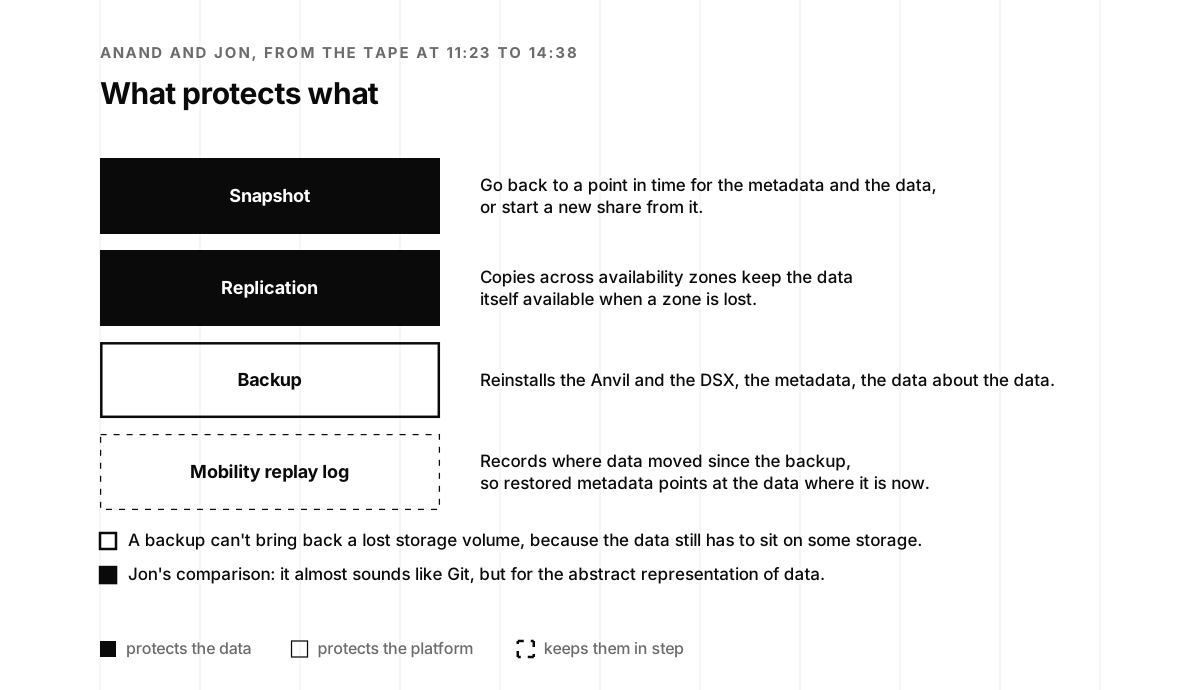
Four rows. Snapshot, filled: go back to a point in time for the metadata and the data, or start a new share from it. Replication, filled: copies across availability zones keep the data itself available when a zone is lost. Backup, outlined: reinstalls the Anvil and the DSX, the metadata, the data about the data. Mobility replay log, dashed: records where data moved since the backup, so restored metadata points at the data where it is now. Two notes: a backup can't bring back a lost storage volume, because the data still has to sit on some storage. Jon's comparison was that it almost sounds like Git, but for the abstract representation of data.
Snapshots and replication protect the data. The backup protects the platform's metadata.

Undelete, and ransomware

Then a feature Jon called convenient.

“And we have features like undelete. Like, if you delete a file, it’ll still be available for a certain amount of time. It’s configurable in the product.”

Anand Ganesh, at 13:04

Jon said that would help with ransomware attacks. Anand added the more common case, users.

“So the end user basically just, if they fat-finger something, they delete a bunch of files, you can just go into the undelete location under the share and sort of bring back the files.”

Anand Ganesh, at 13:21

Listen · Anand on episode 1, from 13:04
About 30 seconds: Anand on undelete and self-service recovery. The clip stops on its own. Read the full transcript.

Undeletion is a feature for “restoring computer files which have been removed from a file system” (Wikipedia). The security point is who can use it. When the user can restore their own files, a mistake or a small incident doesn’t queue behind the storage team, and the storage team keeps its time for the restores only they can do. Hammerspace’s 2026 announcement of validated cryptography lists its ransomware resilience as “Immutable snapshots, clones and WORM capabilities to enable rapid recovery” (Hammerspace), where write once read many means data that “cannot be modified” once written (Wikipedia).

The mobility replay log

Moving data creates its own backup problem. A backup of the metadata records where each file’s data was at that moment, and the objectives keep moving the data afterward. Restore the old metadata and it can point at data that isn’t there anymore.

“So we have something called a mobility replay log that, to figure out where the data moves, so that when you go back in time in metadata, you can sort of go back in time in data and figure out where the data is now compared to where it was when the backup was taken.”

Anand Ganesh, at 14:01

Listen · Anand on episode 1, from 14:01
About 20 seconds: Anand on the log that keeps restored metadata pointing at the right data. The clip stops on its own. Read the full transcript.

Jon heard a familiar tool in it.

“Yeah, it almost sounds like Git, but for the abstract representation of data.”

Jon McLachlan, at 14:31

Git keeps the history of every change so you can move to any earlier state. The replay log does a version of that for data placement, so a restore lands on the data where it actually is.

Active-active is the disaster recovery

The last point in the data protection part was the one the companion post on ransomware recovery leans on. Hammerspace runs on multiple sites at once, and all of them are live.

“it’s all active-active, it’s not active-passive, your global file system sort of becomes a DR, it becomes your DR solution, right?”

Anand Ganesh, at 14:46

So losing a site doesn’t start a failover. Nobody converts a passive site to active or reverses the direction of replication.

“So one site goes down, boom, you just mount from another site and continue. You’re online and you’re up and you’re running.”

Anand Ganesh, at 15:12

Listen · Anand on episode 1, from 14:39
About 40 seconds: Anand on why an active-active global file system becomes the disaster recovery plan. The clip stops on its own. Read the full transcript.

Disaster recovery planning usually means rehearsing exactly the steps Anand listed, because they’re slow and easy to get wrong under pressure. The current white paper spells out the replicated design: metadata replicated between sites at intervals “typically measured in seconds,” and sites that get disconnected “continue to function normally” until they reconnect (Hammerspace).
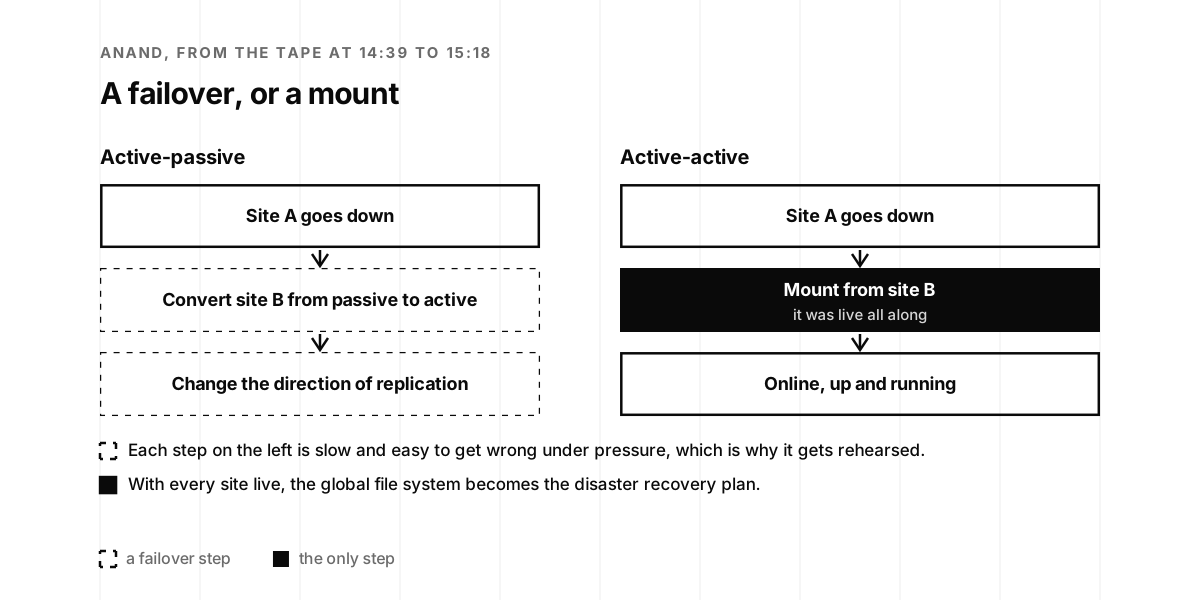
Two columns. Active-passive: site A goes down, then two dashed steps, convert site B from passive to active, then change the direction of replication. Active-active: site A goes down, then a filled box, mount from site B, it was live all along, then online, up and running. Two notes: each step on the left is slow and easy to get wrong under pressure, which is why it gets rehearsed. With every site live, the global file system becomes the disaster recovery plan.
Active-passive needs a failover. Active-active needs a mount.

Jon credited the architecture, and Anand agreed.

“You’re precisely right. Precisely.”

Anand Ganesh, at 15:28

Functions that look at your data

Jon changed topics to confidentiality and privacy. Anand’s answer started from the same idea as the storage: if the platform can send data to a storage container, it can send data to a processor.

“So we have support on the Hammerspace platform for what, you know, generally in the industry we call it Lambda functions, where you can plug in a certain piece of compute that can look at your data and derive additional metadata from it.”

Anand Ganesh, at 16:23

Listen · Anand on episode 1, from 16:09
About 35 seconds: Anand on plugging compute into the data path. The clip stops on its own. Read the full transcript.

AWS Lambda, introduced in 2014, “executes code in response to events” (Wikipedia). In Hammerspace the trigger is an objective, and the function’s output is metadata. A data loss prevention tool, for example, could scan files and flag the ones breaching confidentiality or privacy, like credit card numbers left out in the open.

“The first couple of technologies that we’ve integrated with are antivirus scanning and image recognition.”

Anand Ganesh, at 17:00

The antivirus scan writes back whether the file is a threat and what it found. Image recognition writes back labels. A DLP tool can say whether the file holds data covered by laws like HIPAA or SOX.

Listen · Anand on episode 1, from 17:00
About 30 seconds: Anand on antivirus scanning and image recognition as metadata. The clip stops on its own. Read the full transcript.

Then the objective does the enforcement, with no separate workflow.

“you can put objectives further on that derived metadata to say, if the file is found to be a threat, or if this image contains material that is inappropriate or whatnot, prevent access to the content of that file, right?”

Anand Ganesh, at 18:08

Listen · Anand on episode 1, from 17:45
About 40 seconds: Anand on objectives that lock a file the moment its metadata says so. The clip stops on its own. Read the full transcript.

That closes the loop from the quarantine problem. The file isn’t moved anywhere. Its metadata changes, and access to its content stops, in place, with its lineage intact. In March 2026 Hammerspace and Secuvy announced an integration that lets the two “continuously discover, classify, catalog, and control” unstructured data in one global namespace, warning that “when data is duplicated across systems, governance breaks down” (Hammerspace). It’s the same idea five years later.
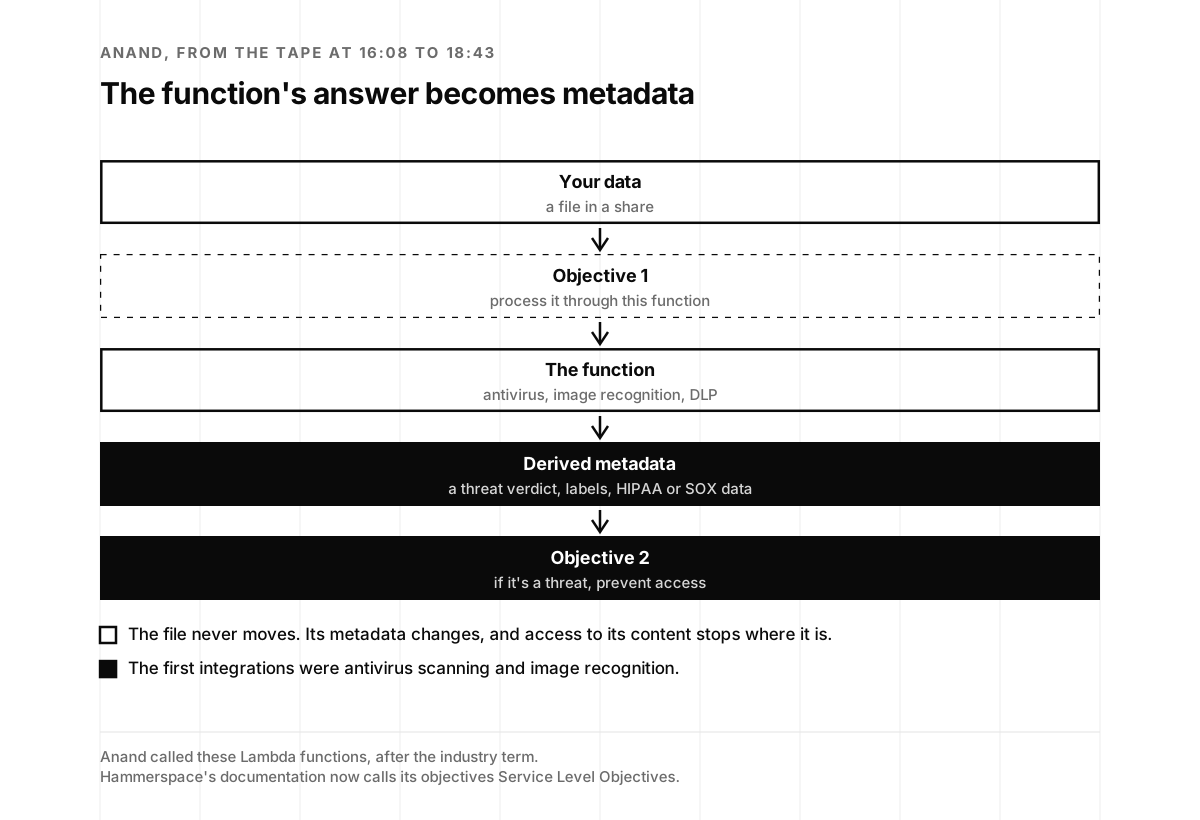
A flow of five boxes from top to bottom. Your data, a file in a share. Objective 1, dashed, process it through this function. The function, antivirus, image recognition or data loss prevention. Derived metadata, filled, a threat verdict, labels, or HIPAA or SOX data. Objective 2, filled, if it's a threat, prevent access. Two notes: the file never moves, its metadata changes and access to its content stops where it is. The first integrations were antivirus scanning and image recognition.
An objective sends the data through a function, and the function's answer becomes metadata a second objective can act on.

Keys from your own HSM

Anand came back to bring your own keys, this time with the plumbing.

“get access to your key management system or your on-premises hardware security module, get the keys, encrypt the data so that while it’s sitting on your storage container at rest, it’s protected.”

Anand Ganesh, at 18:55

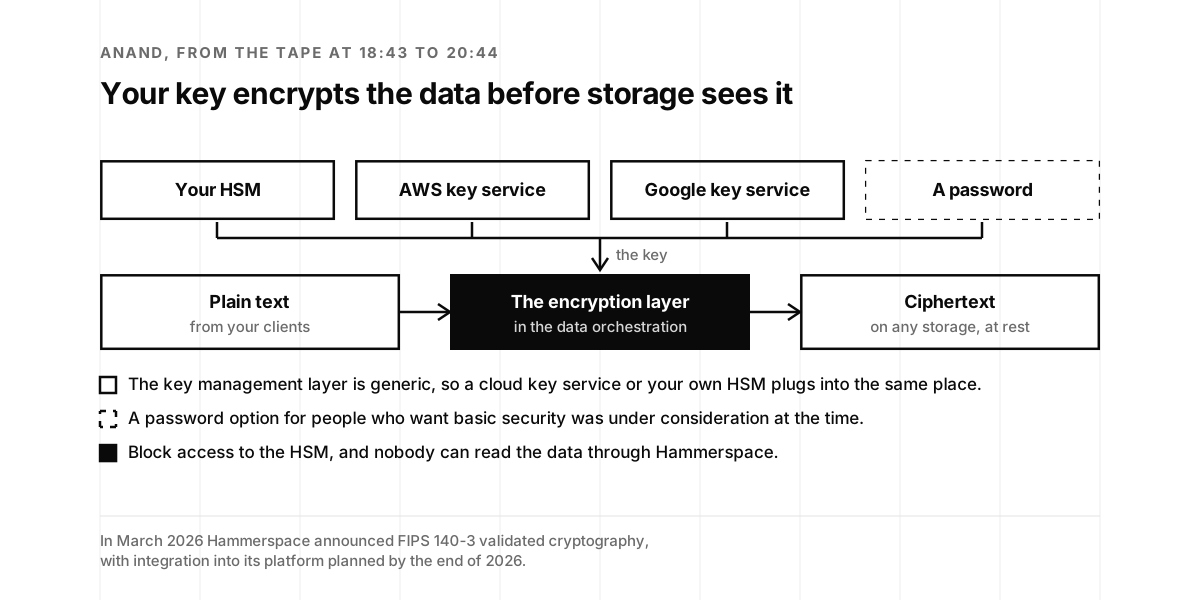
A hardware security module is “a physical computing device that safeguards and manages secrets” (Wikipedia). Jon played it back as keys from an HSM, encryption in the Hammerspace layer, and a DLP tool still running through the functions, and Anand confirmed it. The key management layer was built to be generic, he said, so a cloud key management service from AWS or Google, or your own HSM, plugs into the same place, and a simple password option was under consideration for people who wanted basic security without those systems.

“it is going in as plain text on one side and it’s getting spit out as ciphertext on the other side before it sits on your storage layer.”

Anand Ganesh, at 20:37
Listen · Anand on episode 1, from 20:11
About 35 seconds: Anand on the encryption layer between your clients and your storage. The clip stops on its own. Read the full transcript.
Four key sources across the top: your HSM, an AWS key service, a Google key service, outlined, and a password, dashed. Lines from all four join and point down to a filled box in the middle of a row of three, the encryption layer in the data orchestration. Plain text from your clients flows into it from the left, and ciphertext on any storage, at rest, comes out on the right. Three notes: the key management layer is generic, so a cloud key service or your own HSM plugs into the same place. A password option for people who want basic security was under consideration at the time. Block access to the HSM, and nobody can read the data through Hammerspace.
Your key, from your HSM or key service, encrypts the data before any storage system sees it.

In March 2026 Hammerspace announced FIPS 140-3 validated cryptography for encrypting data in flight and at rest, with integration into the platform “planned for an upcoming release by the end of 2026” (Hammerspace). FIPS 140-3 is the U.S. government standard for approving cryptographic modules, first published on March 22, 2019 (Wikipedia).

Up the stack

Jon zoomed out to how data security has moved over the years.

“First, there’s TLS, just protecting our data as it moves across the network. And now there’s all of this really great work with encrypting at rest, so protecting our data with encryption as it rests on a persistence layer.”

Jon McLachlan, at 20:52

Listen · Jon on episode 1, from 20:45
About 20 seconds: Jon on how encryption moved from the network to the disk. The clip stops on its own. Read the full transcript.

Transport Layer Security covers data in transit. Encryption at rest covers the disk. The next step, Jon said, is the application.

“And if we continue that trend, we go up the stack. Like, eventually we’ll see full end-to-end encryption, where we’re inside applications, encrypting perhaps data inside applications.”

Jon McLachlan, at 21:26

Anand agreed, and said that’s why he liked what Jon was building at Peacemakr.

“I think the holy grail is really making sure that the data is not present in plain text anywhere between the app that is working with the data and where it’s at rest on the storage layer.”

Anand Ganesh, at 21:43

Listen · Anand on episode 1, from 21:43
About 20 seconds: Anand on the holy grail of data security. The clip stops on its own. Read the full transcript.

End-to-end encryption is usually discussed for messaging. Anand was describing the same idea for stored data, where only the application that uses the data ever sees it in the clear.

A losing battle

His reason was the data breaches that had happened at public cloud vendors. The data sits under layers of systems, and every one of them has to be configured right, all the time.

“But that is, in my opinion, just a losing battle, because how many of these systems will you protect, right?”

Anand Ganesh, at 22:25

Server-side encryption doesn’t fix that, in his view, because a break in the permissions model gets the attacker data that’s decrypted for them automatically.

“It should only be decrypted by the keys that are securely in your pocket.”

Anand Ganesh, at 22:53

Listen · Anand on episode 1, from 22:25
About 35 seconds: Anand on why only the application should hold the key. The clip stops on its own. Read the full transcript.

Jon took the compliment for Peacemakr and added a layer of his own.

“Though I do think of security in terms of layers”

Jon McLachlan, at 23:24

A solid encryption layer at rest, across a distributed system with its keys managed, is one of those layers, and application encryption is the next step up. His phrase for the whole effort: “a journey, not a destination.”
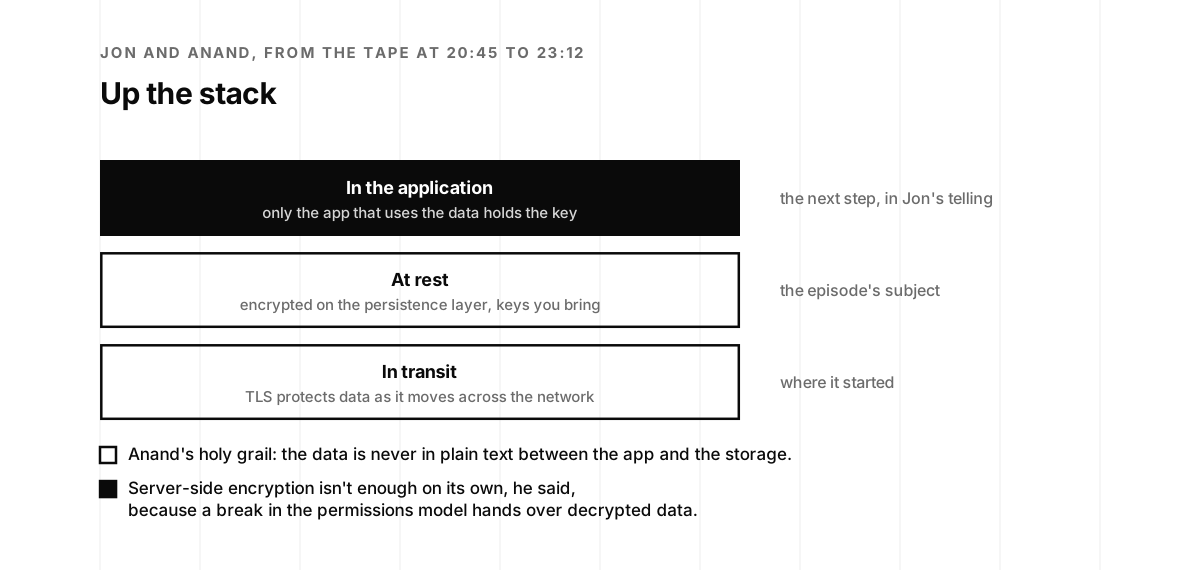
Three stacked layers. At the top, filled, in the application, where only the app that uses the data holds the key, the next step in Jon's telling. In the middle, at rest, encrypted on the persistence layer with keys you bring, the episode's subject. At the bottom, in transit, TLS protecting data as it moves across the network, where it started. Two notes: Anand's holy grail is that the data is never in plain text between the app and the storage. Server-side encryption isn't enough on its own, he said, because a break in the permissions model hands over decrypted data.
In transit, at rest, in the application: each layer narrows who can read the data.

The open bucket

Jon gave an example of the kind of breach Anand meant, at a technology company providing healthcare and patient records management services.

“They had a Microsoft Azure bucket. It was open to the internet, had 100,000 or so files in it, just readable from the internet.”

Jon McLachlan, at 24:08

The fix he pointed to wasn’t a better bucket setting.

“If there was an application that was referencing that data that had encrypted everything, right? There’s your protection right there.”

Jon McLachlan, at 24:17

Listen · Jon on episode 1, from 23:52
About 30 seconds: Jon on an open storage container full of patient records. The clip stops on its own. Read the full transcript.

Anand’s answer was that there wouldn’t have been an exposure. A Microsoft Azure storage container left readable is a misconfiguration in exactly the kind of system on top of the data that Anand said can’t all be kept right. Encryption that the application controls turns that mistake into a pile of ciphertext.

Who do you have to trust?

Then Jon widened it from mistakes to people.

“That’s just one example of a misconfiguration. But if you have an insider threat, do we trust the vendors that are providing us these services?”

Jon McLachlan, at 24:31

An insider threat comes from “people within the organization, such as employees, former employees, contractors or business associates” (Wikipedia), and for data in someone else’s cloud the insiders include the provider’s. Jon asked the question about AWS, and about Hammerspace itself.

“we shouldn’t be forced into a position where we have to trust other people’s systems in order to be able to build interesting services that are secure.”

Jon McLachlan, at 24:46

Listen · Jon on episode 1, from 24:33
About 35 seconds: Jon on how much of someone else's system you should have to trust. The clip stops on its own. Read the full transcript.

Bringing your own keys was his answer for the storage layer, and Anand put it in one line.

“Exactly, because it’s your key, and you know that if you block access to the HSM, nobody can access your data through Hammerspace, right?”

Anand Ganesh, at 25:06

Delete what decrypts it

Jon saw a second use for the same keys.

“And that’s actually a nice way to delete data, too, right?”

Jon McLachlan, at 25:18

If the key reaches the end of its rotation and gets thrown away under your key lifecycle policy, the data still sitting in Hammerspace’s distributed systems can’t be read by anyone, Hammerspace included.

“Yeah, you’ve logically deleted your data.”

Anand Ganesh, at 25:42

That’s crypto-shredding, the practice of “rendering encrypted data unusable by deliberately deleting or overwriting the encryption keys” (Wikipedia). Anand said some customers had asked about it, because retention rules cut both ways. Laws make you keep some data for a set time, a legal hold can stretch that out, and once the time is up the data is a liability.

Hammerspace’s version works at the level of the file.

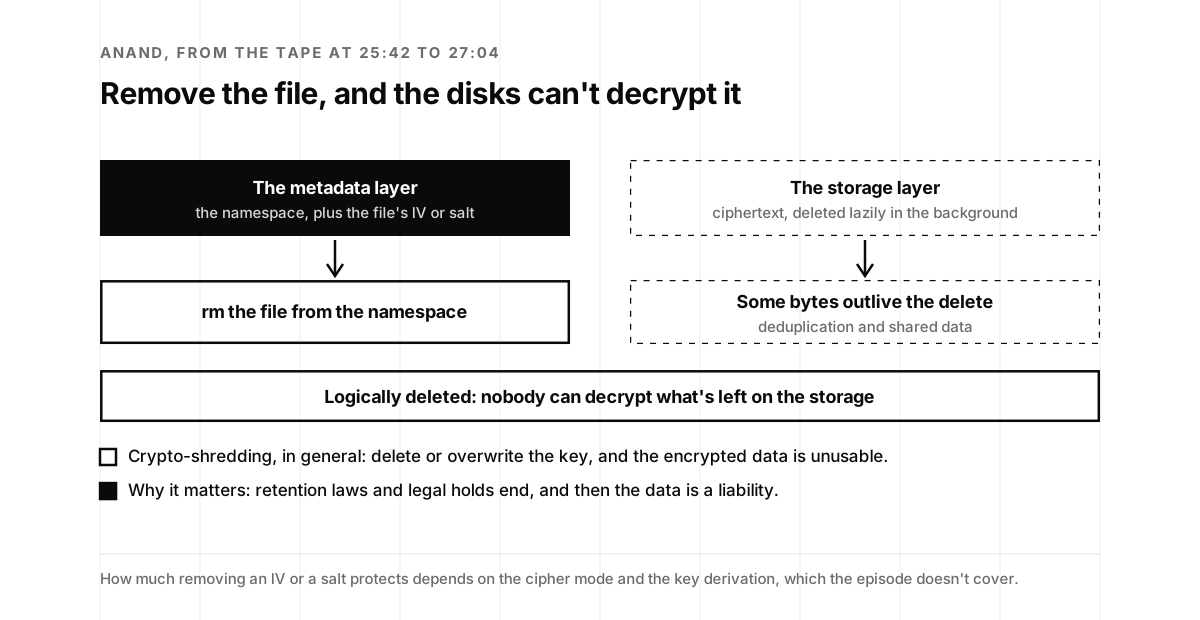
“if your IV or your salt that you’re using for encryption sits with the metadata layer, you rm the file from the namespace and you have lost, you’ve made it impossible for somebody to go and decrypt your content, right?”

Anand Ganesh, at 26:16

Listen · Anand on episode 1, from 26:11
About 25 seconds: Anand on deleting a file by removing what decrypts it. The clip stops on its own. Read the full transcript.

An initialization vector and a salt are the extra random inputs a cipher or a key derivation uses alongside the key. How much removing them protects depends on the cipher mode and on how the keys are derived, which the episode doesn’t go into, so treat this as the design idea and ask your vendor for the details. The reason it matters is the storage underneath.

“And our deletion of data on the storage layer is lazy, because we sometimes will run a background job to go and whack things that are not referenced in the namespace anymore”

Anand Ganesh, at 26:44

With deduplication and data sharing, the bytes of a deleted file can outlive the delete. Tying the delete to the decryption closes that gap.

“as soon as you remove it from the namespace, you’ve lost all capability to decrypt what’s on your storage.”

Anand Ganesh, at 26:59
Listen · Anand on episode 1, from 26:35
About 30 seconds: Anand on lazy deletion and why it doesn't matter once the data can't be decrypted. The clip stops on its own. Read the full transcript.
Two columns. On the left, a filled box, the metadata layer, holding the namespace plus the file's IV or salt, with an arrow down to rm the file from the namespace. On the right, a dashed box, the storage layer, ciphertext deleted lazily in the background, with an arrow down to a dashed box, some bytes outlive the delete because of deduplication and shared data. A band below both reads logically deleted, nobody can decrypt what's left on the storage. Two notes: crypto-shredding, in general, means deleting or overwriting the key so the encrypted data is unusable. It matters because retention laws and legal holds end, and then the data is a liability.
Remove the file from the namespace, and what's left on the disks can't be decrypted.

Jon called it an important feature that often gets overlooked, especially in financial services, where firms must keep records for a set period, after which the records turn into a liability.

“I like how easy it is to securely delete data in that system.”

Jon McLachlan, at 27:06

Any site, any infrastructure

Jon closed by asking what comes next for Hammerspace. Anand’s answer came from the moment. People were working from home and spread across the planet, and he expected that to last beyond the pandemic.

“it’s super important that your data is available where you are.”

Anand Ganesh, at 28:12

The global file system is the answer to that, with objectives doing the delivery, like new data sent overnight to colleagues at another site in a follow-the-sun workflow, where work is handed to the next time zone at the end of each day (Wikipedia). The namespace itself, he added, is decoupled.

“It’s decoupled, which means if one of your sites goes down, all the other sites continue to work as is, as if they were not replicated.”

Anand Ganesh, at 29:01

Listen · Anand on episode 1, from 28:16
About 35 seconds: Anand on keeping data where people are working. The clip stops on its own. Read the full transcript.

His summary of the goal fit in four words.

“So, any site, any infrastructure is what we’re aiming for”

Anand Ganesh, at 29:19

What happened after the tape

When we recorded. This was the first episode of the show, recorded during the pandemic Anand mentioned and published on May 6, 2021, when remote work was the daily routine for many listeners.

The AI data platform. By 2026 Hammerspace described itself as a data platform for AI. In March 2026 it launched an AI Data Platform built on an NVIDIA reference design, and David Flynn’s line on the launch was that it works on data where it already is, “without forcing enterprises into a copy-first AI silo” (X). The argument against copies that Anand made about permissions in 2021 became the argument against copying data into AI storage.

Hammerspace on X, March 2026: the same data, in place, now for AI. View on X.

The security features. The March 31, 2026 announcement of FIPS 140-3 validated cryptography lists encryption in flight and at rest, immutable snapshots, centralized policy enforcement across the global namespace, and “Consistent access policies across file and object data, spanning NFS, SMB and S3” (Hammerspace). Most of the list is the episode’s agenda, five years on.

The metadata, protected. Hammerspace’s white paper on protecting data and metadata, last updated May 28, 2026, describes the backup half of the episode in detail, from synchronous mirroring between Anvils to an export that rebuilds the file system without the platform (Hammerspace).

The company. In April 2026 Hammerspace reported year-to-date bookings of nearly 14 times its full-year 2025 bookings, and in October it hired a sales leader for the Americas (Hammerspace). Those are the company’s own figures.
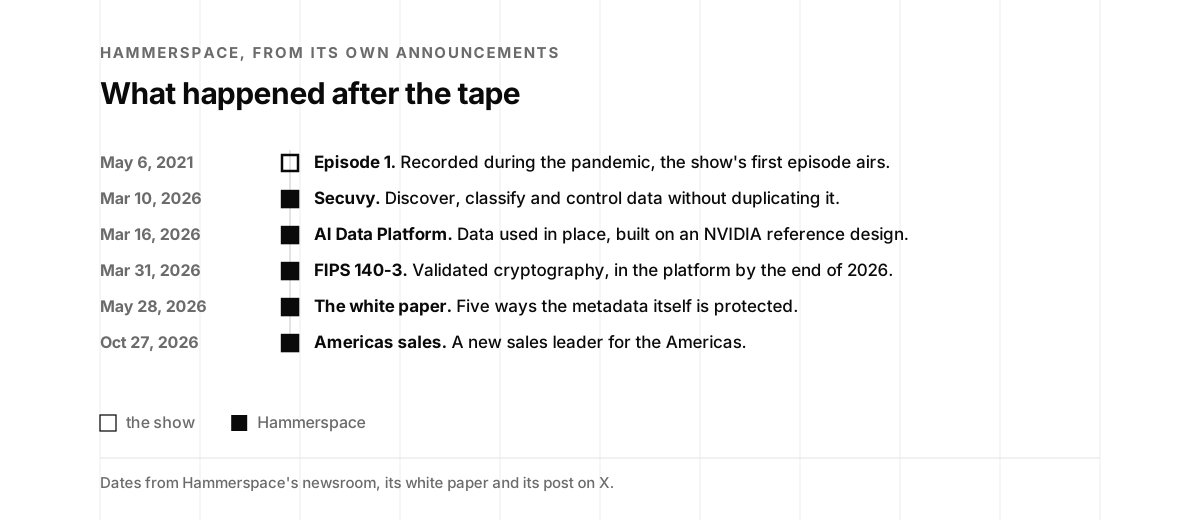
A timeline of six entries. Open, May 6, 2021, episode 1: recorded during the pandemic, the show's first episode airs. Filled, March 10, 2026, Secuvy: discover, classify and control data without duplicating it. Filled, March 16, 2026, AI Data Platform: data used in place, built on an NVIDIA reference design. Filled, March 31, 2026, FIPS 140-3: validated cryptography, in the platform by the end of 2026. Filled, May 28, 2026, the white paper: five ways the metadata itself is protected. Filled, October 27, 2026, Americas sales: a new sales leader for the Americas.
What happened after the tape.

The part of the conversation that aged best is the plainest. Every copy of a file is another place to get the permissions wrong, another system to recover, and another place the bytes outlive a delete. One file, governed in one place and encrypted with a key you hold, is the version of that problem you can actually manage.

Did you catch it? A six-question quiz

Six questions from the episode. Each answer links the moment in the transcript.

Quiz · six questions

Did you catch it?

Pick an answer for each. The explanation shows once you choose.

  1. What are the two parts of the Hammerspace platform?

    1. The Anvil and the DSX
    2. The hammer and the forge
    3. The vault and the gateway

    a. "One is what we call the Anvil, and the other one is the DSX." Transcript, 1:53.

  2. Why doesn't Hammerspace add a hop to every read and write?

    1. It caches all of your data
    2. It compresses the traffic
    3. It sits on the side, and clients talk to the storage directly

    c. "we sort of sit on the side, if you will, where we just allow your clients to talk directly to the data server." Transcript, 2:25.

  3. What does moving a flagged file to a quarantine server cost you, in Anand's telling?

    1. Disk space
    2. Its lineage and its ownership
    3. Its encryption

    b. "Now you've made the problem even worse, because you've lost lineage" Transcript, 6:07.

  4. Why doesn't losing a site start a failover?

    1. Every site is active, so you mount from another one
    2. The backups restore overnight
    3. Replication reverses on its own

    a. "So one site goes down, boom, you just mount from another site and continue." Transcript, 15:12.

  5. What do the first functions Hammerspace integrated with write back to a file?

    1. A compressed copy
    2. Metadata, like a threat verdict or image labels
    3. A new encryption key

    b. "The first couple of technologies that we've integrated with are antivirus scanning and image recognition." Transcript, 17:00.

  6. How does removing a file from the namespace delete it, even before the storage cleans up?

    1. It overwrites every block at once
    2. It tells the storage administrator
    3. What's needed to decrypt it lives in the metadata

    c. "as soon as you remove it from the namespace, you've lost all capability to decrypt what's on your storage." Transcript, 26:59.

Is your data one file or many?

Anand’s argument was that every copy is another place to secure, recover and delete. Eight questions on how many places your data really lives.

Scorecard · eight questions

Is your data one file or many?

Answer for your most important data as it's run today. If two answers fit, pick the lower one.

  1. Can you take one recovery point that's consistent across every storage system your data lives on?

    • No
    • Per system, lined up by hand
    • Yes, one snapshot or one tested procedure

    "you're taking a sort of a point-in-time snapshot of all this data across all these storage systems." See Share-level snapshots.

  2. Who holds the keys that encrypt your data at rest?

    • The storage or cloud provider
    • We do, for some systems
    • We do, from our own key service or HSM, for all of it

    "You usually cannot do sort of BYOK, bring your own keys, with traditional storage." See Bring your own keys.

  3. When a site goes down, how do people get back to their files?

    • We restore from backup
    • We run a failover runbook
    • They mount from another live site

    "So one site goes down, boom, you just mount from another site and continue." See Active-active is the disaster recovery.

  4. Can people restore a file they deleted by mistake without opening a ticket?

    • No
    • With help from IT
    • Yes, it's self-service

    "you can just go into the undelete location under the share and sort of bring back the files." See Undelete, and ransomware.

  5. How many places do you set permissions for the same data?

    • Once per copy, by hand
    • A few places, kept in step by scripts
    • One place for every copy

    "you have your permissions model, and you have to make sure you manage and lock down your permissions." See Every copy needs its own lock.

  6. When a scan finds sensitive data out in the open, what happens to the file?

    • Nothing automatic
    • It gets moved to a quarantine server
    • Access is blocked in place, lineage intact

    "Now you've made the problem even worse, because you've lost lineage" See Quarantine loses the lineage.

  7. Do your scanners write their results where a policy can act on them?

    • No
    • Into a separate console someone reads
    • Into metadata a rule enforces

    "you can plug in a certain piece of compute that can look at your data and derive additional metadata from it." See Functions that look at your data.

  8. When retention ends, can you show the data is unreadable everywhere, copies and leftovers included?

    • No
    • For some systems
    • Yes, because we destroy what decrypts it

    "as soon as you remove it from the namespace, you've lost all capability to decrypt what's on your storage." See Delete what decrypts it.

Copies everywhere

Your data lives in many places and each one is run on its own. Pick one important dataset, map every copy, and put its permissions and its keys in one place first.

Partly one file

Some of it is governed in one place. Extend the same recovery point and the same keys to the systems still run by hand, and test a restore that touches all of them.

A file is a file

Most of your data is governed, recovered and encrypted as one. Keep proving it with restore drills across every system and a deletion you can show reached every copy.

How many hours do your copies cost?

What it takes to keep permissions in step when every dataset lives in more than one place. Change the numbers to your own.

Calculator

How many hours do your copies cost?

Four estimates: how many datasets carry their own permissions, how many copies of each you keep, how often their permissions change, and the minutes one change takes on one copy.

–permission edits a month
–hours a month across every copy
–hours a month with one set of permissions
–hours a month the extra copies cost

Keeping 600 permission edits a month in step across every copy takes 100 h. With one namespace and one set of permissions it would be 33 h, so the extra copies cost 67 h a month.

The defaults are examples, not measurements. Three copies echoes Anand's Australia, Europe and the United States in Every copy needs its own lock, and the rest are round numbers. The hours don't count the cost of getting one copy wrong, which is the part Anand worried about. Hammerspace sells the single-namespace approach, so time your own changes before you decide.

From a cartoon to FIPS 140-3

Everything on this page sits on one timeline, from a 1943 cartoon to Hammerspace’s validated cryptography. Filter it by thread.

Timeline · 1943 to 2026

From a cartoon to FIPS 140-3

Filter by thread. Dates are from the public record except where marked as part of this show.

  1. What's Buzzin' Buzzard?

    Tex Avery's vulture pulls a kitchen's worth of appliances out of thin air, long before anyone called that hammerspace (Wikipedia).

  2. NFSv3

    RFC 1813 publishes version 3 of the Network File System (Wikipedia, on this show).

  3. Fusion-io

    David Flynn and Rick White found the flash memory company, first named Canvas Technologies (Wikipedia).

  4. pNFS

    NFS version 4.1, RFC 5661, adds parallel access that separates the metadata from the data (Wikipedia, on this show).

  5. SanDisk

    SanDisk announces its plan to buy Fusion-io (Wikipedia).

  6. AWS Lambda

    Amazon introduces functions that run code in response to events (Wikipedia, on this show).

  7. Hammerspace

    The company lists 2018 as its founding year (LinkedIn).

  8. RFC 8435

    The pNFS Flexible File Layout, by two authors at Hammerspace (RFC Editor, on this show).

  9. Peacemakr

    Jon co-founds Peacemakr (LinkedIn, on this show).

  10. FIPS 140-3

    The U.S. government standard for cryptographic modules is first published, superseding FIPS 140-2 (Wikipedia).

  11. Episode 1

    Jon and Anand's conversation, recorded during the pandemic, airs as the show's first episode (transcript, on this show).

  12. The companion post

    Our post on immutable backups and ransomware recovery draws on the episode (YSecurity).

  13. Secuvy

    An integration to discover, classify and control data without duplicating it (Hammerspace, on this show).

  14. AI Data Platform

    Hammerspace launches a data platform for AI built on an NVIDIA reference design (X, on this show).

  15. Validated cryptography

    FIPS 140-3 validation, with integration into the platform planned by the end of 2026 (Hammerspace, on this show).

  16. Bookings

    Year-to-date bookings of nearly 14 times full-year 2025, by the company's count (Hammerspace).

  17. The white paper

    Hammerspace's paper on protecting data and metadata is last updated (Hammerspace, on this show).

  18. Americas sales

    Hammerspace names a new sales leader for the Americas (Hammerspace).

What to do this week

Five things, in the order Anand’s argument suggests.

  1. Map where one dataset really lives. Pick your most important one, list every copy on every system and site, and count the places its permissions are set. The calculator above shows what each extra copy costs to keep in step.
  2. Restore from one point in time, across all of it. Take a recovery point and bring the whole dataset back, end to end, on every system it touches. Time it, and write down what had to be lined up by hand.
  3. Find out who holds your keys. For each place that dataset sits, note whether the provider or you control the key that encrypts it at rest, and move the important ones to a key service or HSM you run.
  4. Block in place instead of moving to quarantine. Pick one scanner, antivirus or DLP, and wire its verdict to a rule that stops access to the file where it is, so its owner and history stay attached.
  5. Prove one deletion reached every copy. Write down how you’d make retired data unreadable everywhere, copies and storage leftovers included, and try it on something small. The scorecard above shows where else you stand. If you’d like a hand with any of it, our vCISO team can help, and you can book 15 minutes with us.

Key takeaways

  1. Storageless data is serverless, for files

    Anand framed Hammerspace's idea with the serverless promise: you don't care where the compute runs, only that you get it. Storageless data serves files on any site and any infrastructure, and you orchestrate them with intent, file by file.

  2. Separate the metadata from the data

    Hammerspace splits the file system in two: the Anvil, a metadata server, and the DSX, the data services. The names, permissions and tags live in one place, and the bytes can sit on any storage underneath.

  3. Stay out of the I/O path

    Clients ask the Anvil where the data is and then read and write it on the storage directly, using the open pNFS Flex Files protocol, so there's no extra hop and nothing proprietary on Linux clients.

  4. Traditional storage is managed upside down

    Directives sit at the volume level, the work is prescriptive and seldom self-service, and a storage administrator has to learn every vendor's quirks, even on a decades-old open spec like NFSv3.

  5. Drive the data through metadata

    POSIX metadata plus the tags you add and the metadata you derive from processing the data become the handles for rules, which Anand called objectives, that move data or lock down access to it.

  6. Every copy multiplies the permissions work

    Permissions set by hand are prone to human error, and copying data to a new site or project means setting them again over there, correctly, across time zones. Anand called that a complete nightmare.

  7. Quarantine breaks lineage

    Moving a flagged file to a quarantine server loses its lineage and its ownership, because it now sits on a different system under a different export. Blocking access in place keeps both.

  8. A file is a file is a file

    In Hammerspace there's only one file, rendered on whichever sites need it, so permissions and objectives are managed in one place for every location.

  9. Bring your own keys to storage you don't own

    Because the platform can move data between infrastructures without disruption, it can encrypt the data with keys from the customer's own key management system or HSM, across AWS, Google, Azure and on-premises storage.

  10. One snapshot across every system

    A share is a container for metadata whose data can sit on NetApp, Isilon, Pure Storage, AWS or StorageGRID at once. A share-level snapshot takes one point in time across all of it.

  11. Backups protect the platform, snapshots protect the data

    When metadata and data live apart, a backup reinstalls the Anvil and the DSX, while snapshots and replication between availability zones protect the data. A mobility replay log keeps restored metadata pointing at data that has since moved.

  12. Let users undelete their own files

    Deleted files stay available for a configurable time, and users can restore them from an undelete location under the share, which helps with ransomware and with fat-fingered deletes.

  13. Active-active is the disaster recovery plan

    With every site live, losing one doesn't start a failover. Nobody converts a passive site or reverses replication. You mount from another site and keep running.

  14. Functions turn scans into metadata

    Antivirus scanning, image recognition and data loss prevention tools run as functions on the data, write their answers back as metadata, and an objective can then block access to a threat in place.

  15. Trust as few systems as you can

    Anand saw guarding every system on top of data at rest as a losing battle, and wanted the keys in the data owner's pocket, where only the application can reach them. Jon's version: with your own key in the storage layer, you have to trust the vendor much less.

  16. Delete what decrypts it

    With the IV or salt kept in the metadata layer, removing a file from the namespace leaves what's on the storage undecryptable, even while deduplicated data waits to be cleaned up.

Chapters

Tap a chapter to play from there.

Pull quotes

“in Hammerspace, a file is a file is a file. There's only one file.”

Anand Ganesh ·

“the intent is to evoke in the mind of the listener the same benefits that they have probably experienced and know about with the serverless compute”

Anand Ganesh ·

“we are building technology that allows you to serve data on any site, on any infrastructure”

Anand Ganesh ·

“Hammerspace is really a platform that allows you to disaggregate metadata and data.”

Anand Ganesh ·

“One is what we call the Anvil, and the other one is the DSX. And the Anvil is our metadata server, and DSX is really the data services component.”

Anand Ganesh ·

“there are technologies that'll sit in the I/O path, but we sort of sit on the side, if you will, where we just allow your clients to talk directly to the data server.”

Anand Ganesh ·

“It's built on an open protocol, the pNFS Flex Files protocol. There's an RFC for it.”

Anand Ganesh ·

“I really like the simplicity. I like the use of the open standard.”

Jon McLachlan ·

“So, when you manage your data through the storage layer, you're sort of doing upside-down management.”

Anand Ganesh ·

“You're not file granular.”

Anand Ganesh ·

“And it's seldom self-service.”

Anand Ganesh ·

“even if it's an open spec like NFSv3, which is three decades old, every vendor will have a certain difference to how they implement the protocol.”

Anand Ganesh ·

“And so at Hammerspace, you drive data through metadata, which is very important, because the metadata is the layer that can be augmented.”

Anand Ganesh ·

“And so you can completely orchestrate the movement of data, or the locking down of access to that data, using metadata.”

Anand Ganesh ·

“And that's obviously prone to human error, like anything that is done manually.”

Anand Ganesh ·

“Like, you have data between, let's say, Australia, Europe and the United States, and you're doing this across time zones and whatnot, which becomes a complete nightmare.”

Anand Ganesh ·

“Now you've made the problem even worse, because you've lost lineage”

Anand Ganesh ·

“Yeah, you've lost ownership. Like, you don't know who owns the file anymore.”

Anand Ganesh ·

“But all your management for permissions and the objectives you set on it and whatnot can be done in one site.”

Anand Ganesh ·

“no matter who is accessing that data, what client they're accessing that data from, going to be governed by the same set of rules.”

Jon McLachlan ·

“You usually cannot do sort of BYOK, bring your own keys, with traditional storage.”

Anand Ganesh ·

“And that gives you a completely different level of control and power.”

Anand Ganesh ·

“And so that provides very robust encryption at rest across that entire ecosystem of available storage.”

Jon McLachlan ·

“In the storage community, data protection is really, you know, how do you recover your data easily under different failure circumstances, right?”

Anand Ganesh ·

“That's really data protection for us.”

Anand Ganesh ·

“And your share is really just a container for the metadata.”

Anand Ganesh ·

“And we have share-level snapshots. You can take a snapshot of the share, which means you're taking a sort of a point-in-time snapshot of all this data across all these storage systems.”

Anand Ganesh ·

“Backup is an interesting challenge, because you have metadata and data, which is disaggregated.”

Anand Ganesh ·

“When you're talking about backups, we're really talking about reinstalling your Anvil and your DSX, your Hammerspace sort of infrastructure, right?”

Anand Ganesh ·

“So backup is more for just the metadata, all of the data about the data, so to speak.”

Jon McLachlan ·

“And we have features like undelete. Like, if you delete a file, it'll still be available for a certain amount of time. It's configurable in the product.”

Anand Ganesh ·

“We want to make access to your data as self-service as possible.”

Anand Ganesh ·

“So we have something called a mobility replay log”

Anand Ganesh ·

“Yeah, it almost sounds like Git, but for the abstract representation of data.”

Jon McLachlan ·

“your global file system sort of becomes a DR, it becomes your DR solution, right?”

Anand Ganesh ·

“So one site goes down, boom, you just mount from another site and continue. You're online and you're up and you're running.”

Anand Ganesh ·

“So, how does Hammerspace approach confidentiality?”

Jon McLachlan ·

“just like you can orchestrate data to a storage container, you can orchestrate data to a processor.”

Anand Ganesh ·

“The first couple of technologies that we've integrated with are antivirus scanning and image recognition.”

Anand Ganesh ·

“So you just put an objective on your data that says, process my data through this Lambda function. And boom, that's it. That's all you have to do.”

Anand Ganesh ·

“And then, using our objective system, you can prevent access to data that shouldn't be out in the open.”

Anand Ganesh ·

“encrypt the data so that while it's sitting on your storage container at rest, it's protected.”

Anand Ganesh ·

“it is going in as plain text on one side and it's getting spit out as ciphertext on the other side before it sits on your storage layer.”

Anand Ganesh ·

“First, there's TLS, just protecting our data as it moves across the network.”

Jon McLachlan ·

“And if we continue that trend, we go up the stack.”

Jon McLachlan ·

“I think the holy grail is really making sure that the data is not present in plain text anywhere between the app that is working with the data and where it's at rest on the storage layer.”

Anand Ganesh ·

“But that is, in my opinion, just a losing battle, because how many of these systems will you protect, right?”

Anand Ganesh ·

“It should only be decrypted by the keys that are securely in your pocket.”

Anand Ganesh ·

“And you're spot on that the only things that should access that data are the apps themselves.”

Jon McLachlan ·

“But at the end of the day, this is a journey, not a destination.”

Jon McLachlan ·

“That's just one example of a misconfiguration.”

Jon McLachlan ·

“And I think that as consumers, we shouldn't be forced into a position where we have to trust other people's systems in order to be able to build interesting services that are secure.”

Jon McLachlan ·

“Exactly, because it's your key, and you know that if you block access to the HSM, nobody can access your data through Hammerspace, right? And that's the peace of mind that we want you to have.”

Anand Ganesh ·

“And that's actually a nice way to delete data, too, right?”

Jon McLachlan ·

“Yeah, you've logically deleted your data.”

Anand Ganesh ·

“And beyond that time, it's really a liability to have that data be around, right?”

Anand Ganesh ·

“you rm the file from the namespace and you have lost, you've made it impossible for somebody to go and decrypt your content, right?”

Anand Ganesh ·

“as soon as you remove it from the namespace, you've lost all capability to decrypt what's on your storage.”

Anand Ganesh ·

“I like how easy it is to securely delete data in that system. It's an important feature that oftentimes gets overlooked”

Jon McLachlan ·

“it's super important that your data is available where you are.”

Anand Ganesh ·

“It's decoupled, which means if one of your sites goes down, all the other sites continue to work as is, as if they were not replicated.”

Anand Ganesh ·

“So, any site, any infrastructure is what we're aiming for”

Anand Ganesh ·

About the guest

Anand Ganesh, Founding Software Architect, Hammerspace

Anand Ganesh was the founding software architect at Hammerspace, the Redwood City company behind a global file system that keeps a company's files in one namespace across any storage, when he joined Jon for the show's first episode, published in May 2021. On the episode he explains Hammerspace's split between the Anvil metadata server and the DSX data services, its use of the standard pNFS Flex Files protocol, share-level snapshots, active-active disaster recovery, functions that derive metadata for security, bringing your own keys, and deleting data through the metadata.

About the host

Jon McLachlan is co-founder of YSecurity, the on-demand cybersecurity team for startups, and of Cyberbase.ai. The Security Podcast of Silicon Valley is hosted by Jon McLachlan and Sasha Sinkevich. Jon McLachlan on LinkedIn ↗

Context and sources

  • Hammerspace, about page: a data platform that unifies unstructured data across data centers, clouds and edge environments into a global namespace, its leadership team with David Flynn as chief executive, and its Redwood City office. Source ↗
  • Hammerspace on LinkedIn: founded in 2018, headquartered in Redwood City, California, privately held. Source ↗
  • Hammerspace, David Flynn: co-founder and chief executive, and founder and former chief executive of Fusion-io, which SanDisk acquired in 2014. Source ↗
  • RFC Editor, RFC 8435, Parallel NFS (pNFS) Flexible File Layout, August 2018, by B. Halevy and T. Haynes of Hammerspace: the flexible file layout lets pNFS use storage devices that need only limited interaction with the metadata server. Source ↗
  • Wikipedia, Network File System: NFSv3 as RFC 1813 in June 1995, NFSv4.1 as RFC 5661 in January 2010 with the pNFS extension, and how pNFS separates a file's metadata from the location of its data. Source ↗
  • Hammerspace, white paper, Protecting Data and Metadata in the Hammerspace Data Platform, last updated May 28, 2026: Service Level Objectives, and five methods for protecting the metadata, from mirroring inside the Anvil to an export to JSON. Source ↗
  • Hammerspace, press release, March 31, 2026: FIPS 140-3 validated cryptography, encryption in flight and at rest, immutable snapshots, clones and WORM, and integration into the platform planned by the end of 2026. Source ↗
  • Hammerspace, press release, March 10, 2026: an integration with Secuvy to discover, classify, catalog and control unstructured data in one global namespace. Source ↗
  • Hammerspace on X, March 16, 2026: the AI Data Platform built on an NVIDIA reference design, and David Flynn on data used in place. Source ↗
  • Hammerspace, newsroom: 2026 releases, including year-to-date bookings of nearly 14 times full-year 2025 and a new Americas sales leader. Source ↗
  • Wikipedia, Fusion-io: founded in December 2005 as Canvas Technologies by David Flynn and Rick White, and acquired by SanDisk in 2014. Source ↗
  • Wikipedia, Hammerspace: the imaginary storage area cartoon characters pull objects from. Source ↗
  • Wikipedia, Serverless computing: a cloud model where the customer doesn't provision, deploy or manage the underlying hardware or software. Source ↗
  • Wikipedia, Data lineage: tracking how data is generated, transformed, transmitted and used across systems over time. Source ↗
  • Wikipedia, Snapshot (computer storage): the state of a system at a particular point in time. Source ↗
  • Wikipedia, Undeletion: restoring files that have been removed from a file system. Source ↗
  • Wikipedia, Write once read many: storage where information, once written, cannot be modified. Source ↗
  • Wikipedia, AWS Lambda: Amazon's event-driven serverless functions, introduced on November 13, 2014. Source ↗
  • Wikipedia, Hardware security module: a physical device that safeguards and manages secrets and performs encryption and decryption. Source ↗
  • Wikipedia, FIPS 140-3: the U.S. government standard for approving cryptographic modules, first published on March 22, 2019. Source ↗
  • Wikipedia, Insider threat: threats from people within the organization, including employees, contractors and business associates. Source ↗
  • Wikipedia, Crypto-shredding: rendering encrypted data unusable by deleting or overwriting the keys. Source ↗
  • Wikipedia, Legal hold: preserving potentially relevant information when litigation is pending or anticipated. Source ↗
  • Wikipedia, Follow-the-sun: work handed to the next site in another time zone at the end of each day. Source ↗
  • Jon McLachlan on LinkedIn: co-founder and chief executive of Peacemakr from January 2019. Source ↗

Transcript

Automatic transcription. Jon McLachlan hosts this episode with Anand Ganesh. There is no diarization on the tape, so speaker labels were assigned from the content and checked passage by passage against reference recordings of each voice from this episode, and a few short lines may sit with the wrong speaker. Names and product names were normalized where the recognizer misheard them (Jon McLachlan, Anand, Hammerspace, Anvil, Isilon, NetApp StorageGRID, NFSv3, Peacemakr), as were a few terms the recognizer misheard (I/O path, SOX, data at rest). Words in [brackets] are best guesses where the audio is unclear, and the one place where Anand is cut off is marked with an ellipsis. Answers are transcribed as spoken, with repeated words and false starts trimmed. Short backchannels are left out.

Read the full transcript 4,998 words

Jon McLachlan

Welcome to The Security Podcast of Silicon Valley. I am Jon McLachlan, the host, and today I am joined with a very special guest, Anand Ganesh, the founding software architect at Hammerspace. Hammerspace, for those of you who don't know, they're working on storageless data as a service. So, Anand, great to have you on.

Anand Ganesh

Thank you. Thank you, Jon, for having me on the podcast. It's a pleasure to connect again and take this time to talk about storageless data and many other things.

Jon McLachlan

I'm super excited to hear all about it. So, start right at the beginning. So, what is storageless data?

Anand Ganesh

Right, so storageless data, the term, the intent is to evoke in the mind of the listener the same benefits that they have probably experienced and know about with the serverless compute, which is that at the end of the day, you don't care about where the compute resource resides, where the infrastructure is on the planet, what kind of server technology. All you care about is that you get compute for your job. So, storageless data is, we are building technology that allows you to serve data on any site, on any infrastructure, which is, and then you can orchestrate your data just using intent at a file granular level. That's where storageless data comes into picture. Now, I want to orient maybe your audience a little bit as to where Hammerspace resides. Because you have storage, which is, you know, your NAS storage, like NetApp or Isilon, and/or your object storage, which is AWS, Azure, GCP, but also some on-prem technologies like [MinIO] or Scality. And Hammerspace is really a platform that allows you to disaggregate metadata and data. So Hammerspace as a platform has two pieces that make it up. One is what we call the Anvil, and the other one is the DSX. And the Anvil is our metadata server, and DSX is really the data services component. So, what happens is that Hammerspace sort of sits on the side and it routes your data, it routes your clients to their data. And then, once the clients know where the data is, they directly talk data to the storage that hosts the data. So a lot of times people ask me, does that mean it introduces a hop? It doesn't, because there are technologies that'll sit in the I/O path, but we sort of sit on the side, if you will, where we just allow your clients to talk directly to the data server. It's built on an open protocol, the pNFS Flex Files protocol. There's an RFC for it. And so you don't have to install anything proprietary on your Linux clients. They just talk pNFS. So your clients will talk to the Anvil, get the location for the data, and then just directly talk data to your storage volume.

Jon McLachlan

Wow, it sounds so simple. I really like the simplicity. I like the use of the open standard. So, in terms of security, though, what are the traditional security problems that we face when we're thinking about data storage? And I guess we could put that into context. So, with an abstraction layer now, with someone else managing the service, how can we benefit from that?

Anand Ganesh

Right. So maybe I should touch a little bit upon sort of the trappings of traditional storage and how sort of Hammerspace solves that. So, when you manage your data through the storage layer, you're sort of doing upside-down management. All your directives are usually at the storage volume level, for folks that are sort of familiar with storage layer terminology. You're not file granular. And also, a lot of times you are very prescriptive. You are doing specific tasks and you are replicating data in groups, like at the volume level and whatnot. And it's seldom self-service. There is a clear role between the person who is using the data and the person who's managing the storage infrastructure, what we call the storage administrator, right? And usually, when they're doing that, they have to sort of manually understand how each storage technology works. And even if it's an open spec like NFSv3, which is three decades old, every vendor will have a certain difference to how they implement the protocol. And so you have to learn and integrate with all these nuances, which all gets taken away from your plate as problems to solve when you're with Hammerspace, because we've done that hard work. We've automated pretty much everything when it comes to managing your storage. And so at Hammerspace, you drive data through metadata, which is very important, because the metadata is the layer that can be augmented. The metadata layer not just contains your POSIX metadata, but also stuff that you may tag onto it, or you may derive from running some sort of analysis on that data or processing the data, right? And so you can completely orchestrate the movement of data, or the locking down of access to that data, using metadata. So that brings us to what are the traditional storage problems. So, first of all, when you have traditional storage, you have your permissions model, and you have to make sure you manage and lock down your permissions. And that's obviously prone to human error, like anything that is done manually. When you copy data over, you are provisioning storage at a different location or in a different data center for a different project. You are now exacerbating that problem, because you are copying those files, which means they have to be locked [down] over there, and you have to make sure you've set up your permissions over there correctly. And think about this at the multi-site global level. Like, you have data between, let's say, Australia, Europe and the United States, and you're doing this across time zones and whatnot, which becomes a complete nightmare. So when you find data that needs to be remediated, like there is a file that contains proprietary information that is out in the open, is not encrypted or whatnot, then a lot of the remediation workflows cause you to move the data to a quarantine server. Now you've made the problem even worse, because you've lost lineage, because it's sitting on a different system, under a different export or whatnot, right?

Jon McLachlan

Lineage.

Anand Ganesh

Yeah, you've lost ownership. Like, you don't know who owns the file anymore. So all these problems are solved by Hammerspace, because in Hammerspace, a file is a file is a file. There's only one file. It's just rendered on different sites, and it's created on the infrastructure on those sites so that you can access it locally. But all your management for permissions and the objectives you set on it and whatnot can be done in one site. Now you have really simplified the management of data across all these sites to a single point, which is the file.

Jon McLachlan

I love it. So you just set up your security policies, your management policies, your access policies in one single pane that Hammerspace provides, and no matter who is accessing that data, what client they're accessing that data from, going to be governed by the same set of rules. Really great simplification.

Anand Ganesh

And the one thing I'll also mention, which is, you know, you'll appreciate this given your work with Peacemakr. You usually cannot do sort of BYOK, bring your own keys, with traditional storage. Whereas with Hammerspace, because we've solved the problem of data mobility, we can non-disruptively move data from one infrastructure to another, whether that infrastructure is within the same data center or, like, completely in a different geographical location. We can encrypt your data using the keys that are, you know, from your environment, from your key management systems. And that gives you a completely different level of control and power.

Jon McLachlan

Power. So that's something that has not been possible until Hammerspace showed up on the scene, right? Until a key from a customer is able to encrypt data that's protected, geographically dispersed. Maybe it's even dispersed across different data centers, across different service providers. I don't know exactly what sort of service providers are underneath the hood in Hammerspace. Google?

Anand Ganesh

Any and all. Yes, any: AWS, Google, Azure, your own object storage in a certain data set.

Jon McLachlan

Oh, my own on-prem?

Anand Ganesh

Yes, your own on-prem, doesn't really matter, because we can move it into any storage container, into any storage volume, and we can encrypt the data if you want it to be encrypted.

Jon McLachlan

That's spectacular. And so that provides very robust encryption at rest across that entire ecosystem of available storage. Amazing. So, in the security community, you know, everyone has a very distinct and specific, it's almost like a community-defined term, but data protection [in] the storage community means something very specific. What does that mean in the storage community?

Anand Ganesh

So, in the storage community, it's a good point. In the storage community, data protection is really, you know, how do you recover your data easily under different failure circumstances, right? So in the storage community, we talk about snapshots, backups, disaster recovery, you know, building up availability zones and making sure your data is replicated between those availability zones, and so on and so forth. That's really data protection for us. And of course, security comes into play because, like I just said, we can encrypt your data using your own keys, but we usually talk about that in the context of the term security, not really data protection.

Jon McLachlan

Right. Data protection I think of as more the availability, the backups, your recovery times, those sorts of things.

Anand Ganesh

Right, right. So at Hammerspace, we do, of course, we do all of these. And you can take snapshots of your share. So at Hammerspace, you export your data to your clients through a share, right? It could be SMB clients or NFS clients. And you can take a snapshot of your share. And you can take this snapshot, let me paint a little bit of a picture here so I can better express this. You have your share that has your data. And your share is really just a container for the metadata. It's just containing, imagine the namespace, the permissions, any metadata that you've tagged on the files and whatnot. But the data that makes up each of these files can be sitting on any and all infrastructure underneath that share. Some data could be on a NetApp volume, some data could be on an Isilon, some could be on Pure Storage, some could be in AWS, some could be in NetApp StorageGRID, doesn't really matter. So now you have a share that has its data sitting on these multiple disparate storage containers. And we have share-level snapshots. You can take a snapshot of the share, which means you're taking a sort of a point-in-time snapshot of all this data across all these storage systems. And that becomes pretty powerful, which is kind of going back to something I was saying earlier. Once you know Hammerspace works with a certain storage technology, then you know that all these data services are going to work across all these storage technologies. And of course, we do backups. Backup is an interesting challenge, because you have metadata and data, which is disaggregated. So the question is really, what are you backing up? So, for Hammerspace, when you do a backup, the way we differentiate between backup and snapshot is that snapshot is really something that you can sort of go back point in time for your metadata and data. And of course, you can instantiate a completely new share with your snapshot, is what I was talking about. So you can go back in time with a snapshot. You can instantiate a new copy of the share with a given snapshot copy, so on and so forth. When you're talking about backups, we're really talking about reinstalling your Anvil and your DSX, your Hammerspace sort of infrastructure, right? And if your storage volumes, if you've lost your storage volumes, really the backup is not going to bring it back, because you are sort of storing your metadata, but, you know, your data needs to be sitting on some storage volume. So really your snapshot and your replication of data across availability zones gives you the data protection. And then your backup, the Hammerspace backup technology, allows you to back up your entire estate. Hardware, if you …

Jon McLachlan

I gotcha. I got you. So backup is more for just the metadata, all of the data about the data, so to speak. And your snapshots and your high availability gives you the business continuity, your ability to restore your actual data on top of your snapshots.

Anand Ganesh

Exactly. Exactly. And we have features like undelete. Like, if you delete a file, it'll still be available for a certain amount of time. It's configurable in the product.

Jon McLachlan

That's convenient. That would help with your ransomware attacks.

Anand Ganesh

Exactly. Ransomware attacks, or just users. We want to make access to your data as self-service as possible. So the end user basically just, if they fat-finger something, they delete a bunch of files, you can just go into the undelete location under the share and sort of bring back the files. And the other challenge with, of course, backup is we have data mobility, which means you could take a backup of your metadata at a time where the data is laid out in a certain way, your data is mapped to certain volumes. But then, as time goes by, your data could move based on objectives that you have, which means when you restore your metadata, your metadata could be pointing at data objects that don't exist at the same place anymore. So how do you solve that problem? So we have something called a mobility replay log that, to figure out where the data moves, so that when you go back in time in metadata, you can sort of go back in time in data and figure out where the data is now compared to where it was when the backup was taken. Very interesting technical challenges that we've had to solve to make a backup restore a viable option for this sort of metadata and data disaggregated product.

Jon McLachlan

Yeah, it almost sounds like Git, but for the abstract representation of data.

Anand Ganesh

Right, right. The one last thing I'll say in this area is that, because you can instantiate Hammerspace on multiple sites and it's all active-active, it's not active-passive, your global file system sort of becomes a DR, it becomes your DR solution, right? Because if you lose a site, you really are not waiting. You're not converting one site from passive to active. You're not changing the direction of replication. All the stuff that we've learned to do with traditional storage, you're not doing that anymore. It's active-active. So one site goes down, boom, you just mount from another site and continue. You're online and you're up and you're running.

Jon McLachlan

I love that. It's only because of the architecture that Hammerspace took to solve those complex problems and to bring that abstraction layer up higher.

Anand Ganesh

You're precisely right. Precisely.

Jon McLachlan

Excellent deployment of technology to make everyone's lives better and ultimately save our time and our energy so that we can focus on our end business goals.

Anand Ganesh

Completely, yes.

Jon McLachlan

So, change topics a little bit here. And if we go back to data security, I tend to think of data confidentiality and data privacy. So, how does Hammerspace approach confidentiality? It sounds like we have a lot of great tooling here, where we can distribute our deployment of file systems across very wide regions and seamlessly have it all active-active.

Anand Ganesh

Right. So the cool thing about building Hammerspace this way is, just like you can orchestrate data to a storage container, you can orchestrate data to a processor. So we have support on the Hammerspace platform for what, you know, generally in the industry we call it Lambda functions, where you can plug in a certain piece of compute that can look at your data and derive additional metadata from it. And how does that work here? So, you can configure, let's say, data loss prevention tool as something that can scan your data and figure out if there is data that is breaching confidentiality or privacy. So you have, I don't know, files with credit card numbers out in the open and some such, right? So we have support for that. The first couple of technologies that we've integrated with are antivirus scanning and image recognition. One is core to making sure your data is protected and whatnot. The other is more about working with your data to be able to identify what kind of images you have in your environment. So the cool thing about that is, when the processor runs [on the] data, we derive metadata from it. So, in the image recognition case, you derive your labels, and in the AV scanning case, you derive whether it's a threat or not a threat, and what kind of virus it found and whatnot, right? And if you integrate with DLP tools, it can tell you whether the data has any HIPAA or SOX or any of these, if it has data that needs to be protected as per these laws, right? And the other thing about our platform, like we've talked about earlier, is you can do all of this through objectives. So you just put an objective on your data that says, process my data through this Lambda function. And boom, that's it. That's all you have to do. We orchestrate everything on the back end through your processor, derive the metadata and make that metadata available through the namespace. And once you've done that, you can put objectives further on that derived metadata to say, if the file is found to be a threat, or if this image contains material that is inappropriate or whatnot, prevent access to the content of that file, right? So we bring in all this to say that we've built a way for us to integrate with any technology out there that can process data and provide value to the customer in terms of data security. And then, using our objective system, you can prevent access to data that shouldn't be out in the open. And additionally, beyond that, we've talked about the bring-your-own-keys model, where you can have Hammerspace run your data through, you know, get access to your key management system or your on-premises hardware security module, get the keys, encrypt the data so that while it's sitting on your storage container at rest, it's protected. And using metadata as the context for security and access, and making the platform flexible enough that you can plug in any Lambda function, just opens up the possibilities for how you can secure data with Hammerspace.

Jon McLachlan

Excellent. So, even though, as a customer of Hammerspace, I could bring my own key, I could encrypt, you know, with, I guess, you mentioned an HSM integration. Wow. So, I could have a key come from an HSM and encrypt all of my data using the Hammerspace layer, and still run a DLP, a data loss prevention tool, using the Lambdas.

Anand Ganesh

Yes.

Jon McLachlan

That's very powerful. So you have an internal key management system as part of Hammerspace. So that's great. I know those are tricky to build.

Anand Ganesh

Yes, we spent time making sure that the key management layer is generic enough that you can plug in any key management system, you know, KMSes from cloud vendors like AWS or Google, or your own HSM. And for folks that want some basic security and don't necessarily want to use these technologies, we are contemplating doing like a password-based system, right? For us, it is all just the same, because at the end of the day, it's grabbing access to the key, which could be a password, or it could be talking to an HSM or a KMS. And then using that in the data orchestration layer to make sure that when the data is passing through this encryption layer, if you will, it is going in as plain text on one side and it's getting spit out as ciphertext on the other side before it sits on your storage layer.

Jon McLachlan

Yeah, you know, it's interesting in the data security space, you know, because you see this evolution of security technologies. First, there's TLS, just protecting our data as it moves across the network. And now there's all of this really great work with encrypting at rest, so protecting our data with encryption as it rests on a persistence layer. And Hammerspace is a very interesting persistence layer that's distributed and active-active across all of its clients, and protected as well, and very protected, with some very cool features around that data protection, including this BYOK, and you're integrated with KMS and HSMs and all of that great stuff. And if we continue that trend, we go up the stack. Like, eventually we'll see full end-to-end encryption, where we're inside applications, encrypting perhaps data inside applications.

Anand Ganesh

Completely, completely. And this is why I love what you're building at Peacemakr. I think the holy grail is really making sure that the data is not present in plain text anywhere between the app that is working with the data and where it's at rest on the storage layer. And those two places, you protect them, and anywhere in between, it needs to be protected, right? And it's important to talk about this, because we know about data breaches that have happened at public cloud vendors, and we know that it's because there are systems on top of your data at rest that need to be secure, need to be manually managed, and need to be correct at all times for somebody to not gain access to your data. But that is, in my opinion, just a losing battle, because how many of these systems will you protect, right? And how many will you get right before you can feel peace of mind? And I think the only thing that is viable is when the data is at rest, it's protected. Not with some sort of server-side encryption where somebody, when they try to go through, if you have a breach in your permissions model, they can get access to your data, it's automatically decrypted for them. It should only be decrypted by the keys that are securely in your pocket. And that would mean making sure that the app is the only one that can get to your pocket and get the key so that it can look at the data. And so, definitely, this is an important problem. And I think what you're doing at Peacemakr is super cool.

Jon McLachlan

No, I super appreciate that, Anand. We're going to make a small dent [in] a very large problem here. And you're spot on that the only things that should access that data are the apps themselves. Though I do think of security in terms of layers, and appreciate all of the efforts and the care that you've taken at Hammerspace to ensure a solid at-rest encryption layer across a distributed system, managing keys. But at the end of the day, this is a journey, not a destination. And I think this may be our next step in that data security journey, is to take one more step up the stack. You talk about those breaches that had happened. Just for reference, the [nTreatment] breach, right? Which was, what was it? It was a technology company that was providing healthcare and patient records management services. They had a Microsoft Azure bucket. It was open to the internet, had 100,000 or so files in it, just readable from the internet. If there was an application that was referencing that data that had encrypted everything, right? There's your protection right there.

Anand Ganesh

Yeah, you wouldn't have had the exposure.

Jon McLachlan

Totally. Totally. Exactly. There's other cases out there. That's just one example of a misconfiguration. But if you have an insider threat, do we trust the vendors that are providing us these services? Do we trust AWS? Do we trust Hammerspace's infrastructure? And I think that as consumers, we shouldn't be forced into a position where we have to trust other people's systems in order to be able to build interesting services that are secure. And with BYOK in Hammerspace, I feel very comfortable in a space where I have to trust it much less.

Anand Ganesh

Exactly, because it's your key, and you know that if you block access to the HSM, nobody can access your data through Hammerspace, right? And that's the peace of mind that we want you to have.

Jon McLachlan

That's excellent. And that's actually a nice way to delete data, too, right? Yeah. So, if I encrypt a whole bunch of data, and all of a sudden the rotation on the key expires, and I throw away the key because that's what it says to do in my key lifecycle management policy, and the data is out there in Hammerspace distributed systems, not even Hammerspace can access it anymore, right?

Anand Ganesh

Yeah, you've logically deleted your data. And it's an interesting point you bring up, because there are some of our customers that have asked us how they can, so you have these laws that'll mandate that you have to keep certain data around for a certain amount of time. And beyond that time, it's really a liability to have that data be around, right? And if you get, you know, if you get put on legal hold and whatnot, then your data has to be around for a very long time, and so on and so forth. With Hammerspace, really, we'll talk a little bit of security terminology here, but if your IV or your salt that you're using for encryption sits with the metadata layer, you rm the file from the namespace and you have lost, you've made it impossible for somebody to go and decrypt your content, right? So you are logically, as soon as you delete it from a namespace, you've logically deleted the data. And the reason I mentioned that is, with some of our storage layer technology, we do deduplication and data sharing and whatnot. And our deletion of data on the storage layer is lazy, because we sometimes will run a background job to go and whack things that are not referenced in the namespace anymore, which means some of your data could reside beyond stuff being deleted in the namespace. But if you do it this way, as soon as you remove it from the namespace, you've lost all capability to decrypt what's on your storage.

Jon McLachlan

That's some really awesome stuff. I like how easy it is to securely delete data in that system. It's an important feature that oftentimes gets overlooked, especially when we get excited about moving forward and charging ahead. But you're right, that's absolutely an important use case, especially in the financial industry. They're required to keep all of that data around for a certain period of time, and then it turns into a liability. I suppose you could even make the case that it's a liability during the required period as well, but we won't get into that. So, with all of that great work that you and your founders and everyone there at Hammerspace have been pouring into the product, what do you think the next big piece is for Hammerspace? Don't share any of your secrets or anything like that, but what do you see for the future?

Anand Ganesh

So I think that the need to have data be available on any site, because we are more and more seeing, with people working from home and people being all over the planet trying to collaborate, with the pandemic here, and this trend is going to continue beyond that, it's super important that your data is available where you are. And that's where our global file system comes into play. You have a namespace that is describing your files, and you don't want to spend any amount of energy trying to move data around, copying it over, so on and so forth, right? You just want to work with your data, and you want objectives to automate the delivery of your data, the new data that you created today. Maybe you want to deliver it tonight to your colleagues that are working off of a different site, that may, you know, maybe you may be doing a follow-the-sun workflow in your organization, whatever the need may be, that becomes super important. And I think that the global namespace that is, we didn't talk about this much, but we built it decoupled. It's active-active. It's decoupled, which means if one of your sites goes down, all the other sites continue to work as is, as if they were not replicated. And all these pieces together make Hammerspace a very compelling solution for companies that are looking to have a global presence and not have to worry about delivering data to their site. So, any site, any infrastructure is what we're aiming for, anyone and everyone that's trying to solve that problem, and looking to help them.

Jon McLachlan

That's an amazing data as a service solution. I love things that make our lives easier and that solve hard problems and solve them the right way. So, Anand, thank you so much for coming on the show.

Anand Ganesh

Thank you so much for having me. This was a pleasure.

Jon McLachlan

And thanks to all of our listeners for tuning in this time. And stay tuned for more episodes of The Security Podcast in Silicon Valley. Thank you again, Anand.

Anand Ganesh

Thank you.

FAQ

Questions this episode answers

Who is Anand Ganesh?
Anand Ganesh was the founding software architect at Hammerspace when he came on the first episode of The Security Podcast of Silicon Valley, published May 6, 2021. On the episode he explains Hammerspace's architecture and what it does for permissions, recovery, encryption keys and deletion.
What is Hammerspace?
Hammerspace makes software that puts a company's files into one global namespace across data centers, clouds and edge sites, without copying or migrating them. It separates the metadata from the data, lists 2018 as its founding year, and is based in Redwood City, California. Today it calls its product a data platform for AI.
What is storageless data?
It's Hammerspace's term, modeled on serverless compute. Just as serverless means you don't care where the compute runs, storageless data means you don't care where the storage is. You serve data on any site and any infrastructure, and orchestrate it with intent at the file level.
What are the Anvil and the DSX?
The two parts of the Hammerspace platform. The Anvil is the metadata server, and the DSX is the data services component.
Does Hammerspace sit in the data path?
No. Clients get the data's location from the Anvil and then read and write the storage directly, using the open pNFS Flex Files protocol, RFC 8435, so there's no extra hop and nothing proprietary to install on Linux clients.
Why do copies make permissions harder?
Each copy of the data lands on storage provisioned for it, and its permissions have to be set again, correctly, by hand. Across sites in different countries and time zones that becomes, in Anand's words, a complete nightmare.
Why is moving a file to quarantine a problem?
Because the file ends up on a different system under a different export, and you lose its lineage and its ownership. In Hammerspace the file stays where it is, and an objective on its metadata can block access to it in place.
Can you bring your own encryption keys to storage?
Usually not with traditional storage, Anand said. Hammerspace can encrypt data with keys from the customer's own key management system or hardware security module, because it already moves data between infrastructures, and the encryption happens before the data reaches any storage system.
What does data protection mean in the storage world?
Recovering data under different failure circumstances: snapshots, backups, disaster recovery and replication between availability zones. Encryption with your own keys counts as security, not data protection.
What is a share-level snapshot?
A snapshot of a Hammerspace share, which is a container for metadata whose data can sit on many storage systems at once. It takes one point in time across all of them.
How is a backup different from a snapshot in Hammerspace?
A snapshot lets you go back to a point in time for both metadata and data, or start a new share from it. A backup reinstalls the Anvil and the DSX. It can't bring back a lost storage volume, which is what snapshots and replication are for.
How does active-active replace a failover?
Every site runs live, so when one goes down nobody converts a passive site to active or changes the direction of replication. Users mount from another site and keep working.
How does Hammerspace scan data for security?
It sends data to a processor the same way it sends data to storage, through plug-in functions Anand compared to Lambda functions. Antivirus scanning, image recognition or a data loss prevention tool looks at the data and writes its findings back as metadata, and an objective can then prevent access to a file found to be a threat.
How can you delete data when you can't find every copy?
Destroy what decrypts it. Jon pointed to throwing away an expired key. Anand described keeping each file's IV or salt in the metadata layer, so removing the file from the namespace leaves whatever is still on the storage undecryptable.
What has Hammerspace announced since the episode?
In 2026 it launched an AI Data Platform built on an NVIDIA reference design, an integration with Secuvy for discovery and classification, and FIPS 140-3 validated cryptography with platform integration planned by the end of 2026. It also published a white paper on protecting data and metadata.
Keep reading on the YSecurity blog
New episodes every other Tuesday

Got a story like this one?

We're always looking for practitioners who've been in the room when it mattered.