
Immutable Backups and Ransomware Recovery: Why 3-2-1 Isn't Enough Anymore
Ransomware operators go after your backups first. The 3-2-1 rule was built for hardware failures, not for adversaries who study your infrastructure before they strike. Here is what 3-2-1-1-0 adds, what immutability does and doesn't solve, and how to know you can restore before anyone asks.
Ransomware operators don’t just encrypt your production data anymore. They go after your backups first.
Two very different sources agree. Veeam’s 2025 Ransomware Trends survey (vendor research, so treat it as a published range rather than audited data) found that 89% of organizations had their backup repositories targeted, and that on average 34% of those repositories were modified or deleted. Mandiant’s incident responders put the global median dwell time at 11 days in M-Trends 2025, and at just 5 days when the adversary announces itself, “notably in ransomware cases.” Five days is plenty of time to find the backup console, read its retention settings, and decide what to delete before the first file is encrypted.
The 3-2-1 backup rule (three copies, two media types, one off-site) was the standard for decades. It was built for hardware failures and natural disasters, not for adversaries who study your infrastructure before they strike. On episode 1 of The Security Podcast of Silicon Valley, the very first one we recorded, Anand Ganesh, Founding Software Architect at Hammerspace, walked through the architectural shifts that make ransomware recovery reliable rather than hopeful. Five years on, his argument has aged well. This post is the practitioner’s version of it: what 3-2-1 misses, what immutability does and doesn’t solve, and how to know you can restore before anyone asks you to.

What is the 3-2-1 backup rule, and what does it miss?
Three copies of your data, on two different types of media, with one copy somewhere else. It still works for the failures it was designed around: a dead disk, a flooded server room, a stolen laptop. It’s the floor, and you should still follow it.
The rule has one hidden assumption: that nobody is inside your network trying to destroy the copies. A ransomware crew holding a domain admin credential is exactly that. The identity that runs your backup jobs can usually delete them, shorten their retention, or switch the job off. Off-site protects nothing if it is reachable over the same network with the same credentials, and two media types protect nothing if both are mounted on the same compromised server. CISA’s #StopRansomware Guide, written with the FBI, NSA and MS-ISAC, puts it plainly: “many ransomware variants attempt to find and subsequently delete or encrypt accessible backups to make restoration impossible unless the ransom is paid” (CISA, #StopRansomware Guide).
That is why the rule grew two digits. 3-2-1-1-0 adds one copy that is immutable or offline, and zero errors after verification: automated integrity checks plus restore tests that prove the copy can come back. Backup vendors publish it in roughly those terms (Veeam’s definition is representative); the shorter 3-2-1-1 version stops before the zero.
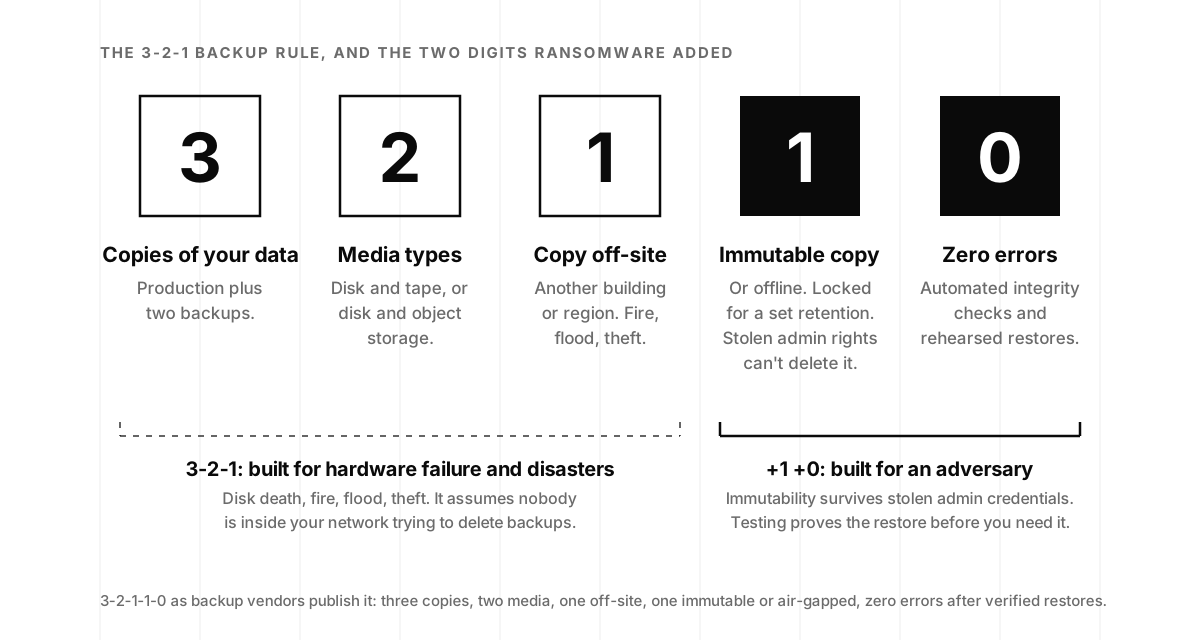
| Rule | Copies | Media types | Off-site | Immutable or offline | Verified restores |
|---|---|---|---|---|---|
| 3-2-1 | 3 | 2 | 1 | Not required | Not required |
| 3-2-1-1 | 3 | 2 | 1 | 1 | Not required |
| 3-2-1-1-0 | 3 | 2 | 1 | 1 | Zero errors |
The extra digits separate organizations that restore from organizations that negotiate, and the published numbers show how much room there is to improve. Sophos’s State of Ransomware 2025, a survey of 3,400 IT and security leaders at organizations hit in the previous year, found that 53% of victims recovered within a week (up from 35% in 2024), that “just under half (49%) paid the ransom and got their data back,” and that “data recovery through backups is at its lowest rate in six years” (Sophos, The State of Ransomware 2025). Recovery is getting faster, and a growing share of it is being bought rather than restored. Backups that survive the attack put you in the other half.
Even 3-2-1-1-0 leaves three questions unanswered: how fast can you actually restore, can you restore consistently across distributed storage, and can the business keep running during recovery? Those are also the questions a SOC 2 auditor asks under the Availability criterion, where a tested restore is the evidence and an untested backup is just a file (what a SOC 2 actually covers).
What is an immutable backup, and how does it work?
An immutable backup is a copy that cannot be modified or deleted for a defined retention period, by anyone, including an administrator with full access. The storage enforces the lock rather than the backup software, which matters because backup software runs with credentials an attacker can steal.
The mechanism is usually WORM storage (write once, read many), and the clearest public description of it is Amazon’s. S3 Object Lock “can help prevent Amazon S3 objects from being deleted or overwritten for a fixed amount of time or indefinitely,” and in compliance mode “a protected object version can’t be overwritten or deleted by any user, including the root user in your AWS account” (AWS, S3 Object Lock). Governance mode is the softer setting: most users are blocked, but a privileged role can still shorten retention or delete, which is precisely the role an attacker goes looking for. Every major cloud and most modern backup platforms offer an equivalent, and CISA’s guide notes that “some cloud vendors offer immutable storage solutions that can protect stored data without the need for a separate environment.”
Immutability solves one critical problem: it stops ransomware from destroying your recovery points. Without it, an attacker with admin credentials deletes the backups before encrypting production. With it, those copies survive regardless of the attacker’s access level, and the negotiation never starts.
Three settings decide whether it works in practice. Retention longer than the attacker’s dwell time plus the time it takes you to notice: with a five-day median and a long tail, 30 days is the sensible minimum and 90 is common for the copy of record. Compliance mode rather than governance mode, so the lock survives stolen credentials. And separate identities: the account that writes backups gets append-only permissions, while the account that can change bucket policy sits behind hardware-key MFA and out of daily use, with the phishing-resistant, device-bound sign-in we argued for in Why Passwords Still Get Stolen.
Immutable versus air-gapped: which do you need?
Both. An air-gapped copy is physically or logically disconnected from production: tape in a vault, a storage system that only connects during the backup window, a separate cloud account with separate credentials. No network path means ransomware can’t reach it, at the cost of slower restores and more operational discipline. Immutable snapshots are the fast primary recovery path (minutes to hours); the offline copy is the one you hope never to need. CISA’s baseline is the offline copy plus the test: “Maintain offline, encrypted backups of critical data, and regularly test the availability and integrity of backups in a disaster recovery scenario.”
How does ransomware actually reach your backups?
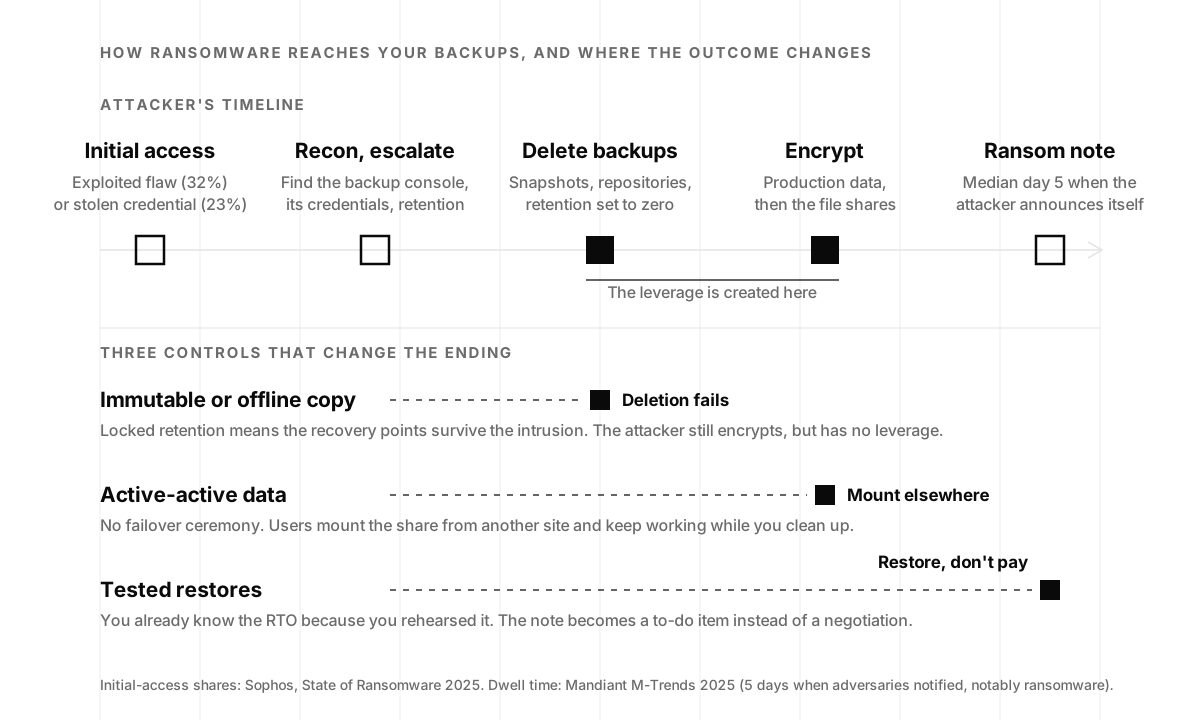
The attack is a sequence, and knowing where each step happens tells you where a control changes the ending.
Initial access. Sophos’s respondents named exploited vulnerabilities as the root cause of 32% of attacks and compromised credentials for 23%, and Mandiant’s casework ranks the same two vectors first and second. The door is rarely exotic: an unpatched edge appliance, a VPN account without MFA, a device nobody put in the inventory. We’ve written about how a printer at factory defaults hands over directory credentials and why forgotten IoT devices are the entry points attackers try first.
Reconnaissance and privilege escalation. The intruder maps the network, harvests credentials, and finds the backup infrastructure: the console, the service account, the repository, the retention policy. This is where the five days go, and it is quiet by design. It is also the phase where a team watching for unusual admin activity can end the story early; a retention policy changed at 2 a.m. by a service account is the kind of event our monitoring and response team exists to catch.
Backup destruction. Snapshots deleted, repositories wiped, retention set to zero, cloud backups removed with the same stolen credentials. Veeam’s 34% of repositories modified or deleted is this step, measured.
Encryption and the note. Production data, then file shares, then the ransom note. With the backups gone, paying is the only path back, which was the point of the two previous steps.
Two shifts have made this sequence faster. Autonomous tooling now chains the steps with little human input, a change we documented in AI Cyberattacks Are Going Autonomous, and the crews using it treat backup deletion as a checklist item. Containment is what buys you time. Andrew Rubin built Illumio on the idea that the perimeter will fail and one foothold should stay one foothold, which we covered in Building a Cybersecurity Startup; segment the backup network from the rest of the estate and the attacker’s step two gets much harder before your recovery ever has to begin.
Why immutable backups are necessary but not sufficient
Immutability protects the recovery points. Three questions remain after you’ve implemented it, and they are the ones Anand Ganesh spent most of episode 1 on.
Can you restore a consistent state across all your storage?
Traditional immutable snapshots are tied to individual storage volumes. Real estates are not. Flexera’s 2026 State of the Cloud Report found that 73% of organizations run hybrid cloud (753 respondents), which in practice means data spread across NetApp or Pure arrays, S3 and Azure Blob, and on-prem object storage at once. Restoring a consistent state across all of that means a separate backup process for each system and manual coordination during an incident, stretching recovery from hours into days.
Ganesh described a different approach, taking the snapshot at the level of the data rather than the device:
“You have a share that has your data, and that share’s data could be sitting on any and all infrastructure… We have share-level snapshots where you take a snapshot across all the storage systems, and that becomes pretty powerful.”
Anand Ganesh, Founding Software Architect at Hammerspace, on episode 1
Whether or not you buy a data orchestration layer to get there, the requirement stands: one recovery point that means the same thing everywhere, or a written procedure for reconciling several.
Can the business keep running while you recover?
Traditional disaster recovery relies on active-passive architecture: a primary handles traffic while a standby waits. When ransomware hits, you “fail over”: flip replication direction, convert passive to active, verify integrity, redirect users. Every step takes time, and every step is a chance to discover the runbook was written for a different version of the system.
“If you lose a site, you’re not waiting to convert one side from passive to active,” Ganesh said. “It’s active-active. One goes down, you just mount from another site and continue running.” Recovery time drops from hours to minutes, and recovery stops being a ceremony that only two people know how to perform.
Do your backups notice the threat?
Immutable backups protect recovery points, but they don’t catch ransomware before it executes. Ganesh described integrating detection into the storage layer itself: put an objective on the data that routes it through a scanning function, derive metadata, and quarantine a file found to be a threat before it spreads. Storage stops being a passive target and becomes an active line of defense. Most teams won’t build that themselves, but the principle transfers: the systems holding your data should generate signals, and someone should be reading them.
How fast can you restore? RTO, RPO and the playbook nobody writes down
Every ransomware guide recommends the same generic advice. Here’s what determines whether recovery takes minutes or weeks.
Two numbers frame all of it. RTO, recovery time objective, is how long the business can be down before the damage compounds. RPO, recovery point objective, is how much data you can afford to lose, measured in time since the last good copy. Write both down per system before an incident, because during one they get set by whoever is shouting loudest. NIST’s recovery guidance for this exact scenario states the standard: “Organizations must be able to quickly recover from a data integrity attack and trust that any recovered data is accurate, complete, and free of malware” (NIST SP 1800-11, Data Integrity: Recovering from Ransomware and Other Destructive Events). Fast, complete, and clean: RTO covers the first, RPO the second, and the third is why you scan before you restore.
- Isolate and identify (0–30 min). Disconnect affected systems to stop lateral spread. Identify the variant, and check the No More Ransom project for a known decryptor before anyone talks about paying.
- Assess backup integrity (30–60 min). Confirm your immutable copies exist and predate the compromise, which may be days before encryption triggered. This is where retention longer than dwell time pays for itself.
- Restore from immutable snapshot (1–4 hr). With cross-infrastructure snapshots this is one operation; with per-volume snapshots you’re coordinating restores across every affected system. Rebuild compromised hosts from the “golden images” CISA recommends keeping current rather than cleaning them in place.
- Enable self-service recovery (concurrent). Don’t funnel every restore through one admin team. In an incident touching thousands of files, that bottleneck turns a four-hour recovery into a four-day one.
- Verify, monitor, harden (4–24 hr). Verify integrity, watch for reinfection, patch the entry point, rotate every credential the attacker could have touched, and preserve the evidence your insurer and counsel will ask for.
On the self-service point, Ganesh’s version is the one to copy:
“The end user… can just go into the undelete location under the share and bring back the files.”
Anand Ganesh, Hammerspace, episode 1
The playbook is only worth what the last drill proved. Veeam’s survey found that while 98% of organizations had some form of ransomware playbook, less than half had verified backup procedures. A full recovery drill once a year, restoring a real system into a clean environment and timing it, plus a scoped restore every quarter, turns the plan from a document into a measurement. It also produces the evidence a SOC 2 auditor wants under Availability, with no extra work.
Air-gapped copies and crypto-shredding: the last line and the clean exit
The strongest posture is layered: immutable snapshots as the fast primary recovery path, an offline or air-gapped copy as the last line of defense, both encrypted, both tested on a schedule you can prove. CISA says “regularly”; our recommendation is quarterly for the immutable tier and at least annually for the offline one, because tape and cold storage fail quietly and the only way to know is to read them back. NIST’s storage security guideline, SP 800-209, names “data protection, isolation, restoration assurance, and encryption” as the security properties specific to storage infrastructure, and restoration assurance is the one most teams have never measured (NIST SP 800-209, Security Guidelines for Storage Infrastructure).
After recovery, compromised or exfiltrated data needs secure destruction, and in a distributed system you cannot promise that every copy on every disk is gone. Bring-your-own-key encryption solves this with crypto-shredding: destroy the key and the data is permanently irrecoverable, even if the ciphertext persists. Ganesh put it simply:
“As soon as you remove it from the namespace and destroy the key, you’ve lost all capability to decrypt what’s on your storage.”
Anand Ganesh, Hammerspace, episode 1
Two practical notes. Crypto-shredding is only as strong as the encryption underneath it, so the algorithm and key choices you make today should already account for what a quantum computer does to them later. And if you carry breach-notification duties under HIPAA or state privacy law, being able to prove exactly what was destroyed, and when, shortens every conversation with counsel and regulators. Provable cryptographic destruction is the difference between “we believe it’s gone” and a signed statement.
A ransomware recovery plan that survives a real attack
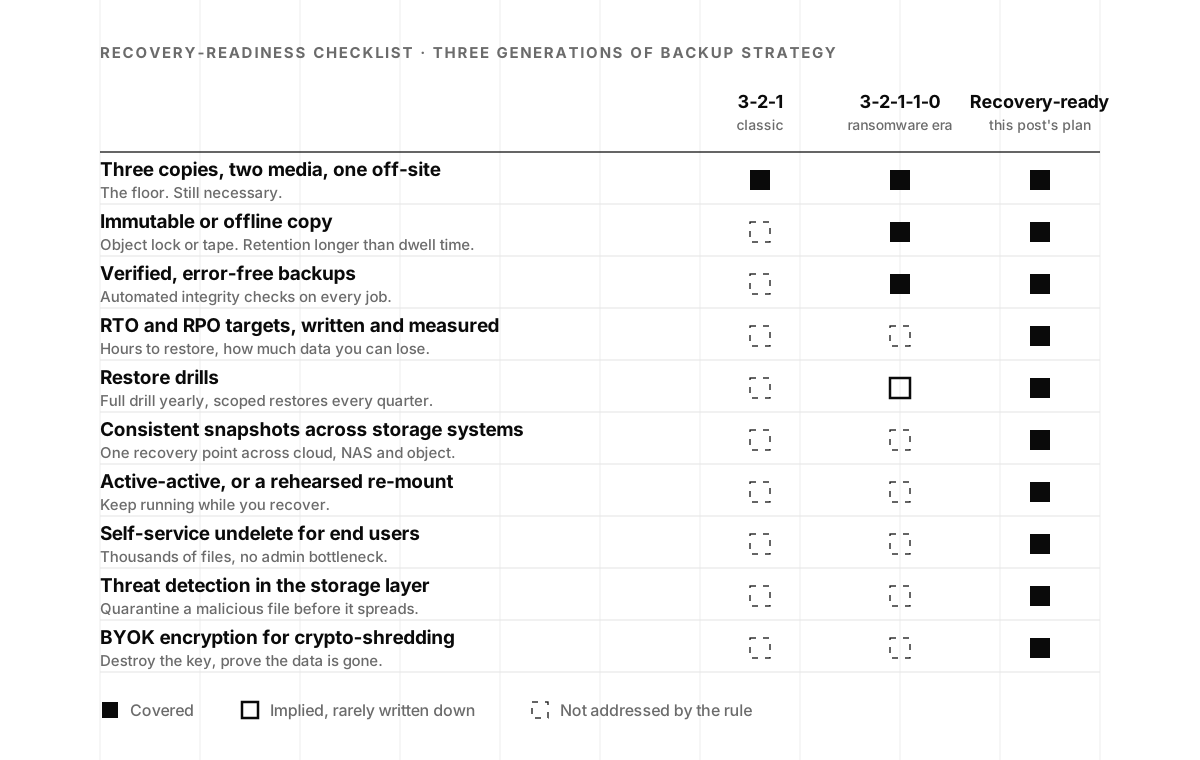
- Immutable snapshots on all production storage, in compliance mode, with retention that exceeds realistic dwell time (30 days minimum, 90 for the copy of record).
- An offline or air-gapped copy in a separate account with separate credentials, encrypted, read back at least annually.
- RTO and RPO targets written down per system.
- Cross-infrastructure snapshot capability, or a documented procedure for reconciling per-volume snapshots.
- Active-active replication where budget allows; a rehearsed re-mount where it doesn’t.
- Self-service undelete for end users.
- Storage-layer or file-activity threat detection, with a human on the other end of the alert.
- BYOK encryption for post-incident crypto-shredding.
- A full recovery drill annually and a scoped restore quarterly, measuring real RTO and RPO against the targets.
- Someone who owns the list.
That last line decides the others. At most startups the backup job was set up by whoever built the first production environment, and it has been quietly succeeding (or quietly failing) ever since. The real decision is who owns recovery, and it’s the same staffing decision we laid out in In-House, On-Demand, or YOLO?: a hire, a partner, or a deliberate bet with a revisit date.
If you’d like to know today whether an attacker with one stolen credential could reach your backup console, a penetration test scoped to include backup infrastructure answers that in a couple of weeks. If you’d rather have someone watching for the 2 a.m. retention change and running the restore drills with your team, that is what our monitoring and response service is for. And for the architectural argument from the person who made it first, Anand Ganesh’s episode 1 is 29 minutes and still the clearest case for treating storage as a line of defense.
Backups alone are not a recovery strategy. Architecture is. That’s the difference between hoping you can restore and knowing you can.
Immutable backups frequently asked questions
- What is an immutable backup?
- An immutable backup is a copy of data that cannot be changed or deleted for a set retention period, by anyone, including administrators. The storage layer enforces the lock, typically through write-once-read-many (WORM) object storage such as S3 Object Lock in compliance mode, so an attacker who steals backup credentials still cannot destroy the recovery points. It is the extra "1" in the 3-2-1-1-0 backup rule and the single most effective control against ransomware that targets backups.
- What is the 3-2-1-1-0 backup rule?
- Three copies of your data, on two different media types, with one copy off-site, one copy immutable or offline, and zero errors after automated verification and restore testing. The last two digits were added for ransomware: the classic 3-2-1 rule protects against hardware failure and disasters but assumes nobody inside your network is deleting backups. The immutable copy survives stolen admin credentials, and the zero means you have proven the restore works before you need it.
- Can ransomware encrypt or delete backups?
- Yes, and modern crews try to as a matter of routine. CISA's #StopRansomware Guide notes that many ransomware variants attempt to find and delete or encrypt accessible backups so that restoration is impossible unless the ransom is paid, and Veeam's 2025 Ransomware Trends survey found 89% of organizations had their backup repositories targeted. Backups that share credentials or a network path with production are reachable. Immutable storage, offline copies and separate credentials are what put them out of reach.
- What is the difference between immutable and air-gapped backups?
- An immutable backup is online but locked: it can be read and restored quickly, but not modified or deleted until its retention period ends. An air-gapped backup is disconnected from the production network entirely, whether on tape in a vault or in a separate account that only connects during the backup window. Immutable copies give you fast recovery in minutes to hours; the air-gapped copy is the last line if everything else is compromised. A layered plan uses both.
- How long should immutable backup retention be?
- Longer than the time an attacker could be inside your network before you notice. Mandiant's M-Trends 2025 puts median dwell time at 5 days when the adversary announces itself, typically with a ransom note, and 11 days overall, with a long tail. Thirty days is a sensible minimum for immutable snapshots, and 90 days is common for the copy of record, so that a recovery point from before the intrusion is always available.
- How often should you test backup restores?
- CISA recommends testing backup availability and integrity regularly in a disaster recovery scenario. Our practice is a full recovery drill once a year, restoring a real system into a clean environment and timing it, plus a scoped restore of a few systems every quarter. Testing is what turns a backup into evidence: it gives you a measured RTO, catches silent media failures, and doubles as the documentation a SOC 2 auditor asks for under the Availability criterion.
- What are RTO and RPO in ransomware recovery?
- RTO, recovery time objective, is how long a system can be down before the business is materially harmed. RPO, recovery point objective, is how much data you can afford to lose, expressed as time since the last good copy. Set both per system before an incident and measure them in every drill. Immutable snapshots and active-active data shorten RTO; frequent snapshots shorten RPO; neither number means anything until a test has produced it.
- What is crypto-shredding?
- Crypto-shredding is destroying the encryption key for a set of data so that every copy of the ciphertext becomes permanently unreadable, wherever it lives. It is the practical way to guarantee deletion in distributed and cloud storage, where you cannot prove that every disk and replica has been wiped. It requires bring-your-own-key encryption with keys you control, and it gives you a provable statement about what was destroyed, which matters when breach-notification obligations apply.