
IoT Device Security: Why Forgotten Devices Are Your Biggest Risk
Printers, cameras, badge readers, sensors: the devices that get attacked first are the ones nobody put in the security org chart. Most IoT failures are governance failures with technical symptoms, which is good news, because governance is cheap to fix.
Most security programs are built for laptops, servers, and cloud workloads. The devices that get attacked first are usually none of those. They’re the printers, IP cameras, badge readers, and sensors nobody put in the security org chart.
Jim LaRoe, founder and CEO of Symphion, has spent a decade securing exactly those devices, starting with the print fleets of large health systems. On episode 94 he called printers “the top of Mount Everest of complexity” for IoT and laid out the numbers: around 20% of enterprise endpoints are printers, roughly 99% of those sit at factory defaults, and Becker’s Healthcare, by his account, ranks cameras and printers as the top two IoT endpoints getting hacked across health systems.
The printer specifics, including the 11,000-device breach in the episode title, live in our companion post, Printer Security: How One Unsecured Printer Becomes Your Weakest Link. This one is about the whole class of forgotten devices, why they end up with no owner, and what a program sized for a startup looks like.
What is IoT device security, and which devices count?
IoT device security is the work of finding, hardening, patching and watching the network-connected things that are not computers. In an office that means printers and copiers, IP cameras, door controllers and badge readers, conference-room video bars, VoIP phones, HVAC controllers and the UPS in the closet. In a clinic, add infusion pumps and imaging systems; in a warehouse, scanners and programmable controllers. LaRoe’s own list has grown outward from print fleets: “We’re doing cameras, we’re doing power supplies, things like that, that are all hackable and entry points into the network out there as well.”
The population is large and growing. IoT Analytics counted 18.5 billion connected IoT devices at the end of 2024, up 12% on the year, and forecasts 21.1 billion by the end of 2025 and 39 billion by 2030, a count that excludes computers, phones and tablets. The category your endpoint tooling was built for is the smaller one.
Four properties set these devices apart. They run vendor firmware you cannot install an agent on. They are configured through the vendor’s own interface, differently for every manufacturer. They outlive their support: “People tend to hang on to their printers for a long time, past the time when they’re making firmware for them,” LaRoe said. And they are bought and installed by people outside IT, which is the property that does the damage.
“It’s been traditionally owned by supply chain and procurement, this endpoint has,” LaRoe told us. “Not by IT, like your PCs, your laptops, what you would consider mainstream endpoints. IS has got their hands full. They’re blamed for everything and responsible for everything and not sleeping at night. And so this endpoint really has grown up outside of IT’s purview and outside of information security.”
Why do forgotten IoT devices keep getting compromised?
The mechanics are boring, which is the point. A device lands on the network with the administrator password the manufacturer published in the manual, “usually set out there like 0123456, published on the internet at default,” as LaRoe puts it. It exposes a web server, often FTP, Telnet and an old SNMP version, because those were the features the vendor competed on. To do its job it holds credentials for the systems around it: scan-to-email needs the mail server, scan-to-folder needs the file share, user lookup needs the directory. Then it sits there, trusted, for ten years.
LaRoe’s summary on episode 94 is that these devices “receive, transmit, process, and store the most sensitive data of the enterprise, and they offer lateral movement,” because the credentials for the mail server, the file server and the directory are stored inside them, often at administrator level. The printer post walks through exactly what one of them holds.
That is why red teams love these devices. Nobody needs a zero day when the login page accepts the default and the device hands over a directory credential; LaRoe relays what the ethical hackers he works with tell him: “If I want to fail somebody, I go after the printers every time.” A camera with an admin password or a door controller with its management port open is the same foothold, already inside the trust boundary, the east-west exposure that convinced Illumio’s founders the perimeter would never be enough on its own. And a static credential stored inside a trusted device is the purest case of the problem in Why Passwords Still Get Stolen: a secret that can be copied will move.
The clock has changed too. The weaknesses are decades old; what is new is how fast they can be found and chained. LaRoe’s phrase for AI-assisted scanning against an unhardened fleet was “putting gasoline on a raging fire,” and we covered the offensive side in AI Cyberattacks Are Going Autonomous. When a pivot through a camera ends in ransomware, backups built to survive an adversary decide the outcome. Better to close the door it came through.
Who should own IoT device security?
Most IoT failures are governance failures with technical symptoms. Procurement buys the device, IT runs the network it sits on, security owns the risk on paper, and the vendor ships the security features switched off. Nobody owns the hardening. Draw it as a matrix and the empty row is obvious.
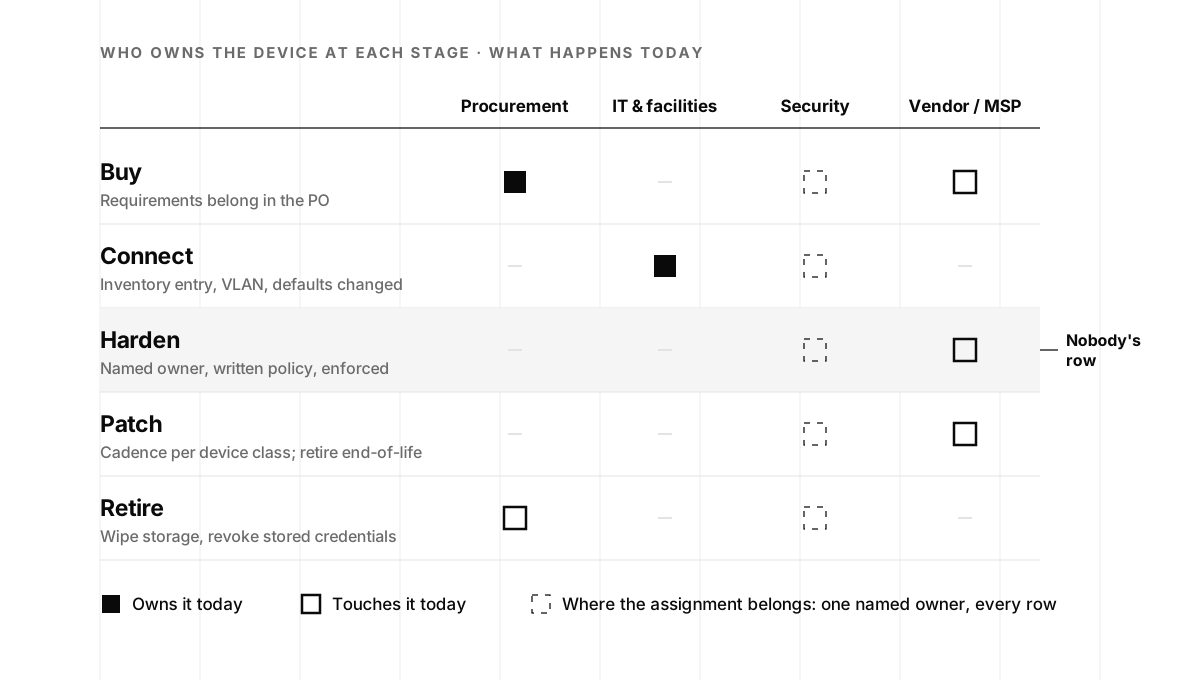
LaRoe’s field example makes it concrete. A health system with roughly 15,000 printers (the customer could not say whether it was 15,000 or 16,000, which is its own finding) was negotiating a five-year managed print contract worth millions. The CISO wanted security written in; purchasing had other priorities. “The GPO, the group purchasing organization that’s in charge of that, redlines the security out,” LaRoe said. “And the CISO has no juice on that.” The industry that manages the devices, which he sizes at $40 billion a year, sells toner, break-fix and cost elimination. Security had never been a line item, so it was the first line cut.
“So the first thing they need to do is find an owner for it that’s willing to sponsor it, set a policy, and then enforce it. So it’s easier said than done, but that’s kind of where we’re at in that market.”
Jim LaRoe, Symphion, episode 94
At a startup the politics are smaller and so is the fix: one name, written down, with the authority to say what a device must look like before it gets an IP address. Whether that name is an engineer with a security hat, a fractional lead or a partner team is the decision we walked through in In-House, On-Demand, or YOLO?, and most device fleets are running the third option today. CISA’s performance goals make the same recommendation for operational technology: a single leader who is responsible and accountable for it.
There is a sales reason to care as well. If you sell to enterprises, you are somebody’s supply chain, and the questionnaires are starting to ask. “You’ve got your lawyers, you’ve got your accountants, you’ve got everybody in the confidential information supply chain, not just the vendors like the HVAC vendor at Target or something like that,” LaRoe said. “You’ve got all the vendors, and it’s all the way into the supply chain, and everybody uses printers.”
Why do factory defaults decide so much?
Every forgotten device begins at factory defaults, and a surprising number return there. Defaults mean a published administrator credential, every service enabled, unencrypted storage and a live walk-up USB port, with the protections the vendor built switched off. “Each manufacturer has incredible features built into the devices to protect them,” LaRoe said. “They’re just not being used. And they have to be programmatically enabled and used.”
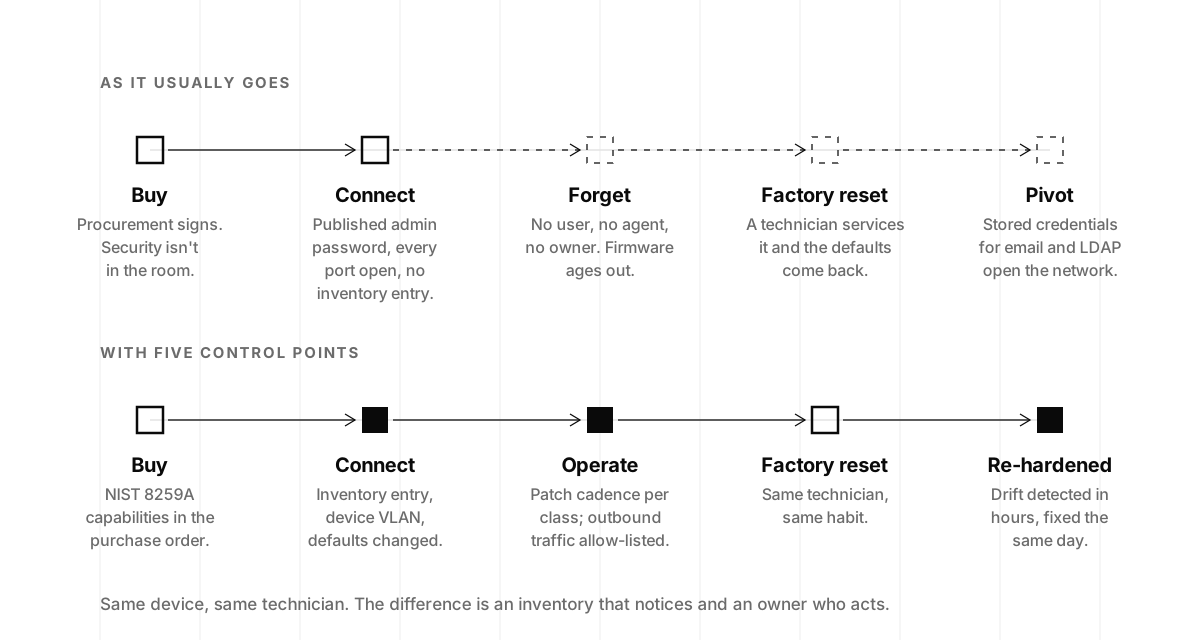
The part most programs miss is the return trip. A device hardened on day one drifts back the first time someone services it.
LaRoe has watched it happen for a decade: a technician trained over five or ten years services a device and resets it to factory defaults on the way out, however good the configuration was when it arrived. His question for every fleet owner is how long it takes them to notice.
For most companies the honest answer is “never,” because nothing compares the device against a known-good profile. That is the top track of the diagram below. The bottom track is the same device, the same technician and the same habit, with five control points added.
Regulators have reached the same conclusion. Since 29 April 2024 the UK’s Product Security and Telecommunications Infrastructure regime has required consumer connectable products to ship with passwords that are unique per device or set by the user. The commercial devices in your office are mostly outside that rule, so the policy has to be yours. CISA’s performance goals state it as one practice: change the manufacturer’s default password on every asset before it goes on the network. It is the cheapest control in this post and the one with the largest effect.
How do you build (and keep) an IoT device inventory?
Symphion began as a configuration management database, built for a customer who had taken a server down for maintenance without realizing it sat in the path of credit-card processing, two weeks before Christmas. Twenty-five years later, LaRoe says the opening conversation with a new fleet has not changed: “We’re on calls all day, every day, and it’s like, I’ve got 15,000 devices, I don’t know where they are, what they are. I don’t have an accurate inventory. It needs to be maintained evergreen.”
Evergreen is the operative word. Devices get swapped, spares get added, a replacement gets plugged into the drop the old one used. “They’re not in a data center like a server is, with system administrators or anything like that,” LaRoe said. “They’re swapped out, and that device may be unconfigured, sitting on the network, and they don’t know about it.” His software discovers a new device on a subnet within the hour; your version can be a scheduled scan that diffs against last week’s list and opens a ticket for every MAC address it has not seen.
A useful record has seven fields: make, model, firmware version, MAC, IP, physical location and named owner, plus the dates it was last verified and vendor support ends. CISA’s asset inventory goal aims at known, unknown (shadow) and unmanaged assets and calls for refreshing the list of IP-addressable assets at least monthly. Agentless discovery (DHCP leases, switch tables, a network scanner) gets you most of the way. The step most teams skip is wiring the install-move-add-change paperwork facilities already keeps into the same list, so the inventory learns about a device before the network does. The step before that one, logging a device’s serial and provenance at receiving rather than at discovery, is the subject of our companion piece on hardware provenance.
There is a compliance dividend too. Asset inventory is among the first things a SOC 2 auditor samples, and an unmanaged fleet shows up in the access-control and change-management criteria as well. We covered what auditors actually read in What Even Is a SOC 2?; a maintained device inventory is audit evidence you get for free from work you needed anyway.
Which standards apply to IoT device security?
More than most teams expect. The two documents worth knowing by number are both from NIST. SP 800-213, published in November 2021 for federal agencies acquiring IoT devices, frames the work as setting device cybersecurity requirements, “the abilities and actions an organization will expect from an IoT device and its manufacturer and/or third parties.” Its companion, NISTIR 8259A from May 2020, defines a core baseline of six capabilities a device should offer:
| Capability | What it means for the device |
|---|---|
| Device identification | Can be uniquely identified, logically and physically |
| Device configuration | Its software configuration can be changed, by authorized entities only |
| Data protection | Protects the data it stores and transmits from unauthorized access and modification |
| Logical access to interfaces | Restricts access to its local and network interfaces, protocols and services to authorized entities |
| Software update | Can be updated by authorized entities using a secure, configurable mechanism |
| Cybersecurity state awareness | Can report on its own cybersecurity state to authorized entities |
NIST calls the baseline “a starting point” rather than a mandate, which is exactly how a startup should use it: as the six questions you ask a vendor before the purchase order is signed. That fills in the Buy row of the ownership matrix, and it is the cheapest moment to learn that a camera cannot be updated.
CISA’s performance goals are the practical companion for the operating program, covering the inventory, default-password and segmentation practices in the plan below. Regulated data adds its own layer: a device that stores protected health information, whether an imaging system or a copier’s hard drive, is inside the scope of a HIPAA risk analysis. Printers have their own lineage, NIST’s 2015 IR 8023 and the DISA STIG baselines, which our printer post covers. One caution before you treat a vulnerability scan as your evidence: “There’s a dearth of CVEs on the printers,” LaRoe said, because manufacturers self-report unevenly, so a clean scan of a device class with few published CVEs is not a clean bill of health. Configuration is the better signal.
A 30-day forgotten-device program for a startup
A Series A company does not have 15,000 printers. It has four, plus a dozen cameras, two badge readers, a video bar in every meeting room and whatever the office manager ordered last quarter. That scale is the good news: one owner with a spreadsheet, a VLAN and a calendar can bring the whole class under control in about a month.
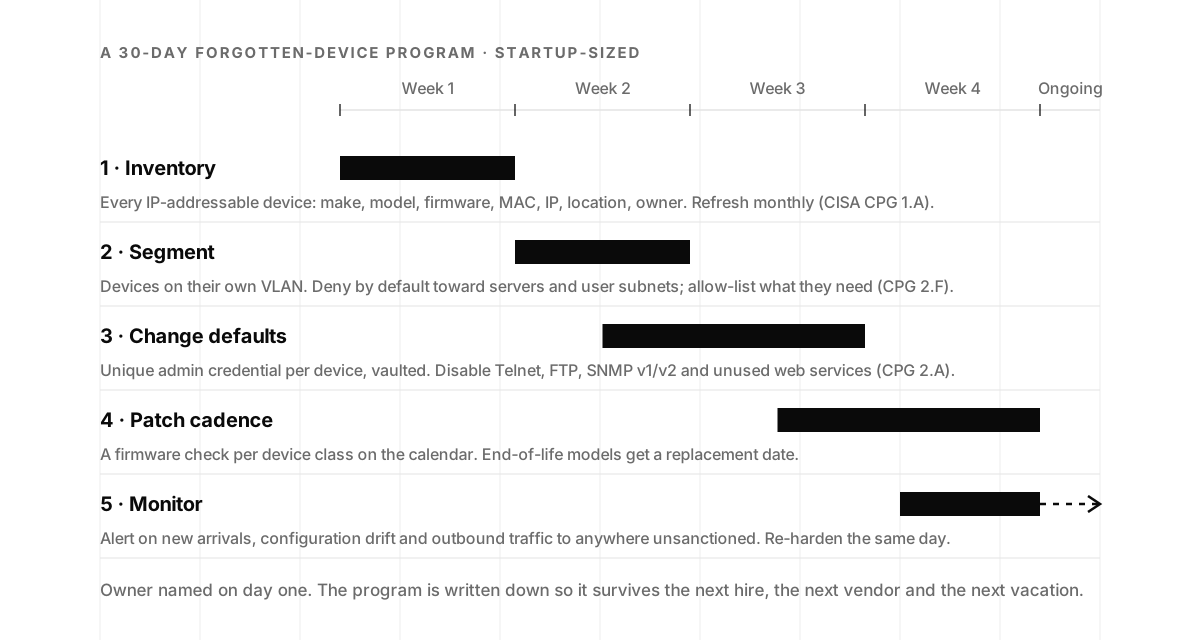
Week 1: inventory. Scan every subnet, pull DHCP and switch tables, and walk the office once with a clipboard, because the badge controller in the electrical closet is not answering pings. Record the seven fields and put a name in the owner column. Anything you cannot identify gets a ticket.
Week 2: segment. Move the devices onto their own network, deny traffic from it to servers and user subnets by default, and allow-list what each class needs: the mail relay for scan-to-email, NTP, a vendor update host if you choose to permit one. A device VLAN turns a compromised camera from a pivot into a dead end.
Weeks 2 to 3: change the defaults. A unique administrator credential per device, stored in your vault. Disable Telnet, FTP, SNMP v1 and v2 and any web service the device does not need. Turn on storage encryption where offered and lock the walk-up USB port. Save the result as the known-good profile for that model; you will need it in week four.
Weeks 3 to 4: set the patch cadence. Firmware notes for these devices are thin; a release “could be something about the camera, the operation of the sorter or the OS, or it could have security updates, maybe,” as LaRoe puts it. So the cadence is per device class and on the calendar. Any model past vendor support gets a replacement date instead of a permanent exception.
Week 4 and onward: monitor. Three alerts matter: a device you have not seen before, a configuration that no longer matches its known-good profile, and outbound traffic to a destination you did not sanction. Be selective about what reaches the SIEM. When Symphion first wired printer logs into one, LaRoe recalls, “the logs are filled on a printer with non-security events, just tons of non-security events that are like, my tray is full or empty, my door is open,” so forward administrator logins, configuration and firmware changes and drop the rest. When drift is detected, re-harden the same day under a standing change order. And put the device VLAN in the scope of your next penetration test, so someone tries the default password before an adversary does.
If you build devices rather than buy them, the six NISTIR 8259A capabilities are the questions your enterprise buyers will put to you, and designing them in is the hardware edge of the discipline behind our product security work.
The decision: put a name on it this week
The forgotten-device problem is unusual in security because it is solved mostly by decisions. The controls are built into the devices, the standards are written, and the inventory is a scan and a spreadsheet. What is missing at most companies is a person whose job it is, and once that person exists the rest follows in about a month. LaRoe puts the economics the way a founder would: “Nobody’s going to do anything unless it’s cost effective. I submit that it’s a very quick win. It’s an affordable, quick, no-operational-lift win for the IS professionals to get behind.”
So pick the owner, run the four weeks, and give the devices the care you already give your servers. If you would rather have a team that already watches the rest of your environment take the device network too, our monitoring and response service covers the alerts that matter here: new arrivals, configuration drift and outbound traffic that should not exist. And for the full story of one printer taking down 11,000 devices, and why the customer planned to wait two years before fixing it, Jim tells it in 38 minutes on episode 94.
IoT device security frequently asked questions
- What is IoT device security?
- IoT device security is the practice of inventorying, hardening, patching and monitoring the network-connected devices that are not laptops or servers: printers, IP cameras, badge readers, building controls, VoIP phones, medical and OT equipment. These devices run vendor firmware, cannot host an endpoint agent, and often store credentials for email, file and directory systems, so the program relies on network controls and device configuration rather than software installed on the device.
- Which devices count as IoT in an office?
- Anything with an IP address that is not a managed computer: printers and multifunction copiers, IP cameras, door controllers and badge readers, conference-room TVs and video bars, VoIP phones, smart thermostats and HVAC controllers, UPS units, lab or medical equipment, and warehouse scanners. A useful test is whether the device would show up in your endpoint management console. If it would not, it belongs in the IoT inventory.
- Who should own IoT device security in a company?
- One named person with the authority to set and enforce a device policy, usually in security or IT rather than procurement. Procurement buys the device, facilities installs it, IT connects it and the vendor services it, so without a single owner the hardening step is nobody's job. Jim LaRoe of Symphion puts the first move plainly: find an owner willing to sponsor the program, set a policy, and enforce it.
- Why are default passwords on IoT devices such a problem?
- Because they are published. Manufacturer manuals and support sites list the default administrator credential for each model, so a device left at factory settings can be logged into by anyone who can reach it on the network. Changing it to a unique, vaulted credential per device is the highest-value single step in an IoT program. The UK now requires consumer connectable products to ship without universal default passwords for exactly this reason.
- How do I build an inventory of IoT devices on my network?
- Start with agentless discovery: DHCP leases, switch MAC tables, ARP caches and a network scanner surface most devices, and manufacturer OUI prefixes tell you what they are. Record make, model, firmware version, MAC, IP, location and owner, then keep the list current by re-scanning on a schedule and alerting on new arrivals. CISA's Cybersecurity Performance Goals recommend refreshing the inventory of IP-addressable assets at least monthly.
- Is there a NIST standard for IoT device security?
- Yes. NIST SP 800-213 (2021) explains how organizations should set cybersecurity requirements when acquiring and deploying IoT devices, and NISTIR 8259A (2020) defines a core baseline of six device capabilities: device identification, device configuration, data protection, logical access to interfaces, software update and cybersecurity state awareness. Together they double as a procurement checklist: ask a vendor which of the six its device supports before you sign.
- Do IoT devices matter for SOC 2 or HIPAA?
- Yes. SOC 2 auditors test asset inventory, access control and change management, and an unmanaged device fleet is visible in all three. Under HIPAA, a printer or imaging device that stores protected health information is part of the environment your risk analysis has to cover. Getting the devices into the inventory and under a written policy produces evidence for the audit and reduces the actual risk at the same time.
- How long does it take a startup to get its IoT devices under control?
- About 30 days for a company with a few dozen devices: a week to inventory, a week to segment them onto their own network, two weeks to change default credentials, disable unused services and set a patch cadence, then ongoing monitoring for new arrivals and configuration drift. The work is small relative to the risk it removes, which is why practitioners describe it as one of the quickest wins available to a security program.