
Printer Security: How One Unsecured Printer Becomes Your Weakest Link
About 20% of enterprise endpoints are printers, and roughly 99% sit at factory defaults, holding admin-level credentials for your email server, file shares and directory. Here is what a printer really stores, how one device took down 11,000, and the checklist that fixes it.
About 20% of the endpoints inside a typical enterprise are printers. Roughly 99% of those sit at factory defaults, with the administrator password published online and most network ports open. Each one stores credentials for the email server, the file server and the directory it has to talk to, often at administrator-level privilege.
That is the setup behind the breach Jim LaRoe, founder and CEO of Symphion, described on episode 94 of The Security Podcast of Silicon Valley. One organization with 11,000 networked devices was compromised through a single printer. The attacker did not need a zero day. They needed a forgotten endpoint with a default password, and a building full of identical ones behind it. This post is about that endpoint: what a printer holds, how the attack path runs, why fleets stay at defaults, and the checklist that fixes it. The wider program for cameras, badge readers and every other device that arrived without a security owner is in our companion piece, IoT Device Security.
Why are printers a security risk? Start with what one actually is
The word “printer” is doing a lot of work. A modern multifunction device is a server: its own operating system, a large hard drive, a web console, FTP, fax-over-IP, scan-to-email and scan-to-folder, plus standing connections to your mail server, file shares and directory. LaRoe’s company has secured print fleets since 2015, including fleets of more than 30,000 devices in large healthcare systems, and his description of the device is the one that sticks:
“They receive, transmit, process, and store the most sensitive data of the enterprise, and they offer lateral movement… They store credentials for ancillary systems like your email system and your file server system and your credential system. And oftentimes that administrator, God-like privilege level, stored in the printer. So they’re like a gold mine of data and access and lateral movement capability for the bad guys, both internal and external.”
Jim LaRoe, founder and CEO of Symphion, on episode 94
His analogy is the one to keep. If a box with those capabilities lived in your data center, it would have physical access control, monitoring, a system administrator and a patch schedule. The printer has the same capabilities and none of the care, and, as he put it, “it’s sitting out in the middle of your floor with walk-up access to it.” In hospitals it is also tier-one infrastructure: discharge, pharmacy and labs stop when the printers do, which is exactly why nobody wants to touch them.

What does a printer store? A credential vault on the office floor
Here is what you typically find on a device at factory defaults.
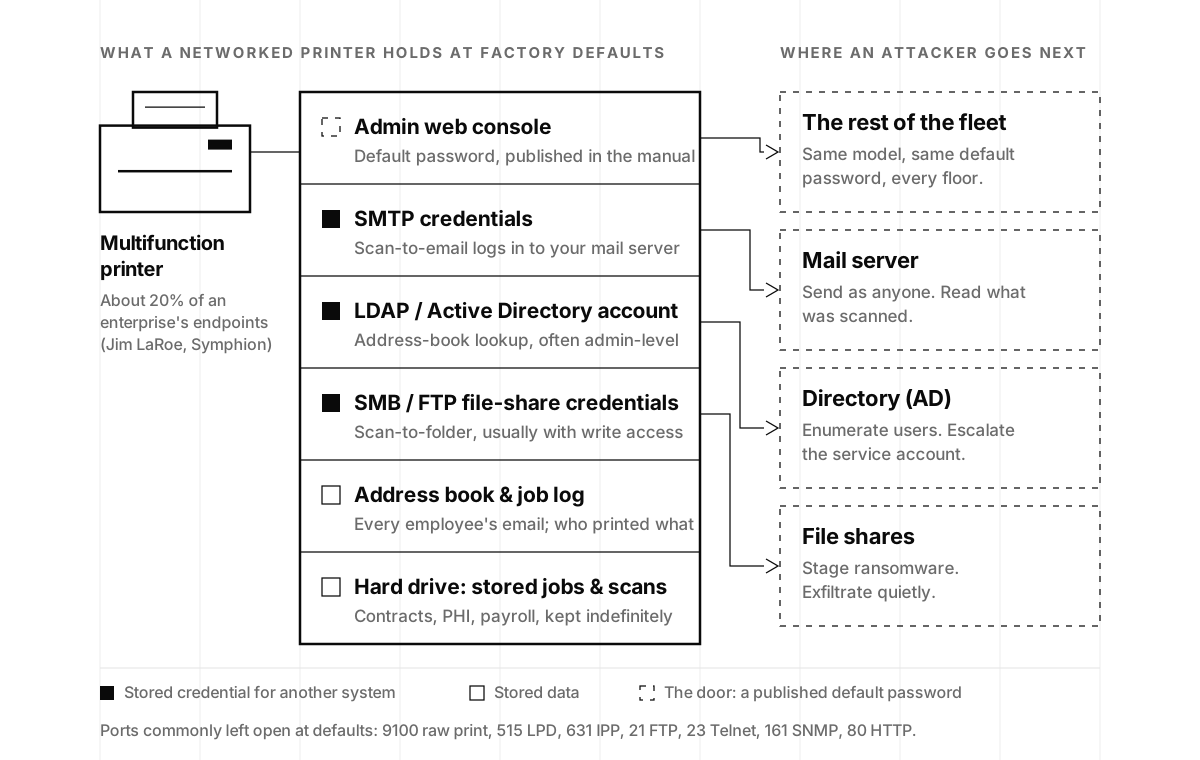
The admin console sits behind a default password that is, in LaRoe’s words, “usually set out there like 0123456, published on the internet.” NIST said the same thing more formally a decade ago: “Many devices have default passwords which can be easily obtained and used to access configuration panels, stored data, or to control the device” (NIST IR 8023, Risk Management for Replication Devices).
Three sets of credentials live behind it. An SMTP account, because scan-to-email means the printer logs in to your mail server. An LDAP or Active Directory account for address-book lookups and panel logins; whoever set it up wanted it to work on the first try, so it is frequently a domain account with far more privilege than a lookup needs. And SMB or FTP credentials for scan-to-folder, with the write access that ransomware also needs.
Then the data: the address book (every employee’s email), the job log (who printed what), and the hard drive, holding print jobs, scans and faxes, sometimes years of them. NIST’s warning is blunt: “Potentially all of the information that was ever processed, stored, or transmitted by the device could remain in the nonvolatile storage indefinitely.”
None of this is theoretical. In June 2025, Rapid7 disclosed eight vulnerabilities across 748 printer models from Brother, Fujifilm, Ricoh, Toshiba and Konica Minolta. One, CVE-2024-51984, let an authenticated attacker read the stored password of an external service such as LDAP or FTP: the credential store, confirmed in a vendor bulletin. Another, CVE-2024-51978, let an unauthenticated attacker learn a device’s serial number and generate its default administrator password from it. Brother said that one “cannot be fully remediated in firmware” and changed its manufacturing process; devices already in the field get a workaround, which means someone has to change the password. We have argued that a secret that can be copied is the root problem with human logins; a printer is the purest version of it, a secret that sits still, in plain sight, for years.
How does one default password become an 11,000-device breach?
A red team working a printer is not phishing for a foothold. It already has one, and it is pivoting.
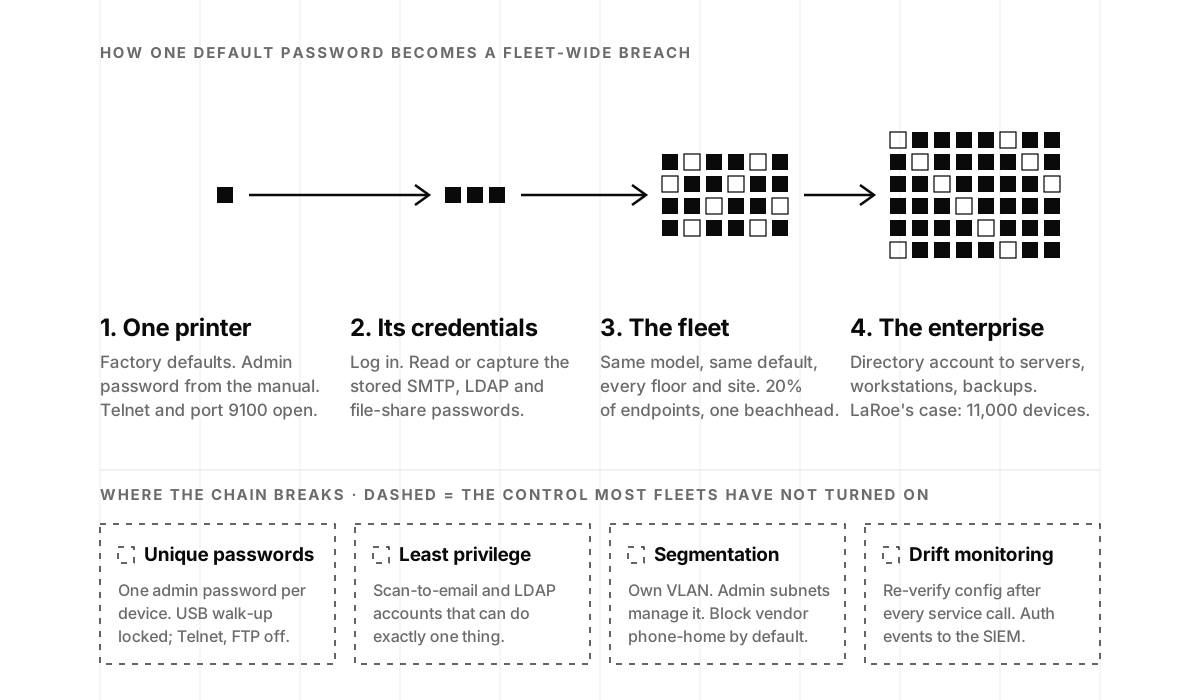
The attacker finds a printer at defaults, by subnet scan from inside or, from the internet, by searching for port 9100, the raw print port. They log in with the published password and go after the stored credentials: read them where the firmware allows it, export the configuration, or repoint the LDAP or SMTP setting at a machine they control and let the printer hand over the account on its next lookup. The rest of the fleet falls at once, because the same model with the same default is on every floor and every site. Then the directory account opens the servers, workstations and backups the printer was trusted to talk to. That is the shape of the attack that took down 11,000 devices, and the epilogue is the part that stings:
“We’ve got other examples where they’ve been hacked through a printer: big system, 11,000 devices, hacked through a printer. ‘We love you, Symphion. We want to go with you. We’re going to wait two years for a managed print service contract to be negotiated to include you in on that before we do a single thing.’”
Jim LaRoe, Symphion, on episode 94
LaRoe’s summary of what the ethical hackers tell him: “If I want to fail somebody, I go after the printers every time.” The containment logic Andrew Rubin built Illumio on, which we covered in Building a Cybersecurity Startup, applies directly: assume the front door fails, and design so that one compromised device stays one compromised device. The clock is also shorter than it was. Autonomous attack tooling chains surfaces that human attackers rarely bothered to connect, a shift we documented in AI Cyberattacks Are Going Autonomous; LaRoe’s phrase for what AI does to a fleet of wide-open devices was “putting gasoline on a raging fire.” If the pivot reaches your backups, the question becomes whether they were immutable and tested.
Why do 99% of printers sit at factory defaults?
Printers grew up outside IT. For most of the last 40 years they were bought by supply chain and procurement, alongside toner and break-fix contracts, and serviced by a managed print services industry that LaRoe sizes at about $40 billion a year. That industry sells cost reduction, and its contracts price devices, toner, paper and repairs. In his words, they “don’t have a line item for security of the devices,” and never have.
Everything else follows from that. The security team runs its vulnerability scanner, a tool built for desktops, against the printers and sends the findings to IT with “go fix it,” where there is no budget and no authority over a fleet that somebody else’s contract governs. LaRoe described a CISO with a fleet of 15,000 printers, or 16,000, nobody was sure, who wanted hardening written into a five-year, multimillion-dollar print contract and watched the group purchasing organization redline the security terms out. Who should own forgotten devices is a question we take up in the companion post; the printer-specific mechanics are these:
| Reason | What it looks like in a print fleet |
|---|---|
| Nobody owns hardening | Procurement buys, IT runs the network, security holds the risk. The fleet stays as shipped. |
| No security line item | Managed print contracts cover toner, paper and repairs. Hardening is nobody’s deliverable. |
| Disparate firmware | Each manufacturer ships its own OS; some security settings are reachable only through the vendor’s tool. |
| Reset after service | Technicians restore factory settings when they work on a device, erasing whatever hardening existed. |
| Sparse CVEs | Manufacturers self-report inconsistently, so scanners and databases under-count the exposure. |
The reset problem is the one that defeats even well-run programs:
“In the print industry, the human behavior is when somebody works on a device, they reset it back to factory. So they could have the best configuration on the planet, and a technician who’s been trained in doing this for even five, ten years, they’re gonna reset it back to factory defaults after they work on it. And how long does it take you to discover that?”
Jim LaRoe, Symphion, on episode 94
On CVEs: “There’s a dearth of CVEs on the printers. It’s just what the printer manufacturers decide they’re gonna do. It’s not like the competitive environment that other endpoints have.” Fewer published vulnerabilities does not mean fewer vulnerabilities; the Rapid7 disclosure above is what happens when a research team decides to look.
Are printer hacks real? Four published incidents
Root cause rarely makes it into a breach notification. As LaRoe put it, “root cause is not published anymore,” and the lawyers prefer it that way; he cited Becker’s Healthcare reporting cameras and printers as the two IoT endpoints most often compromised in healthcare. The incidents that did go public are enough to work with:
- March 2016: the university flyers. Andrew Auernheimer scanned the internet for printers with port 9100 open and sent a hate flyer to, by his own account, “more than 20,000 printers,” most on college campuses (Inside Higher Ed). No exploit, no credentials, just an open port.
- August 2020: the 28,000-printer experiment. CyberNews found “more than 800,000 printers that had network printing features enabled and were accessible over the internet,” picked 50,000, and printed a security guide on 27,944 of them, a 56% hit rate (CyberNews). These two are the incidents LaRoe was reaching for on the show; the figures here are the published ones.
- May 2023: ransomware through print management. CISA and the FBI issued a joint advisory on CVE-2023-27350 in PaperCut MF and NG, an unauthenticated remote code execution flaw in widely used print management software, after the Bl00dy Ransomware Gang used it against the education sector, where roughly 68% of exposed US PaperCut servers sat. The mitigations read like this post: patch, keep the print server off the internet, phishing-resistant MFA.
- June 2025: default passwords by design. The Brother disclosure above: 748 models, default admin passwords derivable from a serial number, not fixable in firmware for devices already sold.
The encouraging pattern: none of these needed anything exotic to stop. Close port 9100 to the internet, change the default password, patch the print server, segment the fleet. Every one of those is on the checklist below.
What standards cover printer security? NIST IR 8023 and the DISA STIG
Two documents do most of the work, and both are free.
NIST IR 8023, Risk Management for Replication Devices (February 2015) covers “any device that reproduces (e.g., copies, prints, scans) documents, images, or objects from an electronic or physical source” and walks through the threats: default passwords, unencrypted data, unused ports and protocols left enabled (“attackers may be able to access a machine undetected”), data lingering in nonvolatile storage, and information recoverable when a device is “disposed, warehoused, or repurposed.” Its controls are the basics you will see in the checklist below. LaRoe’s complaint is fair: NIST later folded the thinking into its general guidance without naming printers, so this standalone document is still the clearest reference.
The DISA Multifunction Device and Network Printers STIG (Version 2, Release 15, January 2025) is the US Department of Defense’s checkable version, published in DISA’s STIG library and mirrored with full rule text at cyber.trackr.live. Two rules carry its highest severity, CAT I: default passwords and SNMP community strings must be replaced with complex passwords (V-6781), and remote management must be restricted to specific locations (V-6784). Below those: management protocols other than HTTPS and SNMPv3 disabled (V-6783), current firmware (V-6780), auditing enabled on devices and print spoolers (V-6797), and hard disks cleared between jobs (V-6801). You do not need to be a defense contractor to borrow it.
If you are working toward a SOC 2, this maps neatly onto evidence you already owe an auditor: a complete asset inventory, access control on every in-scope system, vendor management for the print contract, and logging. We explained what a SOC 2 actually examines elsewhere, and how a hardware intake pipeline turns that inventory into provenance; the print fleet is one of the cheaper places to show the controls are real.
How to secure network printers: the hardening checklist
The point LaRoe made that leaves the most room for optimism: “Each manufacturer has incredible features built into the devices to protect them. They’re just not being used. And they have to be programmatically enabled and used.” No new platform, no traffic-sniffing appliance. Here is the order we use.
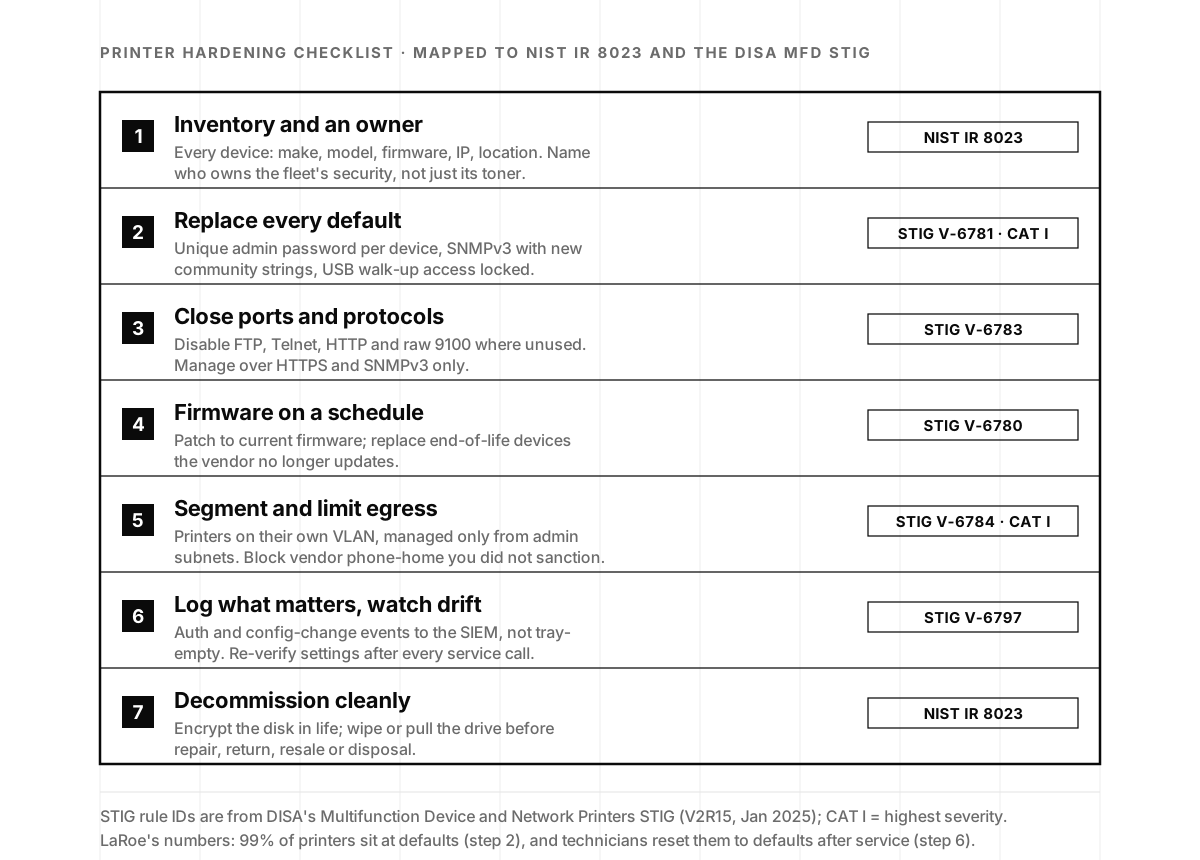
- Inventory, and an owner. Make, model, firmware, IP, location, and the name of the person who owns the fleet’s security rather than its toner. Make the network drop and the inventory update one step, so swapped devices do not spend a year unconfigured.
- Replace every default. A unique administrator password per device, vaulted; SNMPv3 with fresh community strings; USB walk-up access locked. This is the STIG’s CAT I finding, and the step 99% of fleets have not taken. While you are in the console, scope the scan-to-email and LDAP accounts to do exactly one thing, the same least-privilege rule we apply in product and infrastructure security.
- Close ports and protocols. Disable FTP, Telnet, HTTP and raw port 9100 wherever the workflow does not need them; manage over HTTPS and SNMPv3 only. A printer that must be reachable from outside gets a VPN, never a public IP.
- Firmware on a schedule. Release notes rarely say whether an update touches the sorter or the OS, so treat every update as a security update, patch the print server with the same discipline, and retire models the vendor no longer supports.
- Segment and limit egress. Printers on their own VLAN, reachable from the print server, the mail relay and the scan destination, managed only from admin subnets. Decide which vendor phone-home connections you want, then block the rest.
- Log what matters, and watch for drift. Forward a short list, not the firehose: administrator logins and failures, configuration and firmware changes, new devices on the printer VLAN. Re-verify the configuration after every service visit.
- Decommission cleanly. Encrypt the disk in service, and wipe or remove it before repair, return, resale or disposal. Pulling the storage before a device leaves the building is the step almost everyone skips, and the one that turns a lease return into a data breach.
Step six is where most first attempts die, and LaRoe explained why from his early experience wiring printers into a SIEM:
“We turn logging on, but the logs are filled on a printer with non-security events, just tons of non-security events that are like my tray is full or empty, my door is open, and it’s just a ton of non-actionable events. And then what are you gonna do? Am I gonna sort through that log file and find that event?”
Jim LaRoe, Symphion, on episode 94
Filter at the source, and compare each device against a saved profile after every service visit; a technician’s factory reset is invisible until you do. Symphion’s managed program does that discovery and same-day remediation for fleets of thousands. For a startup it is a profile per model and a monthly compare, and if a detection and response team already watches your cloud, the printer VLAN is one more log source that earns a handful of rules.
One addition from our side of the table: ask your next penetration test to put the print fleet in scope explicitly. Most scopes exclude it, which is how “we passed our pentest” and “an attacker walked in through the copier” end up true at the same time.
Who owns the print fleet? The decision that unblocks everything
LaRoe’s advice to security leaders was direct: “The first thing they need to do is find an owner for it that’s willing to sponsor it, set a policy, and then enforce it.” Until someone has explicit authority over the fleet, printers stay parked at defaults no matter how good the checklist is. Once someone does, he calls the whole exercise “a very quick win. It’s an affordable, quick, no operational lift win for the IS professionals to get behind,” and we agree. Complacency, in his phrase, is the enemy of cybersecurity, and this is an unusually cheap place to stop being complacent.
For a startup the scale works in your favor. You have a handful of printers, not 30,000, so the whole checklist is an afternoon plus a standing line in your asset inventory. The real decision is whose afternoon it is: an in-house engineer, your IT provider, or an on-demand security team that already runs your monitoring and testing. That is the choice we laid out in In-House, On-Demand, or YOLO?, and our two-minute quiz will tell you which fits where you are today.
If you would rather start with evidence, a penetration test that includes your printers and IoT is the fastest way to learn what your fleet is currently holding for an attacker. And for the whole story, including a trial lawyer turned printer-security CEO on why security keeps getting redlined out of toner contracts, Jim tells it in 42 minutes on episode 94.
Printer security frequently asked questions
- Why are printers a security risk?
- Because a modern printer is a server with a hard drive, a web console and stored passwords, sitting on the trusted side of your network with almost nobody watching it. Jim LaRoe of Symphion puts printers at about 20% of enterprise endpoints, with roughly 99% still at factory defaults: a published admin password and open ports. An attacker who logs in can read the credentials the printer uses for email, file shares and the directory, then move on to those systems.
- What credentials does a printer store?
- Typically an SMTP account for scan-to-email, an LDAP or Active Directory account for address-book lookups (often given far more privilege than it needs), and SMB or FTP credentials for scan-to-folder, usually with write access. Add the address book, the job log and whatever sits on the hard drive: scans and print jobs, sometimes years of them. NIST IR 8023 warns that everything a device ever processed can remain in its nonvolatile storage indefinitely.
- How do hackers use a printer to get into a network?
- The common path is the admin console. With the default password, an attacker changes settings, exports the configuration, or repoints the printer's LDAP or SMTP settings at a server they control so the device hands over its stored account on the next lookup. That account, frequently a domain user or even an admin, is the real prize: it opens mail, file shares and the directory. From there the printer is a beachhead rather than the target.
- How do I secure a network printer?
- Inventory every device and name an owner; replace the default admin password and SNMP community strings with unique values; disable FTP, Telnet, HTTP and any protocol you do not use; keep firmware current and retire models the vendor no longer patches; put printers on their own VLAN with management allowed only from admin subnets; forward authentication and configuration-change events to your SIEM; and wipe or remove the disk before repair, return or disposal. Re-check settings after every service visit, since technicians often reset devices to factory defaults.
- Should printers be on a separate VLAN?
- Yes. Segmentation limits how far an attacker can get from a compromised printer and lets you define which systems the device may talk to: your print server, mail relay and scan destination, and little else. It also makes egress rules practical, so vendor phone-home traffic only leaves the network when you have sanctioned it. The DISA printer STIG treats unrestricted remote management as a CAT I finding, its highest severity.
- Is there a security standard for printers?
- Two useful ones. NIST IR 8023, Risk Management for Replication Devices (2015), covers copiers, printers, scanners and multifunction devices, including default passwords, unused ports, unencrypted data and disposal of storage media. DISA's Multifunction Device and Network Printers STIG, used across the US Department of Defense and updated in 2025, turns the same ideas into checkable rules. Neither is a certification, but together they make a solid, defensible baseline for any organization.
- Why are there so few printer CVEs?
- Vendors self-report, and printer manufacturers have historically published far less than the PC and server ecosystem, so vulnerability scanners and databases under-represent the real attack surface. Jim LaRoe calls it a dearth of CVEs. When researchers do look, they find plenty: Rapid7's 2025 disclosure covered 748 models from five manufacturers, including a default administrator password derived from the serial number that Brother said could not be fully fixed in firmware.
- Do printers matter for SOC 2 or a security questionnaire?
- Yes, indirectly but in ways auditors notice. SOC 2's Security criteria expect a complete asset inventory, access control on every in-scope system, vendor management and logging, and a managed print contract with no security terms is a vendor-management finding waiting to happen. Enterprise questionnaires increasingly ask how IoT and peripheral devices are hardened. A printer inventory, a hardening baseline and evidence that drift gets caught is a quick, credible answer.