
Why Passwords Still Get Stolen: The Case for Device-Bound Credentials
In Verizon's 2025 DBIR, 88% of basic web application attacks involved stolen credentials. The industry answers with more MFA prompts and shorter tokens. Those are mitigations. The real problem is that the secret moves at all.
In the first half of 2025 alone, infostealer malware harvested more than 1.8 billion credentials, according to Flashpoint’s mid-year threat index. Verizon’s 2025 Data Breach Investigations Report put credential abuse at the top of the initial-access list, at 22% of breaches, and found that 88% of breaches in its basic web application attacks pattern involved stolen credentials. The 2026 edition shows exploited vulnerabilities overtaking credentials as the most common way in, 31% to 13%, with phishing steady at 16%. That is progress worth noticing. It also means that in more than one breach in eight, the attacker’s first move was a secret that had already left its owner. No zero-day, no bespoke malware: a username, a password or a token that moved.
The industry answers with more MFA prompts, shorter token lifetimes, and faster rotation. Those are mitigations, not fixes. On episode 92, Jasson Casey, CEO and co-founder of Beyond Identity, framed it differently: “It’s not necessarily that long-lived and rotation is the problem. The problem is that it moves in the first place.”
This post is the credentials half of that conversation: why secrets that move get stolen, what a device-bound credential is, how device-bound and synced passkeys differ, and how a startup rolls this out without turning every employee into an unpaid security engineer. The other half, Casey’s argument that “is this a deepfake?” is the wrong question and proving identity is the right one, is in Deepfake Attacks Keep Working Because We Keep Detecting Instead of Proving.
Why do passwords still get stolen? Because the secret moves
Every authentication system built on shared secrets has the same structural flaw. The secret has to travel from one place to another, and every stop creates a copy that can be intercepted.
Casey walks through what happens when a user types a password into a browser: it gets written to and read from memory on the local machine, then passes through a reverse proxy, a CDN, a load balancer, a Kubernetes service mesh, each terminating and re-establishing TLS, each holding the credential in memory at least briefly. None of this is theoretical. The 2017 Cloudbleed bug leaked chunks of heap memory (cookies, tokens, POST bodies) from adjacent requests at Cloudflare, one of the best-run edges on the internet. More recently, the Secret Blizzard threat actor has been sitting in the middle of TLS connections to diplomatic targets. Passwords, access tokens, API keys, session cookies: they all move, they all get copied at multiple points, and every copy is attack surface. You inherit that exposure whether you chose it or not. As Casey put it: “You don’t control what’s under the hood, but you’re still responsible for the risk.”
The same flaw hides inside a lot of zero trust programs. If the thing proving identity at each hop is still a shared secret (a password behind the SSO, a bearer token in a header, a cookie in the browser), the perimeter has simply moved to the identity layer, one shared secret at a time. Casey’s response to the industry’s reflex, which is to add another layer of monitoring around the secret, is short: “Security should remove attack surfaces—not just monitor them.”
What is a device-bound credential?
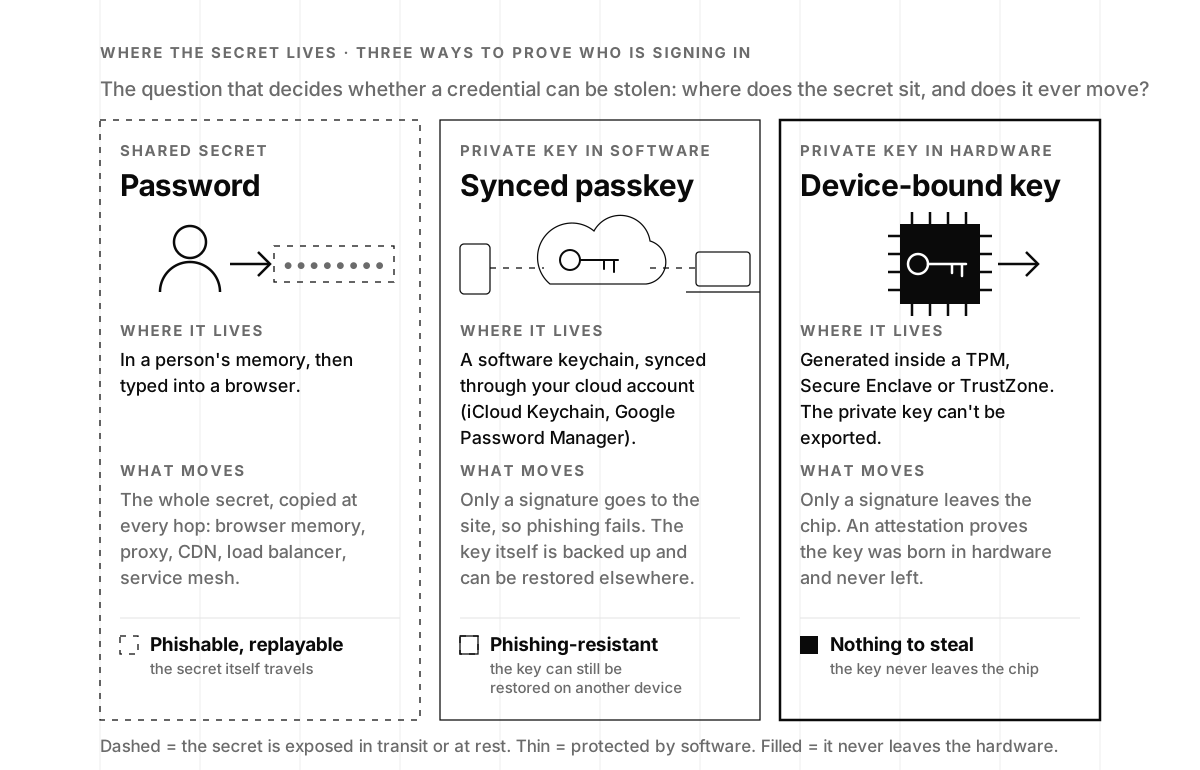
The fix starts with a question Casey and his team asked: “Is there a world where it didn’t have to move?” The first answer is asymmetric cryptography, the same math behind TLS and SSH. The device generates a key pair, keeps the private key, and registers only the public key with the service. To sign in, the service sends a random challenge, the device signs it, and the service checks the signature against the public key it already holds. Nothing that leaves the device is worth stealing, because a signature over one challenge cannot be replayed against the next. That is how a FIDO passkey works, and why the FIDO Alliance describes the credentials as “highly phishing resistant.”
Then Casey’s team went further: “What if we could guarantee it didn’t move?” The guarantee comes from hardware that is already in most modern devices: a TPM in Windows and Linux laptops, the Secure Enclave in Apple devices, TrustZone in ARM chips. Keys generated inside those parts never come out. Microsoft’s documentation for Windows Hello for Business is blunt about it: the private key “is stored locally and protected by the TPM, and can’t be exported” (Microsoft Learn). Apple describes the Secure Enclave as a subsystem isolated from the main processor whose hardware keys “aren’t made visible even to sepOS,” its own operating system (Apple Platform Security). An attacker with full admin rights on the box can dump every byte of system memory with a tool like Mimikatz and find nothing, because the key was never in system memory.
The hardware can also produce an attestation: a signed statement that this key was generated inside this TPM and has never been exported, which is what lets a company enforce “device-bound only” as policy rather than hope. So a device-bound credential is a private key born in secure hardware, unable to leave it, used to sign challenges, with a receipt proving where it lives. The same attestation, pointed at the device itself rather than a login, is how you find out whether the hardware under your zero trust is what the manufacturer shipped.
How device-bound credentials break the credential-theft chain
When the secret never moves, whole categories of attack lose their first step. Credential stuffing needs a stolen password; there is none. Phishing needs a user to type a secret into a look-alike page; there is nothing to type, and the browser will not present a passkey to the wrong domain anyway. Session hijacking needs a copyable cookie or token; bind the session to a device-held key and the copy is useless on another machine. Casey’s summary on the episode:
“If I can guarantee credentials don’t move, then credential theft goes away. Stuffing, spraying, all of that goes away.”
Jasson Casey, CEO and co-founder of Beyond Identity, on episode 92
It pays to be precise here, because “we have MFA” covers a wide range. CISA’s guidance on phishing-resistant MFA ranks the options: FIDO/WebAuthn and PKI-based authentication at the top, app-based codes in the middle, SMS and voice at the bottom, with a note that push notifications without number matching are “vulnerable to push bombing attacks as well as user error.” A real-time phishing kit relays an SMS code as fast as the victim types it. It cannot relay a passkey signature, because the signature is bound to the origin the browser is actually talking to.
The one route passkeys alone leave open is the session after a clean login: an infostealer on the laptop copies the cookie and an attacker uses it from somewhere else. That is what Device Bound Session Credentials address, a draft from the W3C’s Web Application Security Working Group that lets a site periodically ask the browser to prove it still holds a private key, ideally one protected by the TPM, so that “a host can thus know with cryptographic certainty that the session key is protected against malicious exfiltration to a different device.” It is still a draft, so watch it rather than buy it. It reaches the same conclusion Or Eshed of LayerX reached from the browser side in Enterprise Browser Security: the session, not the network, is where the last mile of control now lives.
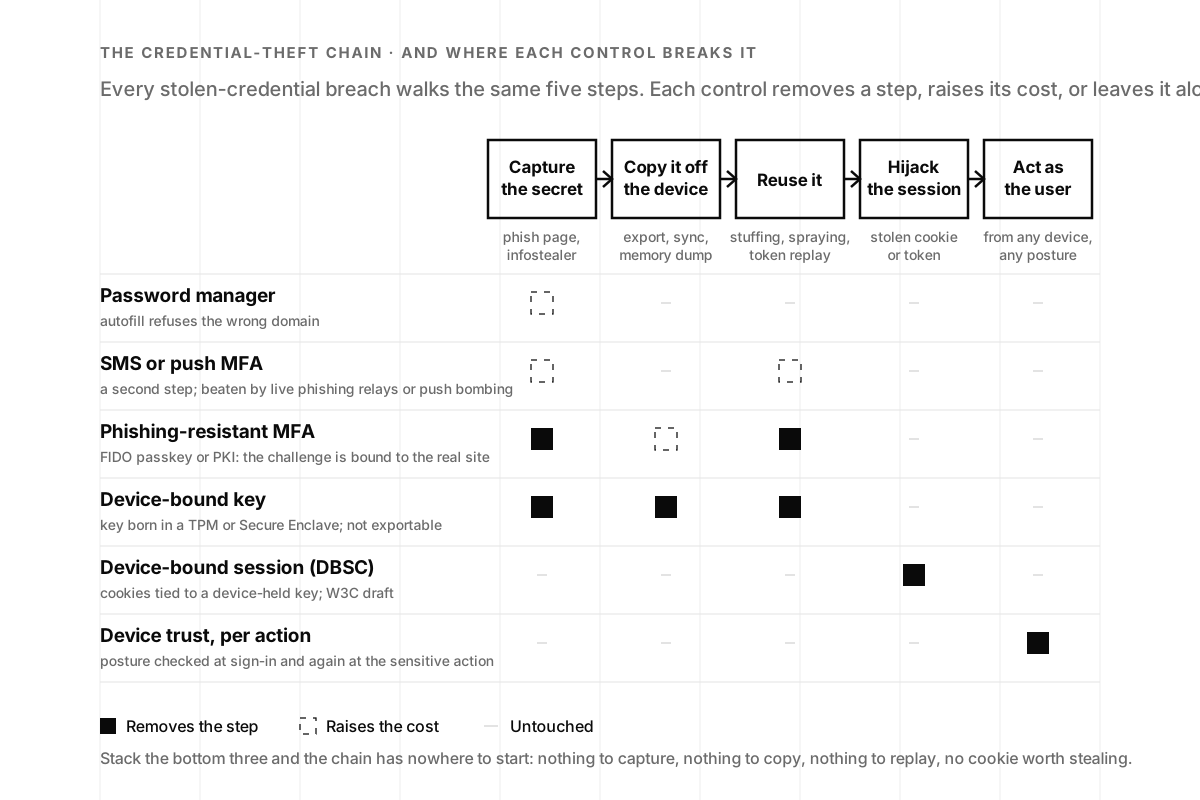
That is the difference between a control that removes a step and one that watches for it. Casey is unambiguous: “Prevention beats detection every time.” Monitoring still matters, which is why we pair identity work with monitoring and response; it just should not be the plan.
Device-bound passkeys vs. synced passkeys: which should a startup use?
Passkeys are winning on adoption. The FIDO Alliance reports that 53% of people have enabled a passkey on at least one account, and publishes a fourfold improvement in sign-in success compared with passwords (FIDO Alliance, published figures). The distinction that matters for a company, though, is where the private key lives. The FIDO Alliance’s enterprise deployment guidance defines synced passkeys as credentials “that may be backed up and made available across devices” through a passkey provider, and device-bound passkeys as credentials “that cannot leave the issued device.”
Synced passkeys (iCloud Keychain, Google Password Manager, a third-party manager) are a large improvement over passwords: phishing-resistant, no shared secret on the server, restorable when you drop your phone in a lake. The trade is that the key material is now protected by software and by the cloud account it syncs through, and it can be restored onto a device you have never seen. For a consumer app that is the right trade. For workforce access to production, source control and the finance stack, most security teams want the key that cannot be copied anywhere, plus the attestation to prove it. FIDO’s guidance points organizations with high-assurance or regulatory requirements at device-bound credentials, and notes that relying parties “can identify these credentials based upon the attestation statements provided at registration.”
Our rule of thumb: synced passkeys for customers, device-bound for employees and for anything with write access to production. (They also make the logical-access section of a SOC 2 report read the way buyers hope it will.) The same principle applies to AI agent authentication: non-human identities handling sensitive operations need credentials that can’t be exfiltrated from the runtime, and the authorization decisions layered on top are only as trustworthy as the identity underneath them.
Why identity, not the network, is the control point
Casey’s broader argument is that identity is the only thing that shows up at every layer of a modern stack. Networks get replaced by SaaS, devices get replaced by whatever the new hire brought from home, but every request still runs as someone or something.
“Identity is the one thing that always crosses every boundary.”
Jasson Casey, Beyond Identity, episode 92
Anchor controls to the network and you defend something that keeps shifting; anchor them to identity and the control follows the user, the service account and the agent wherever they go.
A second idea from the episode is easy to miss: identity is a property of the action, not just the login. Casey’s example is that sending an email and committing code are different risks even for the same person on the same day, and most systems treat them identically because both sit behind the same session. A device-bound credential makes it cheap to ask the question again at the moment that matters: is this the same device, in a healthy state, that signed in this morning, and should it be allowed to push to main? That is what the device-trust step in the rollout plan below means in practice.
It also explains why every forgotten thing with a login is now an identity problem. Whether a human or a machine kicks off a process, Casey notes, it runs under some user ID, that ID has an identity, and in a distributed system those identities multiply fast. The printer nobody put in the security org chart and the CI runner with a long-lived token are the same problem as the sales rep’s laptop, and a credential that cannot leave its device is the same answer.

What breaks in an enterprise passkey rollout (and how to keep users out of it)
The technology works; the deployment is where it gets hard. Casey is candid about what Beyond Identity learned:
“The standard operating procedure in the identity world is to involve the entire workforce in rollouts. That’s horrible.”
Jasson Casey, CEO and co-founder of Beyond Identity, episode 92
Asking every employee to reset a password, scan a QR code and install an app is asking them to take part in a security infrastructure project. As he put it: “Why did we come up with a system where the end user has to be involved in what is fundamentally a technical operation?”
His test for any control is simple: “If your parents can’t do it, you are going to fail.” The principle underneath it: “Security fails when it depends on users doing the right thing.” Device-bound credentials pass both tests when they are deployed the way the hardware allows. The key is generated silently on a managed device, the user keeps unlocking the laptop the way they already do, and the migration happens in the identity provider and the MDM, where engineers can run it as a project instead of a company-wide favor.
Where it actually gets stuck is rarely the cryptography. Enterprise buyers aren’t monolithic: the champion, the budget holder, the administrator and the end user can each block a deployment, and selling to all four can pull a product in conflicting directions. The rollouts that succeed put engineers next to the customer team for three friction points: legacy applications that only understand passwords (put them behind the identity provider or an identity-aware proxy first), personal devices (decide which actions require a managed machine), and device loss (register two authenticators per person and write the recovery runbook before you need it). Casey’s order of operations applies: “Security is there to serve the business.” A rollout that takes the sales team offline for a week has failed on his terms, however strong the key. It’s the same pattern we see building product security into a real organization: the cryptography is the easy part; the integration is the work.
How to roll out device-bound credentials at a startup, in four steps
Here is the order we recommend to Series A to C companies, most of whom are somewhere between step one and step two when we meet them:
- SSO everywhere. Every SaaS app behind one identity provider, shared logins retired, SCIM deprovisioning switched on. This is also most of the logical-access evidence a SOC 2 Type 2 needs.
- Phishing-resistant MFA for the few. Admins, finance, founders and whoever holds the on-call pager go first, with FIDO security keys or platform passkeys, and SMS codes retired for those accounts. CISA’s advice is the same: start with the high-value targets.
- Device-bound passkeys for the whole workforce. Enroll through MDM so the key is generated in the TPM or Secure Enclave and policy requires hardware-backed keys; the user’s only job is to keep unlocking their device. If you ship AI features or run agents, this is also when service-account and agent credentials move to non-exportable or short-lived form, which is what an AI access-control audit checks.
- Device trust at every action. Check posture (disk encryption, EDR running, OS patched) at sign-in and again at the sensitive action: a production deploy, a wire approval, an export of customer data. This is the action-level identity Casey describes.
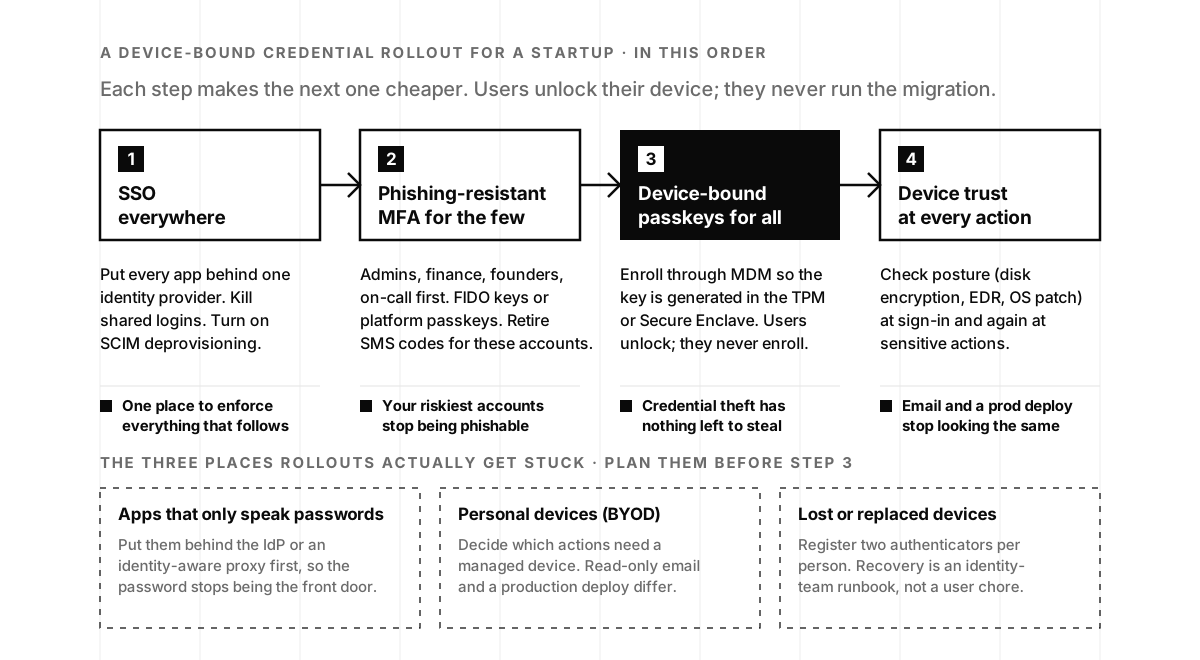
None of these steps requires a company-wide password-reset day, and each one shrinks the list of findings a penetration test can turn into a headline. You will know step three is working the first time a phishing kit collects a signature it cannot use anywhere.
The decision: start with the accounts that can hurt you
If you are a founder reading this with a password manager, an SSO and a push-MFA app, you are in good company and two steps from done. The move this quarter is to make the handful of accounts that could end the company phishing-resistant with device-bound passkeys, then let MDM carry the rest of the workforce across without a single all-hands email. Casey’s own measure of success applies: “It’s one thing to know why you do it. It’s a whole other thing to see it do its job.”
If you want a second pair of hands on the architecture, our product security team designs and runs exactly this kind of rollout, from the identity provider configuration to the recovery runbook, alongside your engineers rather than instead of them. And if you would rather hear the argument from the person who built a company on it, Jasson Casey makes it in 39 minutes on episode 92.
Device-bound credentials frequently asked questions
- What is a device-bound credential?
- A device-bound credential is a cryptographic key pair whose private key is generated inside a device's secure hardware (a TPM on a PC, the Secure Enclave on Apple devices, TrustZone on ARM) and can never be exported. The device proves identity by signing a challenge, and only the signature leaves the chip. Because there is no shared secret to type, phish, or copy, the credential cannot be stolen and replayed from another machine.
- What is the difference between device-bound and synced passkeys?
- Both are FIDO credentials and both are phishing-resistant. A synced passkey is backed up through a passkey provider such as iCloud Keychain or Google Password Manager and can be restored on your other devices, which is convenient for consumers. A device-bound passkey never leaves the device it was created on, and the service can verify that through an attestation at registration. Enterprises with high-assurance or regulatory needs generally want device-bound.
- Are passkeys really phishing-resistant?
- Yes. The browser and operating system only present a passkey to the site it was registered for, so a look-alike domain gets nothing, and the private key is never sent anywhere. CISA lists FIDO/WebAuthn authentication alongside PKI as the phishing-resistant forms of MFA, above app-based codes and well above SMS. What passkeys alone do not protect is the session cookie issued after login, which is why device-bound sessions matter too.
- Can an attacker extract a key from a TPM or Secure Enclave?
- Not with software, including software running as administrator. Keys generated in a TPM are non-exportable; Microsoft's Windows Hello for Business documentation states the private key is protected by the TPM and can't be exported. Apple's Secure Enclave keeps its hardware keys inside the enclave so they are not visible even to its own operating system. Memory-scraping tools find nothing because the key is never in system memory.
- What happens when an employee loses a device-bound credential?
- The key dies with the device, which is the point. Recovery has to be designed in advance: register at least two authenticators per person (laptop plus phone or a hardware security key), and give the identity team a verified re-enrollment runbook, ideally tied to your MDM so a replacement machine gets a new key silently. Treat recovery as an operations process, not something the user improvises through a help-desk ticket.
- Is MFA enough, or do we need device-bound credentials?
- It depends on which MFA. SMS codes and push approvals add a step but can be relayed by real-time phishing kits or worn down with push bombing. Phishing-resistant MFA (a passkey or PKI credential) removes the phishing and stuffing steps. Device-bound credentials go one further by making the key impossible to copy off the machine, and device-bound sessions close the stolen-cookie route. Start with phishing-resistant MFA for admins and finance, then move the workforce to device-bound.
- Do device-bound credentials help with SOC 2?
- Directly. The logical-access controls in the Security criteria, which are in every SOC 2 report, ask how you authenticate users and protect privileged access. Phishing-resistant, hardware-bound authentication is the strongest evidence you can show there, and it shrinks the exception list around password policy, MFA enrollment, and shared accounts. Buyers' security teams read that section closely, so it shortens questionnaires as well.
- What are Device Bound Session Credentials (DBSC)?
- DBSC is a draft W3C specification from the Web Application Security Working Group that binds a web session to a private key held on the device, ideally in a TPM. The site periodically asks the browser to prove it still holds that key, so a session cookie copied by malware is useless from another machine. It closes the route that passkeys alone leave open: stealing the session after a legitimate login.