
Enterprise Browser Security: Why the Browser Is the New Control Point
Users spend most of their day in SaaS and AI tools, on encrypted connections your network appliances can't see into. The browser, not the network, is where the last mile of control now lives.
Enterprise browser security protects company data, identities, and actions inside the web browser, where most work now happens. Instead of routing traffic through a network appliance, it adds policy and visibility to the browser itself, usually through a managed extension. That covers what people do across websites, SaaS apps, and AI tools, including on personal devices and outside the office network.
Consumer browser security (safe-browsing warnings, private mode, a password manager) protects one person from scams and tracking. Enterprise browser security protects an organization: it keeps sensitive data from leaving, flags risky logins, and gives the security team a record of what happened. On episode 98, Or Eshed, co-founder and CEO of LayerX Security, described the starting point plainly: “We’re in a world in which users spend most of their time outside of corporate perimeter using SaaS applications, AI tools, and it’s pretty much impossible to maintain a traditional perimeter security approach.” The browser, not the network, is where the real last mile of control now lives.
Why did the network perimeter stop protecting your data?
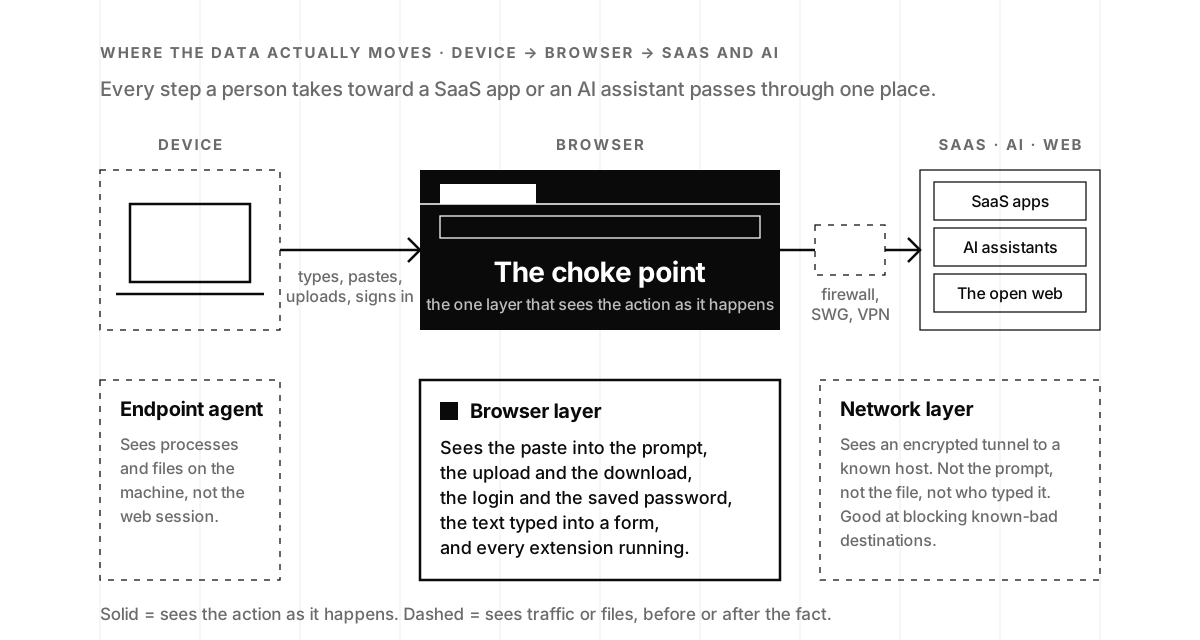
The old model put a firewall around the office and inspected traffic at the edge. That worked when apps and data sat in a building you owned. They don’t anymore. Work moved to SaaS, people log in from anywhere, and traffic is encrypted on its way to the cloud. The firewall sees an encrypted tunnel to a known host; what happens inside the tunnel, the paste, the upload, the login, is invisible to it.
Eshed came to that conclusion the hard way. At Check Point he led what he describes as the takedown of the largest browser-hijacker operation in history, then spent years running incident response for financial services.
“I was doing IR and guess what? Every IR investigation would end up with the user downloading something or browsing somewhere or doing something online. And it just bugged me.”
Or Eshed, co-founder and CEO of LayerX Security, on episode 98
Two shifts turned the observation into a company. Microsoft retired Internet Explorer, so every browser people actually used supported real extensions. And Office 365 moved to SaaS, which made the operating system far less important than the browser sitting on top of it. “At that point in time, I was like, okay, you can, in 10% of the effort, solve 90% of the problem and do way more. I must do this.” It’s the same bet Illumio made a decade earlier from the network side, which we covered in Building a Cybersecurity Startup: when the wall around the office disappears, control has to move closer to the user. The closest you can get without touching every device is the browser tab.
How does enterprise browser security work?
Most enterprise browser security runs as an extension in the browsers people already use, Chrome and Edge above all. Eshed’s description of LayerX: “The way it’s run, it’s agentless. It’s working in the application layer; we deploy as a browser extension built for enterprises across any browser.” Agentless means no separate OS software to install and maintain. Application layer means the extension watches the session as the page renders, so it doesn’t reroute traffic or need new hardware.
From inside the session, the extension can see and control the things that actually move data: copy and paste, uploads and downloads, logins and saved passwords, text typed into web forms and AI chat boxes, and the other extensions installed alongside it. Policy applies at the moment of action: a paste of customer records into a personal chatbot can be warned on or blocked before it leaves, and a login to an unsanctioned SaaS app can be logged and steered to SSO.
There are two ways to package this. A standalone enterprise browser gives the vendor the whole rendering engine and asks every employee to switch browsers. A managed extension rides on the browser people already have and deploys through the policy tooling you already run. Gartner’s definition covers both: secure enterprise browsers “embed enterprise security controls into the native web browsing experience using a customized browser or extension for existing browsers, instead of adding bolt-on controls at the endpoint or network layer” (Gartner, April 2025). For a startup, adoption is the whole game, which is why the extension model tends to win the first round.
One thing the browser layer does not fix on its own is the credential itself. If a password or session token can be copied, it can be phished, however well the tab is watched. That is the argument for device-bound credentials, and the two controls fit together: the browser governs what happens in the session, and the credential makes sure the session belongs to the right person on the right device.
Enterprise browser security vs. network security: what each layer sees
Network security isn’t going away; it answers a different question.
| Layer | Where it runs | Sees inside SaaS/AI sessions | Reroutes traffic | Best at |
|---|---|---|---|---|
| Secure web gateway | Cloud/network edge | Limited (encrypted) | Yes | Blocking known-bad sites |
| VPN / SASE | Cloud edge or tunnel | Limited | Yes | Connecting remote users to private apps |
| Endpoint agent (EDR) | On the device | Limited (processes and files, not page content) | No | Malware, device posture |
| Enterprise browser security | Inside the browser | Yes | No | Data, identity, extension and AI controls at the point of action |
Neither layer replaces the other. The browser layer covers the blind spot the others leave open; the network still blocks the destinations a browser should never reach. Eshed expects the balance to keep tilting toward the session: “the network security players are destined to become VPNs, glorified VPNs.” Gartner sees the same shift in gentler language. Its April 2025 forecast says that by 2028, 25% of organizations will deploy at least one secure enterprise browser technology alongside their existing remote-access and endpoint tools, up from less than 10% at the time, driven by organizations that “primarily rely on SaaS applications” and need “segmented access from unmanaged or lightly managed end-user devices and bring-your-own PC” (Gartner press release). That second reason matters for startups more than most: contractors, agencies and new hires on personal laptops are the norm long before there is an IT department.
What the Cyberhaven extension hack taught everyone about browser extensions
Extensions are the part of the browser few companies have ever inventoried, and one incident made that impossible to ignore. Eshed told the story on the episode:
“A bit over a year ago, there has been a huge breach. A DLP vendor called Cyberhaven got compromised. An attacker took over their admin account in the Google Chrome Store, replacing their browser extension used for DLP with malware. Suddenly, it raised awareness to browser extensions as an offensive vector.”
Or Eshed, LayerX Security, episode 98
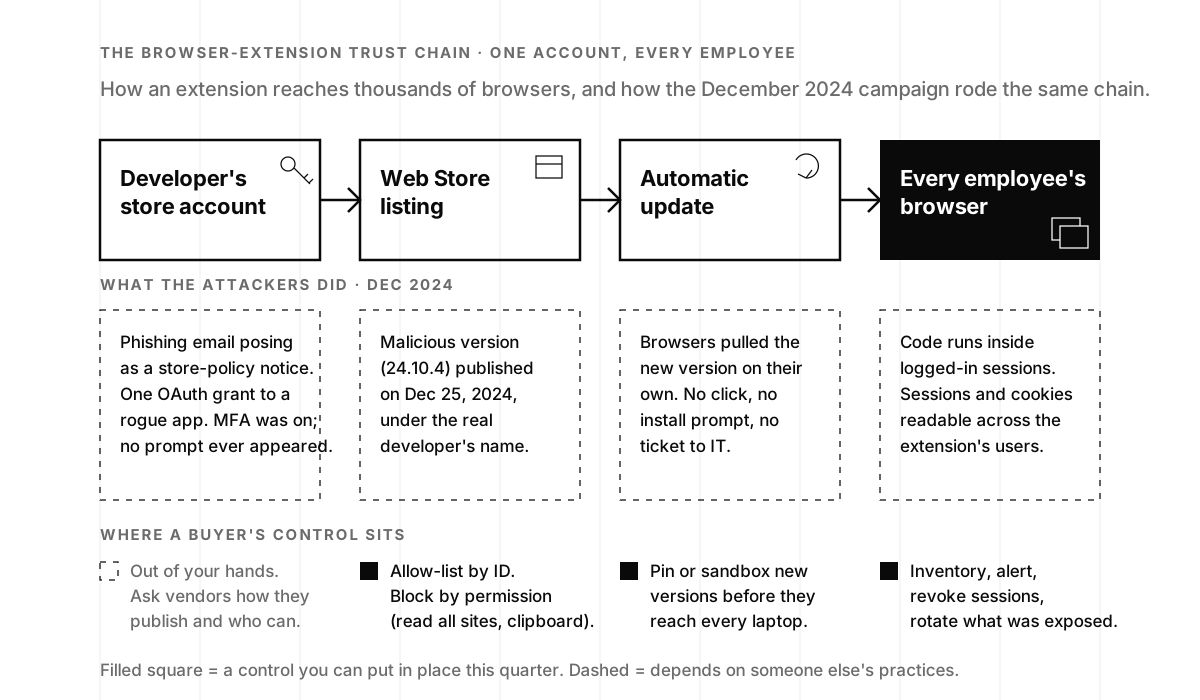
Here is what the public record says. Early on December 25, 2024, an attacker used a compromised Chrome Web Store account to publish a malicious version (24.10.4) of Cyberhaven’s data-loss-prevention extension, which had roughly 400,000 corporate users; the company detected it that afternoon, removed it, shipped a clean 24.10.5 and brought in Mandiant (TechCrunch, December 27, 2024). The malicious code could exfiltrate “sensitive information, including authenticated sessions and cookies.” Follow-up reporting found Cyberhaven was one of at least 35 extensions hijacked in the same campaign, affecting about 2.6 million users. The entry point was a phishing email posing as a Chrome Web Store policy notice, which led a developer to authorize a rogue OAuth app named “Privacy Policy Extension” with permission to “See, edit, update, or publish your Chrome Web Store extensions, themes, apps, and licenses.” Cyberhaven’s employee had MFA and Google Advanced Protection turned on and never saw an MFA prompt, because the attack never asked for a password; it asked for a permission grant through Google’s standard OAuth consent flow (BleepingComputer, December 31, 2024).
Two lessons travel well beyond that one campaign. First, the risk in an extension is concentrated in its update path, not its install. An extension with broad host permissions is code that runs inside your logged-in sessions, and it updates itself silently from someone else’s account. Second, a vendor’s own publishing hygiene is part of your attack surface, so phishing-resistant sign-in for the people who can push an update is a fair question for every vendor whose extension your team runs.
How to secure browser extensions: allow-lists, permissions, sandboxing
The tooling on the buyer’s side of the chain is better than most founders assume, and much of it is free. Google’s enterprise guidance for Chrome lets an admin allow or block extensions by ID, force-install the ones you want, and, the part that matters most, “decide which extensions to allow based on the permissions they request to run,” so anything that asks to read and change data on all websites can be blocked as a class (Google, Managing Extensions in Your Enterprise). Those controls ship through Chrome Enterprise Core, which manages the browser from the Google Admin console at no additional cost, enforces policies across Windows, Mac and Linux, and lets you “block suspicious extensions across your organization” (Google, Chrome Enterprise Core). Microsoft Edge has equivalent extension policies.
Above that sits what the browser-security vendors add: a continuous inventory of every extension across the fleet, risk scoring, and sandboxing of new versions before they reach every laptop. This became LayerX’s wedge. “We were very fortunate to invest in that early on,” Eshed said. “We have a technology partnership with Google.” He also claims “the largest data lake in the world for browser extension sandboxing.” Those are vendor claims, not audited figures, but the go-to-market lesson underneath them holds for any founder: “That’s what CISOs want today. They have a qualified pain.” And: “I don’t want to convince them they have a problem. I want to go for the problems they already are convinced they have and then grow with them.” Extension management was the pain buyers already had. The broader browser platform is what they grew into.

How do you secure SaaS and AI use inside the browser?
AI made the browser urgent. Employees paste customer records, code and strategy into chatbots and copilots, almost always through a browser tab, and the AI features inside approved SaaS apps arrive through the same tab. If you can’t see the browser, you can’t see that data leaving, and you can’t say yes to the tools with confidence. Eshed’s line on the timing: AI “is a huge gift for us because it just landed exactly where we are.”
The temptation for buyers and vendors alike is to look for the one product that secures all of AI. Eshed argues the opposite, and it is one of the sharper moments of the episode:
“If AI is everywhere, you have to be the everywhere security vendor. Newsflash, we’re in 2026, 40 years after the first security vendors came to the market. Some offerings are like 30, 35 years old, and are actually downsizing. They’re starting to minimize what they do. None of them tries to do everything everywhere. So you can’t be everything for everyone. You need to just be in love with an amazing problem that’s growing.”
Or Eshed, LayerX Security, episode 98
For a security program, that translates into a clean division of labor. Humans using AI is a browser problem: which AI apps are in use, what goes into the prompts, whether the account is a corporate one with retention turned off or a personal one on defaults. Agents acting on your behalf are a permissions problem, closer to least privilege for agentic AI and to the connector-by-connector work of a Secure MCP program. Keeping the two straight is how you avoid buying a browser tool to govern agents, or an agent gateway to govern people. “As long as you have employees,” Eshed said, “you’ll have the same mistakes happening time and time again,” and that is the part the browser layer is for.
What the browser gives you on the human side is practical: a real inventory of AI use by application instead of a guess from DNS logs, the ability to warn or block when regulated data heads into a prompt, and audit logs that answer procurement’s “how do you control employee AI use?” question with evidence. The policy side of that program, acceptable use, sanctioned alternatives and how to get people to follow them, is covered in our companion post from the same episode, Shadow AI: The Risks, and How to Govern It Without Blocking AI, and the leadership stance behind it in Stop Saying No. AI coding assistants deserve a mention too: more of them run in a browser tab or web IDE, with the trust-everything behavior we described in Vibe Coding Security, so the browser is often the first place you can catch a secret heading into a prompt.
Then there are AI browsers. Eshed noted that “the AI companies develop their own browsers,” and said LayerX expects “quite a few announcements on our support and integration into AI browsers, which is becoming a really hot topic in 2026.” The principle for a buyer is the same one that governs extensions: an agent browsing on an employee’s behalf inherits that employee’s sessions, so it needs the same session controls, and the same allow-list decision about whether it belongs in your fleet at all.
How should a startup think about browser controls?
You do not need to buy an enterprise browser platform on day one. You do need to know where you stand and climb deliberately, because every rung is something an enterprise security review eventually asks about.
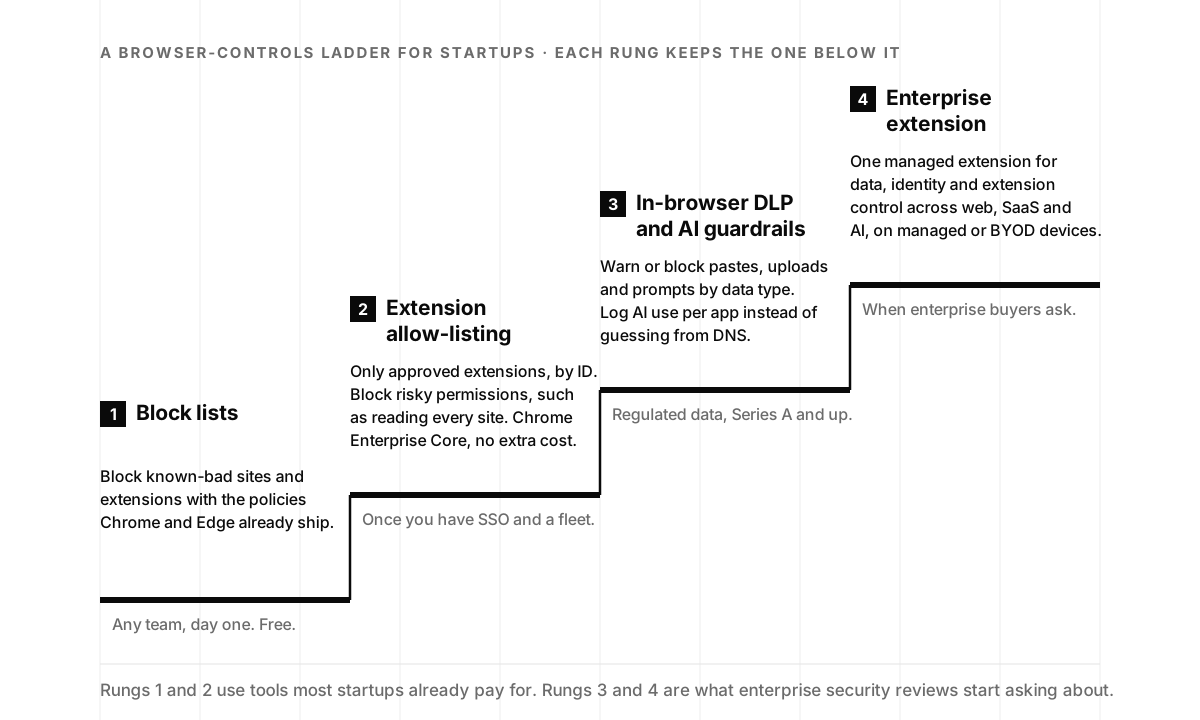
Rung 1: block lists. Chrome and Edge ship policies to block known-bad sites and specific extensions. Turn them on the day you set up Google Workspace or Microsoft 365. Cost: an afternoon.
Rung 2: extension allow-listing. Enroll browsers in Chrome Enterprise Core (or the Edge equivalent), publish a short allow-list of the extensions your team actually uses, block anything requesting data on all sites, and review the list quarterly. An allow-list would have kept most of the 35 extensions hijacked in December 2024 off corporate laptops, since few of them had any business there, and it costs nothing beyond an admin’s time. It would not have stopped a malicious update to an extension you had approved; that is what the next two rungs add. It also gives you an extension inventory, the first thing our shadow-AI exposure review builds.
Rung 3: in-browser DLP and AI guardrails. Once you handle regulated data, or once the first enterprise buyer asks how you stop employees from pasting customer PII into a chatbot, you need controls that see content: warn or block by data type, log AI use per application, pin or sandbox extension updates, and route the alerts to someone who reads them. That last part is where monitoring and response earns its keep; a guardrail nobody watches is a log file.
Rung 4: an enterprise extension. When you have contractors on personal laptops, buyers asking for session-level controls, or an AI-enablement program that needs one place to govern data, identity and extensions across web, SaaS and AI, an enterprise extension of the kind LayerX sells consolidates the rungs below it. Gartner’s forecast has a quarter of organizations running one by 2028, so the security questionnaires you receive will increasingly assume you understand the category.
When you evaluate a vendor for rung 3 or 4, look for:
- Agentless deployment: a browser extension, not a heavy OS agent or a custom browser you force on staff.
- Broad browser coverage, across the browsers your teams already use.
- No architecture change: no new proxies, no rerouted traffic, no inline data center.
- Data, identity, extensions and AI in one place: controls for uploads and AI prompts, session protection, extension inventory and clear governance logs.
- Room to scale, so the tool that solves today’s extension problem is the same one that governs tomorrow’s AI browser.
A good rule: if the tool only works after data has already left the browser, it’s reporting history, not preventing loss. Before you point an AI agent at company data, the browser inventory is also one of the readings in an AI readiness assessment, and who can reach your AI systems, human or extension, is the question our AI access control audits answer.

Where to start this quarter
If you have SSO and a managed fleet, climb to rung 2 this month: enroll the browsers, allow-list the extensions, block the broad permissions. It’s free, it’s an afternoon of admin work, and it closes the door the December 2024 campaign walked through. If you already handle regulated data, or your first enterprise deal is sitting in procurement, start evaluating rungs 3 and 4 now, so the answer to “how do you control employee AI use?” is a screenshot rather than a promise.
If you’d like a second pair of eyes, our free shadow-AI exposure review inventories every AI tool and browser extension touching company data and tells you which rung you are actually standing on. And if you’d rather hear how the category came to be from someone who built one of its companies, Or Eshed tells the whole story, from IR investigations to the Cyberhaven wedge to AI browsers, on episode 98 of The Security Podcast of Silicon Valley.
Enterprise browser security frequently asked questions
- What is enterprise browser security?
- Enterprise browser security adds policy, visibility and data controls to the web browser itself, usually through a managed extension or a purpose-built browser, so an organization can govern what people do across websites, SaaS apps and AI tools. It works inside the session, where it can see a paste into a prompt or an upload to a personal drive, rather than on the network, which sees only an encrypted tunnel. Gartner calls the category secure enterprise browsers.
- Enterprise browser vs. browser extension: which is better?
- Both deliver the same category of control; they differ in what you ask employees to change. A standalone enterprise browser gives the vendor the whole rendering engine but asks everyone to switch browsers. A managed extension rides on the Chrome, Edge or Firefox people already use and deploys through existing policies. Most startups start with the extension model because adoption is the whole battle, and it is the model Or Eshed's LayerX is built on.
- Does enterprise browser security replace a secure web gateway or VPN?
- Usually it complements them, at least at first. A secure web gateway or SASE service is still the best place to block known-bad destinations and connect remote users to private apps. The browser layer covers what those tools can't see: the content of an encrypted SaaS or AI session and the extensions running inside it. Gartner's 2025 forecast has a quarter of organizations adding a secure enterprise browser alongside their remote-access and endpoint tools by 2028.
- Are browser extensions really a security risk?
- Yes, and the risk is concentrated in the update path, not the install. An extension with permission to read every site can see everything you see, and it updates itself silently from the vendor's store account. In December 2024 attackers phished at least 35 extension developers, including the security vendor Cyberhaven, and pushed malicious versions to roughly 2.6 million users. Allow-listing by extension ID and blocking broad permissions removes most of that exposure.
- How can a small company control Chrome extensions without buying anything?
- Chrome Enterprise Core, Google's cloud management for the Chrome browser, is available at no additional cost and lets an admin enroll browsers, enforce policies, and allow or block extensions by ID or by the permissions they request. Microsoft Edge has equivalent extension policies. Start with a short allow-list of the extensions your team actually uses, block anything that asks to read data on all sites, and review the list quarterly.
- Does browser security cover AI tools like ChatGPT and Copilot?
- It covers the part employees touch. Most AI use at work happens in a browser tab: a chat window, a copilot inside a SaaS app, a coding assistant in a web IDE. In-browser controls can see which AI apps are in use, warn or block when regulated data goes into a prompt, and log it per application. AI agents that run on servers or connect through MCP are a separate control plane, which is why Eshed argues no single vendor should claim all of AI security.
- Do browser controls work on personal (BYOD) devices?
- That is one of their main advantages. A managed extension or enterprise browser applies policy to the session rather than the machine, so a contractor or an employee on a personal laptop can reach company SaaS with the same data controls as a corporate device. Gartner lists segmented access from unmanaged devices and bring-your-own PC among the main reasons organizations adopt secure enterprise browsers.
- What about AI browsers and agents that browse for you?
- Treat them as a new browser to govern, not a new category of risk. When an AI agent browses and clicks on an employee's behalf, it inherits that person's logins and data access, so the same session controls apply: which sites, which data, which extensions. On episode 98, Eshed said LayerX expects announcements on its support for and integration into AI browsers, which he called a hot topic for 2026.