
Shadow AI: The Risks, and How to Govern It Without Blocking AI
Data you can't see is data you can't protect. Your team is already using AI tools nobody approved, mostly on personal accounts. Here's what shadow AI looks like, why a flat ban makes it worse, and the policy plus point-of-use guardrails that let you say yes to AI and still know where your data went.
Shadow AI is the use of AI tools at work that the security team hasn’t approved or doesn’t even know about. An employee pastes a customer list into a free chatbot. A team wires an unsanctioned copilot into company data. A browser extension quietly ships documents to an outside AI service. It’s the AI version of shadow IT, and it spreads fast because AI tools are free, genuinely useful, and one click away.
The core problem is simple: data you can’t see is data you can’t protect. When staff feed company information into outside AI tools, that data can be stored, logged, or used to train models far beyond your control. On episode 98, Or Eshed, co-founder and CEO of LayerX Security, captured the human side with a blunt line: a lot of AI risk is “natural stupidity to artificial intelligence,” ordinary people making ordinary mistakes with very powerful tools. The encouraging part, and the point of this post, is that the mistakes are predictable, the doorway they walk through is visible, and a company that governs that doorway gets to say yes to AI with a straight face.
What is shadow AI, and how much of it is already happening?
The definition is easy. The scale is what surprises people. Microsoft and LinkedIn’s 2024 Work Trend Index, a survey of 31,000 knowledge workers, found 75% already using generative AI at work and 78% of those users bringing their own tools, a share that rises to 80% at small and mid-sized companies. More than half (52%) were reluctant to admit using AI for their most important tasks.
The account problem is the part that should worry a founder. Verizon’s 2025 Data Breach Investigations Report found 15% of employees routinely accessing GenAI systems on their corporate devices; of those, 72% used non-corporate emails as their account identifiers and another 17% used corporate emails without an integrated authentication system. Most AI use on company laptops, in other words, runs through accounts the company can’t see, can’t offboard, and can’t set retention terms for. LayerX’s own customer telemetry (published figures, not audited data) is blunter still: 67% of AI usage happens through unmanaged personal accounts, and 77% of employees paste data into GenAI prompts.
Or built LayerX on the observation that the people, and therefore the data, had already left the building:
“We’re in a world in which users spend most of their time outside of corporate perimeter using SaaS applications, AI tools, and it’s pretty much impossible to maintain a traditional perimeter security approach. LayerX is basically around the vision of going where users are.”
Or Eshed, co-founder and CEO of LayerX Security, on episode 98
Xia Hua, co-founder and CEO of Traceforce, sees the same thing from the device side. Her company’s agent records how employees actually use AI, and on episode 100 she described the first-week reaction at almost every customer: “every company gets surprised whenever they install our software, they’re like, I didn’t know that they’re doing that.” The most common surprise is ChatGPT on a personal login, “by far.”
Shadow AI examples you’re probably missing
Shadow AI is rarely one obvious app. It hides inside daily work:
- Pasting sensitive data (customer records, source code, contracts) into public chatbots to summarize or rewrite. Xia’s example was a CSV full of customer emails uploaded to a personal chat account by someone who simply wasn’t paying attention.
- Unsanctioned copilots and plugins connected to email, code repos, or cloud drives, often on personal accounts.
- AI browser extensions that read the contents of a page and send it to a third party.
- Bring-your-own-AI on personal devices, where nothing touches a company log.
- Meeting bots that silently join calls and send transcripts to an outside service.
- AI features switched on inside apps you already approved: the CRM’s new assistant, the note-taker in your video tool, the “summarize this thread” button in chat. The app passed procurement; the new data flow never did.
- Several AI coding assistants running side by side when the company only licensed one.
That last one deserves its own paragraph, because engineering teams hold the most valuable data. Xia again, on what Traceforce finds inside software companies:
“In most organizations, we discover more than one AI coding assistant, for example. They could be using Cursor and Claude Code and Augment Code simultaneously. Typically, one enterprise is only willing to purchase one out of these vendors. And it is a hard decision for them to make to block folks from using the other tools, because those tools are their favorite.”
Xia Hua, co-founder and CEO of Traceforce, on episode 100
Every unlicensed assistant is reading your repository and, unless someone checked, your secrets too. We covered the code-quality half of that story in Vibe Coding Security; the data half is shadow AI. The copilot and plugin cases are the riskiest overall, because they act with a user’s access, the same least-privilege problem behind agentic AI security. An AI tool inherits whatever the employee can reach.
Why is shadow AI a security risk? The numbers
The numbers are no longer theoretical. IBM’s 2025 Cost of a Data Breach Report found that one in five organizations reported a breach due to shadow AI, and that organizations with high levels of shadow AI saw about $670,000 in higher breach costs than those with little or none. Only 37% had policies to manage AI or detect shadow AI; 63% of breached organizations either had no AI governance policy or were still writing one. Of the organizations whose AI models or applications were breached, 97% reported having no AI access controls in place.
The control side is just as lopsided. A 2025 vendor survey of 461 security, IT, and compliance professionals by Kiteworks (published figures, not audited data) found only 17% of organizations had automated controls with data-loss-prevention scanning in front of public AI tools. The rest relied on training and audits alone (40%), warnings without enforcement (20%), or had no policy at all (13%).
Four risks stack up fast: data leakage the moment information enters an outside model; compliance exposure when regulated data lands in an ungoverned tool; identity and credential risk as connected tools widen the blast radius of a phished account, the same pattern behind why passwords still get stolen; and no audit trail, because an invisible tool leaves nothing to prove what went where. You also can’t protect data if you don’t know what’s going into the model, which is the case for tracking an AI data bill of materials.
Here is the upside hiding in those statistics: all four risks are visibility problems first. The 97% figure is about missing access controls, a fixable engineering task, and an AI access-control audit takes weeks, not quarters. Companies that can see the doorway join the small minority the breach data rewards.
Shadow AI vs. shadow IT: what’s different?
| Shadow IT | Shadow AI | |
|---|---|---|
| What it is | Unapproved apps and services | Unapproved AI tools and AI features |
| Main risk | Ungoverned access and data sprawl | Company data fed into models you don’t control |
| Why it’s harder | Usually a separate app to discover | Often hidden inside approved apps and the browser |
| Who owns the account | Frequently a team on a corporate card | Frequently an individual on a personal login |
The key difference: with shadow IT, your data usually stays in a database you could in theory reach. With shadow AI, data pasted into a model may be gone for good. Samsung learned that in April 2023, when employees leaked sensitive internal data to ChatGPT and the company concluded, in TechCrunch’s account, that it is difficult to “retrieve and delete” data once it sits on an external server. There is no support ticket for un-pasting.
Or draws a second line that matters for how you staff this. Employees using AI is one problem; agents roaming the web or sitting inside your product is “an application security problem,” a different one: “the same cow looks very different to the butcher and the veterinarian. You can’t assume that everything AI should be handled by the same vendor.” This post is about the first cow. If you’re deploying agents of your own, start with the AI readiness assessment.
Why banning AI tools backfires (and what Samsung did next)
A flat ban backfires. Tell people they can’t use AI and they’ll use it on their phones, off your network, with zero oversight: more shadow AI, not less. Recall the Microsoft finding that 52% of AI users already hide their most important AI use; a ban converts the other 48% too.
Samsung is the instructive case because the ban wasn’t the whole story. After the April leak it restricted ChatGPT, Bing, and Bard on company devices, and in the same breath said it was building in-house AI tools for software development and translation and “reviewing measures to create a secure environment for safely using generative AI.” The restriction was a bridge to sanctioned tools, and the company said so. Most companies copy the first half and skip the second.
Pranava Adduri, co-founder and CTO of Bedrock Data, described the mechanism on episode 95:
“The pressure to consume these tools and capabilities to be competitive is so high from a business perspective, if you don’t have a sanctioned path, they will come up with a shadow path to do it. They will spin up a personal tenant of GPT and connect it to whatever upstream SaaS they need to get their job done.”
Pranava Adduri, co-founder and CTO of Bedrock Data, on episode 95
That is the whole argument for safe enablement, the same posture behind why security leaders should enable AI instead of blocking it. Or’s version is even more matter-of-fact: “As long as you have employees, you’ll have the same mistakes happening time and time again.” You don’t fix that with a memo. You fix it by making the safe path the easy path, and by putting the guardrail where the mistake happens.
How do you detect shadow AI? Govern the doorway
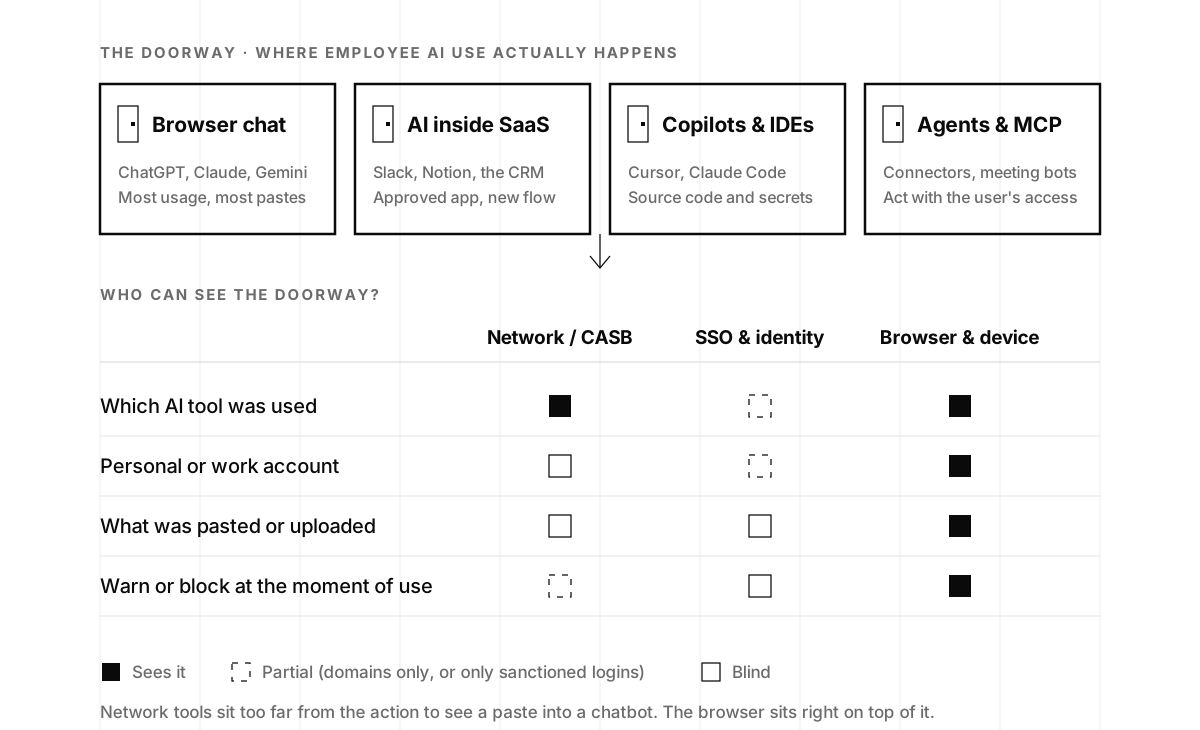
You can’t govern what you can’t see, and most shadow AI happens in the browser, not in network logs. Or’s pitch to CISOs is “last mile” security across web, SaaS and AI, framed the way a founder should hear it: “If you want a strategy for safe enablement of AI, that’s your way to go.” Xia’s device-level view reaches the same conclusion from the other direction. Asked how to capture every signal, she started with a caveat: “Not all of them will leave a footprint in the network.” An agent that opens local files and launches a local browser never crosses a proxy at all.
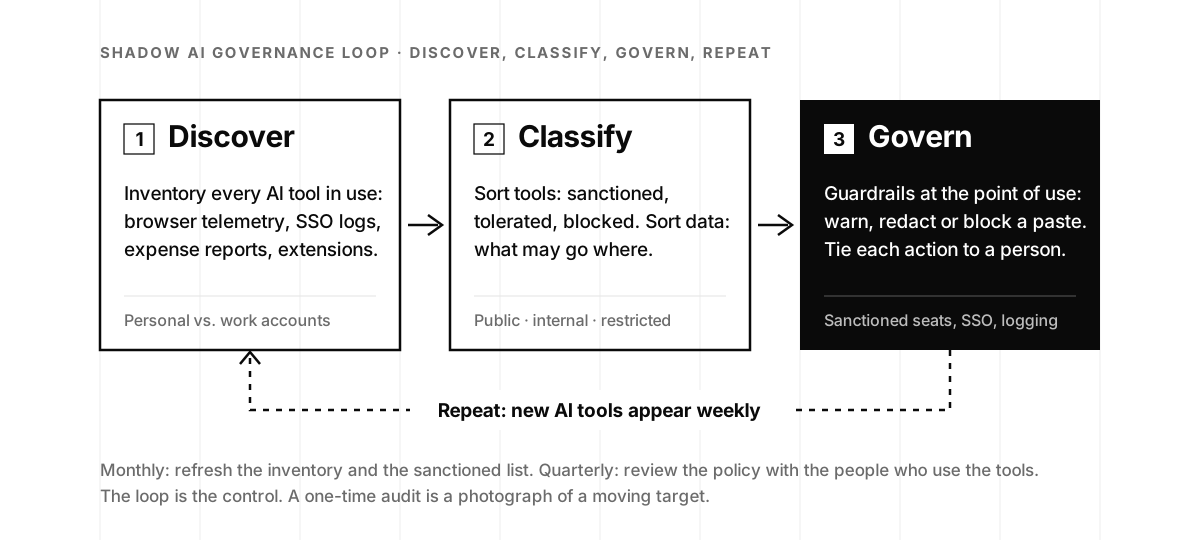
A workable order of operations, and the loop we run with clients:
- Discover. Inventory the AI tools in play and the data flowing to them. Browser telemetry is the richest source; SSO logs, an extension inventory, and a scan of expense reports for AI subscriptions fill in the rest. Sort by account type first: a personal login is the best single predictor of an ungoverned data flow.
- Classify. Sort the tools into sanctioned, tolerated, and blocked, and your data into public, internal, and restricted. Xia’s customers all hit the same wall here: “almost all our customers struggle with one thing. Everybody wants to have allow list and deny list, but they actually don’t know what to allow, what to deny.” The inventory from step one is what makes the decision concrete.
- Govern. Apply controls at the point of use: warn or block when someone pastes regulated data into an AI prompt, redact secrets before they leave the IDE, and tie AI use to identity so every action maps to a person and a role. Traceforce, for instance, hooks inline into ChatGPT and coding assistants to stop AWS tokens from being uploaded.
- Repeat. New AI tools appear weekly. A one-time audit is a photograph of a moving target.
Network tools sit too far from the action to see a paste into a chatbot. The browser sits right on top of it, which is why it has become the enterprise control point (the full argument, including how browser extensions themselves get attacked, is in Enterprise Browser Security). For a startup, the practical version is a shadow AI detection pass: a few weeks to get the inventory, the account split, and the top data flows on one page, so the policy conversation starts from facts.

How to write an AI acceptable-use policy people actually follow
Xia summed up what her customers actually want: “they want people to use more AI, but they also want to put some guardrails, at least know what people are doing.” That is the brief. A policy that holds up usually does four things.
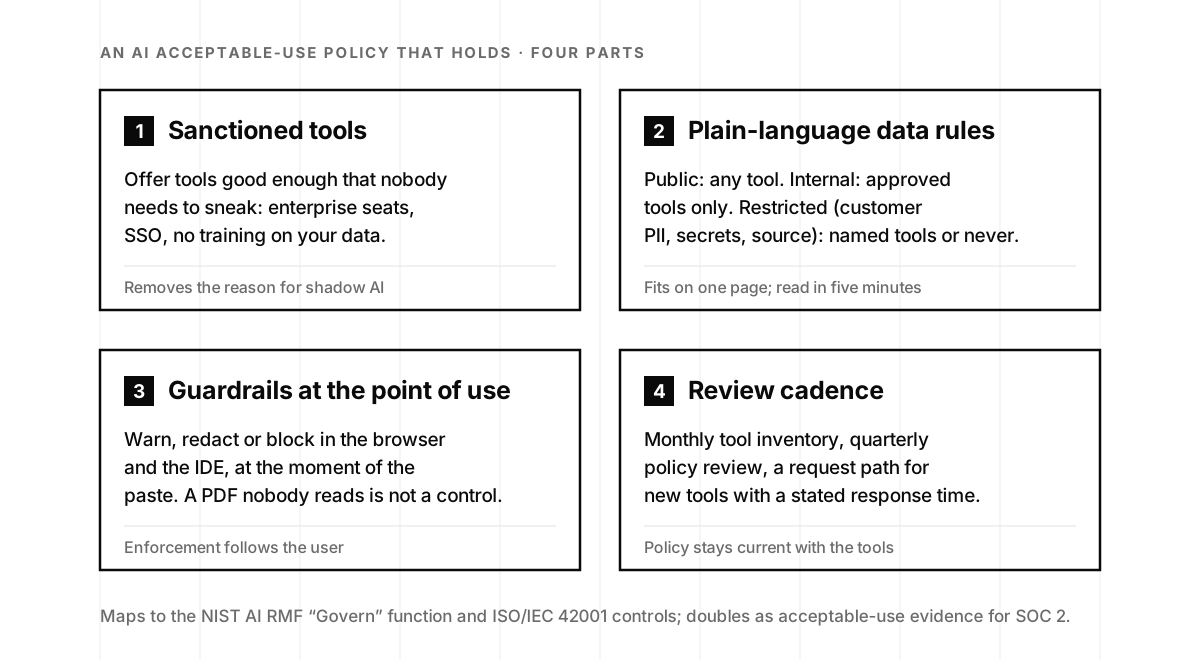
1. Offer sanctioned tools good enough that staff don’t need to sneak. Enterprise seats on the tools people already prefer, behind SSO, with training on your data switched off in the contract. Xia’s coding-assistant story is the test case: if engineers love three tools and you license one, say which one and why, and give requests for the other two a stated response time. Duplicate spend, measured by actual usage, often pays for the sanctioned seats.
2. State clearly what data can go into which tools, in plain language. Three tiers is plenty: public (any tool), internal (approved tools only), restricted (customer PII, credentials, source code, anything under contract: named tools or never). Written for the salesperson, not the lawyer. If you also build AI products, the same tiers govern what goes into your own training sets, the discipline behind training-data scrubbing.
3. Enforce the rules with guardrails at the point of use, not just a document nobody reads. The browser warns before a customer table lands in a personal chatbot; the IDE plugin strips an API key before it leaves the laptop; the sanctioned tool is one click closer than the unsanctioned one. This is the step the Kiteworks survey says 83% of organizations skip, and the step that turns a policy into a control an auditor can test.
4. Review it often, because new AI tools appear every week. Monthly inventory refresh, quarterly policy review with the people who use the tools, and a channel where anyone can ask “can I use X?” and get an answer in days. The review is where you notice that the note-taker everyone adopted in March now stores transcripts you never agreed to.
None of this is exotic. It maps onto the Govern function of the NIST AI Risk Management Framework, the voluntary framework NIST released in January 2023 with four core functions (Govern, Map, Measure, Manage), and onto the controls in ISO/IEC 42001, the December 2023 standard that specifies requirements for an AI management system at any organization that provides or uses AI. When enterprise buyers start asking AI-governance questions, an ISO 42001 program built on this policy answers them once instead of per questionnaire.
The decision: see the doorway first, then say yes
The goal is not zero AI. It’s AI you can see. Govern the doorway, and you can say yes to the tools your teams want without losing track of your data. If a SOC 2 is on your roadmap, this same acceptable-use policy is one of the documents your auditor will ask to see, and the evidence that people follow it counts toward the Security criteria (what’s actually in a SOC 2 report).
So the decision in front of you is smaller than it looks. You don’t have to pick a stance on AI this quarter. You have to find out what your people are already using and on which accounts, a two-to-four-week exercise. Netskope’s 2026 data shows what happens next when you do: the share of AI users on personal apps fell from 78 to 47 percent as enterprise-managed access rose, a number we unpack, alongside the other good reasons organizations wait and the two-arrows temperament that replaces a ban with a control, in The Art and Zen of Adopting AI. A shadow AI detection engagement gives you the inventory, the account split, and a one-page policy draft to react to, a much better meeting than the one where someone asks what happened to the customer list. If you’d rather hear the argument from the person who built a company on it, Or Eshed explains why the browser became the battleground for enterprise AI on episode 98.
Shadow AI frequently asked questions
- What is shadow AI?
- Shadow AI is the use of AI tools, features, or agents at work without the security team's approval or knowledge: pasting company data into a personal ChatGPT account, wiring an unsanctioned copilot into email or code, or installing an AI browser extension. It is the AI version of shadow IT, and it spreads faster because the tools are free, useful, and one click away.
- What are common examples of shadow AI at work?
- The most common is employees using consumer chatbots (ChatGPT by a wide margin, in the telemetry our guests see) on personal accounts. Others include multiple AI coding assistants running side by side when the company only licensed one, AI features switched on inside approved SaaS apps, meeting bots that record calls and send transcripts to a third party, and MCP connectors or agents that act with the employee's full access.
- How is shadow AI different from shadow IT?
- Shadow IT is an unapproved app; the data usually stays in a database you could, in theory, reach. Shadow AI is unapproved AI use, often hidden inside approved apps and the browser, and the data pasted into a model may be stored, logged, or used for training with no way to retrieve it. Discovery is also harder, because most of it happens inside encrypted browser sessions that network tools cannot read.
- Is shadow AI a real security risk or just hype?
- It is measurable now. IBM's 2025 Cost of a Data Breach Report found one in five organizations had a breach due to shadow AI, with about $670,000 in higher breach costs for organizations with high shadow AI use, and only 37% had policies to manage AI or detect shadow AI. The risk is real; the encouraging part is that visibility and point-of-use guardrails close most of it.
- Should we ban ChatGPT and other AI tools at work?
- A flat ban rarely works. People move to personal phones and personal accounts, where nothing touches a company log, so the ban produces more shadow AI and less visibility. Even Samsung, which restricted generative AI after a 2023 leak, paired the restriction with in-house tools and a plan for safe use. Offer sanctioned tools, set plain data rules, and enforce them where the paste happens.
- How do you detect shadow AI in a company?
- Start where AI use actually happens: the browser and the device. Browser telemetry shows which AI tools people use, whether they signed in with a personal or work account, and what was pasted or uploaded. Add SSO logs, an extension inventory, and expense reports for AI subscriptions. Network and CASB tools see domains but rarely the content, so they miss the paste itself.
- What should an AI acceptable-use policy include?
- Four things: a list of sanctioned tools good enough that nobody needs to sneak; plain-language rules for which data may go into which tools (public, internal, restricted); guardrails enforced at the point of use, so the browser or IDE warns or blocks a risky paste; and a review cadence, because new AI tools appear weekly. Keep it to a page. It maps to the NIST AI RMF Govern function and ISO/IEC 42001.
- Does shadow AI affect SOC 2 or ISO 42001?
- Yes. A SOC 2 auditor will ask for your acceptable-use policy and evidence that people follow it, which counts toward the Security criteria, and unsanctioned AI tools are exactly the kind of vendor risk they probe. ISO/IEC 42001, the AI management system standard, goes further and expects you to govern how AI is used across the organization. Solving shadow AI produces the evidence both frameworks want.