
Podcast Episode 19

Episode 019 36 min

Aaron Painter, Founder and CEO of Nametag, On Redefining Authentication

with Aaron Painter · Nametag

0:00 / 36:00

Also on Spotify, Apple Podcasts, YouTube, Podbean, Player FM

Episode 19 of The Security Podcast of Silicon Valley, published August 5, 2022. Host Jon McLachlan talks with Aaron Painter, founder and CEO of Nametag, about nearly 14 years at Microsoft, learning to build trust in a new place, the support calls where agents became identity detectives, why knowledge-based questions fail, why a password is not a passport, where the name Nametag came from, App Clips and Instant Apps, validating people and not devices, the COVID Proof detour, opt-in sharing, the bouncer who sees your home address, a value play for every department including HR and hiring fraud, why passkeys still validate the device, and his advice to look first at how your company handles account recovery. About 36 minutes.

Episode notes

In this engaging episode of a YSecurity.io production, we sit down with Aaron Painter, CEO of Nametag Inc, to explore the cutting-edge future of authentication. As we delve into the concept of "Sign in with ID," Aaron shares his vision for a world where traditional passwords and device-based authentication methods are replaced with a more secure, trusted, and user-friendly alternative.

Aaron provides a deep dive into how Nametag Inc is leading the charge in revolutionizing the way we think about securing our digital identities. Through the innovative "Sign in with ID" approach, Aaron discusses the potential to enhance privacy, reduce fraud, and streamline user experiences across the digital landscape.

Listeners will gain insights into the challenges and opportunities presented by current authentication methods and how Nametag's solutions aim to address these issues head-on. Aaron's expertise and passion for improving digital security shine through as he outlines the technical and societal implications of adopting ID-based authentication systems.

This conversation is not just about the future of authentication; it's a glimpse into the potential for technology to create more secure and efficient interactions in our increasingly digital world. Aaron's thoughtful analysis and forward-looking ideas offer valuable perspectives for anyone interested in the future of digital security, privacy, and user experience.

Tune into this YSecurity.io production for an enlightening conversation with Aaron Painter. Whether you're a tech enthusiast, a security professional, or someone curious about the next generation of authentication technologies, this episode offers a compelling look at how "Sign in with ID" could transform the way we access and protect our online presence.

Hosted by Jon McLachlan — co-founder of YSecurity.

The deep dive

A password is not a passport

Aaron Painter, founder and CEO of Nametag, with Jon on fourteen years at Microsoft, building trust in a new place, the support calls that turned agents into identity detectives, knowledge-based questions, why a password is not a passport, the name tag at a conference, App Clips, validating people and not devices, the COVID detour, opt-in sharing, the bouncer who sees your home address, a value play for every department, passkeys, and the place he told listeners to look first: account recovery.

Episode 19 of The Security Podcast of Silicon Valley aired on August 5, 2022, with Jon McLachlan hosting. The guest was Aaron Painter, founder and CEO of Nametag, which he started in early 2020 (Podbean, Apple Podcasts, Spotify). The episode is called “Aaron Painter, Founder and CEO of Nametag, On Redefining Authentication.” It has no video version.

The line that sums up the conversation comes from his answer on anonymity online.

“I’m a fan of saying a password is not the same thing as a passport, yet we often treat them as such.”

Aaron Painter, at 9:40

Listen · Aaron Painter on episode 19, from 9:32
About 25 seconds: Aaron on a password and a passport. The clip stops on its own. Read the full transcript.

This page follows the conversation in order: a section for each part of it, fourteen figures, fifteen clips from the tape, a LinkedIn post, a talk on YouTube, the full transcript, and five tools: a quiz, a scorecard for whether your account recovery validates the person, a calculator for what locked-out calls cost, a timeline, and a to-do list. Where the decodes of the tape disagree on a word, the transcript puts its best guess in brackets, and the page doesn’t quote or retell those words.

Fourteen years at Microsoft

Jon asked about his background.

“I spent 14 years of my life at Microsoft.”

Aaron Painter, at 0:27

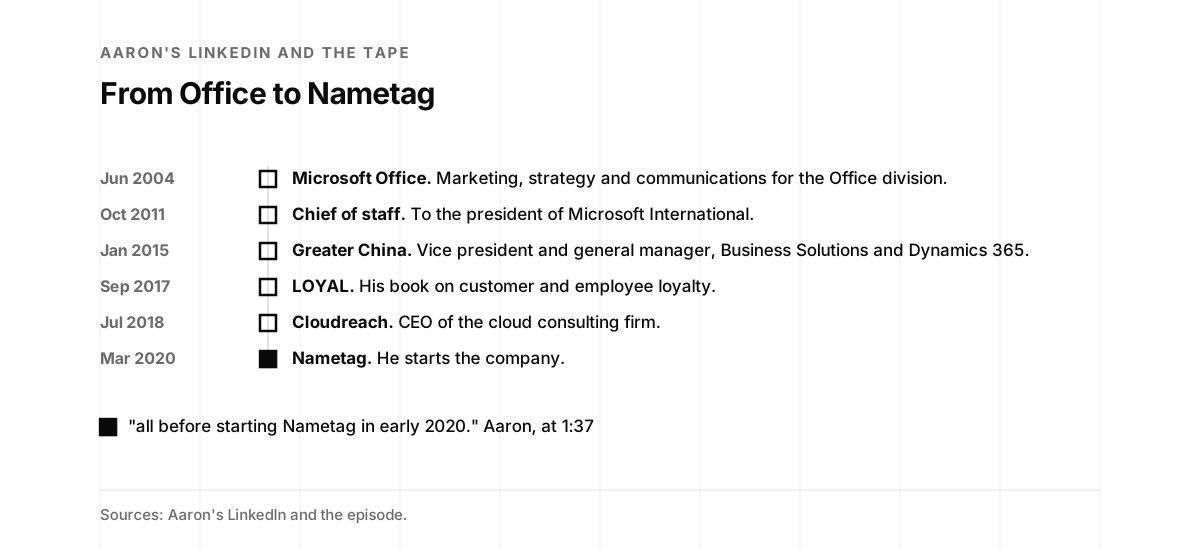
He started in product management for Office. After a couple of years he moved outside the US, and he spent most of the rest of his Microsoft career in international markets, a lot of it helping build Microsoft’s presence in emerging markets. His LinkedIn lists six Microsoft roles over 13 years and 10 months. The first, from June 2004, was in marketing, strategy and communications for the Office division. The last, from January 2015 to March 2018, was vice president and general manager for Microsoft Business Solutions and Dynamics 365 in the Greater China region (LinkedIn).

“I’m a huge Microsoft fan”

Aaron Painter, at 1:10

After Microsoft he wrote a book on customer and employee experience and the connection between the two. His LinkedIn lists it as LOYAL: A Leader’s Guide to Winning Customer and Employee Loyalty. Then he ran Cloudreach, a cloud computing consulting firm based in the UK. At the time, he said, it was AWS’s first and largest professional service partner, and it expanded quickly into Azure and GCP. His LinkedIn lists him as CEO of Cloudreach from July 2018 to December 2019. His About calls it a Blackstone portfolio company, recognized as an AWS Consulting Partner of the Year while he led it (LinkedIn).

“all before starting Nametag in early 2020.”

Aaron Painter, at 1:37

TEDx Talks posted his talk on listening, from TEDxWesleyanU, on May 7, 2018. Its description says he worked at Microsoft and traveled the world finding success by listening to others. Listening comes back on the tape, in Building trust in a new place.
Aaron's TEDx talk on listening, 15 minutes, posted on May 7, 2018. Watch on YouTube.
A timeline. June 2004: Microsoft Office, marketing, strategy and communications for the Office division. October 2011: chief of staff, to the president of Microsoft International. January 2015: Greater China, vice president and general manager, Business Solutions and Dynamics 365. September 2017: LOYAL, his book on customer and employee loyalty. July 2018: Cloudreach, CEO of the cloud consulting firm. March 2020, filled: Nametag, he starts the company. Then: "all before starting Nametag in early 2020." Aaron, at 1:37
Aaron's path from Office to Nametag. Sources: his LinkedIn and the episode.

Building trust in a new place

Jon asked whether anything early in life shaped who he is. Aaron moved often as a kid, and a move often meant a new school.

“And I quickly had to learn how to build trust.”

Aaron Painter, at 2:22

Later his career took him to new countries, often in a new job. People wondered whether he was there to report back to headquarters or to help.

“having to land somewhere new and to build trust”

Aaron Painter, at 3:31

He sees that pattern behind Nametag. Jon asked how listeners should think about trust. In person, Aaron thinks of trust forming when you know who someone is. His book talks about listening.

“when someone listens with an intent to understand, it shows respect.”

Aaron Painter, at 4:09

Mutual respect is the foundation for trust, he said. Online or over the phone, trust is harder.

“it is incredibly hard to trust the identity of someone online or on the phone.”

Aaron Painter, at 4:35

Listen · Aaron Painter on episode 19, from 3:57
About 20 seconds: Aaron on how trust forms. The clip stops on its own. Read the full transcript.

Identity detectives

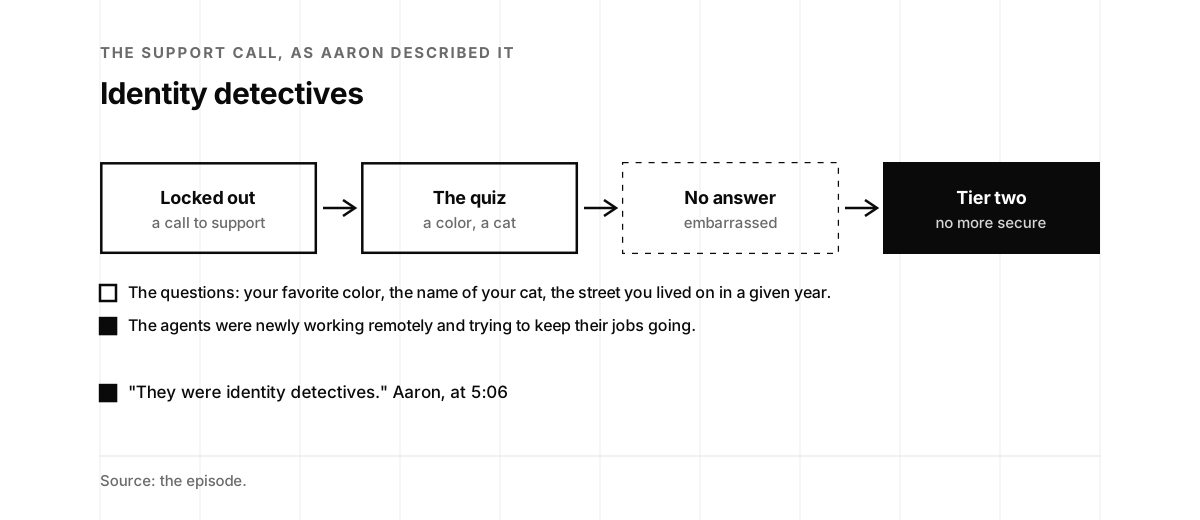
Nametag started with support calls. At the start of the pandemic, friends and family members of his had their identities stolen, and he joined their calls to customer support. The agents were newly working remotely and trying to keep their jobs going.

“They were identity detectives.”

Aaron Painter, at 5:06

Their tools were knowledge-based questions, and he called them a joke. What’s your favorite color? What’s the name of your cat? They didn’t have a cat. What street did you live on in a given year? People couldn’t remember the answers. They got embarrassed and frustrated, and the call went to tier two.

“And at the end of the day, it wasn’t any more secure.”

Aaron Painter, at 5:42

Knowledge-based authentication asks for private information to prove who someone is. Its static form, shared secret questions, is common at banks, financial services companies and email providers, including as a fall-back when someone forgets a password (Wikipedia).

Phones can do almost anything today, he said,

“except actually prove who we really are.”

Aaron Painter, at 5:49
Listen · Aaron Painter on episode 19, from 4:54
About 25 seconds: Aaron on the calls that started Nametag. The clip stops on its own. Read the full transcript.
Four boxes joined by arrows. Locked out, a call to support. The quiz, a color, a cat. No answer, dashed, embarrassed. Tier two, filled, no more secure. Below, a list. The questions: your favorite color, the name of your cat, the street you lived on in a given year. Filled: the agents were newly working remotely and trying to keep their jobs going. Then: "They were identity detectives." Aaron, at 5:06
A support call as Aaron described it. Source: the episode.

A huge threat vector

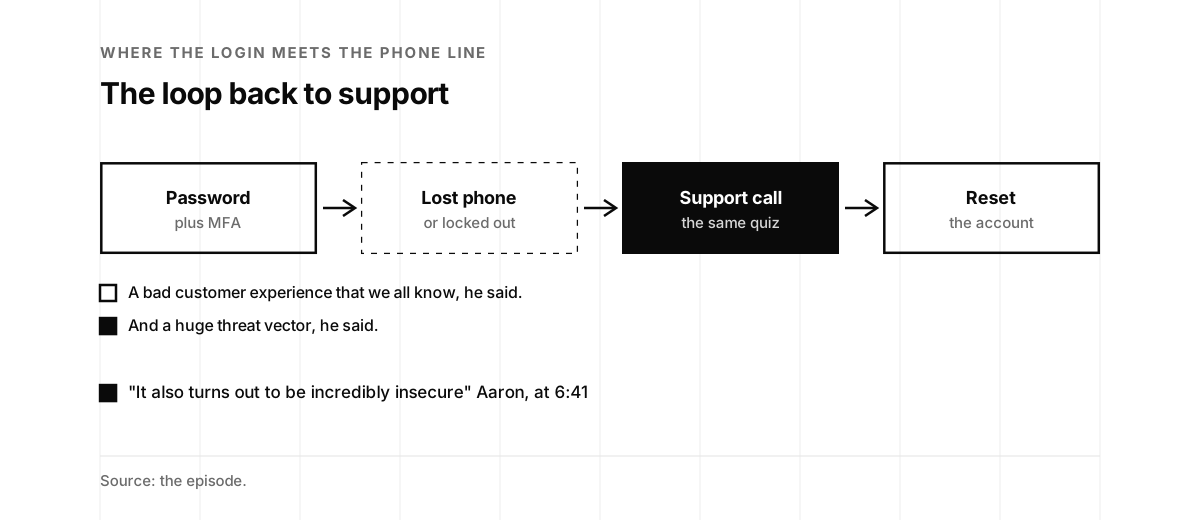
The support line also backs up the login. Online accounts have a username and a password, with two-factor and multi-factor authentication around them, which he called hard to use and difficult to set up. Then you lose your phone, get a new phone or get locked out, and you’re back on the phone with support.

“It turns out it’s a really bad customer experience that we all know.”

Aaron Painter, at 6:37

“It also turns out to be incredibly insecure”

Aaron Painter, at 6:41

Jon added that his favorite color changes, so on old accounts he can only guess at the answer. On episode 57, Vijay Balasubramaniyan of Pindrop showed how a phone menu that greets a caller by name tells a fraudster where someone banks.
Listen · Aaron Painter on episode 19, from 6:09
About 35 seconds: Aaron on the loop back to support. The clip stops on its own. Read the full transcript.
Four boxes joined by arrows. Password, plus MFA. Lost phone, dashed, or locked out. Support call, filled, the same quiz. Reset, the account. Below, a list. A bad customer experience that we all know, he said. Filled: and a huge threat vector, he said. Then: "It also turns out to be incredibly insecure" Aaron, at 6:41
The loop from a lost phone back to the support call. Source: the episode.

The knob

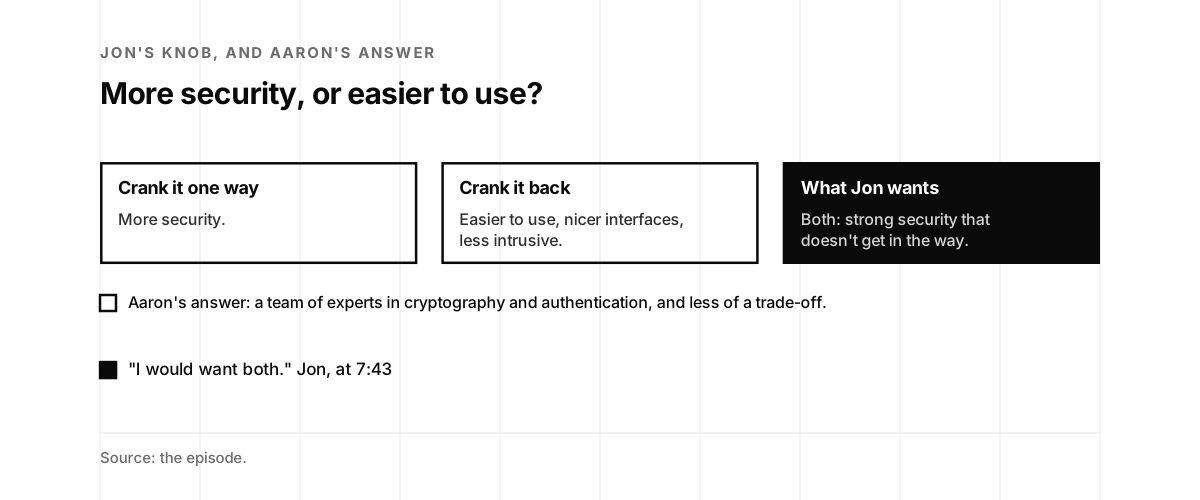
Jon said you know you have a good problem when you find a knob. Crank it one way and you get more security. Crank it back and it gets easier to use.

He called those knobs cop-outs.

“I would want both.”

Jon McLachlan, at 7:43

He wants security that protects what he cares about and doesn’t get in the way. Aaron credited his team: cybersecurity professionals, experts in cryptography and authentication, and people who had spent their careers defending countries from nation-state threats.

He said it’s rare to get to brag that a cybersecurity product is really slick.

“It doesn’t need to be a compromise necessarily.”

Aaron Painter, at 8:36

Jon had seen a demo and didn’t have to download an app.
Listen · Jon McLachlan on episode 19, from 7:20
About 25 seconds: Jon on the knob. The clip stops on its own. Read the full transcript.
Three cards side by side. Crank it one way: more security. Crank it back: easier to use, nicer interfaces, less intrusive. What Jon wants, filled: both, strong security that doesn't get in the way. Below: Aaron's answer, a team of experts in cryptography and authentication, and less of a trade-off. Then: "I would want both." Jon, at 7:43
Jon's knob, and Aaron's answer that the trade-off can shrink. Source: the episode.

A password is not a passport

Jon asked for a truth that most people miss. Aaron believes the internet was built around anonymity, maybe by accident, maybe on purpose. Early computing had smaller communities, where you roughly knew who was from which academic institution or government organization. As the internet spread to almost everyone, anonymity took over. Anyone can spin up a new Gmail address and be anyone, or do something bad and switch identities.

“I think there’s value in anonymity.”

Aaron Painter, at 10:01

As digital lives come to rely on those approaches, he thinks people need another option: communities and platforms where it is sure who is accessing an account. The companies he talks with use that trust to set their platforms apart, and to stop fraud, ID theft and crime.

“And so I believe that safe communities know their members”

Aaron Painter, at 10:49

He also believes platforms have a responsibility to know the real identity of the person using them. He thinks most people miss it, he said, though more of them are starting to get it.
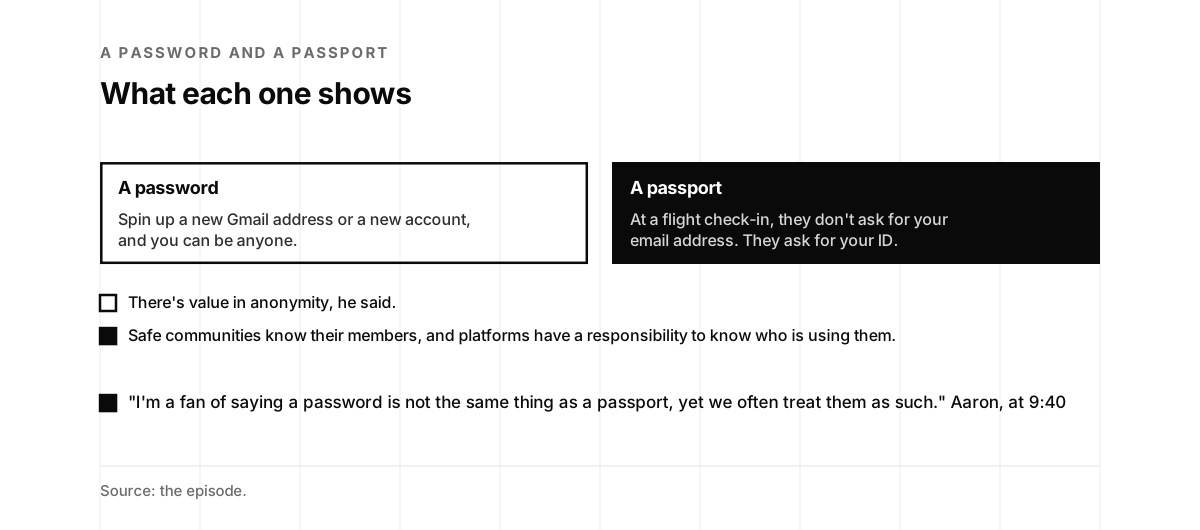
Two cards side by side. A password: spin up a new Gmail address or a new account, and you can be anyone. A passport, filled: at a flight check-in, they don't ask for your email address, they ask for your ID. Below, a list. There's value in anonymity, he said. Filled: safe communities know their members, and platforms have a responsibility to know who is using them. Then: "I'm a fan of saying a password is not the same thing as a passport, yet we often treat them as such." Aaron, at 9:40
What a password proves and what a passport proves. Source: the episode.

Where the name came from

Jon asked whether this is where the name came from. A name tag is a physical sign of who a person is, Aaron said.

“when you go to check in for a flight, they don’t ask for your email address. They ask for your ID.”

Aaron Painter, at 11:20

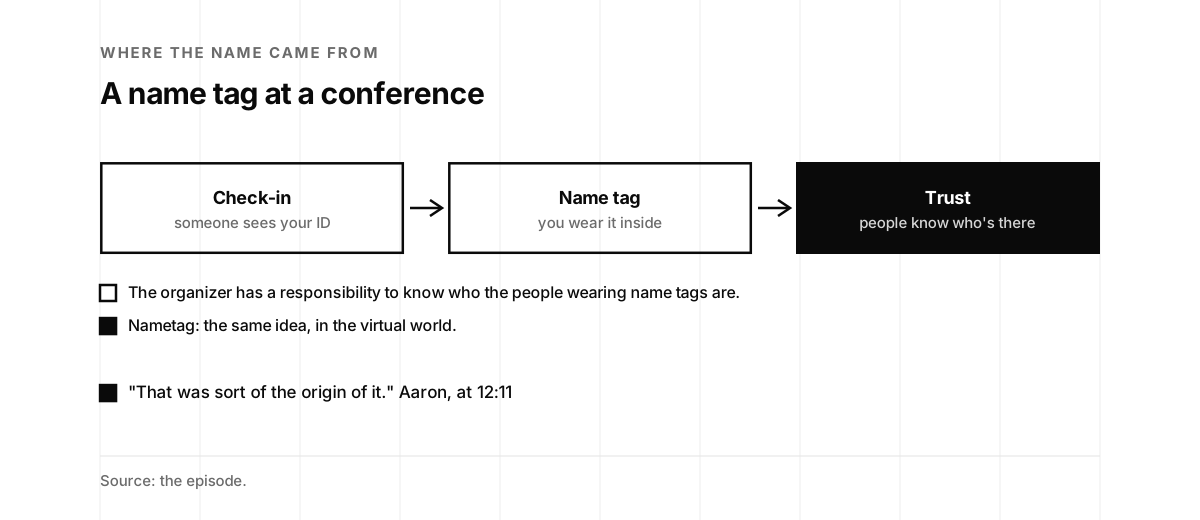
At a conference, someone checks you in and gives you a physical name tag. The organizer has a responsibility to know who the people wearing name tags are, so the community can build trust. Nametag set out to bring that into the virtual world, with the same confidence and assurance.

“That was sort of the origin of it.”

Aaron Painter, at 12:11
Listen · Aaron Painter on episode 19, from 11:20
About 30 seconds: Aaron on the name tag. The clip stops on its own. Read the full transcript.
Three boxes joined by arrows. Check-in, someone sees your ID. Name tag, you wear it inside. Trust, filled, people know who's there. Below, a list. The organizer has a responsibility to know who the people wearing name tags are. Filled: Nametag, the same idea, in the virtual world. Then: "That was sort of the origin of it." Aaron, at 12:11
A conference check-in, and the same idea online. Source: the episode.

App Clips

Jon asked about the best day. For Aaron, it was a change to Nametag’s experience.

“using this technology called App Clips from Apple”

Aaron Painter, at 12:34

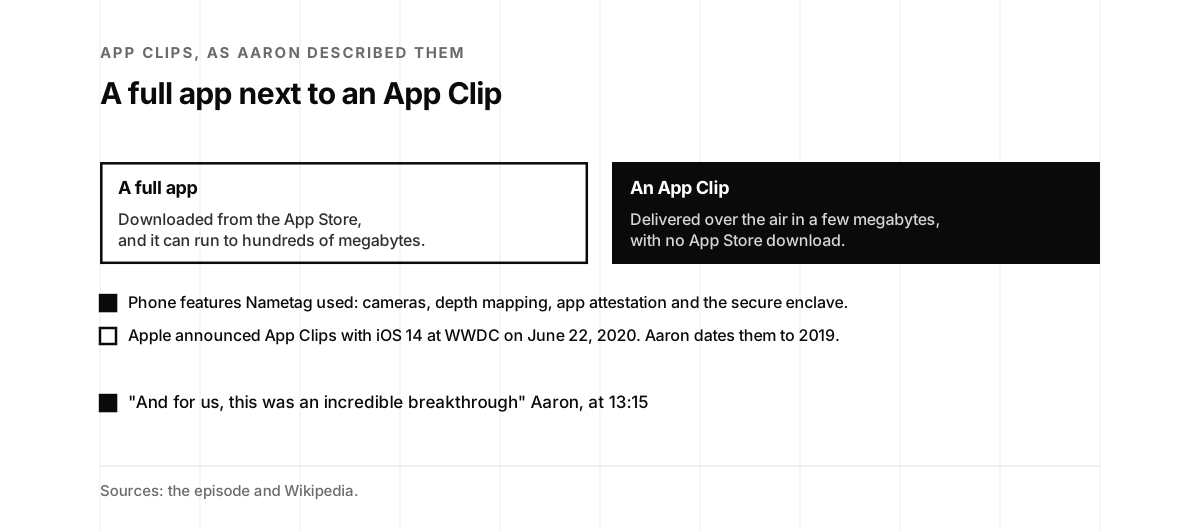
Instant Apps did the same on Android. Nametag’s earliest versions had users download an identity authenticator app, with the person’s identity bound into the app and stored on the phone. An App Clip skips the App Store. It arrives over the air in a package of a few megabytes and gives much of an app without the download. Big apps run to hundreds of megabytes, he said, so their makers wonder what they could do with five, 10 or 15. Nametag fit its check into that package and kept the phone’s native security features: cameras, depth mapping, app attestation and the secure enclave.

“And for us, this was an incredible breakthrough”

Aaron Painter, at 13:15

Apple announced App Clips with iOS 14 at WWDC on June 22, 2020, and released iOS 14 on September 16, 2020. Wikipedia describes App Clips as pared back, with few OS permissions, and found in person through NFC tags or QR codes (Wikipedia). On the tape, Aaron dates App Clips to 2019.

Jon asked whether Nametag saw App Clips coming. A friend who had started a company showed Aaron the technology in early 2020. Aaron thinks Apple meant App Clips for in-person use, and the pandemic got in the way.

“QR codes have probably been one of the greatest resurgences of the pandemic”

Aaron Painter, at 16:32
Listen · Aaron Painter on episode 19, from 12:55
About 20 seconds: Aaron on App Clips. The clip stops on its own. Read the full transcript.
Two cards side by side. A full app: downloaded from the App Store, and it can run to hundreds of megabytes. An App Clip, filled: delivered over the air in a few megabytes, with no App Store download. Below, a list. Filled: phone features Nametag used, cameras, depth mapping, app attestation and the secure enclave. Apple announced App Clips with iOS 14 at WWDC on June 22, 2020, and Aaron dates them to 2019. Then: "And for us, this was an incredible breakthrough" Aaron, at 13:15
A full app next to an App Clip, and the phone features Nametag used. Sources: the episode and Wikipedia.

Validate people, not devices

Much of authentication validates the wrong thing, Aaron said.

“we should be validating people and not devices.”

Aaron Painter, at 18:02

A phone can be lost, and someone else can be on a different phone. Biometrics run into setup. His example was Vanguard, where your voice can be your password.

“But if you happen to have my credentials, and you go set up your voice as my password, that’s probably not so great for me.”

Aaron Painter, at 18:33

Identity validation, scanning an ID and a selfie, isn’t new, he said, but it happens once and isn’t reusable. A bank checks your ID in a KYC flow to tick a regulatory box. When you log in or call later, you’re back to security questions or a device check.

“to bring together those two worlds of identity validation and MFA into something that was reusable.”

Aaron Painter, at 19:21

On episode 92, Jasson Casey of Beyond Identity moved the question from whether a video is fake to who is behind it, and on what device.
Listen · Aaron Painter on episode 19, from 18:26
About 15 seconds: Aaron on enrolling a voice. The clip stops on its own. Read the full transcript.
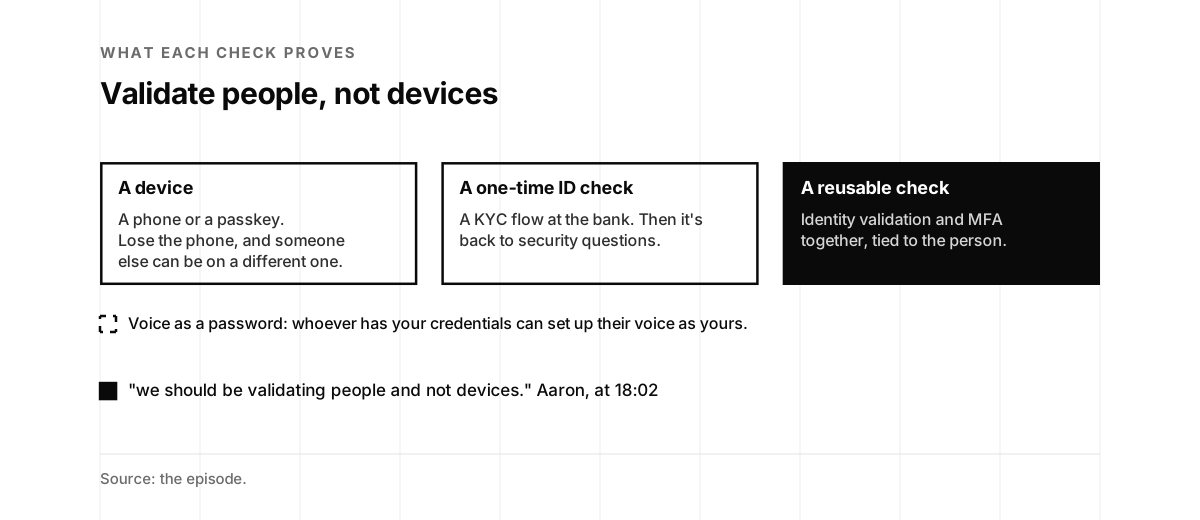
Three cards side by side. A device: a phone or a passkey, and if you lose the phone, someone else can be on a different one. A one-time ID check: a KYC flow at the bank, then it's back to security questions. A reusable check, filled: identity validation and MFA together, tied to the person. Below, dashed: voice as a password, whoever has your credentials can set up their voice as yours. Then: "we should be validating people and not devices." Aaron, at 18:02
What a device check, a one-time ID check and a reusable check each prove. Source: the episode.

The COVID detour

Jon asked about the worst day. Nametag first went to market with a COVID verification product. Within about a week, a bunch of companies asked for help with vaccine verification. A host at a restaurant had to compare a vaccine card with an ID and became the identity detective. Employers didn’t want their HR teams doing that.

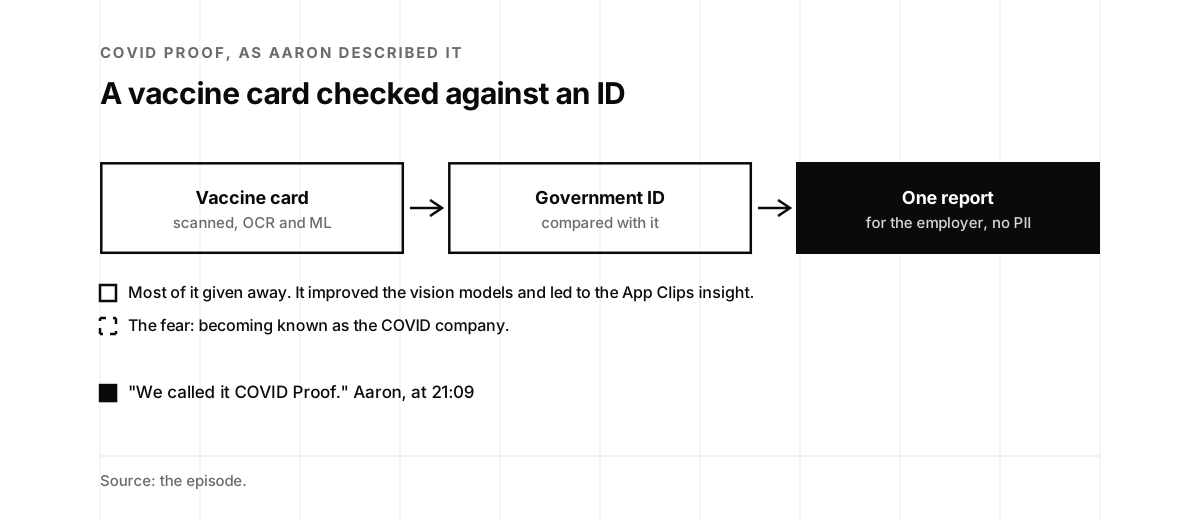
So Nametag scanned the data on a CDC vaccination card, read it with OCR and machine learning, compared it with the government-issued ID, and gave employers one report without the PII.

“We called it COVID Proof.”

Aaron Painter, at 21:09

They gave most of it away. It improved their vision models and led to the insight on user experience and App Clips. Event organizers still sign themselves up, he said. But on launch day he had a fear.

“are we going to become known as, like, this COVID company?”

Aaron Painter, at 21:48

At the same time, it helped people get back to work.

“It was both good and a little bit scary about what it might mean for the future.”

Aaron Painter, at 22:09
Listen · Aaron Painter on episode 19, from 20:34
About 35 seconds: Aaron on COVID Proof. The clip stops on its own. Read the full transcript.
Three boxes joined by arrows. Vaccine card, scanned, OCR and ML. Government ID, compared with it. One report, filled, for the employer, no PII. Below, a list. Most of it given away, it improved the vision models and led to the App Clips insight. Dashed: the fear, becoming known as the COVID company. Then: "We called it COVID Proof." Aaron, at 21:09
How COVID Proof checked a vaccine card against an ID. Source: the episode.

Let the computer do the dirty work

Jon said the pandemic paperwork was a job for computers.

“I always say that computers should always do the dirty work.”

Jon McLachlan, at 22:30

Aaron believes in automation, and in users controlling their data. Nametag uses an opt-in model.

“we only share when the user consents to share information.”

Aaron Painter, at 23:18

He is still shocked by how many modern companies, in Web3 and elsewhere, verify identity by hand. Fraud is at an all-time high despite MFA and identity verification, he said.

“And so what we’re doing today isn’t working.”

Aaron Painter, at 24:01

Someone once asked Jon what makes a great engineer.

“I said laziness.”

Jon McLachlan, at 24:22

An engineer who does the same thing over and over should write a script, he said, and solve the problem once and for all, for everybody.

Listen · Aaron Painter on episode 19, from 23:28
About 40 seconds: Aaron on why manual checks aren't working. The clip stops on its own. Read the full transcript.

The bouncer problem

Jon said it’s unfortunate that there’s a gap between the real world and the digital one.

“There is a gap.”

Aaron Painter, at 25:07

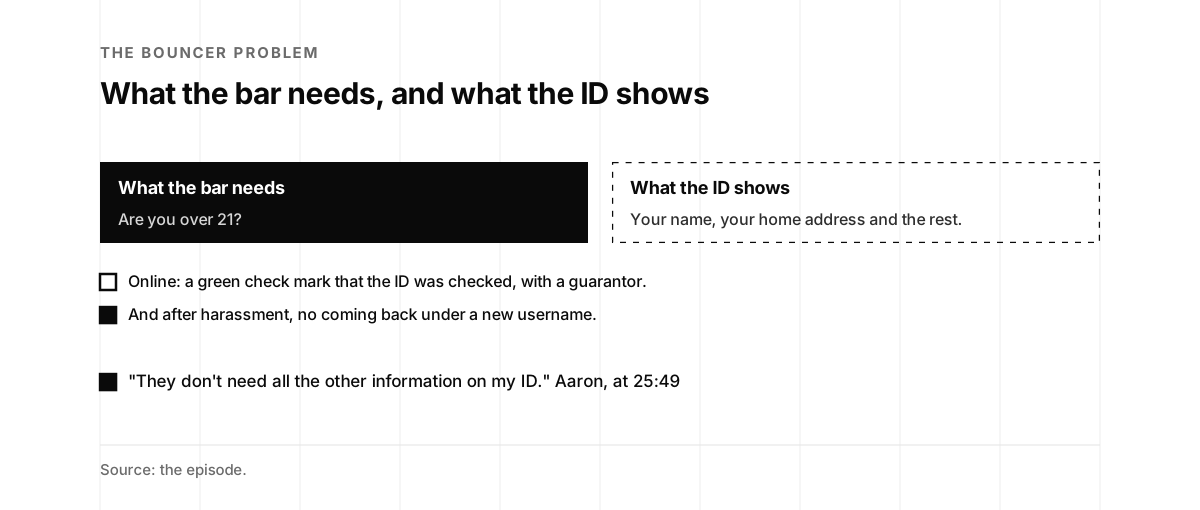
Knowing who someone is doesn’t rule out a pseudonym or an alias, he said, or protecting what you share. At a bar in the US, staff only need to know you’re over 21, and you hand over an ID with your home address on it.

“They don’t need all the other information on my ID.”

Aaron Painter, at 25:49

Online, a platform might not need the data at all. It might only need to say the ID has been checked, with a guarantor, and show a green check mark. If someone harasses others, the platform can deal with that person and stop them from coming back under a new username.

Jon said many security practices don’t work if anyone can create as many identities as they want. He joked that a job as a bouncer at a local bar comes with a bunch of valid identities.
Listen · Aaron Painter on episode 19, from 25:31
About 20 seconds: Aaron on the bouncer. The clip stops on its own. Read the full transcript.
Two cards side by side. What the bar needs, filled: are you over 21? What the ID shows, dashed: your name, your home address and the rest. Below, a list. Online: a green check mark that the ID was checked, with a guarantor. Filled: and after harassment, no coming back under a new username. Then: "They don't need all the other information on my ID." Aaron, at 25:49
What a bouncer needs to know, and what an ID shows. Source: the episode.

A more trusted human internet

Jon asked what success looks like. Aaron’s vision is a more trusted human internet. He sees Sign in with ID becoming a standard: on the web, in apps, in phone calls and customer support, and in person, where you scan a QR code at a door to open it or register as a visitor.

“a digital, reusable form of identification that a user is in control of”

Aaron Painter, at 28:13

He spent most of his days talking with companies, some trying to disrupt themselves and some just starting out.

“I don’t know why we sign documents, for example, with an IP address.”

Aaron Painter, at 28:36

His list ran from document signatures to online dating, gig worker economies and home healthcare workers. He sees a world where users trust the platforms they use, or else make room for new ones.

Listen · Aaron Painter on episode 19, from 27:55
About 30 seconds: Aaron on Sign in with ID as a standard. The clip stops on its own. Read the full transcript.

A value play for every department

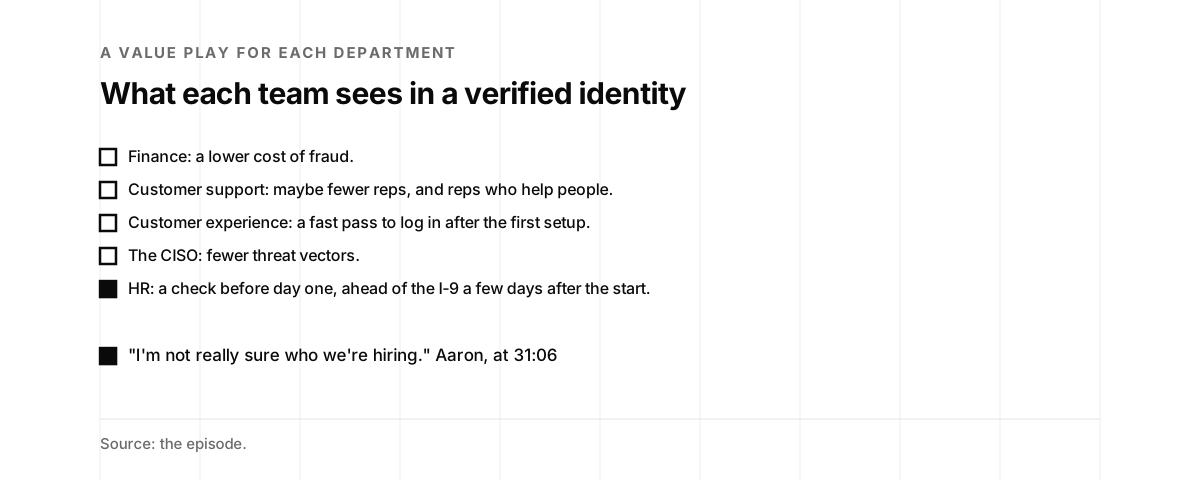
Jon asked whether customers see a large payoff in the fraud department. Each department gets excited about its own thing, Aaron said, and each has its own value play. Finance sees a lower cost of fraud. Customer support may need fewer reps, and those reps can help people. Customer experience teams get a fast pass to log in after the first setup. A CISO sees fewer threat vectors. HR teams bring a newer worry.

“I’m not really sure who we’re hiring.”

Aaron Painter, at 31:06

In the cases they bring him, a new hire shows up on day one, steals corporate resources and disappears, before the I-9 check that comes a few days after the start. Form I-9 has been used since 1986 to verify the identity and work authorization of employees in the US (Wikipedia). HR leaders asked to use Nametag before someone starts, as part of a job pre-qualification flow. Hiring Is Now an Attack Surface, on our blog, covers fake candidates and laptop farms. On episode 71, Ben Colman of Reality Defender talked about AI-generated job interviews.
Listen · Aaron Painter on episode 19, from 31:03
About 20 seconds: Aaron on hiring fraud. The clip stops on its own. Read the full transcript.
A list. Finance: a lower cost of fraud. Customer support: maybe fewer reps, and reps who help people. Customer experience: a fast pass to log in after the first setup. The CISO: fewer threat vectors. Filled: HR, a check before day one, ahead of the I-9 a few days after the start. Then: "I'm not really sure who we're hiring." Aaron, at 31:06
What each department sees in a verified identity, as Aaron listed them. Source: the episode.

Passkeys validate the device

Jon asked about password managers. He and Aaron share a belief.

“we are not passwords.”

Jon McLachlan, at 32:05

Aaron uses a password manager every day, since there isn’t necessarily a better solution, he said. As a security professional, he couldn’t imagine using the same password in different places.

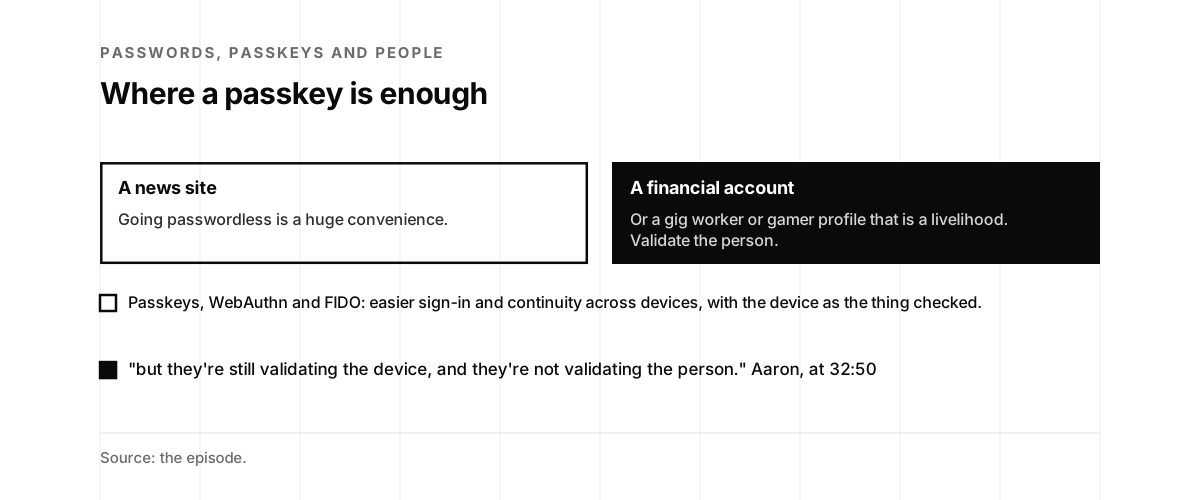
Passkeys, WebAuthn and the work from FIDO make sign-in easier and help with continuity across devices, he said, and they’re a step toward ending the password.

“but they’re still validating the device, and they’re not validating the person.”

Aaron Painter, at 32:50

For a news site, going passwordless is a huge convenience. A financial account is different, and so is a gig worker or gamer profile that is someone’s livelihood.

“There are things where validating the person makes an enormous difference.”

Aaron Painter, at 33:59

A passkey is a pair of cryptographic keys that the user’s authenticator creates for an account. The private key stays on the authenticator (Wikipedia). Jon came back to his line with Deepak Dutt of Zighra on episode 78. On episode 30, Dominik Schürmann described heylogin, a password manager with no master password. On episode 61, Taher Elgamal, the father of SSL, said passwords are his fault, because SSL made client certificates optional.
Listen · Aaron Painter on episode 19, from 32:27
About 30 seconds: Aaron on passkeys. The clip stops on its own. Read the full transcript.
Two cards side by side. A news site: going passwordless is a huge convenience. A financial account, filled: or a gig worker or gamer profile that is a livelihood, validate the person. Below: passkeys, WebAuthn and FIDO, easier sign-in and continuity across devices, with the device as the thing checked. Then: "but they're still validating the device, and they're not validating the person." Aaron, at 32:50
Where a passkey is enough, and where Aaron wants the person validated. Source: the episode.

How does your company handle account recovery?

Jon asked for parting words. Aaron believes identity is fundamental to cybersecurity, and too often handled as a separate effort.

“go look into how your organization handles account recoveries.”

Aaron Painter, at 34:43

“What do you do on customer support when someone calls and says they’re locked out?”

Aaron Painter, at 34:47

Many companies he talks with are finding a threat vector they hadn’t known about.

“because it’s unfortunately an easy thing to get around.”

Aaron Painter, at 34:58

Jon asked whether developers could try it. Nametag had a demo and trial site and API documentation at getnametag.com, Aaron said, along with a blog.
Listen · Aaron Painter on episode 19, from 34:40
About 20 seconds: Aaron on account recovery. The clip stops on its own. Read the full transcript.
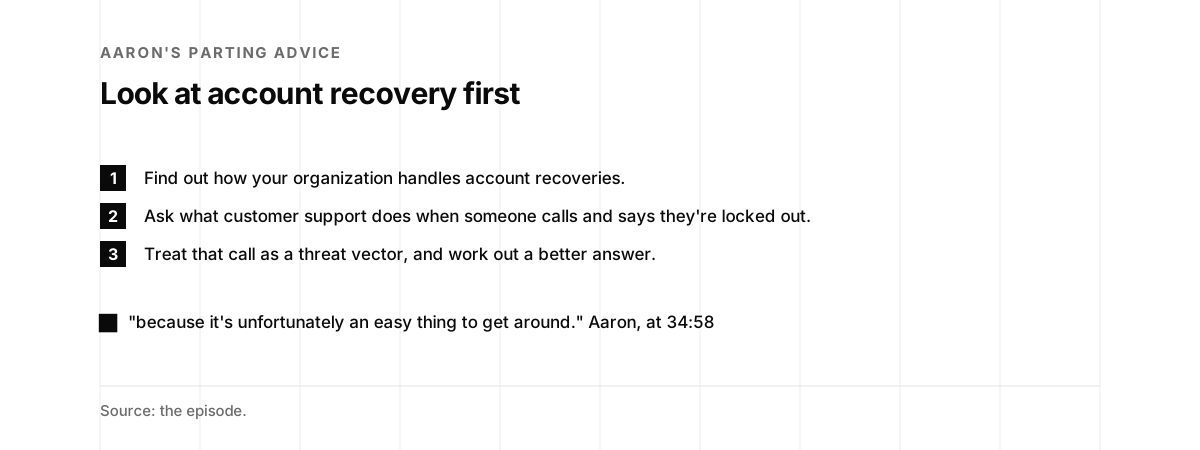
A numbered list. One: find out how your organization handles account recoveries. Two: ask what customer support does when someone calls and says they're locked out. Three: treat that call as a threat vector, and work out a better answer. Then: "because it's unfortunately an easy thing to get around." Aaron, at 34:58
Aaron's parting advice as a checklist. Source: the episode.

What happened after the tape

A call to the help desk. In September 2023, a cyberattack by the hacking group Scattered Spider disrupted MGM Resorts’ hotel and casino operations for several days. MGM refused to pay a ransom and said cyber insurance would cover its $100 million in losses (Wikipedia). Wikipedia’s article on the group says it called MGM’s help desk posing as an employee it had found on LinkedIn, and got in on September 11, 2023 (Wikipedia). On June 27, 2025, the FBI warned on X that Scattered Spider often impersonates employees or contractors to get IT help desks to grant access, including by adding MFA devices to compromised accounts (X). The episode 78 page shows that alert. It is the kind of call Aaron told listeners to look into, in How does your company handle account recovery?

Nametag after the tape. Nametag’s press room lists the milestones since. On October 3, 2025, it introduced Nametag Signa, to make sure actions are taken by a human. On November 10, 2025, Yubico chose Nametag for a new identity verification program. On May 22, 2026, it launched Nametag Recruit, for identity assurance in enterprise hiring, with Workday and Greenhouse. On June 23, 2026, it deepened its partnership with ServiceNow to protect enterprise helpdesks against impersonation. On July 31, 2026, Gartner named it a Visionary in the 2026 Magic Quadrant for Identity Verification (Nametag). The hiring and helpdesk work picks up what Aaron said on the tape, in A value play for every department.

A new kind of identity check. On LinkedIn, Aaron wrote that when Nametag started, “‘identity verification’ meant one thing: checking a customer at signup.” Nobody was asking whether a company needed to verify its own employees, he wrote.

Aaron on Nametag's place in Gartner's Magic Quadrant for Identity Verification.

Aaron Painter · August 3, 2026
His post on the Gartner Magic Quadrant. View on LinkedIn.

A book on deepfakes. His LinkedIn headline names him as the author of Deepfaked: Restoring Trust in the Age of AI Impersonation. His About describes Nametag as identity verification that protects organizations from impersonators and deepfakes (LinkedIn).

More on this site. On episode 57, a scorecard asks whether a cloned voice would get through your phone lines. On episode 17, Sean Cassidy wanted a way to stop support agents from being tricked into installing remote access software. On the blog, Deepfake Attacks Keep Working Because We Keep Detecting Instead of Proving covers identity proof.
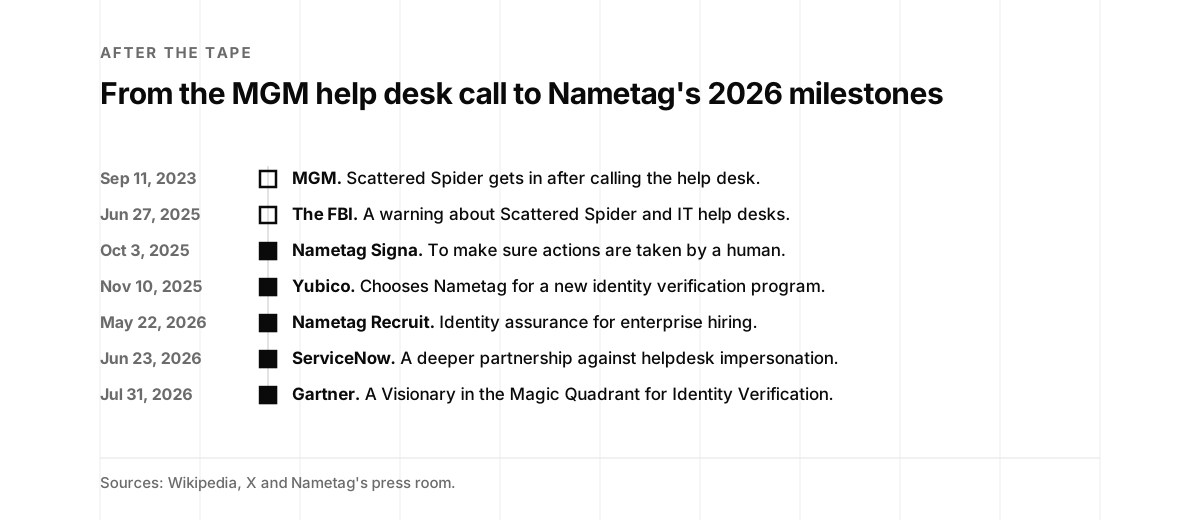
A timeline. September 11, 2023: MGM, Scattered Spider gets in after calling the help desk. June 27, 2025: the FBI, a warning about Scattered Spider and IT help desks. October 3, 2025, filled: Nametag Signa, to make sure actions are taken by a human. November 10, 2025, filled: Yubico chooses Nametag for a new identity verification program. May 22, 2026, filled: Nametag Recruit, identity assurance for enterprise hiring. June 23, 2026, filled: ServiceNow, a deeper partnership against helpdesk impersonation. July 31, 2026, filled: Gartner, a Visionary in the Magic Quadrant for Identity Verification.
After the tape, from the MGM help desk call to Nametag's 2026 milestones. Sources: Wikipedia, X, Nametag's press room and LinkedIn.

Did you catch it? A seven-question quiz

Seven questions from the episode. Each answer links the moment in the transcript.

Quiz · seven questions

Did you catch it?

Pick an answer to see whether you caught it.

  1. How many years did Aaron spend at Microsoft?

    a. "I spent 14 years of my life at Microsoft." Transcript, 0:27.

  2. What did Aaron call the support agents on those calls?

    b. "They were identity detectives." Transcript, 5:06.

  3. A password is not the same thing as what?

    c. "I'm a fan of saying a password is not the same thing as a passport, yet we often treat them as such." Transcript, 9:40.

  4. Which Apple technology let Nametag skip the app download?

    a. "using this technology called App Clips from Apple" Transcript, 12:34.

  5. What did Nametag call its COVID verification product?

    c. "We called it COVID Proof." Transcript, 21:09.

  6. What does a bar need to know from your ID, in Aaron's example?

    b. "They don't need all the other information on my ID." Transcript, 25:49.

  7. Where did Aaron tell listeners to look first?

    a. "go look into how your organization handles account recoveries." Transcript, 34:43.

Does your account recovery validate the person?

Eight questions on what happens when someone says they’re locked out, and what your sign-in checks. Each tip quotes the tape or paraphrases it, and links its section.

Scorecard · eight questions

Does your account recovery validate the person?

Answer for your company as it runs today. If two answers fit, pick the lower one.

  1. When a customer calls and says they're locked out, how does support check who they are?

    • Questions like a pet's name or an old street
    • A code sent to the phone or email on file
    • The person proves who they are with an ID check tied to the account

    "They were identity detectives." See Identity detectives.

  2. Who can reset MFA for an employee who calls the help desk?

    • Any agent, after a few questions
    • An agent, after a callback to a number on file
    • No one, until the person proves who they are again

    "What do you do on customer support when someone calls and says they're locked out?" See How does your company handle account recovery?

  3. What happens when someone loses their phone?

    • Support starts over with security questions
    • A manual review that takes days
    • They verify again with an ID and a selfie

    Aaron's loop: you lose your phone, get locked out, and end up back on the phone with support. See A huge threat vector.

  4. For your highest-risk actions, what does your sign-in check?

    • A password
    • A device, through a passkey or an authenticator app
    • The person

    "we should be validating people and not devices." See Validate people, not devices.

  5. When someone sets up voice or face login, how do you know it's the right person?

    • Whoever has the credentials can set it up
    • We check the email on the account first
    • We validate the person before setup

    Aaron's Vanguard example: someone with his credentials could set up their voice as his password. See Validate people, not devices.

  6. When do you check that a new hire is who they say they are?

    • At the I-9, a few days after they start
    • On a video interview
    • Before day one, with an ID check tied to the person

    "I'm not really sure who we're hiring." See A value play for every department.

  7. How much personal data do you keep to verify someone?

    • The whole ID, kept on file
    • The whole ID, deleted later
    • Only the fact we need, such as over 21

    "They don't need all the other information on my ID." See The bouncer problem.

  8. Can a banned user come back under a new username?

    • Yes, easily
    • Sometimes we catch it
    • No, accounts are tied to a verified person

    Aaron wants platforms to stop the same person coming back under a new username. See The bouncer problem.

Identity detectives

Your agents quiz callers, and a caller with a good story gets in. Start with the locked-out call: decide what a caller must prove before anyone resets a login.

Turning the knob

Some checks are strong, and the recovery path is weaker than the sign-in. Next, move MFA resets and new hires onto a check of the person.

Validating people

Recovery and sign-in both check the person. Keep only the data you need, and test the help desk with a practice call.

What do locked-out calls cost?

Aaron’s parting advice was to look at what happens when someone calls and says they’re locked out. This calculator counts the agent time those calls take.

Calculator

What do locked-out calls cost?

Four numbers: the people with accounts, the locked-out calls each person makes a year, the minutes a call takes, and what an agent hour costs.

$20,000agent cost a year
2,500locked-out calls a year
500 hagent hours a year

Locked-out calls a year: 2,500. Agent hours: 500 h. Agent cost: $20,000. Each of those calls is a chance for a caller to talk past the checks.

The calculator counts agent time only, and leaves out fraud losses and the cost to the person who is locked out. The defaults are placeholders: put in your own numbers.

From Microsoft to Nametag

Aaron’s path, the technology and incidents he talked about, and the episodes on this site that pick up the thread. Filter by topic.

Timeline

From Microsoft to Nametag

  1. Microsoft Office

    Marketing, strategy and communications for the Office division, his first Microsoft role (LinkedIn, on this page).

  2. Chief of staff

    To the president of Microsoft International (LinkedIn).

  3. Greater China

    Vice president and general manager for Microsoft Business Solutions and Dynamics 365 (LinkedIn).

  4. LOYAL

    His book on customer and employee loyalty (LinkedIn).

  5. A TEDx talk

    On how listening can change work (YouTube, on this page).

  6. Cloudreach

    CEO of the cloud consulting firm (LinkedIn).

  7. Nametag

    He starts the company (LinkedIn, on this page).

  8. App Clips

    Apple announces them with iOS 14 at WWDC (Wikipedia, on this page).

  9. iOS 14

    Apple releases it, with App Clips (Wikipedia).

  10. Episode 19

    Aaron on the show (Podbean, transcript).

  11. Episode 30

    Dominik Schürmann on a password manager with no master password (episode page).

  12. The MGM help desk

    Scattered Spider gets in after calling MGM's help desk (Wikipedia, on this page).

  13. Episode 57

    Vijay Balasubramaniyan on what a phone line gives away (episode page).

  14. Episode 61

    Taher Elgamal on why passwords are his fault (episode page).

  15. The FBI on help desks

    A warning about Scattered Spider and IT help desks (X).

  16. Episode 78

    Deepak Dutt, and "we are not passwords" a year later (episode page).

  17. Nametag Signa

    To make sure actions are taken by a human (Nametag).

  18. Yubico

    Chooses Nametag for a new identity verification program (Nametag).

  19. Episode 92

    Jasson Casey on who is on the other end (episode page).

  20. Nametag Recruit

    Identity assurance for enterprise hiring (Nametag, on this page).

  21. ServiceNow

    A deeper partnership to protect enterprise helpdesks against impersonation (Nametag).

  22. A Gartner Visionary

    In the 2026 Magic Quadrant for Identity Verification (Nametag, on this page).

  23. His post on the quadrant

    On how identity verification used to mean checking a customer at signup (LinkedIn).

What to do this week

Five things, in the order of the episode.

  1. Make a practice call. Call your own support line as a locked-out customer, and note what the agent asks, as in Identity detectives.
  2. Retire the security questions. List where your company still asks for a pet’s name or an old street, and plan what replaces each one, as in A huge threat vector.
  3. Check who sets up the factor. For voice, face and passkey setup, write down what proves it’s the right person, as in Validate people, not devices.
  4. Verify hires before day one. Move the identity check ahead of the start date, as in A value play for every department. Our Counter Business Espionage & IP Protection work covers hiring diligence.
  5. Take the scorecard, then get help. Take the scorecard. A vCISO can lead the account recovery work, and a penetration test can add physical and social testing. If you want to talk it through, book 15 minutes with us.

Key takeaways

  1. Look at account recovery first

    Aaron's parting advice: find out what customer support does when someone calls and says they're locked out. Many companies he talks with are finding a threat vector there that they hadn't known about.

  2. Security questions don't prove identity

    Favorite colors, pets and old streets turned support agents into identity detectives. Callers couldn't remember the answers, and the calls weren't any more secure.

  3. The phone line backs up the login

    Passwords and MFA lead back to customer support when a phone is lost or someone is locked out, which makes the support call a huge threat vector.

  4. A password is not a passport

    The internet was built around anonymity, and a new email address lets anyone be anyone. Aaron thinks platforms have a responsibility to know who is using them.

  5. Validate people, not devices

    Phones get lost, and whoever has your credentials can set up their own voice as your password. Nametag set out to join identity validation and MFA into something reusable.

  6. Skip the app download

    App Clips and Instant Apps gave Nametag the security features of an app, including the camera, depth mapping, app attestation and the secure enclave, with no App Store download.

  7. Share only what is needed

    A bar only needs to know you're over 21, but your ID shows your home address. Nametag uses an opt-in model, and a platform may only need a check mark that the ID was checked.

  8. Every department has its own payoff

    Finance sees a lower cost of fraud, support may need fewer reps, customer experience gets a fast pass to log in, the CISO sees fewer threat vectors, and HR can check hires before day one.

  9. Check hires before day one

    Some fraudulent hires steal corporate resources on day one and disappear before the I-9 check a few days later. HR leaders asked to verify identity before someone starts.

  10. Passkeys still validate the device

    Passkeys, WebAuthn and FIDO are a step toward ending the password, and they check the device. Where trust matters, as with a financial account, Aaron wants the person validated.

Chapters

Tap a chapter to play from there.

Pull quotes

“I spent 14 years of my life at Microsoft.”

Aaron Painter ·

“And I quickly had to learn how to build trust.”

Aaron Painter ·

“when someone listens with an intent to understand, it shows respect.”

Aaron Painter ·

“it is incredibly hard to trust the identity of someone online or on the phone.”

Aaron Painter ·

“They were identity detectives.”

Aaron Painter ·

“And at the end of the day, it wasn't any more secure.”

Aaron Painter ·

“except actually prove who we really are.”

Aaron Painter ·

“I would want both.”

Jon McLachlan ·

“It doesn't need to be a compromise necessarily.”

Aaron Painter ·

“I'm a fan of saying a password is not the same thing as a passport, yet we often treat them as such.”

Aaron Painter ·

“I think there's value in anonymity.”

Aaron Painter ·

“And so I believe that safe communities know their members”

Aaron Painter ·

“That was sort of the origin of it.”

Aaron Painter ·

“we should be validating people and not devices.”

Aaron Painter ·

“We called it COVID Proof.”

Aaron Painter ·

“I always say that computers should always do the dirty work.”

Jon McLachlan ·

“And so what we're doing today isn't working.”

Aaron Painter ·

“They don't need all the other information on my ID.”

Aaron Painter ·

“a digital, reusable form of identification that a user is in control of”

Aaron Painter ·

“I'm not really sure who we're hiring.”

Aaron Painter ·

“but they're still validating the device, and they're not validating the person.”

Aaron Painter ·

“go look into how your organization handles account recoveries.”

Aaron Painter ·

“because it's unfortunately an easy thing to get around.”

Aaron Painter ·

About the guest

Aaron Painter, Founder and CEO, Nametag

Aaron Painter is the founder and CEO of Nametag, which he started in early 2020 to verify the person behind an account. Before Nametag he spent nearly 14 years at Microsoft, from product management for Office to vice president and general manager for Microsoft Business Solutions and Dynamics 365 in the Greater China region, and he was CEO of Cloudreach, a cloud consulting firm, from July 2018 to December 2019. He wrote LOYAL, a book on customer and employee loyalty, and his LinkedIn headline names him as the author of Deepfaked: Restoring Trust in the Age of AI Impersonation.

About the host

Jon McLachlan is co-founder of YSecurity, the on-demand cybersecurity team for startups, and of Cyberbase.ai. The Security Podcast of Silicon Valley is hosted by Jon McLachlan and Sasha Sinkevich. Jon McLachlan on LinkedIn ↗

Context and sources

  • Episode 19 on Podbean: Aaron Painter, CEO of Nametag, on the future of authentication and Sign in with ID. Source ↗
  • Aaron Painter's LinkedIn profile: CEO of Nametag and author of Deepfaked: Restoring Trust in the Age of AI Impersonation, with nearly 14 years at Microsoft and a term as CEO of Cloudreach. Source ↗
  • Aaron Painter's LinkedIn experience: Microsoft from June 2004 to March 2018, ending as vice president and general manager for Microsoft Business Solutions and Dynamics 365 in the Greater China region, author of LOYAL from September 2017, CEO of Cloudreach from July 2018 to December 2019, and CEO of Nametag from March 2020. Source ↗
  • Aaron Painter on LinkedIn, August 3, 2026: Nametag is a Visionary in the 2026 Gartner Magic Quadrant for Identity Verification. Source ↗
  • TEDx Talks on YouTube, May 7, 2018: Listen to This! How Listening Can Transform Work (and the World), Aaron Painter at TEDxWesleyanU. Source ↗
  • Nametag: identity verification for hiring, onboarding, self-service account recovery, helpdesk verification and agentic AI security. Source ↗
  • Nametag press room: Nametag Signa on October 3, 2025, Yubico on November 10, 2025, Nametag Recruit on May 22, 2026, ServiceNow on June 23, 2026, and the Gartner Visionary recognition on July 31, 2026. Source ↗
  • Wikipedia, Knowledge-based authentication: static questions, or shared secrets, used by banks, financial services companies and email providers, including as a fall-back for a forgotten password. Source ↗
  • Wikipedia, iOS 14: announced at WWDC on June 22, 2020, released September 16, 2020, with App Clips that can be found through NFC tags or QR codes. Source ↗
  • Wikipedia, Passkey: a pair of cryptographic keys generated by the user's authenticator, with the private key stored on the authenticator. Source ↗
  • Wikipedia, MGM Resorts International: a cyberattack by Scattered Spider disrupted its hotel and casino operations in September 2023, and MGM said cyber insurance would cover its $100 million in losses. Source ↗
  • Wikipedia, Scattered Spider: the group called MGM's help desk posing as an employee it found on LinkedIn, and got in on September 11, 2023. Source ↗
  • The FBI on X, June 27, 2025: Scattered Spider often impersonates employees or contractors to get IT help desks to grant access. Source ↗
  • Wikipedia, Form I-9: the Employment Eligibility Verification form, used since 1986 to verify the identity and work authorization of employees in the United States. Source ↗

Transcript

Automatic transcription. Jon McLachlan hosts this episode with Aaron Painter, founder and CEO of Nametag. There is no diarization on the tape, so speaker labels were assigned from the content and checked against reference recordings of each voice from this episode and by pitch, and a few short lines may sit with the wrong speaker. Names and terms were normalized where the recognizer misheard them (Jon McLachlan, Aaron Painter, Nametag, Microsoft, Cloudreach, App Clips, Instant Apps, WWDC, Sign in with ID, KYC, MFA, IDV, WebAuthn, FIDO, passkey, getnametag.com). Words in [brackets] are best guesses where the audio is unclear. Answers are transcribed as spoken, with most repeated words and false starts kept. Short backchannels such as "yeah" and "right" are left out where they overlap the other speaker.

Read the full transcript 7,530 words

Jon McLachlan

Hello, everyone, and welcome to another episode of the Security Podcast in Silicon Valley. I'm your host, Jon McLachlan. I'm joined today by a very special guest, Aaron Painter, the founder and CEO of Nametag, a new up-and-coming startup right here in the Valley. Aaron, thank you so much for joining.

Aaron Painter

Thanks, Jon. I'm really excited to be here.

Jon McLachlan

Would you like to share with our listeners just a bit about your background?

Aaron Painter

I spent 14 years of my life at Microsoft. I started in product management for Office. Back in the day, we called it the system. And it was the combination of the individual Word, PowerPoint and Excel. Probably now think of it as 365. But after a couple years in the Seattle area, I quickly moved outside the US, spent most of the rest of my career in different international markets, several years in France and the UK. And even more exciting for me in some ways, a lot of that time was spent in emerging markets, helping to build Microsoft's presence in emerging countries across Africa, Southeast Asia, [Central and Eastern Europe], et cetera. I then spent a couple of years in Brazil running the Windows franchise, and then ultimately five and a half years in China, building kind of the enterprise business almost from the ground up. So I love that incredible experience. I'm a huge Microsoft fan, particularly [on] the mission and values alignment side of things. I then left, I wrote a book focused on customer and employee experience and the connection between the two, and then went to run a cloud computing consulting firm called Cloudreach that was based in the UK and was at the time AWS's largest professional service partner, first and largest. And we expanded really quite quickly into Azure and GCP, [built] managed service practice, some really powerful software assisting cloud migrations, things like that, all before starting Nametag in early 2020.

Jon McLachlan

That's an amazing background. So international, too.

Aaron Painter

Thanks. [Big] part of my life.

Jon McLachlan

Now, if we go back even further, perhaps to your childhood, oftentimes there's things that happen to us, challenges that we face and we overcome. Is there anything that really helped shape who you are today?

Aaron Painter

Yeah, I think one thing that was very formative for me is that as a kid, I moved quite frequently. My parents weren't in the military or something like that, but they were often, hey, let's move here. They were adventurous and wanted to be in kind of new locales, mostly within the US. But every few years, it felt like we moved to a new city. And often for me, that meant a new school. And I quickly had to learn how to build trust. I had to kind of build a social network and a life in a new community, but I really reflect a lot on how do I build trust or meaningful relationships with people that would help me enjoy my time there and kind of enjoy my life and my childhood. And for me, that was really formative, because then, as I grew into my professional career, as we were talking about, a lot of my life actually was moving to new countries. And I was moving somewhere new, often in a new job, sometimes in the same company, later on not. But I was in that same situation of how do I build trust in a new environment. And while, when I was younger, and it was, oh, you moved from the South to the North or vice versa, they would think, oh, you're a Yankee or you're a Southerner, and I had those sort of cultural expectations to deal with or manage through. In the professional world, it was sometimes even more challenging, because I would move to a country and they would think, oh, you're from the corporate team, or, you know, you're a foreigner, which I technically was. And there was this decision: is he a spy to tell back to the headquarters how we're doing, or is he actually here to help and to make a difference and to engage locally in the market? And so I had this recurring pattern from childhood through my professional career of having to land somewhere new and to build trust in a new context. And I think that was really formative on ultimately what we're doing now with my company, Nametag.

Jon McLachlan

Yeah, that sounds very challenging. I'm happy that you had the opportunity, though, to learn that early and bring that valuable experience forward with you through your career. So, when you think about trust, what's the, I mean, how do you approach that? How do you, how would you recommend our listeners think about trust?

Aaron Painter

Yeah, in the in-person world, I often think of trust as forms when you know who someone is. And that often, maybe there are different ways to build trust. In my book, I talk a lot about the importance of listening, and when someone listens with an intent to understand, it shows respect. And typically, when you have mutual respect, you have the foundation to build trust. And that serves me a lot. There's a lot of interesting threads there for a management context and a work relationship context. But I find that concept of trust even harder online or over the phone. And that's where it's incredibly difficult. And in fact, the thesis of what I spend most of my days trying to solve is solving that problem statement, that it is incredibly hard to trust the identity of someone online or on the phone. You don't necessarily know [who someone is] when they're calling. And for me, that was very formative in founding Nametag, because I had a bunch of friends and family members who had their identity stolen. And I was with them, and I said, all right, let's figure this out. We'll get through this. It was the start of the pandemic, and things were all remote. And so let's do calls together. And we would call these customer support teams, and these very well-intentioned, hardworking customer support teams, who were just dislodged, now working remotely from all these crazy locations and trying to find a way to keep their job going. They were identity detectives. And they would start a call that was meant to be helpful, but trying to quiz my friend or family member on who they were. And frankly, the tools they had to do it and the questions they asked was all, in the security realm, we think of as knowledge-based authentication. It was a joke. You know, what's your favorite color? What's the name of your cat? They don't have a cat. Okay, what's the street you lived on in whatever year? Exactly. People couldn't think of what the answer was. They didn't remember. Then they were embarrassed. They were frustrated. It got worse. The CSR rep, the customer support person, is getting, all right, well, maybe we need to go to tier two. You failed. You couldn't remember where you lived once upon a time. It was a horrible experience. And at the end of the day, it wasn't any more secure. And I said, gosh, we can do almost anything from our mobile phones today except actually prove who we really are. And when you call for customer support, that is one of these scenarios where it is so real and so critical to know authentically who is on the other end of the line, because that person's about to make account changes or transfer money or do really important transactions. And those digital accounts that we live with happen on the phone, and they happen online. And oddly, they're incredibly connected, because online, we end up with a username and a password often to protect us. We've surrounded that with more things, you know, two-factor and multi-factor authentication. It's hard to use. It's difficult to set up. And then things happen. You lose your phone, you got a new phone, you got locked out, something went wrong. And sure enough, you're back on the phone with customer support to again have that friendly customer support rep try and figure out if you're the person they're talking to, to reset or to fix that account. It turns out it's a really bad customer experience that we all know. It also turns out to be incredibly insecure and a huge threat vector point.

Jon McLachlan

Yeah, I couldn't agree more. And my favorite color changes. Asking about my preference, my favorite something, like, come on now. I mean, we're all learning and growing and changing, like, over time. So, especially for the old accounts, just forget it. I don't know. I could take a guess at what my old favorite color was, but it's not going to help me get into your website, probably, or [pass] your customer support quizzes. I'm glad that someone of your caliber has noticed this problem and has stepped up to the plate and really is throwing everything that they've got behind it to try to think through the subtleties here. I always like to say that you know you've got a really good problem when you find a little knobby thing that seems to indicate that, you know, you turn it one way, you crank it one way, you get more security, and you crank it back, and it seems to get easier to use, and nicer interfaces, and less intrusive. But, you know, I think of those knobs as kind of cop-outs. I would want both. I want security that is strong, protects what I care about, but doesn't get in the way. And everyone is so much more than just a username and a password.

Aaron Painter

That's right. I feel really grateful that I was exposed to enough of these to find the problem statement, but I'm also really grateful I've been able to assemble an incredibly talented team of cybersecurity professionals, experts in cryptography and authentication, people who spend much of their career defending even countries from nation-state threats. And so this technical expertise that I was able to pair with the problem statement has meant we've been able to make something that we're incredibly proud of, not only on the security side, but on the user experience side. It's not often you get to brag about a cybersecurity product being really slick, and we're really proud of what we've been able to build, that it is sort of that there's less of that trade-off. You don't necessarily have to have the knob one or the other, to your point. It doesn't need to be a compromise necessarily.

Jon McLachlan

Yeah, I saw the demo with Brian, and I was just blown away by how simple and seamless, and I didn't have to download an app, and I was like, oh, we're optimizing for the user experience. That's refreshing in a B2C security place. So I was absolutely delighted. Maybe you'd be willing to share a truth that you see in the world that most people would regard as false, or maybe they would miss.

Aaron Painter

Yeah, I believe, particularly in this internet world today, that the internet has been built, maybe accidentally, maybe intentionally, but around anonymity. You know, the early days of computing were friendlier or smaller communities, where you roughly knew who was someone from this academic institution or from this government organization. And you could kind of identify, and there's a sense of trust, because the people that accessed the internet in the early days were similar in some ways. They were at least geeks at that level. As the internet has become almost everyone, almost everywhere, we've entered this point where anonymity has taken over. I'm a fan of saying a password is not the same thing as a passport, yet we often treat them as such. And the fact that I can go spin up a new Gmail address and be anyone I want, or create a new account and, oh, I did something bad, or I don't like the way I'm coming across, let me just switch my identity and be a different person. I think there's value in that. I think there's value in anonymity. But as our digital lives have become ones that rely fully on these sorts of approaches, I think you need another option. I think you need to be able to build communities and have platforms where they're not anonymous, where it is very sure who the person is who is accessing an account. And it's frustrating for me in some ways, and also exciting, but because I live in this world of almost imagining how things can be different. And I get to talk with all these really neat companies that have either built things or are building things, and they're trying to use that element of trust and safety and knowing who the person is to differentiate their platform, their product, their business. And they're doing it to try and stop fraud, to stop ID theft, to stop crime, all things that are just getting worse and worse in today's solutions. And so I believe that safe communities know their members, and I believe that platforms have a responsibility to know who the real identity of a person is who's using that platform. So that's something I see, I see so clearly, and I get emphatic about, but I think most people miss, although it feels like every day in the news, there's a headline that more and more people are starting to get it.

Jon McLachlan

Is this, this is great. Is this where the Nametag came from?

Aaron Painter

Yeah, you know, Nametag is interesting, because it's a physical embodiment of who a person is. You know, when you go to check in for a flight, they don't ask for your email address. They ask for your ID. And that's how you get security, and you theoretically go behind the TSA secure zone, and it's a safer space, because everyone's sort of been identified. When you go to a conference in the real world, they give you a physical name tag to wear. But someone's checked you in. Someone said, you know, you're probably from this company. Can I see your ID? Okay, you were invited because of this, you registered. And that event organizer sort of has a responsibility to make sure the people that are inside wearing a name tag, that you know who they are. And so that community can start to build trust and get to know each other in a respectful way. And so it's, how do you take that physical experience and bring that idea of wearing a name tag in the physical world into the virtual world, with that same sense of confidence and assurance, so that you can build a safe online community like you might do in the physical world? That was sort of the origin of it.

Jon McLachlan

I love it. It makes perfect sense, and it flows perfectly into the product and the experience and the conceptual model of the entire company and the vision [too]. [Nice.] What's the best day that you've had on your journey?

Aaron Painter

Yeah, one of the best experiences we had was creating an evolution in our experience using this technology called App Clips from Apple, or Instant Apps from Android. It was, we got a lot of feedback. Our earliest incarnations had users download essentially an authenticator app, an identity authenticator app. We bound the identity of the person into that app, stored it on the phone, made it super easy and reusable. And we have a version of it that's even radically more modern and advanced today. But Apple in 2019 created this App Clip technology that allowed users essentially to download an app, or a mini app, as I like to call them. It's sidestepping the App Store, that's delivered over the air in a few-megabyte package that delivers a lot of the functionality of a full app without that download and without that experience. And for us, this was an incredible breakthrough, and particularly in making that user experience wildly simple and seamless. And still, for us, being able to then have all the security properties of an app. You know, if you're the Pandora app or the Spotify, you're hundreds of megabytes, Facebook app, originally downloaded. Right? So when you think about an App Clip, for them, they're like, what am I going to do with five, 10, 15 megabytes? Not a big deal. For us, we were able to create that experience in this mini package that takes advantage of all the native security functionality of a phone. And there are all these incredible things, cameras, depth mapping, app attestation, like all these great, the secure enclave, these features we can use and leverage to have something that's really secure, but that just pops up and feels almost like it's a part of the phone asking you to do something. That day that we figured out how to get that work, that we took that live, our kind of our first version of the App Clip, and later with Instant Apps, was so fulfilling, and just a moment of excitement for all of us, because we felt like we had really innovated on the experience. And it was, like, the one piece we felt like we had been missing. And then I have to tell you, really candidly, a bit vague on purpose, but we were really excited last week. Our lead iOS developer was at, recently, WWDC, Apple's developer conference, and just spent time with all the teams building this and all the subsequent teams. And the first time they'd met someone, by the end of the event, everyone had known about it. They were all so excited. They ran back in and were sharing with all their friends, oh my gosh, this was sort of the dream App Clip, right? When we built this framework, we hoped people would be able to innovate on it in this way. And we had felt on the outside, we had felt really proud of what we built. And we, you know, the closest other App Clip you find is, like, Toast, you know, if you're paying the restaurant checkout bill, and it launched Apple Pay, which is fantastic. I love that. But wow, we were able to pack so much security and functionality and advanced stuff into this App Clip experience. And it was just neat, again, privately, no public statement from them, but of their excitement for what we had built, because we were really proud, and we were getting that feedback from so many in the market. But it was neat to kind of go behind the scenes with them and to feel their excitement too.

Jon McLachlan

I love it. And that passion can feed off of each other. So they can go off and build the next great thing, and you guys can build on top of what they've built so far. So was that like a, I know Apple is a very secretive company, and everyone is speculating about what they're building. Did you have insight that something like that was coming, or you just went for it and [rebuilt] the app, and you kind of were hoping that you could simplify the experience even more, and then it showed up and it was a pleasant surprise?

Aaron Painter

Yeah, actually, I had another friend who had started a company and was playing with similar technologies in early 2020. And he exposed that to me. I [said], teach me more [of] this. I want to understand it. And he was using a very different use case, but I think he saw it early and helped pass some of that knowledge on. And it became, wow, that's foundational technology, but what do you do with it? And they were trying to do one thing. You know, Toast is something else. Etsy actually has a flavor of an App Clip, browsing items on Etsy. We said, hey, can we run with that and unpack it in a whole nother way? I think, you know, they're just guessing here a little bit, I think Apple might have had a few reasons for creating that technology, but one of them, the vision, was more in-person use cases. And they debuted in 2019, at late 2019. And then with the pandemic, that didn't really come to fruition, because people weren't out and about doing in-person use cases, scanning QR codes in person, certainly for a while. QR codes have probably been one of the greatest resurgences of the pandemic, and something that was popular in other countries we've now certainly accelerated use of in the US. But I think it was something they almost had this false start of, because it was meant to be used in person. That didn't happen. And the world just didn't notice it, I think, at the same pace that we probably follow other cool Apple technologies.

Jon McLachlan

Did they do a WWDC announcement on this technology in particular? On [App Clips]?

Aaron Painter

Yeah, and they did, and they've been consistent with it. And they've done some, I don't know how much they actually publicly shared on their update in this last WWDC, but they're continuing to innovate in that space. I think they're continuing to have, you know, you'd expect normal kind of feature upgrades and builds. There's some suspicions out there that it helps connect into their metaverse strategy, and what that might be in kind of an augmented reality AR use case, being able to launch App Clips from there. I think Apple, [too], is continuing to build more native functionality, Apple-branded properties inside Apple, and having an ecosystem where developers can use some of those same tools is probably a really wise move to kind of spur innovation. So a lot of potential rationale for them on why they built it and could even invest in it. But we're really excited to be able to use it, and that was probably one of the greatest days, when we were able to take a use case in that space live into the market.

Jon McLachlan

Yeah, and a great use of the technology too. You're bridging the gap between the physical, actual, real world.

Aaron Painter

I think one of our big insights is that so much today in the security realm, in the world of authentication, validates the wrong thing. It's not bad, but it validates devices. And we have this philosophy that we should be validating people and not devices. And there is a difference. And even when you get into the use case, then, of, well, is someone holding this phone? The reason is that is a more secure experience, for sure. But again, you get into, I lost my phone. What if it's someone on a different phone? And then people jump quickly off to biometrics. Oh, biometrics, great, because someone only has one voice or one fingerprint or one way they walk, or gait detection, or other things. But then you even get into provisioning challenges. You know, if I happen to use Vanguard, and my voice is my password, that's wonderful. But if you happen to have my credentials, and you go set up your voice as my password, that's probably not so great for me. And it's incredibly difficult to, again, validate the person at that setup or provisioning phase. And so many of those steps are separate. And then this other world is identity validation. Like, it's not fundamentally new to be able to scan your ID into a selfie, and there are companies out there that have been working on that technology for years, but it's not reusable, and it's one time. And so this premise that when you access a service, think of a bank account, maybe you go through a KYC flow and you scan your ID, and they're checking a regulatory box. That's great. But then when you log into that bank, or you call to transact on the phone, they're back to the silly security questions, or to low-security ways, and validating a device or some other knowledge-based question instead of you as a person. And that's what we wanted to do, to bring together those two worlds of identity validation and MFA into something that was reusable.

Jon McLachlan

So what's the worst day that you've had so far in your journey there at Nametag?

Aaron Painter

Yeah, it's interesting. We got started in market late last summer with a COVID verification solution. And this was really a tough thing for us, because we were really excited about building what we now call Sign in with ID. And this, you know, is an alternative to usernames and passwords, and the core flow. But we had a bunch of companies, probably in the span of a week, come to us and say, hey, I know you're doing other stuff, but you seem to be good at validating people's IDs. Can you help us with this COVID vaccine verification space? And as you know, it's all common. If you go in, you know, during that period of show your vaccine everywhere you went, you would show a vaccine card, either on paper or maybe digital over time, and then you would show your ID. And some hosts or hostess at a restaurant, or wherever you were going, had to compare the two, and they became, like, the customer support identity detective, quizzing you, do your names match? Does this look the same? Oh, I don't have my ID. Ridiculous. A bad experience, and unfortunate that it had to be that way. But employers said, I can't go through that same hassle. I don't want my HR teams, who are already taxed with remote work and all these other things, having to be those sort of detectives. So we created technology to scan the data on a CDC vaccination card, essentially OCR it, and a bunch of ML insight as to what we pick up and how we match it to, and then compare it to the government-issued ID. And it allowed employers then to have one report of, okay, who of my organization has been vaccinated? I don't want the PII. Just tell me what I need to know, so I don't take on unnecessary risk. And we created this and we launched this. We called it COVID Proof. And it became actually this really wonderful thing for a lot of companies. And they come, they sign themselves up still. We have event organizers that come and do this still all the time, people hosting events. It was a great application of our technology. We gave most of it away for free at very low cost. It helped improve all of our vision models, led to the insight on user experience and App Clips. But it was frustrating, and it was a little bit scary, because, so, this isn't our core business. I don't want to forever be in the COVID verification business. And the first day we launched it, I remember we had this incredible excitement, because we had a bunch of companies already using it, and it picked up really well and grew really fast. But I had this fear. I'm like, oh my goodness, are we going to become known as, like, this COVID company? And by the way, some people don't like COVID or don't like vaccine verification. And, you know, are we almost convoluting our Nametag brand into that space? But at the flip side, I felt like we were helping a lot of people. We were helping people get back to work and doing the right thing. But it was a real existential moment for me and a lot of the team when we launched that. It was both good and a little bit scary about what it might mean for the future. That was a harder period.

Jon McLachlan

That sounds tough. Those existential questions, like what is meaningful. I'm glad that you navigated that, and that you nonetheless, even with the challenges, helps a lot of people get back out into the world, reconnect, and scale. You know, I always say that computers should always do the dirty work. And the more that we can push into that space where the computer is doing the dirty work, then the better and easier the lives of everyone will get. I guess, like, that paperwork of juggling all of your IDs and then the CDC thing is part of that. Or it became part of that through COVID.

Aaron Painter

That's right. I believe firmly, I mean, as we all do, probably, we're in this space, I believe in what technology can do and the power of automation. I think another flavor that we really tried to inject is how do you do that in a world of privacy, and also make users in control, allow them to be in control of their data and what they share and when and how they hold it. And we're, we've tried to be really progressive in this space of, we have an opt-in model. So there's not an opt-out. Oh, I no longer, I don't want to share, don't use my data for this. We are truly, we only share when the user consents to share information. So we tried to build that as core and fundamental, which we're really proud of. But it's, I believe, in that same spirit, if things can be automated. And it's shocking to me still how many companies I speak to who are doing modern things, in very modern companies, Web3 and others, and they are doing incredibly manual processes, which turns out, around identity verification, is not efficient and not necessarily fair in a lot of ways, let alone time-consuming and expensive and other things. And it's not working. I think that's been our biggest learning. Today's methods, all the approaches we've taken on security and authentication and MFA and IDV, fraud is at an all-time high. Identity [theft] is at an all-time high across every platform in every industry. And so what we're doing today isn't working. And I would argue it's time for a different solution.

Jon McLachlan

Definitely. I love that spirit. You know, it's funny. Someone asked me once, like, what makes a really great engineer? And I thought about it for a second. Response, I think, surprised them. I said laziness. Because if you could, if you keep doing the same thing, like, over and over and over again, and you're an engineer, you're not writing a script or something, like, like, all right, no, come on, what's going on? And the fundamental drive there behind that is really not wanting to do the same thing. Solve the bigger problem. Solve it once and for all. Solve it for everybody, you know, and to share that.

Aaron Painter

I, I think it [gets] really insightful.

Jon McLachlan

I appreciate that, you know, your share, and the huge problem that Nametag is taking on in bridging the gap between the real world and our digital. I think a lot of the interesting technology that will come out is going to be around bridging that gap. And it's unfortunate that we have a gap, but.

Aaron Painter

There is a gap. I think we would be fooling ourselves if we pretended there was no gap. Maybe the gap will always be some piece of that, but we can always strive to get rid of it. There doesn't need to be that. And just because you know who someone is doesn't mean you can't have a pseudonym, doesn't mean you can't have an alias, right? It doesn't mean you can't protect your privacy in what you share. You know, in, like, classic ones, even in real life, kind of thing, in person, you know, it's crazy that you go into a bar, and they just need to know, are you over 21 in the US? And you, as an unsuspecting person, are giving over your ID. Maybe you don't want to share your home address, you know, to that not always friendly bartender, bouncer person. Like, they just need to know you're over 21. They don't need all the other information on my ID. There has to be a better way to help protect the privacy and protect the in-person safety of people that still satisfies the requirement of [is someone] over 21. And those sorts of scenarios in person are just as relevant online. You know, it might be one thing for the platform to know the name of a person. Just because you've scanned your ID doesn't mean they need all that data. Or maybe the platform doesn't even need to know. They just need to be able to say, hey, this ID has been checked, and we have a guarantor of that. And you can give a real green check mark, kind of, in a verified profile context, that the ID of the person has been checked and that you know who they are, such that others can trust them, which also means that if things go wrong, you know, or harassment occurs, or inappropriate behavior occurs on a platform, can you not only correct it and make sure that person is kind of dealt with or managed the right way, in line with that platform's policies, but you can also prevent that the same person doesn't come back just under a new username. And I believe enormously in the importance of platforms knowing who their users are to create these sort of safer online communities.

Jon McLachlan

Yeah, a lot of the security practices that we want to deploy as security professionals just don't work if you can create as many identities as you want. And I love putting both the company in a position where it has a much better, much stronger foundation of who people are that are using the platform, but still letting the end user, our customers, us, the human being, remain in control of information. That's actually a really good point about the bouncer. You know, they're just trying to check to see if you're 21, and boom, there's all of your information right there. And you're right, people don't even think about it, do they? But there's a lot of safety issues there. And if you talk about the fraud space, that'd be a great job for a [fraudster]. Just get a job as a local bouncer at your local bar. There's a bunch of valid identities for you. When we look at the future, though, you fast forward into that future, you see a better future. I love the vision that you have with Nametag, but what does success really look like?

Aaron Painter

Yeah, I'm incredibly passionate about our vision of building a more trusted human internet. And I see a world where Sign in with ID is something that becomes a standard, that sites are using not just on the web, but in their app and in their phone call and customer support, and even when they show up in person and scan a QR code at a door to unlock it or register as a visitor or other. I think this idea of having a digital, reusable form of identification that a user is in control of has potential to impact so many industries today. And that's one of the really fun parts. I spend most of my day in talking with different companies that are trying to figure out either how do we disrupt ourselves, because, wow, this becomes a big differentiation point in the spirit of trust and safety. Or new companies that are starting that say, gosh, I don't know why we sign documents, for example, with an IP address. Like, that doesn't really give you confidence that person signed. You know, maybe there's a better way. And the same thing goes from document signatures to online dating, you know, to gig worker economies and home healthcare workers. And just the list goes on and on, where these industries are all thinking, oh my goodness, how can we be different and solve some of these fraud problems and offer our end users more trust and safety by knowing authentically who they are? And so I see very clearly a world where that changes, and where users have a sense of comfort and trust on the platforms that they're using, or else they make room for new platforms to emerge.

Jon McLachlan

Amazing. So you've mentioned trust many times, and I love that we're focusing on trust. Sometimes founders and CEOs in general will have to drive change by connecting it to some monetary payout, like a, demonstrate an ROI on the vision and the future, and instigate sort of the shift, because it is asking folks to do a little bit of work to adopt a new standard. And so, not to say, like, what's in it for them, but what are they investing in? And you've mentioned fraud a couple of times. Do you find that the potential customers that you speak with, and the ones that you sign, do they say they use this technology and see a large payoff in terms of their ROI in the fraud department?

Aaron Painter

Yeah, this is actually one of our complexities, in a way. In some ways, it's good. When we talk to a given company, different stakeholders in that company or departments get excited about their own thing. And so there is a value play for each of them. You know, partly if it's finance-oriented, oh, yes, this cuts down on the cost of fraud. If it's someone working on a customer support team, they say, oh, wow, maybe I need less reps. My reps can be more efficient. And actually, my reps maybe won't be as dissatisfied and unhappy, because they can actually be helping people as opposed to interrogating identity. So you hit finance metrics in one case. You hit core customer support business metrics in another. You know, we have a lot of customer experience, CMO-type teams who say, wow, you mean I can reconfirm the identity quickly every time someone comes up? So there's maybe minor friction in the first setup, not arguably more than setting up an authenticator app or something like this. But you mean the next time they come, they have a fast pass to log in? Wow, I love that from an experience perspective. You know, CISO says, oh, wow, this cuts down a lot of my threat vectors, right? We have HR teams now who are saying, you know, I'm not really sure who we're hiring. And they're coming with cases of fraud where an employee applies for a job online. They, in the US at least, need I-9 verification a few days after they start. But day one, they show up, and they're stealing corporate resources and then disappearing, right? They have no idea who actually they hired and came into the network. And so HR leaders are saying, hey, can I use this for my hiring process? Can I use this before someone starts, as part of a job pre-qualification flow? And so what we're finding is different business teams all have their own set of metrics that we're checking the box on, simply by introducing this concept that you can know the real identity of the person who's engaging with your company, your product or service, or other things.

Jon McLachlan

That's amazing. Spectacular. So there's lots of different applications of this very broad technology and standard, really. So I'm curious, some of the ways that people manage this problem today is that they use something like password manager. And you've mentioned how, you know, we are both, I think, passionate about, we are not passwords. I'm excited to see the day where we don't need passwords on any sites anymore. And what do you see happening with things like password managers?

Aaron Painter

I find them a huge convenience in my life today, because my life revolves around passwords. And I couldn't imagine having the same password used in different places, but that's because I'm a security professional, like many on this podcast who listen. Yes. I, one of the challenges, though, with going passwordless is often that people then [just trust] the device. And so you move into this world of passkey, for example, or WebAuthn, and some of the innovations from FIDO, I think are fantastic in helping to make those experiences sort of more express and solving the issues of continuity across devices, and a step forward in eliminating the password, but they're still validating the device, and they're not validating the person. And that is a fundamental different belief that we have. Now, maybe if you're logging into, you know, pick your favorite news site, CNN, New York Times, whatever, they might like to really know who you are. Separate from that, you might not really care about who they think you are when you're logging into that, and passwordless would be a huge convenience. Where we find that we're really unique is when trust matters. I use a password manager every day today, because there isn't necessarily a better solution. And passwordless technology can be a great way to access sites and applications where we would say trust is less critical. Things like passkey and FIDO's advances are really valuable, and I think take us all towards a more passwordless future in a healthy way. But fundamentally, they still validate devices instead of validating people. And it's fine to validate a device and move passwordless. Again, if it's a low-value site, or something that you're just checking in for news or information, it's completely different when you're doing that to access a financial account, or a gig worker profile that maybe is your livelihood, or a gamer profile that is your livelihood in your daily life. There are things where validating the person makes an enormous difference. And we're focused on scenarios where trust matters, and where validating the person matters, versus the mere convenience of having a passwordless passkey or otherwise.

Jon McLachlan

Amazing. I love it. I'm excited to live this future. I hope it's not too far off. Would you like to leave our listeners with any parting words of wisdom?

Aaron Painter

Yeah, I would encourage you to reach out. I love brainstorming these areas. I love talking about security, privacy, identity. I believe identity is fundamental in cybersecurity. And I think all too often we focus on many other things, and identity is handled as a separate effort, when I really believe they can be connected. If there was one thing I'd suggest you go look into, go look into how your organization handles account recoveries. What do you do on customer support when someone calls and says they're locked out? Because the number of companies that I speak to who are realizing that is a threat vector they hadn't otherwise known about, it's becoming massive, because it's unfortunately an easy thing to get around. So go look into that. I think it will bring benefits to all. And hopefully you can develop a better solution for it. We can be a part of that. Of course, that'd be a lot of fun. And more so, any use cases people have in mind, things where they think trust matters, and they want to be able to identify their customers or users or employees, again, please reach out, because it's a really exciting area, and we love to partner and brainstorm.

Jon McLachlan

Are there instructions for developers to integrate this onto their websites and into their apps right on your website that they can try from?

Aaron Painter

We do. We have a really cool demo and trial site, and we've got really clear API documentation. It's all from getnametag.com. So check us out there. We've also got a lot of content we've been producing there on our blog and on some social channels in the security and identity space. So please feel free to check that out. And again, we'd love feedback on it, and other comments that we can think about, and make us better as we all sort of learn and move forward here.

Jon McLachlan

Amazing. Thank you so much, Aaron, for joining me on the Security Podcast of Silicon Valley. I have all of the gratitude in the world for your undertaking all of this, this very challenging problem, and being the change that you want to see in the world. That's great. And putting to use your value of trust and letting that lead your product and the future that we can all share together.

Aaron Painter

I appreciate that, Jon. I'm a big fan of you and of the podcast. So it was really an honor. Thank you.

Jon McLachlan

No, thank you again. And thank you to all of our listeners. And stay tuned for another episode next time.

FAQ

Questions this episode answers

Who is Aaron Painter?
Aaron Painter is the founder and CEO of Nametag, which he started in early 2020. He spent nearly 14 years at Microsoft, from product management for Office to vice president and general manager for Microsoft Business Solutions and Dynamics 365 in the Greater China region, and was CEO of Cloudreach from July 2018 to December 2019. He wrote LOYAL, a book on customer and employee loyalty.
What is Nametag?
Nametag verifies who a person is, to protect their accounts. On the tape, Aaron described Sign in with ID, which joins identity validation and MFA into something reusable, delivered through an App Clip with no App Store download. Its website now lists identity verification for hiring, onboarding, self-service account recovery, helpdesk verification and agentic AI security.
Why are security questions weak?
Knowledge-based questions, like your favorite color, your cat's name or a street you once lived on, are hard for real customers to remember, and Aaron said they didn't make support calls any more secure. Static questions are still common at banks, financial services companies and email providers, including as a fall-back for a forgotten password.
Why is account recovery a threat vector?
When someone loses a phone or gets locked out, they call customer support, and the agent has to decide whether the caller owns the account. Aaron called it a huge threat vector and an easy thing to get around. In September 2023, the group Scattered Spider got into MGM after calling its help desk posing as an employee.
What does validating people, not devices, mean?
Most authentication checks a device, such as a phone or a passkey, and a lost phone or credentials in the wrong hands can defeat it. Aaron's approach validates the person, and he wants that check used on the web, in apps, on phone calls and in customer support.
What are App Clips?
App Clips are pared-back parts of an iOS app that run with no App Store download. Apple announced them with iOS 14 at WWDC on June 22, 2020. Nametag used them, and Instant Apps on Android, to verify people with the phone's cameras, depth mapping, app attestation and secure enclave.
What was COVID Proof?
COVID Proof was Nametag's first product in market. It scanned a CDC vaccination card, compared it with the person's government-issued ID, and gave employers one report without the personal data. Aaron worried Nametag would become known as a COVID company.
Do passkeys solve identity?
Aaron sees passkeys, WebAuthn and FIDO as a step toward ending the password, and a huge convenience on low-value sites such as news. They validate the device. Where trust matters, such as a financial account or a profile that is someone's livelihood, he wants the person validated.
How can HR teams stop hiring fraud?
Aaron said HR teams told him of new hires who show up on day one, steal corporate resources and disappear before the I-9 check a few days after they start. HR leaders asked to verify identity before someone starts, as part of a job pre-qualification flow.
What is Aaron Painter doing now?
He is CEO of Nametag. In July 2026, Gartner named Nametag a Visionary in its Magic Quadrant for Identity Verification, and his LinkedIn headline names him as the author of Deepfaked: Restoring Trust in the Age of AI Impersonation.
New episodes every other Tuesday

Got a story like this one?

We're always looking for practitioners who've been in the room when it mattered.