
You Just Raised Your Series A: The First 90 Days of Security Before Your First Enterprise Review
The round closes, the announcement goes out, and within a quarter or two an enterprise buyer sends a security review. Jon McLachlan on why the first 90 days after a Series A are the cheapest time you'll ever have to get security right, the twelve moves that fit in them, in the order that matters, what you can truthfully tell a buyer at day 30, 60 and 90, and a free builder that dates the plan from the day your round closed.
Over the past few weeks I’ve congratulated a lot of founders on LinkedIn as their Series A rounds were announced. The rounds deserve the congratulations. They’re a real achievement and a real vote of confidence. But I’ve usually added a second thought, because for most B2B startups a Series A is also the money that pays for an enterprise sales motion, and that motion brings a security review with it sooner than most founders expect.
The pattern is familiar. The company hires account executives and starts pursuing larger customers, and somewhere in the second or third month a buyer it very much wants sends a security questionnaire with a few hundred questions and a deadline. The questionnaire asks who can reach production, how the company would know if someone did, where its AI sends customer data and when its SOC 2 report will be ready.
Most founders I work with end up answering those questions while the deal is already under way, with the buyer waiting and the company in the middle of a hiring push. That’s the hardest time to do it. This post is about a better time, which is the 90 days right after the round closes.
It’s also a question many founders are facing at once. Crunchbase counted $159 billion in global venture funding in the third quarter of 2026, with $102 billion of it, about 64%, going to AI companies, and early-stage rounds up 25% from a year earlier (Crunchbase). Much of that money is going to agent-heavy B2B startups in finance, payments, data and healthcare, which are the markets where enterprise buyers ask the most detailed security questions. A large number of companies will meet their first enterprise security review over the next few quarters.
Below: why the first 90 days are the right time, what changes once a round is announced, the twelve moves that fit in those 90 days and the order they go in, what you can truthfully tell a buyer at each stage, and a builder that turns all of it into a dated plan for your company.
The short answer
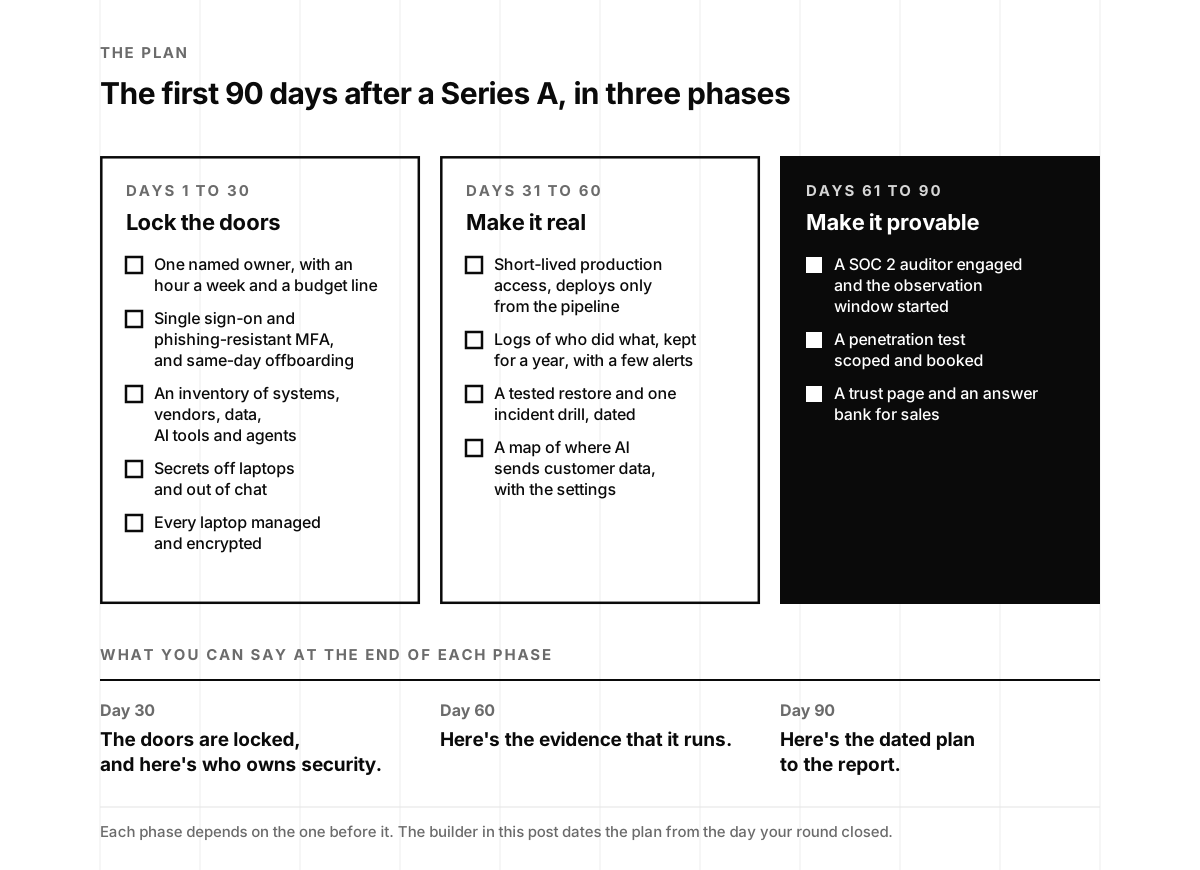
The first 90 days after a Series A fit twelve security moves, in three phases of about a month each:
- Days 1 to 30, lock the doors. Name one owner for security. Put single sign-on and phishing-resistant multi-factor authentication on email, cloud, code and every admin console, and remove access the same day someone leaves. Write down every system, vendor, data store, AI tool and agent you run. Move secrets off laptops and out of chat. Bring every laptop under management.
- Days 31 to 60, make it real. Make production access short-lived, with deploys only from the build pipeline. Keep a record of who did what. Restore a backup on purpose and run one incident drill. Map where AI sends customer data, along with the provider settings that support your commitments.
- Days 61 to 90, make it provable. Engage a SOC 2 auditor and start your observation window. Scope and book a penetration test. Publish a trust page and build the answer bank your sales team will use.
At day 90 you won’t have a SOC 2 report yet. What you will have is what a first enterprise buyer most needs to see: controls that exist, evidence that they operate, a named owner, and a dated answer for each item still in progress. In our experience, that combination is what leads a reviewer to approve a young vendor with follow-ups rather than escalate the review.
Why the first 90 days
A few things make this quarter easier and less expensive than the ones that follow.
The company is still small. Setting up single sign-on for twenty people takes an afternoon. For eighty people, with a few years of accumulated tools, personal accounts and contractors in other time zones, it becomes a project. Each person hired before the basics are in place adds accounts that will need to be cleaned up later, and most companies hire quickly after a Series A.
No buyer is waiting yet. The first review is coming, but it hasn’t arrived. Controls put in place during a calm month tend to be better designed than controls built against a buyer’s deadline, and they cost less, because nobody has to be pulled off product work to answer questions about controls that don’t exist yet.
The board is paying attention. New investors expect a plan for the coming year, and security belongs in it. A 90-day plan with owners and dates is much easier to present to a board than a general intention to start SOC 2, and I’ll come back to how to present it at the end.
The broader threat picture also shifted this year in ways that affect startups early. Verizon’s 2026 Data Breach Investigations Report found that exploited software flaws, at 31% of breaches, overtook stolen credentials as the most common way in for the first time in the report’s 19 years. It found that breaches involving a third party reached 48%, up 60%, and that the share of employees using AI frequently rose from 15% to 45% in a single year (Verizon). IBM’s 2026 Cost of a Data Breach study put the average breach at $4.99 million worldwide and $11.5 million in the United States, and found that 92% of organizations with an AI-related incident lacked proper AI access controls (Baker Donelson on IBM’s report).
For a startup, those findings point in a clear direction. Once you sell to enterprises, you become part of your customers’ third-party risk. Your team is very likely using AI tools more widely than anyone has written down. And the internet-facing software you deploy is exactly what attackers now exploit fastest, as Sasha and I described in our post on the *sshole OpenSSH bug, which was exploited within hours of its fix.
What changes once the round is announced
A funding announcement helps with recruiting and sales, and it also gives attackers useful information. It tells anyone reading that the company has new money, is about to hire, has new relationships with lawyers, banks and investors, and has a team that is likely stretched.
Each of those creates a specific kind of risk.
Hiring. I wrote recently that hiring is now an attack surface. Fake candidates apply for open roles, fake recruiters approach existing engineers, and the tools in between process whatever they’re given. Pindrop told Axios this month that North Korea-linked applications across its customers had risen to about 1 in 47. A company that has just announced twenty open roles has a large number of new identities to verify.
Recruiters approaching your engineers. The largest crypto theft on record, Binance’s on October 29, began with a fake job interview and reached the money through a deployment token on an engineer’s laptop. Nothing in that chain depended on Binance’s size; a small startup has the same kinds of laptops, tokens and engineers.
Money movement. A new round brings wire transfers, new bank accounts and new vendors, and most finance teams have seen a convincing email asking them to update payment details. The established safeguard still works well: confirm any change to payment details with a phone call to a number you already have on file.
A busy team. When people are stretched, they approve prompts quickly and share credentials to unblock colleagues. Much of the first phase below is about making those everyday shortcuts safe.
None of this is a reason to keep a round quiet. It’s a reason to treat the announcement as the start of the plan.
Days 1 to 30: lock the doors
The first month focuses on identity. Most of the incidents we see at startups begin with an account of some kind: a stolen password, a token left on a laptop, a former contractor who still has access or an admin console that nobody remembered. There are five moves in this phase.
1. Name one owner
At a twenty-person company, security isn’t a department. It’s a person who has a few hours a week, a small budget and the authority to ask for things to be done differently. That person is usually the CTO, the head of engineering or a founder. Name them, put a recurring hour on their calendar and let the company know.
It’s a small step, but it may be the most important one on the list. Every other move needs someone to see it through, and one of the first questions in many enterprise reviews is some version of “Who is responsible for information security?” A named person is a stronger answer than a role you plan to hire for. If that person would benefit from senior support, a fractional or virtual CISO can provide it, and Sasha’s seven questions can help you choose one.
2. Put every login behind single sign-on and strong sign-in
Turn on single sign-on for every system that supports it, starting with email, your cloud console, your code host and every admin panel. Require multi-factor authentication everywhere, and make it phishing-resistant for anyone with admin or production rights, which means passkeys or hardware security keys rather than text messages or codes that can be read aloud over the phone. CISA’s guidance treats phishing-resistant multi-factor authentication built on FIDO and WebAuthn as the strongest form available (CISA), and most identity providers already support it.
Then check that nothing can still sign in around these controls. Common gaps include shared accounts, legacy app passwords, a personal Gmail address that owns the domain registrar account, and an API that still accepts a basic login. Our post Enabled Isn’t Enforced includes a ten-minute check for each.
Finally, agree on how access ends: every account, session, token and device is removed on the day someone leaves, in a single step. That applies to contractors as well, and to AI agents, which should be retired in the same way. The agent offboarding checklist covers what an agent tends to leave behind.
3. Write down what you have
It’s difficult to protect systems that haven’t been listed. Set aside a day to build four lists in a single spreadsheet:
- Systems: every production service, database, storage bucket, domain and admin console, each with an owner.
- Vendors: every company that holds or processes customer data, including smaller tools paid for on a credit card.
- Data: what customer data you hold, where it’s stored, who can reach it and how long you keep it.
- AI: every model, provider, coding tool and agent your team uses, what each can read and do, and whose credentials it runs on.
The AI list is usually where Series A companies find the most surprises. Our 30-minute credential inventory is a practical way to begin it, and in our experience it turns up keys nobody was aware of at most companies that complete it.
4. Move secrets off laptops and out of chat
Move every API key, database password, signing key and cloud credential into a secrets manager, and rotate any that have ever been pasted into chat, a ticket or a document. Turn on secret scanning in your code host for every repository. It’s also worth looking at the .env files on engineers’ machines, because coding agents can read them, along with anything those agents were given earlier. I covered this in more detail in The .env File Is Your First Security Program, which includes a one-hour version you can start with.
The goal for this month is modest: no long-lived production secret stored on a laptop, and none in chat history. The second phase tightens this further.
5. Manage every laptop
Enroll every company laptop in device management, with disk encryption, automatic updates, a screen lock and the ability to wipe it remotely. If people also work on personal machines, decide now what those machines can reach. Email, chat and documents through single sign-on is a reasonable limit; code and production generally aren’t.
This becomes more important over time. A developer’s laptop is where code, tokens, agents and browser sessions all come together, which is why it appeared at the start of the Binance attack and why attackers continue to focus on it.
Days 31 to 60: make it real
The second month turns settings into routine practice and starts to produce the evidence you’ll need in the third. There are four moves in this phase.
6. Make production access short-lived
No one, founders included, should hold standing access to production or customer data. Access should be granted for a specific task, through single sign-on, for hours rather than months, with each grant logged. Deploys should come only from the build pipeline, with the credentials they need held in the pipeline rather than as long-lived tokens on someone’s laptop.
The same principle applies to agents: each agent should have its own key, with its own owner, scope, spending limit and way to switch it off. Our post on agents that share one API key explains why, and Your AI Agent Said No. Your API Key Said Yes. explains why a model’s refusal can’t stand in for an access control.
7. Keep a record of who did what
Turn on the audit logs that your identity provider, cloud, code host and production systems already generate, send them to one central place and keep them for at least a year. Then set up a small number of alerts that matter: a new admin, single sign-on being turned off, a sign-in from an unexpected location, a large export of customer data, and a production credential used outside the pipeline.
A security operations center isn’t necessary at this stage. A few alerts that someone actually reads are more useful than a large dashboard that nobody checks. The aim this month is to be able to answer “Would you know?” truthfully, and to have records that show it.
8. Restore a backup on purpose, and run one drill
Make sure production data is backed up, encrypted and stored where someone with your cloud admin credentials can’t delete it. Then restore it deliberately to a separate environment and note how long it took. Until a backup has been restored, it’s difficult to be confident it will work when needed. Our post on immutable backups covers how to keep backups out of reach of ransomware.
In the same week, run a one-hour tabletop exercise. Choose a realistic scenario, such as a leaked production key or an agent taking an action it shouldn’t, walk through who would do what, and write down what you learned and what you’ll change. Dated notes from an exercise like this are among the most persuasive evidence a young company can share, and relatively few companies have them.
9. Map where AI sends customer data
For every AI feature and internal AI tool that touches customer data, record the model, the provider, the region, what data is sent, how long the provider keeps it and whether it can be used for training. Keep a screenshot of the setting behind each answer, and check that the contract terms match.
This has become one of the first AI questions in most enterprise reviews, and Sasha’s post From AI Policy to Proof explains why buyers ask for the settings rather than the policy statement. If you sell to health systems, add your business associate agreements to the same map, since a BAA on its own rarely gets you through the review.
Days 61 to 90: make it provable
The third month turns what you’ve built into something an outside reviewer can verify. There are three moves in this phase.
10. Engage a SOC 2 auditor and start the observation window
If you sell to enterprises, you’ll need a SOC 2 Type 2 report. It covers an observation window, usually between three and twelve months for a first report, and it’s issued after that window ends. Our post on how long a SOC 2 audit takes sets out the full timeline, including how Augment Code reached its Type 2 in five months with zero deviations.
The practical step in the third month is to choose a CPA firm, agree on the scope and start the observation window, ideally with the controls from the first two phases already in place so the window tests something meaningful. That gives you an accurate statement to share with buyers: your SOC 2 Type 2 examination is under way with a named firm, with specific dates. Our post on what to say while SOC 2 is in progress has suggested wording and the terms to avoid. In particular, avoid describing the company as compliant or certified until the report has been issued. Because buyers have started to look more closely at audit quality, Is Your SOC 2 Real? is worth reading before you choose a firm.
If you’re unsure whether to start with a Type 1, this comparison can help. Most enterprise buyers ask for a Type 2.
11. Scope and book a penetration test
Enterprise buyers ask for a recent penetration test nearly as often as they ask for a SOC 2 report, and it’s often the first follow-up question once the report is shared. Scope the test around what buyers care about: your application, your API, your cloud environment and, if you have them, your AI features and agents. Schedule it for after the second phase is complete, so the testers spend their time on the harder issues rather than the obvious ones, and plan for a retest.
Our post on pentest frequency in 2027 covers which kind of test to buy, whether human, hybrid or AI, and what enterprise security teams now expect beyond an annual test.
12. Publish a trust page and build an answer bank
Publish a simple trust page that covers who owns security, the controls in place, your SOC 2 status and dates, your subprocessors and how to report a vulnerability. Then build an answer bank: one approved, accurate answer for each question you’re likely to be asked, together with the evidence to attach. The standard questionnaire sections are a good starting point, along with the ten AI questions Sasha covered in The 10 AI Security Questions Your First Enterprise Buyer Will Ask in 2027.
An answer bank makes a significant difference for the sales team. Without one, each account executive has to write answers from scratch. With one, a first questionnaire typically takes days rather than weeks. If questionnaires are new to your team, What Is a DDQ? explains the formats you’re likely to see.
What to leave for later
A Series A makes some larger purchases possible, and a few of them tend to come too early. These are the ones we see most often.
A full-time CISO as the first security hire. At twenty to forty people, there usually isn’t yet a full-time security role to fill, and people hired into that position early sometimes move on within a year for that reason. A named owner with senior part-time support usually fits this stage better. Our post In-House, On-Demand, or YOLO? covers when that changes.
A security operations center or a large monitoring platform. The logs and the handful of alerts in the second phase are the right size for now. Larger tools make more sense once there’s more to monitor and someone dedicated to monitoring it.
A large set of policies. Buyers will ask for an information security policy, an acceptable use policy, an incident response plan and a few others. It’s better to write the handful you need and make sure each describes what you actually do than to adopt a long set of templates that don’t match how the company works.
A ban on AI tools. Your team is almost certainly using AI already, and Verizon’s numbers suggest most people are using it often. A blanket ban tends to move that use to personal accounts, where it’s harder to see. A better approach is to approve the tools you’re comfortable standing behind, put them behind single sign-on and configure them to match your commitments. Our post on shadow AI covers the policy side.
Relying on a compliance platform alone. A compliance platform can help you gather evidence and manage an audit, but it can’t make the underlying controls true. Some of the most difficult reviews we’ve seen involved companies whose compliance dashboard looked complete while their access logs told a different story.
What you can tell a buyer at day 30, 60 and 90
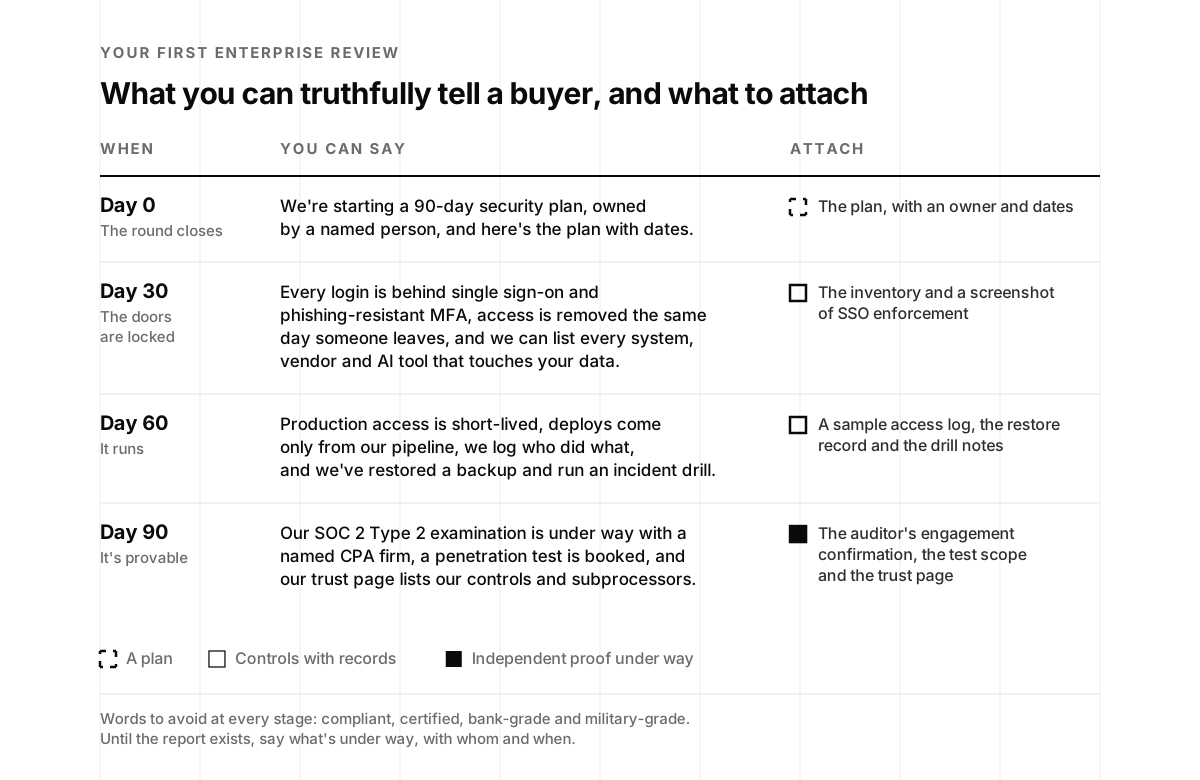
A first review may arrive before day 90, so it helps to have an accurate answer at each stage. Here’s how the same company might describe its security program as the plan progresses, in one sentence at each point.
At day 0:
We've started a 90-day security plan owned by [name], our [role], and we're happy to share the plan, with dates, and walk your team through it.
At day 30:
Every login to our email, cloud, code and admin consoles goes through single sign-on with phishing-resistant multi-factor authentication, access is removed the same day someone leaves, and we can show you every system, vendor and AI tool that touches your data.
At day 60:
No one has standing access to production, deploys come only from our build pipeline, we keep a year of logs showing who did what, and we restored our production data and ran an incident drill on [date].
At day 90:
Our SOC 2 Type 2 examination is under way with [CPA firm], with an observation window from [date] to [date] and the report expected by [date], our penetration test is booked for [date], and our trust page lists our controls and subprocessors.
None of these statements relies on words like “compliant,” “certified,” “bank-grade” or “industry-leading.” Each one describes a specific mechanism, date or person, and each can be verified. In our experience, buyers regularly accept a dated “not yet” from a company at this stage. Deals are more often slowed by a confident statement that doesn’t hold up to the first follow-up question.
If a buyer’s review arrives before the plan is finished, consider sending the plan itself. For a company that closed its round two months ago, a 90-day plan with dates, a named owner and the first phase complete is a credible answer to “What does your security program look like?”
Build your 90-day plan
Enter the date your round closed, answer a few questions about your company and mark where each of the twelve moves stands today. The builder dates the plan from your close date, flags anything overdue, lists the open moves in the order that matters most for your company, and drafts a sentence you can accurately share with a buyer today.
The Series A 90-day security plan
Pick the answer closest to what's true today, not what's planned. The plan updates as you go.
Everything here runs in your browser and is saved only in this browser. The order and weights reflect our experience with Series A startups, not a standard. The sentence for buyers is a starting point: send only what's true for your company, and replace every bracket before you send it.
Got it. Sasha or I will reply to set up a review of your 90-day plan.
Something went wrong. Email hello@ysecurity.io and we'll set it up by hand.
What it costs
The cost is usually lower than founders expect, and it rises as the company grows. Here’s a realistic range for a company of twenty to forty people, based on our work with startups at this stage:
- The first phase: a few days of engineering time spread across the month, plus a few hours a week from the owner. Single sign-on, multi-factor authentication, device management and a secrets manager are often included in plans you already pay for, or cost a few dollars per person per month.
- The second phase: about a week of engineering time to set up short-lived access, central logging and alerts, an afternoon for the restore, an hour for the drill and a day for the AI data map.
- The third phase: most of the outside spend. The SOC 2 audit and the penetration test are typically the largest security costs of the year, and both tend to take less time and turn up fewer findings when the first two phases are complete.
- Senior support, if you want it: a fractional CISO for a few hours a week, which is the right-sized form of security leadership at this stage.
Taken together, that’s about a quarter of steady work rather than a year, and most of it carries forward. People hired after day 30 join a company where the basics are already in place, and reviews after day 90 start from an answer bank instead of a blank questionnaire.
At the end of the quarter, it’s worth summarizing the work on the security slide in your board deck: the moves completed, the dates for the rest and any deals the work has supported. Investors who have just funded an enterprise sales motion will want to know it isn’t likely to stall in security review, and that slide is a clear way to show them.
Sasha and I will be talking about this at MicroConf US in Austin next April, where YSecurity is a sponsor and our talk is “How Founders Turn Security Commitments Into Revenue.” It’s on our events page, along with notes from the events we’ve attended this year.
A Series A reflects a belief that the company can build something large organizations will buy. A first enterprise security review asks a closely related question about whether the company is ready to be trusted with those organizations’ data. Using the first 90 days to prepare a good, accurate answer means the review is more likely to be a routine step toward the deal than a reason it slows down.
Jon
Series A security in the first 90 days, frequently asked questions
- What security does a startup need after raising a Series A?
- Enough to pass the first enterprise security review without slowing the company down. In practice that's twelve moves over about 90 days: a named owner, single sign-on with phishing-resistant multi-factor authentication, an inventory of systems, vendors, data and AI, secrets off laptops, managed devices, short-lived production access, useful logs, a tested restore and an incident drill, a map of where AI sends customer data, a SOC 2 auditor and observation window, a scoped penetration test, and a trust page with an answer bank.
- When will my first enterprise security review happen after a Series A?
- Usually within one or two quarters, because a Series A is typically the money that funds an enterprise sales motion. The first review often arrives as a security questionnaire or due diligence questionnaire attached to a pilot or a procurement step, and it asks about controls that take weeks to put in place, so the 90 days after the round closes are the right time to start.
- Should a startup hire a full-time CISO after a Series A?
- Usually not first. At Series A most companies need a named owner, a few hours a week of senior judgment and someone who can sit in a buyer's security call. A founder or engineering lead can own security with help from a fractional or virtual CISO, and a full-time security hire tends to make sense when the work fills a week every week, often after the first several enterprise customers.
- Do I need SOC 2 right after my Series A?
- You need to start it if you sell to enterprises. A SOC 2 Type 2 report covers an observation window of several months and is issued after it ends, so a startup that begins in the first 90 days after its round usually has a report within about six to nine months. Until then, you can truthfully say your examination is under way with a named CPA firm and give the dates, but never that you are SOC 2 compliant or certified.
- What should I tell an enterprise buyer if my security program is new?
- The dated truth. Say what is in place today, what is in progress, who owns it and when it will be done, and attach evidence for the parts that exist. Buyers accept dated not-yets with named owners far more readily than confident answers that turn out to be thin.
- What are the most important security controls for a Series A startup?
- Identity first: single sign-on and phishing-resistant multi-factor authentication on email, cloud, code and every admin console, with same-day removal when someone leaves. Then secrets off laptops and out of chat, short-lived production access with deploys only from the build pipeline, and managed laptops. Most startup breaches start with a stolen login, a token on a laptop or a forgotten account, and these controls close those doors.
- How much does a Series A security program cost?
- For a twenty to forty person company, the first 90 days usually cost a few hours a week from a named owner and engineering, tools that are mostly already in your identity and cloud plans, and outside spend on a SOC 2 audit, a penetration test and, if you use one, a fractional CISO. The audit and the test are the largest line items, and both are cheaper when the controls are already in place before they start.
- Does an AI startup need anything different in its first 90 days?
- Yes, two things. A map of every model, provider and agent that touches customer data, with the provider settings that back your no-training and retention promises, and separate keys, owners and scopes for each agent. Enterprise buyers now ask AI-specific questions in the first review, and those two pieces answer most of them.
- Does the 90-day plan builder store or send what I enter?
- It runs in your browser and saves your answers only in this browser. Nothing is sent unless you use the optional email form, which sends your email, the context you picked and the status of each move, never your company details or the date you entered. Our usual site analytics run on this page too, with the builder masked.