
The AI Agent Offboarding Checklist: How Founders Retire an Agent Cleanly
Starting an AI agent takes an afternoon. Retiring one properly touches a dozen systems: API keys, OAuth grants, service accounts, MCP servers, bot identities, webhooks, allowlisted domains, memory, logs and the model providers that still hold your data. Here's why agents are easy to start and hard to end, why it matters to your deals and your SOC 2, the seven moments an agent needs offboarding, and a ten-step checklist with a free builder that turns it into an evidence record.
Starting an AI agent takes an afternoon. You create an API key, connect it to a few tools, give it a Slack bot so the team can talk to it, point a webhook at it and watch it work. It’s a great afternoon.
Retiring that agent takes longer, because by the time it retires, the afternoon has turned into a dozen small grants spread across systems with different owners. The key lives in a secrets manager and in one engineer’s .env file. The OAuth grant sits in your Google Workspace. The bot has a user in Slack. The webhook still accepts requests. A model provider still holds the conversation logs, and the vector store still holds what it learned about your customers.
Nobody plans for this part. We’d like to change that, because offboarding is where a team takes responsibility for the end of the software it started, and it’s one of the highest-value hours a founder can spend on security this year. Retiring an agent is closer to closing up a house than saying goodbye to a coworker: you hand back every key, cancel the mail, take your name off the utilities and tell the alarm company. This post is the checklist for that, with a builder you can use today.
The short answer
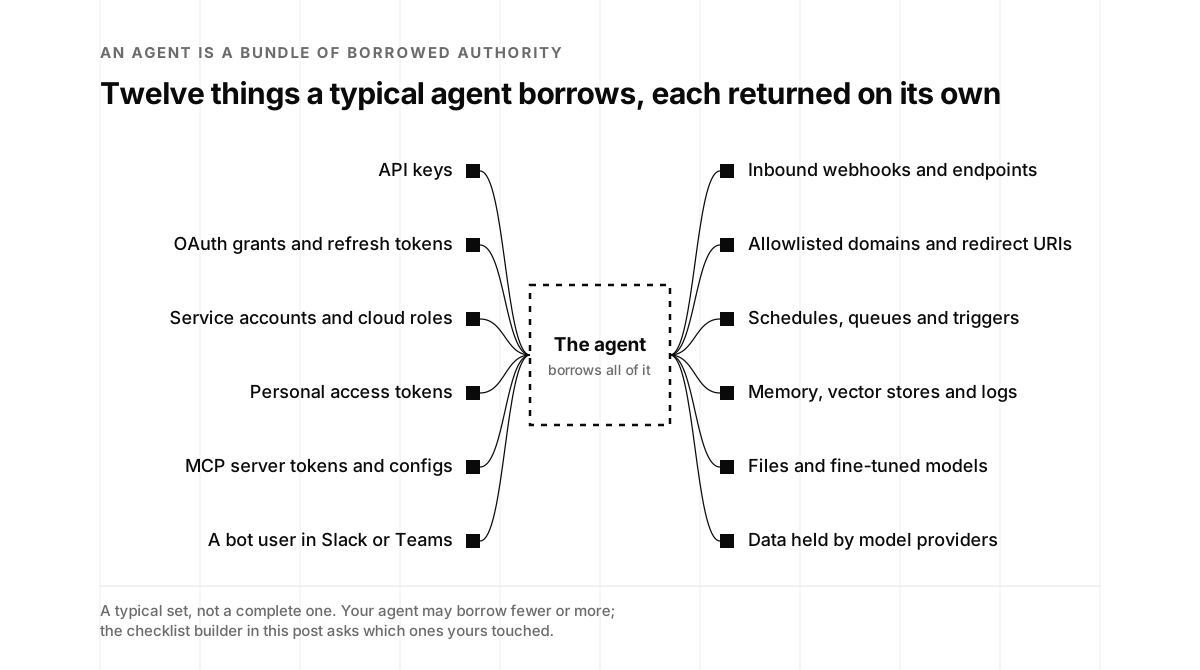
An AI agent is a bundle of borrowed authority. Offboarding it means returning every piece, proving each one is really gone, and writing it down. Ten steps cover it:
- Name the agent and its sponsor. One person signs off on the retirement.
- Pause, then stop. Freeze schedules and triggers, let in-flight work finish or fail safely, and snapshot the configuration for the record.
- Revoke every credential. API keys, OAuth refresh tokens, service accounts, cloud roles, MCP tokens and anything shared it could read.
- Remove its identities. Identity provider accounts, app registrations, bot users, email aliases and phone numbers.
- Close its doors. Webhooks, public endpoints, allowlisted domains, redirect URIs and MCP entries in developer tools.
- Decide what happens to its data. Memory, vector stores, logs, files, fine-tuned models and evaluation sets, matched to your contracts.
- Settle its vendors. Model providers, agent platforms and tool APIs: keys, projects, retention and deletion requests.
- Verify it’s gone. Try the old credentials, watch the logs and the bill, and scan your code for leftovers.
- Write the record. Date, sponsor, what was revoked, what data was kept or deleted, and the verification results.
- Give the next one an end date. Every new agent starts with an owner, an expiry and a place in the inventory.
The checklist builder below turns those steps into a list tailored to your agent, with an evidence record you can file for SOC 2 or attach to a security questionnaire.
Why agents are easy to start and hard to end
Four ideas explain almost every offboarding miss we see. They’re worth understanding before the checklist, because the checklist only works when you know why each step is there.
An agent is a bundle of borrowed authority
An agent doesn’t own anything. Everything it can do, it can do because someone lent it something: a key, a token, a role, a seat in a chat workspace, a spot on an allowlist. Creation is quick because each grant is quick. Retirement is slow because each grant has to come back from a different place, usually managed by a different person.
Nothing announces an ending
When a person leaves, the HR system announces it, and good identity setups turn that announcement into deprovisioning. Agents don’t have an HR record. In Okta’s survey of 260 executives in 2025, 91 percent of organizations were already using AI agents, but only 10 percent reported a well-developed strategy or roadmap for managing non-human identities. Lifecycle management was the second-most-cited concern for those identities, at 69 percent (Okta).
Identity vendors are building the missing announcement. Microsoft’s Entra Agent ID gives each agent identity a sponsor, defined as the business representative “accountable for the agent’s purpose and lifecycle decisions, including access reviews and agent retention,” and requires at least one per agent. Its guidance adds that “sponsorship should be maintained to ensure succession when an employee who’s a sponsor moves or leaves” (Microsoft Learn). You don’t need Entra to borrow the idea. You need a name next to every agent.
Software keeps doing what it was configured to do
An agent is deterministic software running on infrastructure you configured, with prompts you wrote and credentials you issued. It doesn’t decide to leave, and it doesn’t stop when the project does. A scheduled job keeps firing. A webhook keeps accepting requests. A refresh token keeps refreshing. That’s not a flaw in the agent. It’s software doing exactly what it was set up to do, which is why the ending has to be set up too.
”Unused” isn’t offboarded
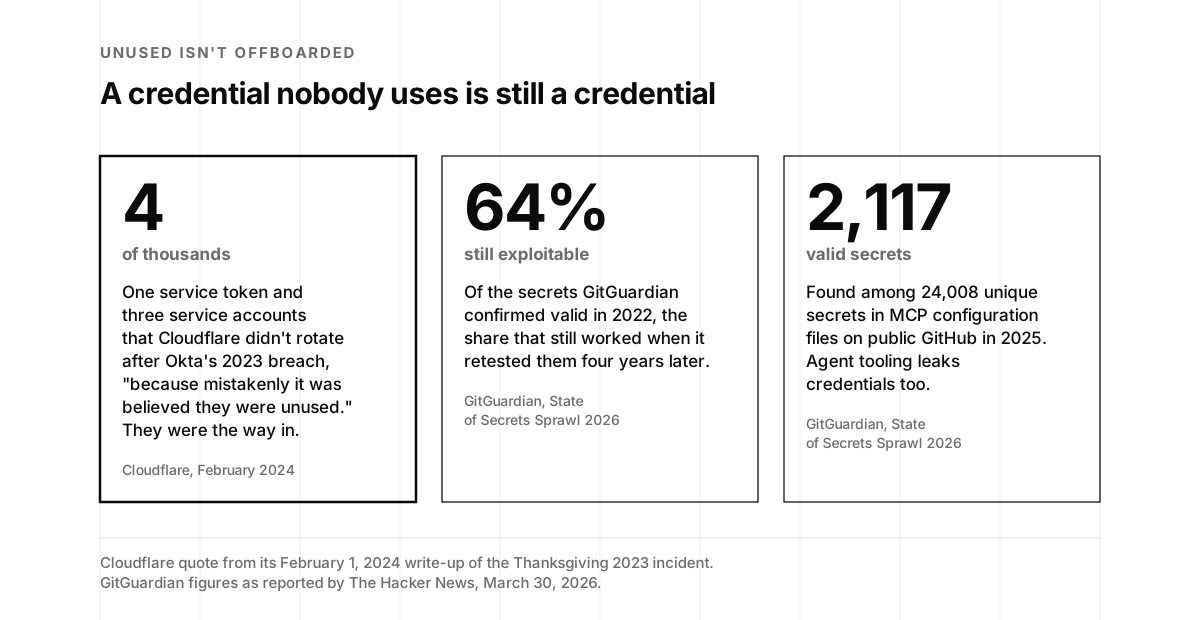
The most common sentence in the incident reports we read is some version of “we thought nobody was using it.” Cloudflare published one of the most honest examples. After Okta’s 2023 breach, Cloudflare rotated thousands of credentials, but, as its leaders wrote, “we failed to rotate one service token and three service accounts (out of thousands).” The reason: “The one service token and three accounts were not rotated because mistakenly it was believed they were unused.” An attacker used them to get into Cloudflare’s Atlassian systems over Thanksgiving (Cloudflare).
"They did, and they admitted that it was their fault. I have to give them credit for that much."
autoexec, on Cloudflare's write-up, on Hacker News, February 2024
We’d give them credit too. Owning a miss in public is how the rest of us learn. And the lesson scales: GitGuardian found that 64 percent of the secrets it confirmed valid in 2022 were still exploitable when it retested them four years later (The Hacker News, on GitGuardian’s 2026 report). A credential nobody uses is still a credential.
Why this matters to a founder
If you’re shipping agents into your product or running them inside your company, offboarding shows up in five places that matter to your business.
Your buyers ask about it. Every enterprise security questionnaire asks how you remove access. For an agent company, the follow-up is now “and how do you remove an agent’s access?” A one-page offboarding record answers it better than a paragraph of policy. We cover the rest of what they’ll ask in Friday’s post on the five questionnaire questions.
Your auditor tests it. SOC 2’s Common Criteria 6.2 says that “for those users whose access is administered by the entity, user system credentials are removed when user access is no longer authorized” (KirkPatrickPrice, quoting the criteria). Auditors test removal with samples. If your agents have their own accounts, keys or service principals, they belong in that population, and an agent retired without a record is an exception waiting to be found. Our SOC 2 Type 2 team builds this evidence into the program from the start.
Your customers’ data has an exit clause. Most data processing agreements follow GDPR Article 28(3)(g): at the end of the service, the processor deletes or returns the personal data and deletes existing copies, unless the law requires keeping them (GDPR, Article 28). For an agent, “existing copies” includes memory, embeddings, logs and anything you sent to a model provider.
Somebody else’s agent can open your door. In August 2025, attackers used OAuth tokens stolen from Salesloft’s Drift chat agent integration to export data from many companies’ Salesforce instances, then searched the data for AWS keys, passwords and Snowflake tokens (Google Threat Intelligence Group). At least 700 organizations were potentially affected (Atlanta Journal-Constitution).
Idle agents still spend money and still count. A retired agent that still holds a key can still run up a bill, which we wrote about in Too Fancy. And when investors or acquirers run diligence, every forgotten integration they find lowers their confidence in the rest of the story.
There’s a forward-looking reason too. Gartner predicted in June 2025 that over 40 percent of agentic AI projects will be canceled by the end of 2027 (Gartner). Whatever you think of the forecast, a lot of agents are going to be retired in the next two years. The teams that retire them cleanly will spend those years shipping instead of cleaning up.
The seven moments an agent needs offboarding
Offboarding isn’t one event. Seven situations trigger it, and each one changes what comes first.
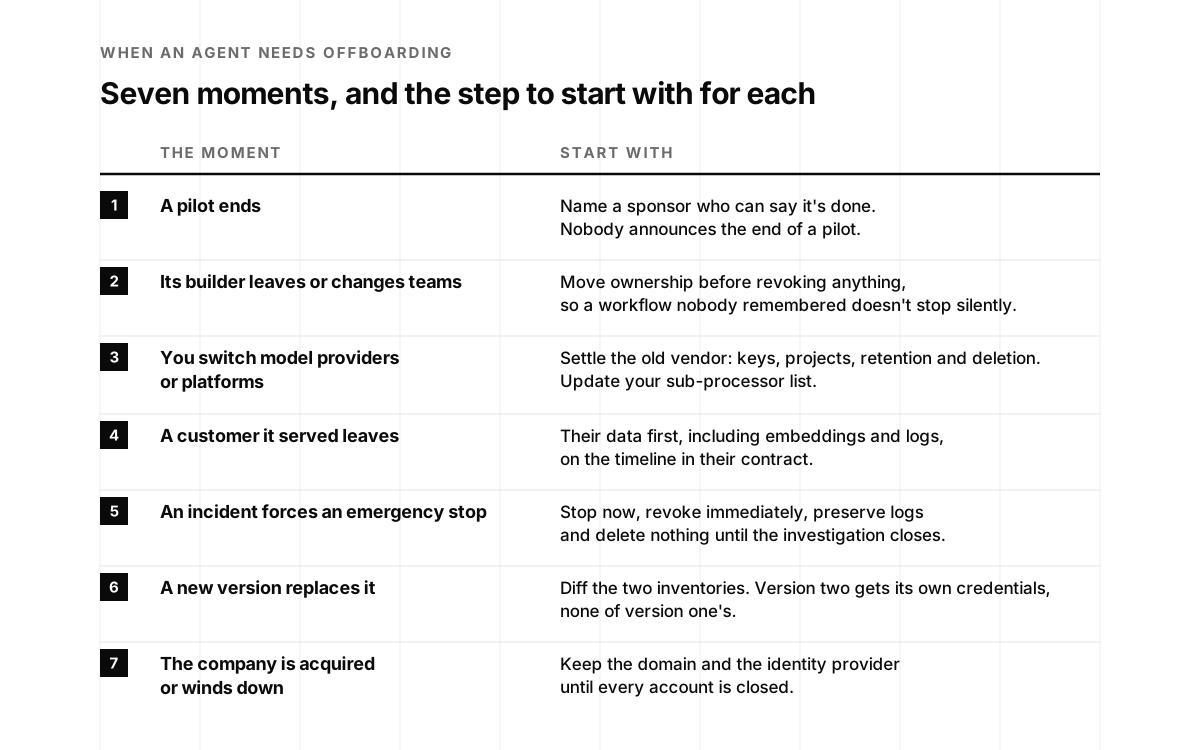
- A pilot ends. The most common trigger and the easiest to miss, because nobody announces that a pilot is over. It just stops being discussed. Start by naming a sponsor who can say it’s done.
- The person who built it leaves or changes teams. Agents built by one engineer often run on that engineer’s personal tokens: a GitHub personal access token, a Zapier connection, a Google OAuth grant. CloudEagle, an identity governance vendor, lists the usual survivors of employee offboarding as Copilot Studio agents, Zapier-style workflows, API keys embedded in code, agents built inside SaaS platforms and MCP server connections (CloudEagle). Start by moving ownership before anything gets revoked, so nothing important breaks silently.
- You switch model providers or agent platforms. The old provider still has your keys, your projects and its own logs. Start with the vendor step, and update your list of sub-processors.
- A customer the agent served leaves. Their tokens, their data and their slice of the agent’s memory have to go, on the timeline in their contract. Start with the data step.
- An incident forces an emergency stop. The order flips: stop first, revoke immediately, preserve logs, and hold off on deleting anything until the investigation closes. Our blast radius playbook covers the first hours.
- A new version replaces it. Version two often gets new credentials while version one keeps its old ones. Start with an inventory diff between the two.
- The company is acquired or winds down. This is the moment founders forget, and it’s the one with the longest tail. In January 2025, Truffle Security showed that anyone who buys a failed startup’s domain can recreate former employees’ email addresses and use “Sign in with Google” to get into old accounts at services like ChatGPT, Slack, Notion and Zoom. “Google’s [OAuth] login doesn’t protect against someone purchasing a failed startup’s domain,” said Dylan Ayrey, Truffle’s chief executive. Google’s guidance was for companies to close out domains properly (The Hacker News). Start with the domain and the identity provider, and keep the domain longer than you think you need to.
Yair Grindlinger, the co-founder and chief executive of Surf AI, made the case for shrinking what any single foothold can reach on episode 105. Retired agents are the cheapest footholds to remove, because nobody is using them.
The agent offboarding checklist
Here is the full checklist, with why each step matters and what evidence to keep. Use it as written, or jump to the builder to get a version tailored to your agent.
1. Name the agent and its sponsor
Write down the agent’s name, what it does, which systems it touches, who built it and who sponsors it now. If you keep an AI credential inventory, start from its row. If you don’t, this is the moment to start one.
The sponsor is one person who can say “yes, retire it” and sign the record at the end. When the builder has left, the sponsor is usually their manager or the product owner. Ownership moves before anything is revoked, so that a production workflow nobody remembered doesn’t stop without warning.
Evidence: the inventory row and the sponsor’s written sign-off.
2. Pause, then stop
Freeze the agent’s schedules, cron jobs, triggers, queues and retries first. Let in-flight work finish or fail safely. Then stop the runtime. Snapshot the configuration, prompts, tool list and permissions before you change anything, because you’ll want the “before” picture for the record and for any investigation.
In an incident, skip the gentle part: stop it now and preserve the logs.
Evidence: the configuration snapshot and the time the runtime stopped.
3. Revoke every credential
Revoke each credential at its source, not just in your secrets manager:
- API keys for model providers, tool APIs and internal services.
- OAuth grants and refresh tokens, revoked in each connected app (Google Workspace, Microsoft 365, Slack, GitHub, Salesforce and the rest). Removing a key from your code doesn’t revoke the grant on the other side.
- Service accounts and cloud roles, including keys you generated for them.
- Personal access tokens the agent used, especially ones tied to a person.
- MCP server tokens and any credentials stored in MCP configuration files. GitGuardian found 24,008 unique secrets in MCP-related configuration files on public GitHub in 2025, and 2,117 of them were valid (The Hacker News).
- Shared secrets the agent could read, rotated, even if they weren’t issued to the agent. If it could read it, assume it could have repeated it.
That last point is the hard-won lesson from the Drift incident. Google’s guidance was to “treat any and all authentication tokens stored in or connected to the Drift platform as potentially compromised,” and Cloudflare, one of the affected companies, rotated 104 Cloudflare API tokens it found in the exposed support-case data (Cloudflare). One key per agent makes this step dramatically easier, which is the case we made in Your Agents Share One API Key.
Evidence: a list of each credential, where it was revoked, by whom and when.
4. Remove its identities
Delete or disable every identity the agent had: accounts in your identity provider (deprovisioned through SCIM if you use it), app registrations and service principals, bot users in Slack or Microsoft Teams, email addresses and aliases, and phone numbers for voice or text agents. Reassign anything the identity owned, such as shared drives or channels, to the sponsor.
The OWASP Non-Human Identities Top 10 puts improper offboarding at number one for 2025 and rates it easy to exploit and severe in impact. Its prevention advice is plain: review every non-human identity tied to a departing owner, automate the steps you can, and “periodically recertify NHIs to confirm they are still in use, actively needed, and have valid owners” (OWASP).
Evidence: screenshots or exports showing each identity disabled or deleted.
5. Close its doors
Agents receive as well as send. Close every way in:
- Inbound webhooks and public endpoints that triggered the agent. A webhook that still accepts requests is an open door even with the runtime stopped.
- Allowlisted domains and redirect URIs. Remove the agent’s domains from allowlists, content security policies and OAuth redirect lists. If you’re giving up a domain, take it off every allowlist first. In 2025, Noma Security showed a prompt injection against Salesforce’s Agentforce that worked partly because a domain on an allowlist had expired, and the researchers bought it for five dollars (The Register).
- MCP entries in developer tools. Remove the server from shared and personal configuration files, and shut down any hosted MCP server the agent used. We wrote about what happens when those servers change underneath you in Your MCP Server Passed Review, Then It Changed.
- DNS records pointing at the agent’s infrastructure.
Evidence: the list of endpoints and entries removed, and a test request that now fails.
6. Decide what happens to its data
Agents remember. Make a deliberate keep, delete or archive decision for each place it stored something: memory, vector store embeddings, conversation and tool-call logs, uploaded files, caches, fine-tuned models and evaluation sets.
Three things set the decision. Your customer contracts, which usually require deleting or returning customer data at the end of the service. Any legal hold or open investigation, which overrides deletion. And your own audit needs, because you may want to keep logs of what the agent did for your retention period even after you delete what it knew about customers.
Deletion on your side isn’t always deletion everywhere. In 2025, a court order in The New York Times’ lawsuit against OpenAI required it to preserve ChatGPT output logs that would otherwise have been deleted, from May until a new order in October ended the obligation going forward, with exceptions for accounts the Times had flagged (Engadget). You can’t control a court, but you can know your providers’ retention terms and settings, request deletion where the terms allow it, and write down what you asked for and what they confirmed.
Evidence: the data decision per store, the deletion or export proof, and any hold notice.
7. Settle its vendors
For each model provider, agent platform and tool API the agent used: delete or disable its projects and keys, check the retention and training settings that applied to its data, request deletion where your terms allow, and cancel what you no longer need. If you’re switching providers, update your list of sub-processors and your trust center, because your customers may have been told who processes their data.
Evidence: the vendor list, the actions taken with each and their confirmations.
8. Verify it’s gone
This is the step that turns a checklist into a fact, and it’s the fun one. Run a small game day:
- Try the old credentials. Every revoked key, token and password should fail. Keep the error messages.
- Watch the logs for any activity from the agent’s identities after the retirement date.
- Check the bill. Spend on its model provider keys and tool APIs should drop to zero.
- Scan for leftovers. Search your repositories, configuration and secrets stores for the agent’s name, keys and endpoints. Secret scanning catches what memory doesn’t.
- Send a test request to each closed webhook and endpoint.
Evidence: the results of each test, with timestamps.
9. Write the record
One page per agent: what it was, why it was retired, the sponsor, the dates, every credential and identity removed, every data decision, every vendor action and the verification results. This page is your SOC 2 evidence, your answer when a buyer asks how you offboard agents, and the document a future engineer will thank you for.
Evidence: the record itself, signed by the sponsor.
10. Give the next one an end date
The cheapest offboarding is the one you planned at onboarding. Every new agent should start with a named sponsor, an expiry or review date, one credential per agent, the narrowest scopes that work and a row in your inventory. We wrote the onboarding side in AI Agent Governance Starts at Onboarding, Not Runtime. Then put a recertification on the calendar: once a quarter, confirm every agent is still used, still needed and still has an owner.
⚠️ Salesloft pulled the plug on Drift after a massive supply-chain hack.
The Hacker News (@TheHackersNews) · September 3, 2025
Hackers stole its OAuth tokens—then used them to breach Salesforce at Cloudflare, Google Workspace, Palo Alto, Zscaler & 700+ orgs.
Full story →
Build your checklist
Pick the moment you’re in, check what your agent touched, and the builder turns the ten steps into a tailored checklist with the evidence to keep. It saves your progress in this browser, exports Markdown and CSV, and prints a clean evidence record.
The agent offboarding checklist builder
Choose why the agent is being retired and what it touched. Check items off as you go; the record at the bottom fills in as you work.
Everything here runs in your browser and is saved only in this browser, agent name included. The record is a starting point for your evidence, not a substitute for your auditor's requirements.
Got it. Jon or Sasha will reply with what we'd do first for an agent like yours.
Something went wrong. Email hello@ysecurity.io and we'll pick it up by hand.
When it’s someone else’s agent
Half the agents with access to your systems aren’t yours. They belong to vendors: a chat agent on your website, a sales assistant in your CRM, a meeting bot in your calendar, a coding assistant in your repositories. When you stop using one, or when its vendor has a bad week, you run the same checklist from the other side.
The Drift incident is the example to study. Google’s threat intelligence team advised affected companies to “review all third-party integrations connected to their Drift instance, revoke and rotate credentials for those applications, and investigate all connected systems for signs of unauthorized access” (Google Threat Intelligence Group). Cloudflare’s own write-up added practical habits: give each third-party app only the access it needs, don’t use admin accounts for vendors, apply IP restrictions where you can, set a rotation schedule and watch for unusually large exports (Cloudflare).
For a vendor’s agent, steps 3 to 5 and 8 do most of the work: revoke its grants in each system, remove its bot users and webhooks, rotate anything it could read, and verify. Step 7 becomes a deletion request to the vendor, and step 9 is the record you’ll want when your own customers ask whether they were affected.
Make the next one easy
The founders who handle this well don’t run a big governance program. They build three habits.
Every agent is born with an end date. A sponsor, an expiry or review date, one credential per agent and the narrowest scopes that work. It costs five minutes at creation and saves a day at retirement.
Every quarter, one game day. Pick one agent and retire it in staging, or retire a real one that’s no longer needed. Time it. See which step took longest and fix that. It’s a good way to learn how your own systems actually fit together, and teams usually find a forgotten grant or two in the first round.
Every retirement leaves a record. One page per agent, filed where your SOC 2 evidence lives. After a few, the record becomes a template, and the template becomes the answer to the questionnaire.
If you’d like a hand, our AI access control audits map what every agent and integration can reach, our MCP security team covers the tool connections, and our monitoring and response team watches for the activity that shouldn’t be there after an agent is gone.
Retiring an agent cleanly is a small act of responsibility that compounds. Each one makes the next easier, makes your answers to buyers sharper and leaves less behind for anyone looking for an open door. Start with one this week.
Jon and Sasha
AI agent offboarding, frequently asked questions
- What is AI agent offboarding?
- AI agent offboarding is the process of retiring an agent and everything it was given: its credentials, OAuth grants, service accounts and cloud roles, its tool and MCP connections, its bot identities and inbound webhooks, its schedules, and the data it holds or sent to model providers. The goal is that nothing the agent could do or reach still works after its retirement date, and that you have a record proving it.
- Why is offboarding an AI agent harder than offboarding an employee?
- An employee's departure is announced by the HR system, which usually triggers single sign-on deprovisioning. An agent has no HR record. Its authority is spread across API keys, OAuth refresh tokens, service accounts, MCP configs, bot users and webhooks that live in different systems with different owners, and disabling one person's login rarely touches any of them. In Okta's 2025 survey, 91 percent of organizations were using AI agents but only 10 percent had a well-developed strategy for managing non-human identities.
- What should an AI agent offboarding checklist include?
- Ten steps: name the agent and its sponsor; pause it before you stop it; revoke every credential it held; remove its identities; close its inbound doors such as webhooks, endpoints, allowlisted domains and MCP entries; decide what happens to its data; settle its vendors and model providers; verify that the old credentials fail and that activity stops; write an evidence record; and give the next agent an end date and an owner on day one.
- When does an AI agent need to be offboarded?
- Seven common moments: a pilot ends; the person who built it leaves or changes teams; you switch model providers or agent platforms; a customer the agent served leaves; an incident forces an emergency stop; a new version replaces it; or the company is acquired or winds down. Each one changes which steps come first.
- Does SOC 2 require removing access for AI agents?
- SOC 2 doesn't name AI agents, but its access criteria cover any credentials your system issues. Common Criteria 6.2 says user system credentials are removed when user access is no longer authorized, and auditors test that with samples of removed access. If an agent has its own account, key or service principal, expect it in the population. An offboarding record per agent is the cleanest evidence.
- Is revoking an agent's API key enough?
- Usually not. Agents often hold OAuth refresh tokens that outlive the session, service account keys, cloud roles, MCP server tokens, bot identities in Slack or Teams, and webhook URLs that still accept requests. They may also have copied secrets into logs, memory or support tickets. Revoke each credential at its source, rotate any shared secret the agent could read, and then test the old credentials to confirm they fail.
- What happens to an agent's data when it's retired?
- Decide it on purpose: memory, vector store embeddings, conversation logs, files, caches, fine-tuned models and evaluation sets each need a keep, delete or archive decision that matches your customer contracts and any legal hold. Your data processing agreements usually require deleting or returning customer data at the end of a service. Remember that model providers keep their own logs under their own retention terms, so record what you requested and what they confirmed.
- How do I offboard a vendor's AI agent connected to my systems?
- Revoke its OAuth grants and connected-app access in each system it touches, rotate any credentials it could read, remove its bot users and webhooks, and review the logs for unexpected activity. When the Salesloft Drift tokens were stolen in 2025, Google's threat intelligence team advised affected companies to treat any and all tokens connected to the Drift platform as potentially compromised, and to review, revoke and rotate credentials for connected applications.
- Does the checklist builder store or send my information?
- It runs in your browser and saves your selections and checkmarks only in this browser. It sends nothing unless you use the optional email form, which sends your email and counts (the trigger, how many steps, which categories you selected), never the agent's name or your notes. Our usual site analytics run on this page too, with the builder masked.