
Who Holds Your Agent's Keys? The 30-Minute AI Credential Inventory
Every AI agent your team runs is holding someone's keys: an API key in a .env file, an OAuth grant to your CRM, a cloud role, a token it borrowed from you. Most startups can't list them. Here's where those keys live, fourteen months of receipts, a 30-minute first-pass inventory with a template you can download, and the answer to give when an enterprise buyer asks.
In April, Vercel posted a security bulletin that started with an AI tool. An employee had signed up for Context.ai, a third-party AI product, and connected it to their work Google account. When Context.ai was compromised, the attacker used that connection to take over the employee’s Google Workspace account, then their Vercel account, and from there reached customer environment variables Vercel had marked as “non-sensitive” (Vercel, April 2026). Push Security later reported that the app was probably a self-service trial nobody remembered (Push Security, April 2026).
Nobody at Vercel wrote a bad line of code. A person clicked “Allow,” an AI tool got a token, and the token outlived anyone’s memory of it.
That’s the pattern this post is about. Every artificial intelligence (AI) agent your team runs is holding someone’s keys. A coding agent has a GitHub token. A Model Context Protocol (MCP) server, built on the standard that lets AI applications connect to tools and data, has a database password in a config file on an engineer’s laptop. A support bot has an OAuth grant to your help desk. The model API key for your product’s AI feature sits in three .env files, and one of them is in a repo nobody has opened since March.
Sooner or later, a security questionnaire from your biggest prospect will include a line like this: List the AI agents and AI tools that can access our data, and describe how their credentials are issued, scoped and revoked. Most startups can’t answer it in one sitting, not because they’re careless, but because agent credentials don’t live in one place, and agents never show up in the HR system that triggers every other access review.
This guide walks through where those keys live, what fourteen months of incidents say about them, and a 30-minute first-pass inventory that finds most of them. There’s a free spreadsheet template, the five red flags to fix first, and a sample answer for the questionnaire.
The short answer
An AI agent credential inventory is a table with one row per credential an agent can use. Each row answers seven questions: which agent uses it, where it lives, what it can reach, which human owns it, when it expires, when it was last rotated and how you’d shut it off.
If you can fill that table in, you can answer the buyer’s question and give your auditor concrete evidence of how agent access is issued, scoped, reviewed and revoked. If you can’t, the empty cells are your to-do list. A first pass takes about half an hour for a small team.
If you remember one thing from this post, make it this: know which AI agents have access to what, who owns that access, how long it lasts, and how to shut it off. Everything below is detail on how to get there.
Why agent keys became the soft spot
Credentials have been the front door for attackers for a long time. What changed in the last two years is how many of them belong to software instead of people, and how fast they’re multiplying.
- Machine identities now outnumber people, by a lot, and AI agents are a fast-growing share of them. Palo Alto Networks surveyed 2,930 cybersecurity decision-makers and found an average of 109 machine identities for every human, a figure that “includes 79 AI agent identities per human.” Forty percent of those agents already have access to organizational data, and “fewer than half of organizations report applying core lifecycle controls, such as behavioral monitoring and credential revocation” across them (Palo Alto Networks, 2026). A year earlier, CyberArk counted 82 machine identities per human and found 42 percent of them had privileged or sensitive access (CyberArk, April 2025).
- AI keys are the fastest-growing kind of leaked secret. GitGuardian’s State of Secrets Sprawl 2026 counted about 29 million new hardcoded secrets on public GitHub in 2025. Leaks of secrets for AI services “increased +81% YoY (to 1,275,105)” (GitGuardian, March 2026), and “eight of the ten fastest-growing categories of leaked secrets were AI-related” (The Hacker News, March 2026).
- AI-assisted development is creating another path for secrets to leak. The same report found “Claude Code-assisted commits leaked secrets at ~3.2%, 2× the baseline” (GitGuardian, March 2026). That’s a measure of commits, not of agents misbehaving, and it’s not a knock on one tool. More code written faster also means more config files written faster.
- MCP configs are a new hiding place. GitGuardian found “24,008 unique secrets exposed in the studied MCP configuration files” (GitGuardian, March 2026), and 2,117 of them were verified as valid (The Hacker News, March 2026). Astrix studied more than 5,200 open-source MCP servers and found 88 percent need credentials, “53% still rely on static API keys or Personal Access Tokens” and “only 8.5% use OAuth” (Astrix, October 2025).
- Your private repos are worse than your public ones. Internal repositories are “~6× more likely than public ones to contain hardcoded secrets” (GitGuardian, March 2026): 32.2 percent of internal repos against 5.6 percent of public ones (The Hacker News, March 2026).
- Leaked keys stay live. Sixty-four percent of secrets GitGuardian confirmed valid in 2022 still worked when it retested them four years later. Verizon’s 2025 Data Breach Investigations Report (DBIR) put the median time to remediate a leaked secret found in a GitHub repository at 94 days (Verizon, 2025).
IBM’s 2025 Cost of a Data Breach report connects the dots. Thirteen percent of organizations reported a breach of an AI model or application, and “of those compromised, 97% report not having AI access controls in place” (IBM via Nasdaq, July 2025). One in five reported a breach tied to shadow AI, the tools employees connect without asking, and those breaches cost $670,000 more on average. If shadow AI is new to you, our shadow AI guide covers how to find it without starting a witch hunt.
Attackers noticed the economics first. Stealing cloud credentials or API keys to run AI models on someone else’s bill is known as LLMjacking. In 2024, Sysdig estimated “the cost to the victim can be over $46,000 per day” (Sysdig, May 2024). By September 2024 the figure for a high-end model was “over $100,000/day” (Sysdig, September 2024). In January, Pillar Security attributed the first LLMjacking campaign with its own storefront: 35,000 attack sessions against exposed AI endpoints, with stolen access resold through a marketplace where, as Pillar put it, “silver.inc resells access at 40-60% discounts while you pay full retail for unauthorized usage” (Pillar Security, January 2026).
A stolen model key costs you money. A stolen key that belongs to an agent with tools costs you whatever the agent can reach.
Six places an agent’s keys live
When we run this inventory with clients, the credentials nearly always turn up in the same six places. Knowing them in advance is most of what makes a 30-minute first pass possible.
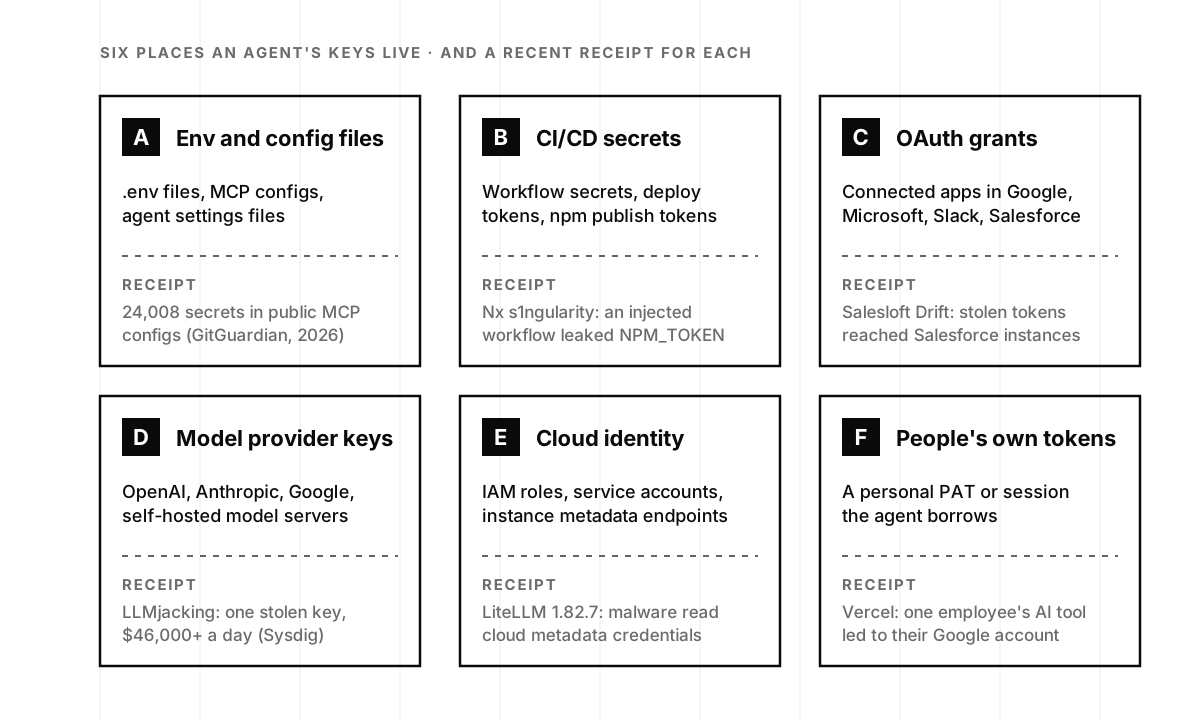
A. Environment and config files. .env files, MCP configuration files, IDE agent settings and the occasional credentials.json checked in “just for now.” This is where coding agents look first, because it’s where the code tells them to. Lakera found Claude Code’s local settings file, .claude/settings.local.json, inside 428 published npm packages, 30 of them holding live credentials, and noted “there is no warning during npm publish if the directory is present” (Lakera; TechTalks, April 2026).
B. CI/CD secrets. GitHub Actions, GitLab and CircleCI secrets, deploy keys and package-publishing tokens. Agents increasingly run inside these pipelines, which means a successful prompt injection in an issue or pull request can reach the same secrets your deploy job uses.
C. OAuth grants. The connected-apps page in Google Workspace, Microsoft 365, Slack, GitHub, Salesforce and every other system that lets a third-party tool act on a user’s behalf. OAuth grants can persist long after the original use case is forgotten, which makes them an easy place for an AI tool to collect access nobody reviews.
D. Model provider keys. The API keys page at OpenAI, Anthropic, Google and anyone else you pay for inference, plus any self-hosted model server. Cyera reported about 300,000 Ollama servers exposed on the internet, and noted that “Ollama launches with no authentication by default and listens on all network interfaces” (Cyera, May 2026).
E. Cloud identity. IAM roles, service accounts and the instance metadata endpoints that hand credentials to whatever runs on a machine. An agent running in your cloud inherits the role of the workload it runs in, which is often much broader than the agent’s job.
F. People’s own tokens. The personal access token an engineer pasted into an agent’s config, the browser session an agent drives, the Google account a trial AI tool was connected to. These are the hardest to find, because they look like the person in every log, and revoking them locks the person out too.
Fourteen months of receipts
None of the six places is theoretical. Here’s what the last fourteen months looked like, tagged with where each credential lived.
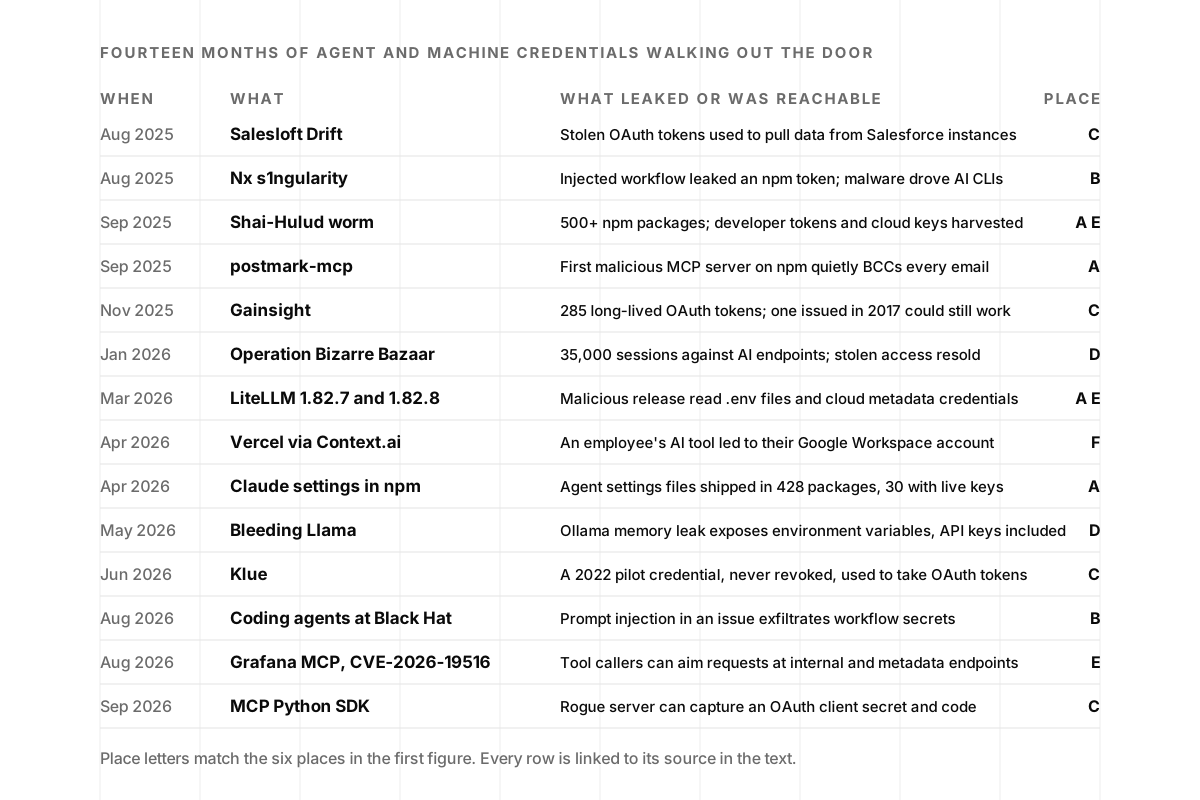
A few of these are worth a closer look, because each one teaches a different part of the inventory.
Salesloft Drift: the OAuth grant as the target. Between August 8 and August 18, 2025, an actor Google tracks as UNC6395 “targeted Salesforce customer instances through compromised OAuth tokens” belonging to Drift, Salesloft’s chat agent. Google’s threat intelligence team wrote that “the primary intent of the threat actor is to harvest credentials,” and that it went looking for “Amazon Web Services (AWS) access keys (AKIA), passwords, and Snowflake-related access tokens” inside the stolen data (Google Threat Intelligence, August 2025). Salesloft later traced the entry point to its own GitHub account, which attackers had been in since March, and from there to Drift’s AWS environment, where the customers’ tokens lived (The Register, September 2025). Cloudflare, one of the victims, reviewed the support cases that were taken and “found 104 Cloudflare API tokens” its customers had pasted into tickets, then rotated every one (Cloudflare, September 2025). One grant, many hops, and secrets sitting in places nobody thinks of as secret storage.
Nx s1ngularity: the agent as the burglar’s flashlight. On August 26, 2025, malicious versions of the Nx build tool went live on npm for about four hours. The root cause was a GitHub workflow that let a pull request title run as a shell command, which leaked the project’s npm publishing token (Nx, September 2025). What made it new was the payload. According to Wiz, the malware “weaponized installed AI CLI tools by prompting them with dangerous flags” such as --dangerously-skip-permissions and --yolo, then used Claude, Gemini and Amazon Q’s command-line tools to search the machine for secrets. It collected “over a thousand valid Github tokens” and “dozens of valid cloud credentials and NPM tokens” (Wiz, August 2025). The agents weren’t compromised. They were helpful, to the wrong person.
Shai-Hulud: the worm that ran on tokens. A month later, a self-replicating worm spread through npm by stealing developers’ publishing tokens and using them to infect more packages. The Cybersecurity and Infrastructure Security Agency (CISA) reported it had “compromised over 500 packages,” harvesting GitHub personal access tokens and cloud API keys, and told developers to “immediately rotate all developer credentials” (CISA, September 2025). Its second wave in November compromised the secrets of “more than 25,000 developers” within three days, according to Wiz (The Register, November 2025).
LiteLLM: the AI gateway that read the room. On March 24, attackers published two malicious versions of LiteLLM, a popular open-source gateway that sits between applications and model providers and therefore holds a lot of model keys. LiteLLM traced the compromise to “the Trivy dependency used in our CI/CD security scanning workflow,” a poisoned release of a security scanner, and told users to “treat any credentials present on the affected systems as compromised” (LiteLLM, March 2026). The Open Source Vulnerabilities (OSV) advisory lists what the malware went after: SSH keys, .env files, Kubernetes tokens and cloud metadata credentials (OSV, PYSEC-2026-2). A tool whose whole job is to hold model keys is the first place an attacker looks for them.
Gainsight and Klue: the credentials time forgot. Two incidents involving customer-success and sales tools are worth putting side by side. In November 2025, attackers abused 285 OAuth tokens connected to Gainsight. Gainsight’s chief technology officer wrote the most useful postmortem line of the year: “OAuth tokens were allowed to live too long,” adding that “a token issued in 2017 could theoretically still work in 2025” (Gainsight, January 2026). In June, Klue disclosed that a “compromised legacy credential associated with an integration service” had been used to steal “OAuth tokens used to connect Klue with certain third-party platforms, including Salesforce” (Klue, June 2026). TechCrunch reported the credential “was originally provided to a third-party in 2022, for a limited pilot” (TechCrunch, June 2026). A pilot ends. Its credential doesn’t, unless someone owns it.
Coding agents at Black Hat: the issue that read the secrets. In August, Novee Security showed that a prompt injection hidden in a GitHub issue could get Anthropic’s Claude Code GitHub Action to send out a workflow’s secrets: “Every workflow secret is exfiltrated: GITHUB_TOKEN, ANTHROPIC_API_KEY, all of it.” Google’s Gemini CLI had a similar flaw (Novee Security, August 2026). Both vendors issued fixes. The lesson for the inventory is that every secret you hand an agent in CI is one prompt injection away from whoever can open an issue.
MCP’s own plumbing. Two advisories in the last two months landed in the protocol layer itself. In August, Grafana published CVE-2026-19516, a critical (9.1) server-side request forgery flaw in its MCP server that let anyone able to call one of its tools point it at internal, loopback and cloud metadata endpoints and read the responses. Metadata endpoints are where many cloud workloads pick up their credentials; the fix is version 1.1.0. On September 28, Cycode disclosed an account takeover in the official MCP Python SDK: a malicious server could redirect the client’s login and capture its client secret, authorization code and PKCE verifier, enough to act as the victim. Versions 1.9.1 through 2.1.1 were affected; the fix is 1.30.0 or 2.2.0, and the machine-to-machine providers also need an issuer= setting. Cycode’s advice after upgrading includes rotating the client secret and revoking tokens if you might have connected to an untrusted server. I covered how MCP servers change after approval in Your MCP Server Passed Review, Then It Changed. Here the question is simpler: when an advisory says “rotate the client secret,” do you know which agents hold one?
Why “rotate it” isn’t enough
The standard advice after any of these incidents is to rotate credentials. It’s good advice, and every advisory above ends with it. It’s also an admission that the credential was the kind of thing that could be copied, carried away and used somewhere else.
Jasson Casey, chief executive of Beyond Identity, made the point on episode 92 about human credentials, and it applies even more to agents: “It’s not necessarily that long-lived and rotation is the problem. The problem is that it moves in the first place.” We wrote up the human side of that argument in Why Passwords Still Get Stolen. For agents, a credential that can’t move isn’t always available yet, so the practical goal is a credential that’s useless soon after it moves: short-lived, narrowly scoped and tied to one job.
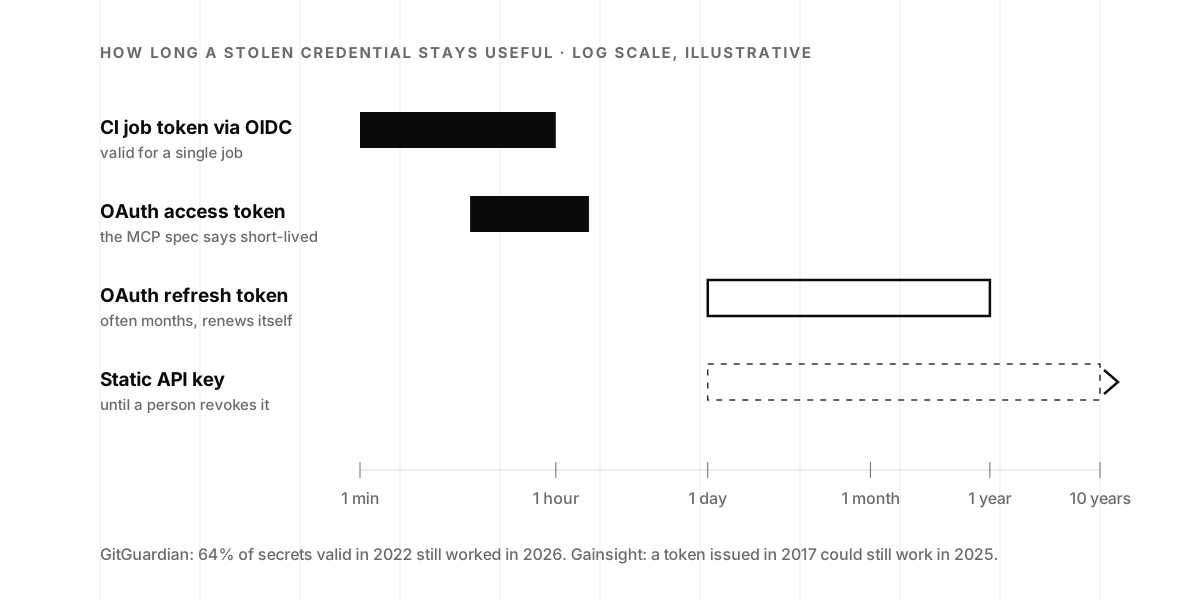
The good news is that the systems agents use are moving to the left side of that chart. GitHub Actions can request cloud credentials through OpenID Connect (OIDC), so “your cloud provider issues a short-lived access token that is only valid for a single job,” with no stored key at all (GitHub Docs). The MCP authorization specification says authorization servers “SHOULD issue short-lived access tokens” (MCP specification, June 2025). And an Internet Engineering Task Force (IETF) draft on agent identity, written by authors from OpenAI, Okta, AWS and others, calls static API keys “an antipattern for agent identity” and says agent credentials “SHOULD be short-lived” (IETF, September 2026).
The bad news is that many model providers still hand you a static key, and many startups still have static keys scattered across their systems. That’s what the inventory is for.
The 30-minute first-pass inventory
Set a timer and open a spreadsheet, or download our template with the columns already set up and three example rows. The goal of the first pass is a complete list, not a perfect one. “Unknown” is a fine answer in any cell; it’s information.
Treat this as a first pass, not an audit. It finds the credentials people know about and the ones a quick scan turns up. A full review goes further: every token, connector scope and service account, checked against what each agent actually needs. The first pass tells you where to start.
One rule before you start: the inventory lists credentials, not secrets. Record a key’s name or ID and where it lives. Never paste the secret itself into the spreadsheet, or you’ve just created the most valuable file in the company.
Minutes 0 to 5: list every agent and AI tool
Write down everything that uses AI and touches your systems or data, then post the list in your team channel and ask what’s missing. The list is usually longer than you think. Typical rows:
- Coding agents and assistants, in the IDE, in CI or running on their own
- MCP servers your team has installed, local or remote
- Agents you built: internal automations, support bots, data pipelines that call a model
- AI features in your product that call a model provider
- Third-party AI apps someone connected to Google Workspace, Microsoft 365, Slack, GitHub or your CRM, including trials
Minutes 5 to 15: find the credentials
Walk the six places, in this order, because it’s the order that finds the most in the least time:
- OAuth grants (C). In the Google Workspace admin console, open Security, then Access and data control, then API controls, then Manage Third-Party App Access, and sort by access level. Microsoft 365, Slack, GitHub and Salesforce all have an equivalent connected-apps page. Google’s default for apps you haven’t configured is to “allow users to access any third-party apps” (Google Workspace Admin Help), so expect surprises.
- Model provider consoles (D). Open the API keys page for every provider you pay. Note each key’s name, project or workspace, permission level and creation date.
- CI/CD secrets (B). List the secrets in each repository and organization, and which workflows use them.
- Cloud identity (E). List the roles or service accounts attached to the workloads where agents run.
- Env and config files (A). Ask each engineer to check their
.envfiles, MCP config files and agent settings for credentials, and to name them in the sheet, not paste them. - People’s own tokens (F). Ask the direct question: “Is any agent using your personal token, your session or your account?” Write down every yes.
Minutes 15 to 20: scan your repositories
Run a free secrets scanner such as Gitleaks or TruffleHog across your repositories, including the private ones, and their history, not just the latest commit. Remember the GitGuardian finding: internal repos leak at about six times the public rate. Anything the scan finds goes in the table, and anything valid gets rotated this week. Where available on your GitHub plan, turn on secret scanning and push protection while you’re there; GitHub’s push protection blocks known key formats before they’re committed, and for providers such as Anthropic it also checks whether a leaked key is still valid (GitHub Docs).
Minutes 20 to 25: fill in the columns
For each credential, fill in the row:
| Column | What to write |
|---|---|
| Agent | The tool or agent that uses it |
| Credential | Key, token, OAuth grant, cloud role, password, and its name or ID |
| Where it lives | Secrets manager, CI, .env, MCP config, provider console, someone’s laptop |
| What it can reach | Which systems, and read, write or admin |
| Human owner | One named person who answers for it |
| Expires | A date, “end of job,” or “never” |
| Last rotated | A date, or “unknown” |
| Shared with a person? | Yes or no |
| Kill switch | How to revoke it, and who’s allowed to |
Minutes 25 to 30: mark the red flags
Highlight every row that trips one of the five red flags in the next section, then pick the top three to fix this week. Put a name and a date next to each. That’s the end of the first pass.
".env obfuscation alone is security theater against a capable agent."
brianthinks, in a Hacker News thread on hiding .env secrets from coding agents, February 2026
That comment is a good reminder of what the inventory is and isn’t. It won’t stop a capable agent from reading a file it can reach. What it does is tell you which files, tokens and grants are within reach, so you can take them out of reach instead of hiding them.
Five red flags to fix first
Every row in the inventory that has one of these problems goes to the top of the list. Each one maps to an item on the OWASP Non-Human Identities Top 10, which is useful when a buyer or an auditor asks why you prioritized what you did.
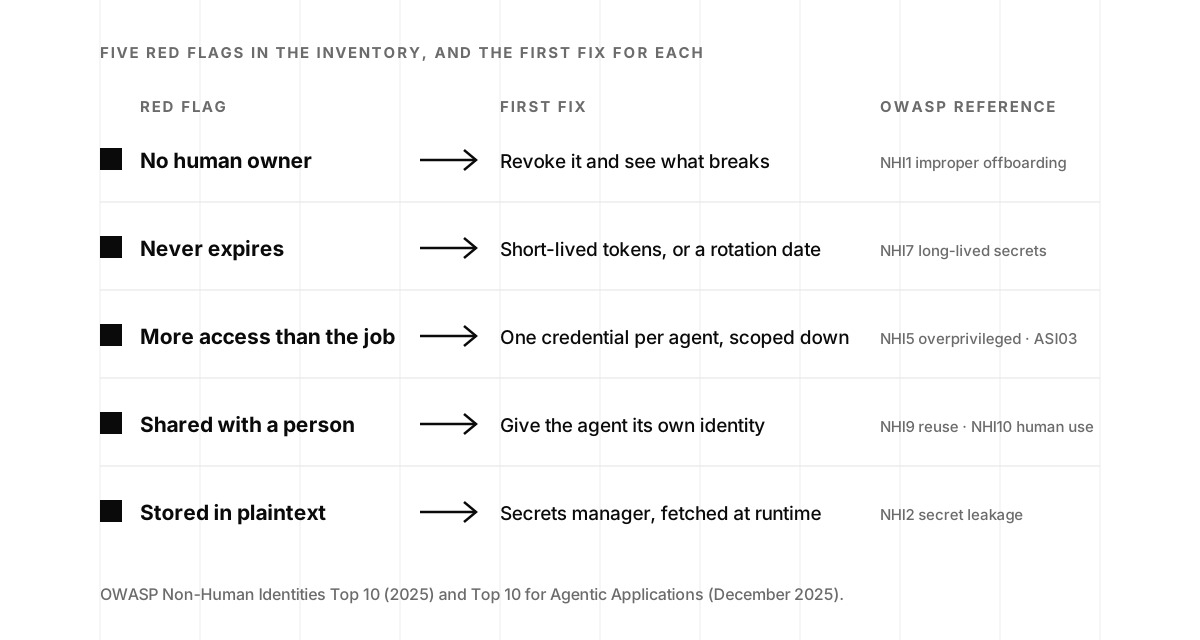
- No human owner. Nobody can approve it, rotate it or revoke it, which is exactly how the Klue pilot credential survived four years. OWASP calls the failure mode improper offboarding (NHI1).
- Never expires. Long-lived secrets are NHI7, defined as secrets “with expiration dates that are too far in the future or that don’t expire at all.” Gainsight’s 2017 token is the example to remember.
- More access than the job needs. A full-permission key for an agent that only reads, or a cloud role inherited from the workload. That’s overprivileged NHI (NHI5), and in agent terms it’s ASI03 on OWASP’s agentic list, covered in the standards section below.
- Shared with a person. If an agent uses your personal token or session, its actions look like yours in every log, and revoking it locks you out too. OWASP lists both directions: reuse of one identity across systems (NHI9) and humans using machine credentials (NHI10).
- Stored in plaintext. In a config file, a repo, a support ticket or a chat message. That’s secret leakage (NHI2), and Cloudflare’s 104 tokens in support cases show how far “plaintext” can travel.
What to fix, and how
Work in this order. Each step is small, and the first two usually take less than a day.
1. Revoke what nobody owns. If no one can say what a key or grant is for, turn it off and see what breaks. Usually nothing does. If something does, you’ve found its owner.
2. One credential per agent, scoped to its job. Many providers support this now, and it’s the change that makes every later step cheaper, because you can revoke one agent without breaking the rest.
- OpenAI keys default to “All” permissions, but can be set to “Restricted,” with per-endpoint read or write access, or to “Read Only” (OpenAI Help Center). Project service accounts let a system hold a key that isn’t tied to a person, and project spend limits (set a hard cap, not just an alert) limit the damage (OpenAI Help Center).
- Anthropic API keys “can be scoped to a single workspace,” and each workspace can have its own spend and rate limits. One catch: “You cannot set limits on the Default Workspace,” so create a workspace per environment or product (Claude Docs).
- GitHub fine-grained personal access tokens can be limited “to only access specific repositories,” organizations can require approval for them, and for automation GitHub recommends a GitHub App instead of a person’s token (GitHub Docs).
- Google Workspace lets you set each third-party app to trusted, limited, specific Google data or blocked, instead of the “allow everything” default (Google Workspace Admin Help).
3. Give agents their own identity. Replace every “the agent uses my token” with a service account, a GitHub App or an OAuth client the agent owns. It’s the cleanest way to tell the agent’s actions apart from yours in a log, and to revoke it without revoking yourself.
4. Move secrets out of files. Put them in a secrets manager and have the agent fetch them at runtime. Then tell the agent what it may not read. Claude Code, for example, supports a permissions.deny rule such as Read(./.env) (Claude Code settings). That’s not a wall, as the Hacker News comment above says, but combined with secrets that aren’t in the file to begin with, it narrows what a confused or manipulated agent can stumble into. Our one-hour .env security program has the exact settings for Claude Code, Cursor, Codex and Gemini CLI, plus the commands to find and rotate what has already leaked.
5. Prefer short-lived credentials. Where you can, use workload identity or OIDC federation so agents get tokens that expire in minutes, not keys that live for years. In CI, use OIDC to your cloud provider instead of stored access keys, and for agents running in your cloud, use the workload’s own identity rather than a key in an environment variable.
6. Put a budget on every key that can spend money. Simon Willison, who has written more clearly than anyone about agent risk, puts it in one line: “If a credential can spend money, set a tight budget limit” (Simon Willison, September 2025). He also suggests giving agents credentials for test or staging environments “where any damage can be well contained.” LLMjacking shows up first as a bill, and a spend alert turns a five-figure surprise into a same-day page.
7. Write down the kill switch. For each agent, one line in the inventory: how to shut it off and who’s allowed to. When an advisory like Cycode’s lands on a Friday afternoon, this is the page you open.
"AI agents should be isolated from any actual secrets, because they can't be trusted to follow instructions."
Geee, in a Hacker News thread on what a coding agent's CLI sends home, July 2026
That’s the end state worth aiming for, and steps 3 through 5 are how you get there gradually. If your agents also have write access to production, our posts on least privilege for agentic AI and when an agent has earned write access go deeper on how to grant it one rung at a time. Graham Neray, who runs the authorization company Oso, explained why that matters for growing SaaS companies on episode 89, and Eric Olden of Strata Identity walked through the identity control plane for agents on episode 81.
What the standards now say
A year ago, a startup asking “what’s the standard for agent credentials?” would have gotten a shrug. Now there are several, and they agree with each other more than you’d expect.
OWASP’s agentic list names the risk. The OWASP Top 10 for Agentic Applications, released in December 2025, lists Identity and Privilege Abuse as ASI03 (OWASP GenAI Security Project, December 2025). Microsoft’s summary describes it as “exploiting delegated trust, inherited credentials, or role chains to gain unauthorized access or actions” (Microsoft Security, March 2026). The OWASP Non-Human Identities Top 10 covers the mechanics behind it, and the five red flags above map straight onto it.
Five governments told you to stop using static keys. In May, CISA, the National Security Agency (NSA) and their counterparts in Australia, Canada, New Zealand and the United Kingdom published joint guidance on adopting agentic AI. It warns that “malicious actors can steal these secret keys or tokens when organisations keep them static,” and tells organizations to “replace static, long-lived secrets with ephemeral credentials that expire when the job is complete” and to “require just-in-time credentials for high-impact or privileged actions” (Five Eyes joint guidance, May 2026). The NSA’s separate MCP guidance adds that “the core MCP specification does not mandate any requirement for lifecycle management” and that “MCP agent processes themselves should follow the principle of least privilege” (NSA, May 2026).
The MCP specification forbids the worst shortcut. MCP’s authorization rules say “MCP servers MUST NOT accept or transit any other tokens” and “the MCP server MUST NOT pass through the token it received from the MCP client” (MCP specification, June 2025). In plain terms: an MCP server should get its own token for the downstream system, scoped to the request, instead of forwarding yours. If a server in your inventory asks you to paste a personal token into its config, that’s the shortcut the spec is warning about.
NIST is asking the same questions you are. The National Institute of Standards and Technology’s National Cybersecurity Center of Excellence (NCCoE) published a concept paper in February on software and AI agent identity. Two of its questions could be the column headers of your inventory: “How do we handle key management for agents? Issuance, update, and revocation?” and “How do we establish ‘least privilege’ for an agent?” It points to OAuth, OpenID Connect and SPIFFE, a standard for workload identity, as the building blocks (NIST NCCoE, February 2026).
Security leaders are saying the same thing in their own words. Michael Adams, the chief information security officer (CISO) of Docusign, told CSO Online that agents mean “the creation of new credentials and tokens, which many inventory processes weren’t designed to track,” and that teams should “assume credentials may be compromised and architect accordingly” (CSO Online, April 2026). Dustin Wilcox, CISO of S&P Global, put it in eight words in the same piece: “Identity is now both a control surface and an attack surface.”
The question in your next security review
Buyers are starting to ask about this directly. Okta’s request-for-information template for AI agent identity, built from more than 400 customer conversations, groups its questions into discovery and inventory, short-lived credentials and least privilege, and runtime controls such as kill switches (Okta, 2026). Those are the columns of the table you just filled in.
Yash Kosaraju, the CISO of a16z, told me on episode 104 how his team handles a request for a new AI tool. They don’t say no. They “see what they’re trying to do, and then define access to the right set of data for that use case. If it’s a POC, that can have a subset of test data.” That’s the security review your buyer will run on you, and it’s the review the inventory lets you run on yourself.
It also lines up with your audit. SOC 2’s logical access criteria cover this ground without ever saying “agent.” CC6.2 asks that “prior to issuing system credentials and granting system access, the entity registers and authorizes new internal and external users,” and CC6.3 covers how the entity “authorizes, modifies, or removes access” over time. The same logical access controls can apply to agents when they have their own credentials and access within the system boundary, and an auditor who asks for your user access review may well ask whether agents are on it. If you’re preparing for a first audit, What Even Is a SOC 2? explains the criteria, and the free SOC 2 readiness checklist scores your access controls along with the nine other areas auditors review.
When the questionnaire asks, you want to be able to say something like this, with the spreadsheet behind it. Treat it as an example policy, and adjust the review cadence and controls to what you actually run:
“We maintain an inventory of every AI agent and AI integration with access to our systems or customer data. Each credential has a named owner, is scoped to the agent’s task, is stored in our secrets manager rather than in code, and is reviewed as part of our periodic user access review. Agents never use employees’ personal credentials. Where the platform supports it, agents use short-lived tokens; model API keys have spend limits and rotate on a schedule. We can revoke any agent’s access within minutes, and we document how in the inventory.”
That answer is short because the work behind it is done. It’s also the kind of answer Is Your SOC 2 Real? argues buyers now test, so only write the sentences that are true today, and let the inventory tell you which ones those are. When the reviewer’s next question is what each agent can reach, the agent access register in our week-after guide turns this inventory into a one-page answer. And once every agent has its own key, the seven-part gate in our post on agent authorization decides what each key may do on each call.
Keep it current
The first-pass inventory takes about 30 minutes for a small team. After that, it’s maintenance:
- Quarterly, alongside your user access review, walk the six places again and update the rows.
- Whenever someone adds an agent, an MCP server or an AI integration, add the row before the tool goes live. Make “who owns this credential?” part of the approval.
- Whenever an advisory lands, search the inventory for the affected tool. If the advisory says rotate, you’ll know exactly what and where.
- Whenever someone leaves, check the “human owner” and “shared with a person” columns, the same way you’d check their laptop and their accounts.
The goal is the same one this post started with: know which AI agents have access to what, who owns that access, how long it lasts, and how to shut it off.
That answer is also the first row of the security slide your board deck is missing: how many agents you run, whose keys they hold and who can revoke them.
If you’d like help, this is work we do every week at YSecurity: securing MCP servers, running AI access control audits that produce this kind of inventory, along with least-privilege fixes and audit evidence, and getting the evidence ready for SOC 2 Type 2. Our operators join your Slack and work in your cloud and codebase, and we bill in 15-minute increments with no retainers.
Not sure where your agents’ keys are? Book a free 15-minute call, or if you’re a startup, claim your first 8 hours free.
AI agent credentials, frequently asked questions
- What is an AI agent credential inventory?
- It's a list of every credential an AI agent or AI tool in your company can use: API keys, OAuth grants, cloud roles, service account tokens and any personal tokens it borrows. For each one you record where it lives, what it can reach, which human owns it, when it expires, when it was last rotated and how to revoke it. It's the user access review you already run for employees, applied to agents.
- How many non-human identities does a typical company have?
- Far more than human ones. Palo Alto Networks' 2026 Identity Security Landscape report puts the average at 109 machine identities for every human, including 79 AI agent identities per human. CyberArk's 2025 report put the ratio at 82 to 1.
- Where do AI agent credentials usually leak?
- Mostly in code, configuration and CI. GitGuardian counted 1,275,105 leaked secrets tied to AI services on public GitHub in 2025, up 81 percent in a year, and 24,008 unique secrets in MCP configuration files. Internal repositories are worse than public ones: 32.2 percent contain at least one hardcoded secret, about six times the public rate. OAuth grants to third-party tools are the other big source, as the Salesloft Drift and Vercel incidents showed.
- What happens if someone steals an AI API key?
- At minimum they spend your money. Researchers call it LLMjacking, and Sysdig estimated the cost to a victim can be over $46,000 a day. Stolen access to AI endpoints is now resold through marketplaces. If the key belongs to an agent with tools, the attacker also gets whatever the agent can reach, which can include your code, your customers' data and your cloud.
- What does OWASP say about AI agent credentials?
- Two OWASP lists cover it. The Top 10 for Agentic Applications, published in December 2025, lists Identity and Privilege Abuse as ASI03: agents exploiting delegated trust, inherited credentials or role chains to get access they shouldn't have. The Non-Human Identities Top 10 (2025) covers the mechanics, including secret leakage (NHI2), overprivileged identities (NHI5), long-lived secrets (NHI7) and humans using machine credentials (NHI10).
- Does SOC 2 cover AI agent credentials?
- Not by name, but the logical access criteria do. CC6.1 through CC6.3 cover how credentials are issued, scoped, modified and removed for the users of your system, and the same logical access controls can apply to agents when they have their own credentials and access within the system boundary. Auditors and enterprise buyers increasingly ask about agents directly, so an inventory with owners, scopes and expiry dates is useful evidence to have ready, alongside the controls themselves.
- Should AI agents use static API keys or OAuth?
- Short-lived, scoped credentials wherever the system allows it. The May 2026 Five Eyes guidance on agentic AI says to replace static, long-lived secrets with ephemeral credentials that expire when the job is done, and the MCP authorization specification expects OAuth with short-lived access tokens. Static keys still exist for many model providers, so scope them, give each agent its own, set spend limits and rotate them on a schedule.
- How often should we redo the inventory?
- Quarterly, alongside your user access review, and whenever someone adds an agent, an MCP server or an AI integration. A first pass takes about 30 minutes for a small team. Later passes are faster because you're only checking what changed.