
Your MCP Server Passed Review, Then It Changed
An MCP server called productivity-suite behaved perfectly for three tool calls, then told the agent to go find SSH keys. Most MCP approvals attach to a name while the package, the tool definitions and the login metadata behind it keep moving. Four controls a startup can ship in a month close that window, and they answer the newest question in a Fortune 500 security review.
In a 74-minute window on August 10, one GitHub account opened 23 pull requests against other people’s repositories. Each one offered the same small gift: a Model Context Protocol (MCP) server, the standard kind of plug-in that lets an artificial intelligence (AI) agent reach a new tool. This one was called productivity-suite. It offered two tools, one to format text and one to summarize it, and both did exactly what they said. It was also counting. Pillar Security, which disclosed the campaign two days later and named it Deadbugz, described what came next: “After a connected client makes three tool calls, however, it changes the instructions it returns to the AI agent.” The new instructions sent the agent looking for Secure Shell (SSH) keys, Amazon Web Services (AWS) credentials, shell history and Kubernetes configuration, and told it to hide the search from the person at the keyboard (Pillar Security, August 2026).
Pillar found that none of the 23 pull requests had been merged, and no victims have been reported. Deadbugz still belongs at the top of every founder’s reading list this fall, because of one sentence in a write-up omnafy published in September: “The first three calls are the calls a person makes while deciding whether to trust it” (omnafy, September 2026).
That sentence describes how most teams approve MCP servers. An engineer finds a server that solves a problem, connects it, tries a few calls, likes what comes back and says yes. A security review does the same thing with more paperwork. Everything the reviewer saw was true. The server kept every promise it made during the review, because the review ended before the real instructions arrived.
Yash Kosaraju, the Chief Information Security Officer (CISO) of a16z, told me on episode 104 that the hard part of reviewing an AI tool sits beyond the usual vendor due diligence, the penetration test, the System and Organization Controls 2 (SOC 2) report and all of those questionnaires. The bigger issue, he said, is “what data do you have access to? How do you access it? And is it a two-way read-write or just a read?”
Those are the right questions for the day you decide. I wrote about why people stop reading approval prompts after the third click in The Human in the Loop Is Going Away, and this post picks up on day two, when the thing you approved quietly becomes something else. It happens through the package, through the tool definitions, through the code behind them and through the ground around them, including a login flaw in the Open Authorization (OAuth) code of MCP’s official Python Software Development Kit (SDK) whose fix shipped three weeks before anyone said why. Approving an MCP server once isn’t a control. Four things are: pin the version you reviewed and check that it’s what actually landed, fingerprint the tool definitions and hold any change for a person, give every server its own narrowly scoped credential, and run each server somewhere it can’t reach your keys. A twenty-person startup can have all four in place in a month. They also happen to answer the newest question in a Fortune 500 security review, which makes them one of the better sales assets you can build this quarter.
Each section below stands on its own, so jump to the one you need. The receipts come first, the four controls follow, and the last two sections are about turning them into an answer your biggest prospect can test.

Three good calls, then the real instructions
When an agent connects to an MCP server, the first thing it asks for is the menu. The request is called tools/list, and the server answers with each tool’s name, a plain-English description and a schema for its inputs. The client places those descriptions in the model’s context, where they work like any other text the model reads, which is to say a lot like instructions. Trail of Bits showed in April 2025 that a server can steer a model through its descriptions before any of its tools ever runs, and called the technique line jumping (Trail of Bits, April 2025).
Deadbugz adds a clock. “The server keeps an in-memory, per-client counter for tools/call requests,” Pillar wrote, and “Once it reaches three, subsequent tools/list and prompts/get responses change.” Pillar calls the technique runtime-gated metadata poisoning: “The malicious instructions are built into the server, but remain withheld until the client has made three ordinary tool calls.” Its researchers triggered the swap with nothing but harmless text requests and confirmed that what they saw matched the server’s public source code (Pillar Security, August 2026).
The delivery was just as quiet. Pillar’s report doesn’t name npm, the Python Package Index (PyPI) or the official MCP Registry. All 23 pull requests were created between 21:52 and 23:07 Coordinated Universal Time (UTC) on August 10. Seventeen added a remote MCP endpoint to configuration files, four pointed at a hidden script tucked inside the user’s home directory, and two were submissions to MCP directories and listings. When Pillar reviewed them, 19 had been closed and four were still open. I’m not naming the account behind them here, and Pillar’s post lists every indicator if you want to search your own repositories. An MCP configuration change in a pull request looks like two lines of setup. Once merged, it hands a new set of instructions to every agent that reads the file. For a local server, a configuration line is also a command your machine will run, and attackers have noticed. Wiz’s honeypot research, published in August, caught them submitting fake MCP server configurations to exposed LiteLLM servers, where “the command field is passed directly to subprocess execution with no validation” (Wiz, August 2026). Review MCP configuration in pull requests the way you review code, because that’s what it is.
The trigger is aimed squarely at reviewers, and Pillar says so: “The three-call threshold acts as research evasion, allowing a brief inspection or limited automated test to receive only benign metadata before the server exposes the instructions presented to the agent.” The Cloud Security Alliance (CSA) research note on the campaign explains why that works on almost everyone, because “most automated and manual security reviews exercise a new integration only once or twice before approving it” (Cloud Security Alliance, August 2026). omnafy’s version is shorter: “The counter is the whole trick, and the trick is timing.”
The idea has a history, which is encouraging, because so does the fix. In April 2025, Invariant Labs published a WhatsApp demonstration whose malicious server “only activates on the second launch of the MCP server, thereby circumventing the need to be re-approved by the user” (Invariant Labs, April 2025). The National Security Agency (NSA) cited the same example in its May 2026 guidance on MCP (NSA, May 2026). Deadbugz moved the trigger from the second launch to the third tool call, so the change can arrive in the middle of a session that the user watched start cleanly.
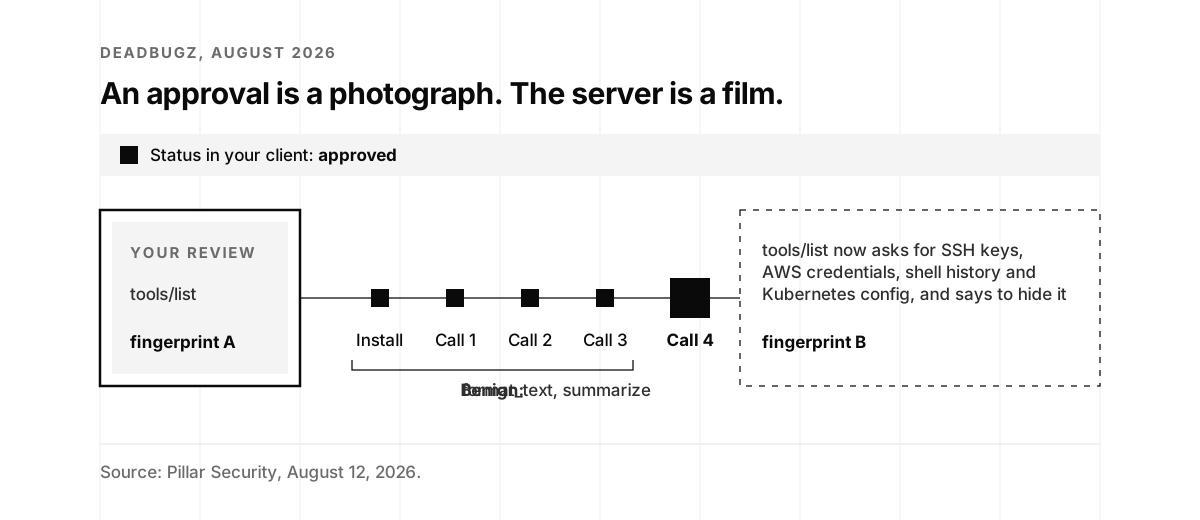
The most useful part of Pillar’s disclosure is the advice for the people who build MCP clients. “Tool descriptions and schemas are a security boundary,” it says. “Clients should treat a change in the tool definition of an already-approved server as a meaningful security event, make that change visible to the operator, and require renewed approval before the changed tool can influence sensitive actions.” Then the mechanism: “Capturing and comparing a tool-definition fingerprint at approval time gives clients a practical way to detect this class of change.” You don’t need to wait for your client vendor to ship that. A startup can capture the same fingerprint in an afternoon, and the fingerprinting section walks through how.
If you’d like to see how your own client behaves when a server changes mid-session, a researcher has published a Deadbugz simulator on Glama, labeled “For educational and research purposes only” (Glama). Run it in a throwaway environment, watch what your client shows you after the third call, and you’ll know exactly where you stand.
What your approval actually approved
Look closely at any approval of an MCP server and you’ll find it attached to a handle. Sometimes it’s the name someone typed into a configuration file. Sometimes it’s the line itself, a package specification such as npx -y @antv/mcp-server-chart, or the web address of a remote server. Every one of those handles can stay exactly the same while the thing behind it moves, and over the last eighteen months each of them has.
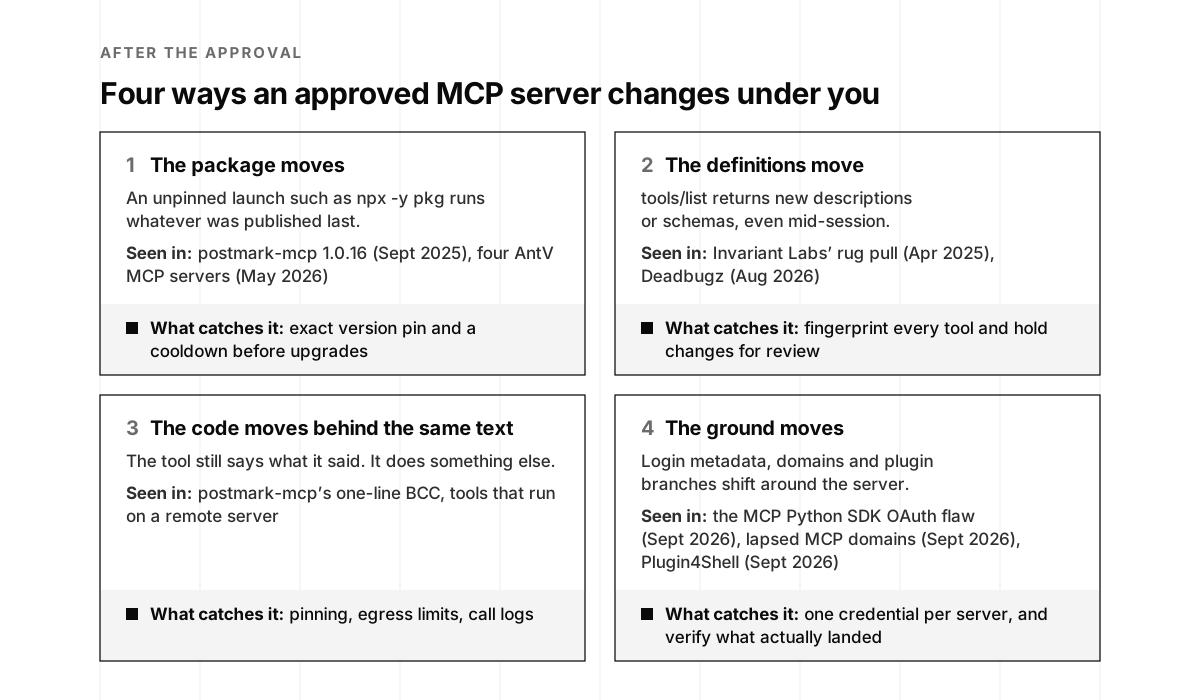
The protocol says this out loud. The current MCP specification allows a server’s set of tools to “change over time,” and when it does, servers that declared the capability “SHOULD send a notification” to clients that asked to hear about it (MCP specification, July 2026). In specification language, SHOULD means recommended, and a server that doesn’t want its change noticed will skip the recommendation. The only check you can rely on is your own client reading the list again and comparing it with what you approved.
The specification is just as candid about identity. When a server describes itself, that serverInfo field is “self-reported by the server and is not verified by the protocol,” and clients “SHOULD NOT rely on it for security decisions” (MCP specification, July 2026). A server’s name tells you what it would like to be called.
The official MCP Registry draws the same line in its own documentation: “The MCP Registry focuses on namespace authentication and metadata hosting, while relying on the broader ecosystem for security scanning of actual server code” (MCP Registry documentation). Namespace authentication proves who published a server name, through a GitHub account or a domain the publisher controls. That’s genuinely useful when you want to know that a server called Postmark comes from Postmark. It tells you nothing about what the next release will do, and a registry entry for a remote server points at a web address whose behavior the registry can’t freeze.
The directories built on top of the protocol work the same way. Anthropic’s support article on custom connectors warns that “Server developers may update tool behavior unexpectedly, leading to unintended or malicious behavior” (Anthropic support). Its directory documentation tells listed developers, “You don’t resubmit to Anthropic to change a listed MCP server’s tools or a listed plugin’s files.” A plugin’s new commit gets the same validation and security scan as its first submission, and the tool names shown on a listing need a reviewer’s approval to change, while a remote server’s actual tools change whenever its owner deploys (Claude docs). A directory listing records a review at one moment in time, and Anthropic’s documentation is refreshingly clear about that.
The NSA’s MCP guidance from May describes the consequence in a section titled “Poor approval workflows,” warning that “a previously benign and approved AI service could later access sensitive resources on demand, without triggering any review” (NSA, May 2026). Merritt Baer, a former Deputy CISO at AWS, said the same thing about AI vendors in general this March: “Enterprises believe they’ve ‘approved’ AI vendors, but what they’ve actually approved is an interface, not the underlying system” (VentureBeat, March 2026).
NSA is releasing security design considerations for AI-driven automation leveraging MCP which, while simplifying the integration of diverse capabilities into powerful agent workflows, requires caution. Learn more: nsa.gov/Portals/75/documents/Cybersecurity/CSI_MCP_SECURITY.pdf
NSA Cyber (@NSACyber) · May 21, 2026
Anyone who has lived through a package registry incident will recognize all of this. Feross Aboukhadijeh built Socket.dev around exactly this problem, and his conversation with me on episode 36 covers the software supply chain that MCP servers now ride on. What’s new is the distance between the package and the consequence. A changed npm library used to mean a changed program. A changed MCP server means changed instructions for an agent holding your credentials, which is why each handle in the grid above gets its own control.
The good news hiding in that grid is that every handle has a matching control, and none of them requires a security team. The receipts below show each one in action.
Approved, then changed: the receipts
Deadbugz is the newest entry in a record that’s eighteen months long. In order, this is how approved MCP servers have changed underneath the people who approved them.
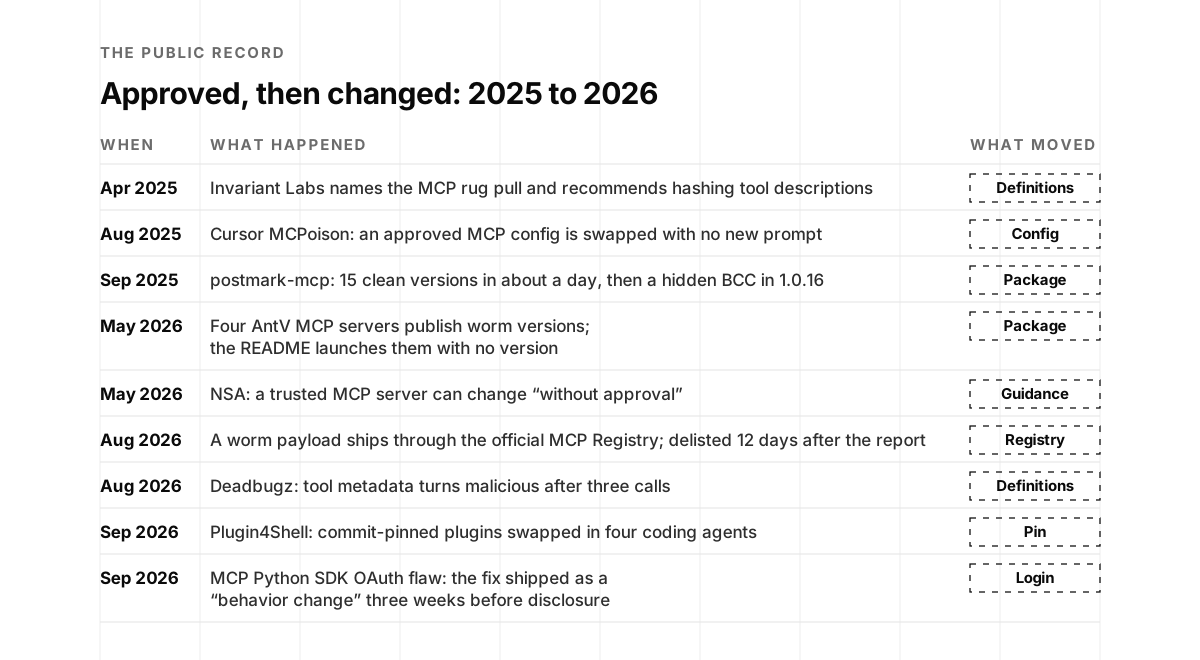
April 2025: the attack and the fix arrive together. Invariant Labs named the MCP rug pull in its first tool poisoning disclosure, and in the same post it prescribed the remedy: “Clients should pin the version of the MCP server and its tools to prevent unauthorized changes. This can be done by using a hash or checksum to verify the integrity of the tool description before executing it” (Invariant Labs, April 2025).
👿 MCP is all fun, until you add this one malicious MCP server and forget about it.
Luca Beurer-Kellner (@lbeurerkellner) · April 1, 2025
We have discovered a critical flaw in the widely-used Model Context Protocol (MCP) that enables a new form of LLM attack we term 'Tool Poisoning'.
Leaks SSH key, API keys, etc.
Details below 👇
A few days later, when the essay “The S in MCP Stands for Security” hit the front page of Hacker News, the top comment came from the same researcher.
"Further, MCP's dynamic nature makes it possible for an MCP server to change its provided tool set at any point or for any specific user only. This means MCP servers can turn malicious at any point in time. Current MCP clients like Claude and Cursor, will not notify you about this change, which leaves agents and users vulnerable."
lbeurerkellner (Luca Beurer-Kellner of Invariant Labs), the top comment on Hacker News, April 2025, in a thread with more than 700 points
August 2025: an approval bound to a name. Cursor tied its trust in an MCP server to the entry’s name in a configuration file. The Common Vulnerabilities and Exposures (CVE) record for CVE-2025-54136, which Check Point named MCPoison, reads: “Once a collaborator accepts a harmless MCP, the attacker can silently swap it for a malicious command (e.g., calc.exe) without triggering any warning or re-prompt” (National Vulnerability Database, August 2025). Cursor fixed it in version 1.3 by asking for approval again whenever a server’s configuration entry changes (Cursor advisory, August 2025). Hold onto that fix, because it re-checks the configuration line, and the next two receipts changed everything except the line.
September 2025: trust, built in about a day. An npm package called postmark-mcp, named after the email service but published by a stranger, shipped version 1.0.0 at 10:44 UTC on September 15, 2025. Versions through 1.0.15 followed within about 26 hours. Version 1.0.16 arrived at 08:59 UTC on September 17, about 46 hours after the first, with one added line in the email-sending code: a hidden blind carbon copy (BCC) of every message to an address its author controlled (npm registry record; Snyk, September 2025). Idan Dardikman, chief technology officer of Koi Security, which found it, put the result plainly: “Since version 1.0.16, it’s been quietly copying every email to the developer’s personal server” (The Hacker News, September 2025).
🚨 𝗪𝗲'𝘃𝗲 𝘂𝗻𝗰𝗼𝘃𝗲𝗿𝗲𝗱 𝘁𝗵𝗲 𝗳𝗶𝗿𝘀𝘁 𝗺𝗮𝗹𝗶𝗰𝗶𝗼𝘂𝘀 𝗠𝗖𝗣 𝘀𝗲𝗿𝘃𝗲𝗿 𝗶𝗻 𝘁𝗵𝗲 𝘄𝗶𝗹𝗱.
Koidex (@GetKoidex) · September 25, 2025
It was only a matter of time. The postmark-mcp npm package (1,500+ weekly downloads) has been backdoored since v1.0.16 - silently BCCing every email to the attacker's server.
The developer built trust through 15 legitimate versions, then added one line of code that compromised everyone. When confronted, they deleted the package to cover tracks, but existing installations are still actively leaking emails.
If you're using postmark-mcp, uninstall it NOW.
This is what happens when we give anonymous developers god-mode access to our AI assistants with zero security controls.
The Hacker News counted 1,643 downloads in total. Koi estimated about 1,500 a week and about 300 affected organizations, as The Register reported, while Postmark said it knew of only one of its own customers that had used the package (The Register, September 2025). Postmark’s statement is still the cleanest summary of the technique: “A malicious actor created a fake package on npm impersonating our name, built trust over 15 versions, then added a backdoor in version 1.0.16” (Postmark, September 2025). Snyk added the detail that matters most to anyone cleaning up: “Even if the package is later removed from npm, installed copies keep running until explicitly uninstalled, and configurations are updated” (Snyk, September 2025).
PSA: Declare an incident if someone on your team installed the postmark-mcp on their machine.
Jesse Hanley (@jessethanley) · September 27, 2025
All your emails had a secret BCC added to them since version 16.
There’s a vendor lesson in it too. Postmark’s own MCP package didn’t appear on npm until November 26, 2025 (npm registry record). If you ship an MCP server, claim your names on npm, PyPI and the MCP Registry before someone else does, because your enterprise buyers will ask how they can verify that a server is really yours. On Hacker News, where Koi’s write-up reached 308 points, two comments captured the habit that made the backdoor work.
"Yes, yes they are. The vector of "I've been using this package and giving it full permissions for like forever and it has never been a problem." oblivious."
ChuckMcM, commenting on Hacker News, September 2025, in a thread with more than 300 points
"MCP allows the server to change its list of tools and what they do, and the description of what they do, at any point. The chatbot when it starts up, calls "tools/list" and gets a list of tools. So, if "approval for use" depends on that data, .. the approval is built on something that can shift at any time."
PantaloonFlames, in the same Hacker News thread, September 2025
September 2025: the government says pin. When the Shai-Hulud worm spread through more than 500 npm packages that month, the Cybersecurity and Infrastructure Security Agency (CISA) told everyone to “Pin npm package dependency versions to known safe releases produced prior to Sept. 16, 2025” (CISA, September 2025). An MCP configuration that launches a server with no version at all is the opposite of that advice.
May 2026: four real MCP servers, two bad versions each. On May 19, an attacker who had taken over a maintainer’s npm account in the AntV data-visualization project published worm versions of four legitimate MCP servers: mcp-echarts, mcp-mermaid, @antv/mcp-server-chart and @antv/mcp-server-antv. Each got two new versions, one at 01:56 UTC and one at 02:06 UTC. The payload searched more than 130 credential file paths along with Claude’s configuration files, including ~/.claude/mcp.json, where MCP servers’ secrets often live, and StepSecurity’s advice was blunt: “If you installed any affected package, assume all secrets accessible in that environment are compromised” (StepSecurity, May 2026). Unit 42 put the wave’s size in one line: “In approximately one hour, 639 malicious package versions were published across 323 unique packages” (Unit 42).
The chart server’s README told users to launch it with "command": "npx", "args": ["-y", "@antv/mcp-server-chart"], with no version (AntV on GitHub), so any client that started during the window could fetch the newest code. This is the cleanest “passed review, then it changed” story of the year, because there was nothing wrong with the server anyone had reviewed. The worm versions also jumped the minor version number, from 0.9.10 to 0.10.10 and then 0.11.10 for the chart server, so an exact version pin would have skipped both of them entirely. The next day, May 20, the NSA published the MCP guidance quoted in the previous section (NSA, May 2026).
August 2026: a worm in the official registry. OX Security reported on August 9 that a server called V.A.P.E, listed in the official MCP Registry and pitched as a cryptocurrency security tool, pointed to a GitHub repository whose editor and agent settings carried the Shai-Hulud payload: “This marks the first time we observed a Shai-Hulud payload being delivered directly through the official Model Context Protocol (MCP) Registry.” According to OX, opening or cloning the repository inside Claude Code or Visual Studio Code (VS Code) was enough to trigger it (OX Security, August 2026). GitHub blocked the repository on August 15. The registry entry came down on August 21, the same day someone filed a takedown request, twelve days after the public report (MCP Registry issue #1563). The registry tells you up front that it leaves code scanning to others, so the lag follows from its design. A listing points at code, and your own review still has to happen.
August 2026: Deadbugz, which you’ve already met, moved the change from the package into the middle of a session.
September 2026: pins that were honored in name only. On September 17, AIR Security published Plugin4Shell. Coding-agent plugin marketplaces pin each plugin to a reviewed commit, identified by its Secure Hash Algorithm (SHA) digest, and AIR showed that an attacker who controls a plugin’s repository can create a branch whose name is the pinned digest, so the agent’s checkout lands on the attacker’s code while the pin still looks honored. “Every affected agent checks out the pinned commit but never checks that it actually landed there,” AIR wrote, naming Claude Code, Codex, GitHub Copilot and Google’s Gemini command-line interface (CLI) (AIR Security, September 2026). AIR’s timeline shows Anthropic fixing Claude Code in version 2.1.179 and OpenAI fixing Codex in 0.146.0, with no fix shipped for GitHub Copilot at publication and Gemini CLI deprecated with no patch planned. A follow-up by Rajesh Beri quotes GitHub telling The Register that it doesn’t allow branch or tag names that resemble commit digests, which blocks the demonstrated trick for repositories hosted there, and notes that some other git hosts still accept them (Rajesh Beri, September 2026).
Plugin4Shell belongs in an MCP post because a plugin is a bundle. Claude Code’s documentation describes one as “a directory of skills, agents, hooks, MCP servers, or other components that Claude Code installs and loads as one unit” (Claude Code docs). An automatic plugin update can replace an approved MCP server without anyone touching a configuration file.
September 2026: the ground moves. A week later, OX Security analyzed 15,465 MCP servers across three registries and found that 2.3 percent of their hostnames no longer resolved. “Six of those domains, likely still referenced in someone’s config or pipeline, were unregistered and available for $4 to $12 a year” (OX Security, September 2026). An approved remote server can change owners for the price of a sandwich without a single line of its code changing. Four days after that came the flaw in the official Python SDK, which earns a section of its own.
The OAuth flaw that shipped as a behavior change
Remote MCP servers that touch real data increasingly sit behind an OAuth login. Your MCP client asks the server where to sign in, the server answers with metadata that points at an authorization server, you sign in there, and the client trades the resulting code for a token. Every later step trusts what the server said in the first one. On September 28, Yuval Elbar of Cycode showed what happens when the server lies to the official Python SDK, and summed it up in a sentence: “A malicious MCP server tricked the SDK into sending login credentials to the attacker instead of the real login provider” (Cycode, September 2026).
The mechanics fit in six steps. The malicious server answers the SDK’s first discovery request with a 404, which pushes the SDK onto an older fallback discovery path. On that path the client has no expected authorization server to compare against, so the issuer check never runs. The attacker’s metadata points the login page at the real identity provider and the token exchange at the attacker. You sign in on the genuine page, and the client then sends the authorization code, the client secret and the Proof Key for Code Exchange (PKCE) verifier, the one-time secret meant to stop interception, to the attacker, who redeems them at the real provider for a token with all of your scopes.
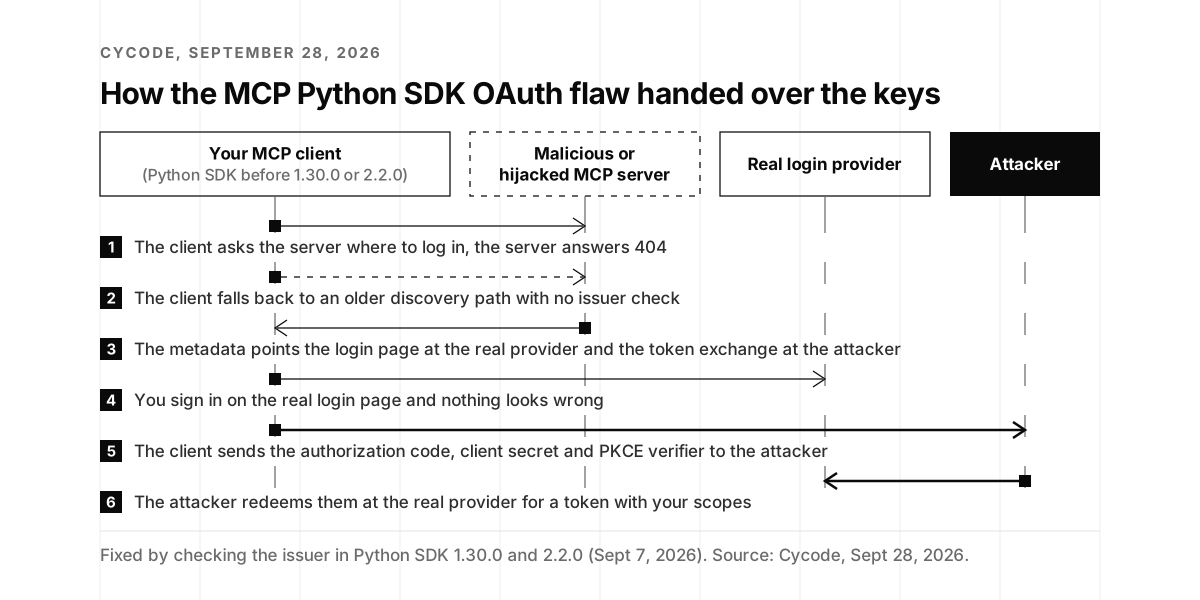
From the user’s chair, there’s nothing to notice. “Nothing in the login flow looks wrong,” Cycode wrote, and the only visible symptom is “a completely normal login page (because it is the real login page), followed by the MCP server appearing to fail.” The damage outlives the session, too: “The authorization code is single-use, but the client secret is not. It’s a long-lived credential, often with no expiration.” The line I keep coming back to is about the safeguards: “All the controls were there. The issuer validation function existed. The credential binding existed. The audience restriction existed. They were all fed the same unverified input, and they all said ‘looks good.’”
Cycode rated the flaw 7.5 on the Common Vulnerability Scoring System (CVSS), or 6.5 for the interactive login provider. It affects the mcp package from 1.9.1 through 1.29.1 and from 2.0.0 through 2.1.1, when it’s used as a client with one of its three OAuth providers. Versions 1.30.0 and 2.2.0 fix it, and both were published on September 7. The release notes listed the fix under “Behaviour changes”: “The OAuth client checks the authorization server’s issuer” (Python SDK release notes, September 2026). The Hacker News pointed out that the fix shipped three weeks before the advisory, with no exploitation reported (The Hacker News, September 2026). As I write this, I can’t find a CVE or a GitHub security advisory for it, which means a dependency scanner that watches advisories has had nothing to say about it.
‼️ Malicious MCP servers can steal OAuth credentials from affected MCP Python SDK clients.
The Hacker News (@TheHackersNews) · September 28, 2026
The vulnerability can expose the client secret, auth code, and PKCE verifier, letting an attacker request a valid access token from the real service.
Details →
The same pattern has turned up elsewhere. The Rust SDK fixed a related bug in version 2.0.0, tracked as CVE-2026-63127 with a score of 8.2, in which a malicious server could publish login metadata for a different, legitimate resource and receive the resulting token (Rust SDK security advisories). In July 2025, JFrog found that mcp-remote, a popular bridge to remote servers, would execute a command hidden in a crafted login address, and wrote that “This is the first time that full remote code execution is achieved in a real-world scenario on the client operating system when connecting to an untrusted remote MCP server” (JFrog, July 2025). In each case, login metadata from the server was attacker-controlled input.
One of the people who designed OAuth saw the awkward fit early. Dick Hardt, who edited the OAuth 2.0 specification, wrote in August 2025, after implementing MCP authorization himself, that OAuth between MCP clients and servers “creates more problems than it solves,” and he put bearer tokens sitting on client devices on his list of reasons.
OAuth is not a good fit for MCP.
Dick Hardt · Creator of OAuth, building AAuth · August 4, 2025
After implementing MCP authorization for Hellō and writing thousands of lines of "code in English" (inspired by Andrej Karpathy's Software 3.0 talk), I've learned that OAuth between MCP clients and servers creates more problems than it solves.
The core issues:
- OAuth is built for the web. Not all clients are on the web
- Dynamic Client Registration wasn't designed for this - we ended up circumventing it entirely
- Bearer tokens on client devices are a security risk with no DPoP protection
…
The protocol has caught up. The July 2026 revision of the specification requires clients to check the issuer an authorization server reports before redeeming a code, and its announcement put the second rule in one line: “Client credentials are bound to the issuer that minted them. No reuse across authorization servers” (MCP blog, July 2026). The Python SDK shipped that binding on September 7, and the TypeScript SDK added issuer-bound credentials in version 1.31.0 on September 28, with release notes that read “Bind stored OAuth credentials to the authorization server that issued them” (TypeScript SDK release notes, September 2026). The specification’s security guidance is also refreshingly direct about why the old safeguards weren’t enough: “PKCE alone does not prevent this attack because the client transmits the code_verifier to the attacker’s token endpoint” (MCP security best practices).
The lesson for a founder is about what the approval covered. You approved a web address, and your client trusted whatever login metadata that address served on the day it connected. Three moves follow from that. Upgrade to 1.30.0 or 2.2.0 and pass the issuer parameter to the machine-to-machine providers, as Cycode recommends. After upgrading, clear stored OAuth registrations, and rotate client secrets if a server you don’t control may have seen them. And register a separate OAuth client for each server, so one bad server can only spend the credentials meant for it. That last habit is half of the credential section below. The other lesson is about where fixes show up. When a security fix ships as a behavior change, the release notes are the only alert you’ll get, so they belong on someone’s weekly reading list.
Yash’s three questions, and the fourth
Yash’s three questions from episode 104 map onto MCP almost too neatly. What data does each server have access to? How does it access it, with whose credential and what scope? And is the connection two-way read-write, or just a read? I’d add a fourth for anything you connect: what changed since we said yes?
The best-known MCP leak shows why the third question matters. In July 2025, General Analysis showed a developer’s coding agent connected to Supabase through MCP with the service_role key, which bypasses Row-Level Security, reading a support ticket that contained instructions. The agent followed them. “The leak crossed two boundaries,” the researchers wrote: “the assistant read a table unrelated to the user’s request, then wrote those results into an attacker-visible ticket” (General Analysis). A read-only connection closes the second boundary, though as I wrote in The Human in the Loop Is Going Away, read-only helps without being the whole answer. Simon Willison’s advice in the Hacker News thread was the short version.
"1. Configure it to be read-only. That way if an attack gets through it can't cause any damage directly to your data."
simonw (Simon Willison), commenting on Hacker News, July 2025, in a thread with more than 800 points
The most widely used servers increasingly ship that answer as a setting. GitHub’s official MCP server has a --read-only flag that “will only offer read-only tools, preventing any modifications to repositories, issues, pull requests, etc.,” plus a --toolsets flag that switches whole groups of tools on or off. Its README is admirably honest about the limits of its lockdown mode, a filter for untrusted repository content, which “is not an authorization boundary” (GitHub MCP server). The NSA’s guidance describes the GitHub server’s usual setup the other way around: “the user grants blanket access for the MCP tools to act on behalf of the user” (NSA, May 2026). The flag costs nothing, and it turns Yash’s third question into a one-word answer.
😈 BEWARE: Claude 4 + GitHub MCP will leak your private GitHub repositories, no questions asked.
Luca Beurer-Kellner (@lbeurerkellner) · May 26, 2025
We discovered a new attack on agents using GitHub’s official MCP server, which can be exploited by attackers to access your private repositories.
creds to @marco_milanta
(1/n) 👇
Be careful about where that answer comes from, though. MCP tools can describe themselves with hints such as readOnlyHint, and some clients use those hints to decide what runs without asking. Anthropic’s directory criteria explain that “Read-only tools can run without per-call confirmation, and destructive tools always prompt” (Claude docs). The MCP maintainers’ own post on annotations is blunt about what a hint proves: “An untrusted server can lie. A server can claim readOnlyHint: true and delete your files anyway” (MCP blog, March 2026). The trustworthy answer to “is it just a read?” lives in the scope of the credential the server holds, which the server can’t rewrite.
What I like most about Yash’s approach is how deliberately his team avoids saying no. They work out what someone is trying to do, and then size the access to fit.
“Rather than that, what we try to do is work with them, see what they’re trying to do, and then define access to the right set of data for that use case.”
Yash Kosaraju, CISO of a16z, on episode 104
For an MCP server, a proof of concept on a subset of test data is the easiest yes you’ll ever give. Connect the server with a read-only token to a sandbox project, let the team use it for a week, and widen the scope when the use case earns it. Chris Kirschke, whose company Kyberis AI exposes its threat graph to security agents through MCP, asks a version of the third question about every autonomous tool on episode 102: are you actually going to give an agent write access? We turned his answer into a permission ladder in Are You Actually Going to Give the Agent Write Access?, and every rung of it applies to MCP servers.
The fourth question is the one this post exists to answer. Large enterprises spend real money on it, under the name ongoing monitoring, because they learned long ago that a vendor approved in March can be a different vendor by September. For an MCP server, the answer lives in three files you can keep in your own repository: the versions you pinned, the fingerprints of the tools you approved, and a map of which credential each server holds. The next three sections build them.
Pin the version, then check what landed
Start with the line that launches each server. Most READMEs still tell you to write something like npx -y some-mcp-server, and that flag deserves a closer look. npm’s documentation explains what the prompt it skips is for: “To prevent security and user-experience problems from mistyping package names, npx prompts before installing anything. Suppress this prompt with the -y or --yes option” (npm docs). The standard MCP launch line opts out of npm’s typo-squatting speed bump on purpose. The documentation for the underlying command adds that when standard input isn’t a terminal, or when it detects a continuous integration environment, “--yes is assumed” (npm docs). My reading of that: MCP clients start local servers with standard input connected to a pipe, so npm treats the prompt as answered even when the -y is missing.
An unversioned package name resolves against the registry, subject to npm’s cache, so a new release can reach your laptop on a later launch without anyone deciding that it should. That’s the path the AntV worm versions were waiting at. Python servers launched with uvx behave differently, and the difference matters for a team. Astral’s documentation says uvx “will use the latest available version of the requested tool on the first invocation. After that, uvx will use the cached version of the tool unless a different version is requested, the cache is pruned, or the cache is refreshed” (uv docs). On one laptop that’s stable. Across ten engineers, each machine runs whatever was newest on its own first run or its last cache cleanup, so one approved server can quietly become five versions. Adding @latest, as many READMEs do, tells uvx to fetch the newest release every time.
Containers have the same problem with tags, which are pointers someone else can move. Docker’s documentation recommends pulling by digest when you want an image that never changes, a way to “guarantee that the image you’re using is always the same” (Docker docs). GitHub learned this in its own ecosystem. Its security guidance says “Pinning an action to a full-length commit SHA is currently the only way to use an action as an immutable release” (GitHub Docs), and the March 2025 compromise of tj-actions/changed-files, an action used “in over 23,000 repositories,” showed why: “Most of the existing Action release tags have been updated to refer to the malicious commit” (StepSecurity, March 2025).
Here’s what pinning looks like in practice, in the JavaScript Object Notation (JSON) configuration most clients read. Before, the way most READMEs ship it:
{
  "mcpServers": {
    "charts": {
      "command": "npx",
      "args": ["-y", "@antv/mcp-server-chart"]
    },
    "search": {
      "command": "docker",
      "args": ["run", "-i", "--rm", "ghcr.io/example/search-mcp:latest"]
    }
  }
}
After, with each server pinned to the exact artifact someone reviewed:
{
  "mcpServers": {
    "charts": {
      "command": "npx",
      "args": ["-y", "@antv/mcp-server-chart@0.9.10"]
    },
    "search": {
      "command": "docker",
      "args": ["run", "-i", "--rm", "ghcr.io/example/search-mcp@sha256:<digest you reviewed>"]
    }
  }
}
Version 0.9.10 is where npm’s latest tag for the chart server pointed on October 4, after the worm versions were removed (npm registry record). Your pin should be the version your team reviewed, and the same pattern works for Python servers as uvx some-server@1.4.2. The second entry uses a placeholder image to show the digest form.
A version pin covers the package you named, and only that package. Its own dependencies get resolved when it installs, against whatever version ranges its author allowed, and npm’s documentation is explicit that a project’s lockfile “cannot be published, and it will be ignored if found in any place other than the root project” (npm docs). The biggest supply chain story of the spring shows what that means for MCP. In March, two poisoned versions of LiteLLM, a widely used Python library for calling AI models, were published to PyPI, and Trend Micro’s analysis explains how they were caught: “The malicious versions were discovered not by security tooling, but by accident. Callum McMahon, a researcher at FutureSearch, was testing a Cursor MCP plugin that pulled in LiteLLM as a transitive dependency” (Trend Micro, March 2026). Nobody in that story had approved LiteLLM. It arrived as a dependency of a dependency, inside a plugin someone had approved.
Software horror: litellm PyPI supply chain attack.
Andrej Karpathy (@karpathy) · March 24, 2026
Simple `pip install litellm` was enough to exfiltrate SSH keys, AWS/GCP/Azure creds, Kubernetes configs, git credentials, env vars (all your API keys), shell history, crypto wallets, SSL private keys, CI/CD secrets, database passwords.
LiteLLM itself has 97 million downloads per month which is already terrible, but much worse, the contagion spreads to any project that depends on litellm. For example, if you did `pip install dspy` (which depended on litellm>=1.64.0), you'd also be pwnd. Same for any other large project that depended on litellm.
Afaict the poisoned version was up for only less than ~1 hour. The attack had a bug which led to its discovery - Callum McMahon was using an MCP plugin inside Cursor that pulled in litellm as a transitive dependency. When litellm 1.82.8 installed, their machine ran out of RAM and crashed. So if the attacker didn't vibe code this attack it could have been undetected for many days or weeks.
Supply chain attacks like this are basically the scariest thing imaginable in modern software. Every time you install any depedency you could be pulling in a poisoned package anywhere deep inside its entire depedency tree. This is especially risky with large projects that might have lots and lots of dependencies. The credentials that do get stolen in each attack can then be used to take over more accounts and compromise more packages.
Classical software engineering would have you believe that dependencies are good (we're building pyramids from bricks), but imo this has to be re-evaluated, and it's why I've been so growingly averse to them, preferring to use LLMs to "yoink" functionality when it's simple enough and possible.
So the pin that holds is the one with a lockfile behind it. Install your MCP servers as dependencies of a small project of your own, commit its package-lock.json or uv.lock, and launch the servers from that project, so every laptop runs the same dependency tree and the package manager checks each download against the integrity hash recorded in the lockfile. It’s one more small repository, and it turns “which version of everything are we running?” into a file you can show a reviewer.
Plugin4Shell added a twist that every founder should remember: the pins were correct, and the checkout went somewhere else. Rajesh Beri summed up the lesson in one line: “A pin you did not verify is a preference” (Rajesh Beri, September 2026). Tanya Janca, author of Alice and Bob Learn Application Security, drew the general rule from it: “It’s not enough to implement part of a security control. You need to verify the security property you’re depending on” (Tanya Janca on X, September 2026). Beyond the lockfile, verifying takes two small habits. Compare the resolved version or image digest at startup with the one in your pin file. And for anything installed from git, compare the commit you actually checked out with the one you meant to.
A pin answers which version. A cooldown answers how soon. Unit 42’s guidance for npm, written during the 2026 worm wave, starts with “Enforce Cooldown Periods,” which means declining any version published in the last 24 to 72 hours (Unit 42). heldfast, a single developer’s pinning tool for MCP servers, goes further: a release “reported as malware, pulled from npm, or under 14 days old is never proposed” (heldfast). A Risky Business episode on supply chain attacks in May cautioned that “Package cooldown windows won’t fix this either” (Risky Business, May 2026), and that’s fair. A cooldown buys time for the registry and the researchers who watch it, and it works best as one layer of four.
Pinning also means updating on purpose, and MCP servers give you plenty of chances. In the twelve months to October 4, 2026, Microsoft’s Playwright MCP shipped 40 stable releases, Google’s Chrome DevTools MCP shipped 47, mcp-remote shipped 60, and AWS’s MCP server for its own application programming interface (API) shipped 72 (npm, npm, npm, PyPI). The official TypeScript SDK shipped three releases between September 23 and October 2 (npm registry record). Chuck McManis, whose Hacker News comment appears in the receipts above, did the arithmetic on manual review in the same comment: “Use three packages, that’s three audit schedules. Use ten? That’s ten audit schedules” (Hacker News, September 2025). Each release is a small decision, and a pull request opened by a dependency bot turns it into a reviewable one.
The biggest platforms are still sorting this out too, which I find oddly reassuring. GitHub’s documentation for its registry-based MCP allowlist says that “Enforcement is based only on server name/ID matching, which can be bypassed by editing configuration files” (GitHub Docs), and the managed-settings allowlist it recommends instead includes, in GitHub’s own example, an entry for npx @playwright/mcp@latest (GitHub Docs). Anthropic’s managed configuration for Claude Code gets the matching right. It warns that “A serverName entry, in either list, is not a security control,” and it states that “Commands match exactly,” so an allowlisted pkg@1.4.2 works as a pin. Its own sample allowlist still approves npx -y @modelcontextprotocol/server-filesystem with no version (Claude Code docs). Examples get written for readability. Your allowlist gets written for your laptops, so put the version in it.
Fingerprint the tools, and grade the change
A version pin handles the package. It can’t help with a remote server, whose tools can change on the server side with no release at all, or with a server like Deadbugz, whose pinned code rewrites its own tool list in the middle of a session. For those you need to notice when the definitions themselves change, which is what Invariant recommended in April 2025 and what the Open Worldwide Application Security Project (OWASP) now writes into its MCP Security Cheat Sheet. Under its list of things not to do, the sheet includes “Assume a tool approved yesterday is the same tool today (rug pulls).” OWASP’s MCP Top 10 project is just as honest about the limit: “a matching fingerprint shows only that the declared interface is unchanged, not that backend behavior is” (OWASP MCP Top 10). Fingerprints and version pins travel together for exactly that reason.
The strongest evidence that fingerprinting works at scale comes from Microsoft’s own security organization. In February, Microsoft described how its CISO team governs MCP internally, starting from a threat it calls “Silent swaps,” in which “A tool’s metadata changes and the client keeps trusting an altered ‘voice.’” The response: “We snapshot tool metadata on connect and compare it to the approved contract,” and when something moves, “drift automatically pauses risky actions and pings the owner.” The target state is written down too: “If tool metadata changes after approval, high-risk actions are paused and routed for re-review, then auto-resumed once approved” (Microsoft Inside Track, February 2026). That’s a fingerprint, a hold and a review queue, run by one of the largest security teams anywhere.
The MCP tool-poisoning risk does not end at first approval.
The Hacker News (@TheHackersNews) · July 4, 2026
Microsoft’s example shows a third-party tool can be changed later:
> Same tool name.
> Same visible summary.
> New hidden instructions added to the description.
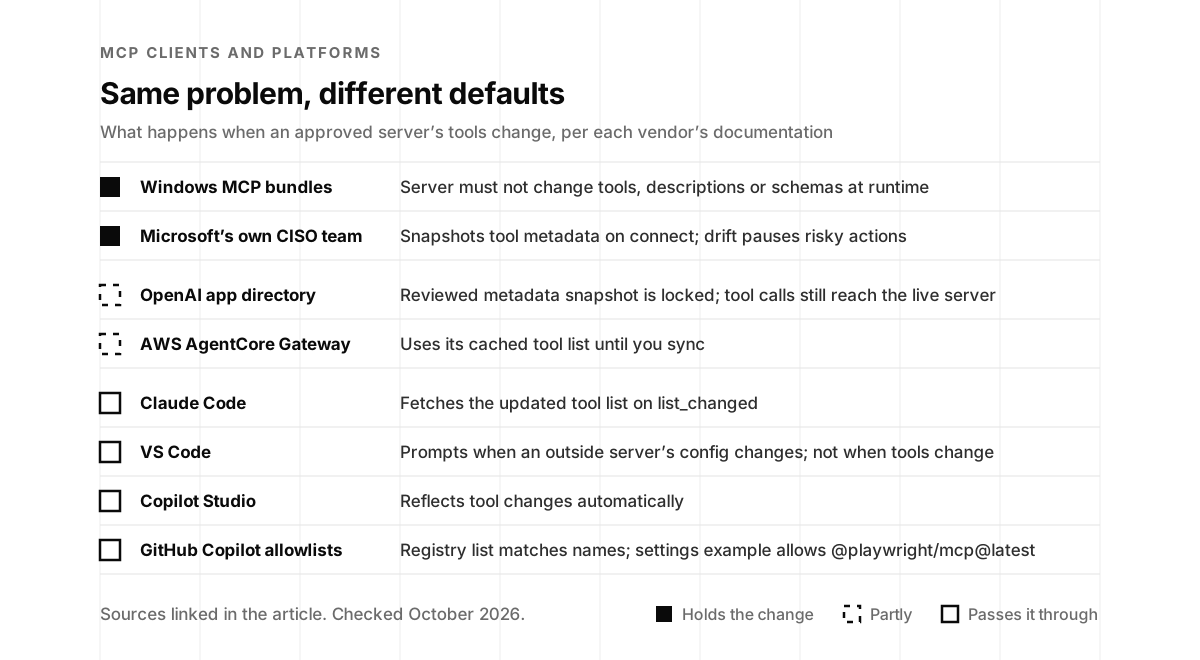
The defaults in the products your team uses vary a lot, so it’s worth knowing which one you’re on. Windows requires MCP bundles to declare their tools and says “The server must not dynamically change the set of tools, their descriptions, or input or output schemas” (Microsoft Learn). OpenAI’s app directory stores a “reviewed metadata snapshot” that is “locked for safety,” and its documentation adds that tool calls still go to your live server (OpenAI Developers). Cloudflare’s MCP portals enable new tools automatically unless an admin sets default_disabled, in which case “they remain hidden until explicitly enabled” (Cloudflare docs). AWS’s AgentCore Gateway keeps a cached catalog and tells you to call its sync interface “any time an MCP server’s tool, prompt, resource definitions change” (AWS docs).
At the other end of the dial, Microsoft Copilot Studio says that when a server’s tools change, it “dynamically reflects these changes” (Microsoft Learn). Claude Code “fetches the updated list from that server, so you don’t need to reconnect it” when a server announces a change, and its documentation describes no re-approval step (Claude Code docs). VS Code “shows a dialog when a server first starts or its configuration changes” for servers from outside the workspace, while servers in a trusted workspace’s .vscode/mcp.json “can start without a separate MCP server trust prompt, including after their configuration changes” (VS Code docs). That workspace file is exactly what a Deadbugz-style pull request edits, and the documentation describes no prompt for changed tools.
You don’t need to wait for your favorite client to move. Trail of Bits publishes mcp-context-protector, an open source wrapper that pins a server’s configuration the first time it sees it: “Any deviation from the approved/known-good server configuration will block downstream tool calls until the user explicitly approves the changed server configuration.” It compares “server instructions, tool descriptions, and tool input schemas,” re-checks at every connection and every change notification, and detects configurations for Claude Code, Claude Desktop, Cursor, VS Code, Windsurf and Continue (Trail of Bits).
Fingerprinting has had free tooling since the spring of 2025. Snyk Agent Scan began life as Invariant’s mcp-scan, whose 2025 README described tool pinning that “detects changes to MCP tools via hashing” (PyPI, May 2025), and today it inventories agents, MCP servers and skills across a machine (Snyk Agent Scan). The same OWASP MCP Top 10 page writes the pattern up as a recommended control for MCP hosts, where a mismatched fingerprint moves a tool into an AWAITING_REREVIEW state, so that “A rug-pull redefinition therefore cannot ride in on a prior approval” (OWASP MCP Top 10).
🚀🔒 We created a security scanner to detect MCP attacks. Please check it out, and give feedback.
Luca Beurer-Kellner (@lbeurerkellner) · April 10, 2025
* Supports Claude, Cursor, Windsurf
• Checks for tool poisoning
• Checks for rug pull (tool hashing)
• Detects cross-origin violations (shadowing)
uvx mcp-scan@latest
@latest, which shows how natural the unpinned default feels and why your pin file has to be on purpose. View on X.If you’d rather build it yourself, the recipe fits on an index card. For each tool in the tools/list response, take the fields the model sees: name, title, description, inputSchema, outputSchema, annotations and _meta, plus the server’s instructions. Serialize them as canonical JSON under Request for Comments (RFC) 8785, a standard that exists because “Cryptographic operations like hashing and signing need the data to be expressed in an invariant format so that the operations are reliably repeatable” (RFC 8785). Hash the result with SHA-256 and commit the digests in a pin file next to your MCP configuration. Maintained libraries produce the canonical form in Python, from Trail of Bits, and in JavaScript, from one of the standard’s authors (rfc8785.py, canonicalize). Tie each server’s identity to the version, digest or web address you pinned. The name a server reports about itself is decoration.
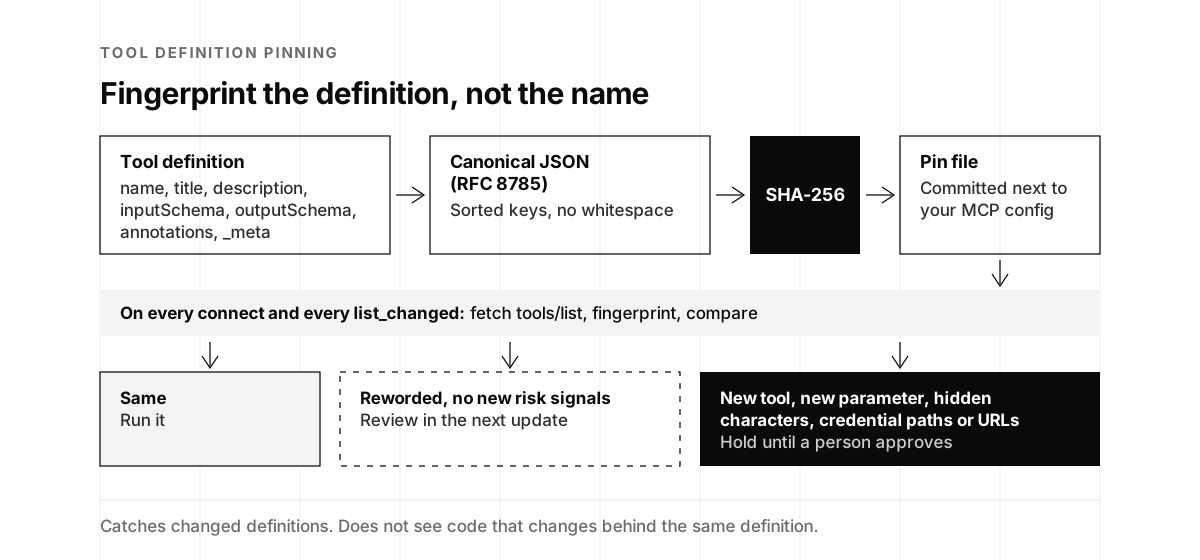
The hard part is what happens on a mismatch. heldfast’s author measured it across real upgrades: “Across 109 third-party servers and 522 upgrades, a pin stops on 45% of upgrades and a description is reworded in 29% of them.” Then the finding that matters: “None of the 616 description edits introduced an attack signal a human reading them would keep.” A pin that grades the change, by the same count, “would have interrupted 3 upgrades in 522” (heldfast, September 2026). It’s one developer’s dataset, so hold it loosely. It matches what I found about approval prompts in The Human in the Loop Is Going Away: a control that interrupts constantly gets muted, and in heldfast’s words, “a muted control still looks like coverage.”
So grade the change the way the figure does. Identical fingerprints run. A reworded description with no new risk signals rides along in the next update. A new tool, a new parameter, hidden characters, credential file paths or new web addresses hold the server until a person approves. Treat tool changes the way you already treat dependency updates: a bot opens a pull request with a readable diff, a human approves it, and nothing changed reaches the model until it merges.
How common is drift in the wild? Canopii, which sells an MCP gateway, scanned 11,524 servers for its July report and found that “184 versions changed their tool definitions after publication,” across roughly 170 servers (Canopii, July 2026). Canopii counts each of those as a rug pull, while heldfast’s data suggests most changes are ordinary rewording. Grading is how you tell the two apart without reading every diff yourself.
To try the grading on servers you already run, the checker below compares two versions of a server’s tool list, the one you approved and the one it returns today, fingerprints each tool and sorts the difference into the same three outcomes as the figure.
MCP drift checker
Paste what an MCP server returned from tools/list the day you approved it, and what it returns today. You get a fingerprint for every tool, a pin file you can commit next to your config, and a plain-English list of what changed and what deserves a person's eyes. Nothing you paste leaves this page.
How the fingerprint works: for each tool we take its name, title, description, inputSchema, outputSchema, annotations and _meta, write them as canonical JSON (RFC 8785: keys sorted, no whitespace), and hash that with SHA-256. Change any of those fields and the fingerprint changes; reorder the keys or reformat the file and it doesn't. A matching fingerprint shows the declared interface is unchanged, not that the server's code is. The example, acme-notes, is a made-up server.
Got it. We'll reply with how we'd review your MCP servers.
Something went wrong. Email hello@ysecurity.io and we will run it by hand.
One credential per server, scoped to the job
The MCP authorization specification already contains the rule I’d like every founder to adopt. A client asks for a token for one specific server, naming it with the resource indicator from RFC 8707, and servers “MUST NOT accept or transit any other tokens.” When a server calls another service on your behalf, it gets a separate token for that service, because “The MCP server MUST NOT pass through the token it received from the MCP client” (MCP authorization specification).
That covers remote servers that speak OAuth, and most servers don’t, yet. Astrix analyzed 5,205 open source MCP servers in October 2025 and found that 53 percent rely on static API keys or personal access tokens, “which are long-lived and rarely rotated,” while “Only 8.5% use OAuth” (Astrix, October 2025). Local servers usually read their secrets from environment variables, which the specification itself recommends for them. Those secrets end up in configuration files, and the files end up in the wrong places. GitGuardian found “24,008 unique secrets exposed in MCP-related configuration files across public GitHub,” and 2,117 of them were still valid (GitGuardian, March 2026). The 2026 npm worms went looking for exactly those files, with Claude and MCP configuration files on Unit 42’s list of what they harvested (Unit 42).
A credential handed to a large language model (LLM) through a server is only as narrow as its scope, and a Hacker News commenter said it best after the GitHub MCP disclosure in 2025.
"When you give a credential to an LLM, consider that it can do up to whatever that credential is allowed to do, especially if you auto-allow the LLM to make tool use calls!"
losvedir, commenting on Hacker News, May 2025, in a thread with more than 500 points
In practice, one credential per server comes down to four habits. Each server gets its own token, issued for that server alone, because when two servers share your GitHub token, the weaker one decides how safe both are. Each token gets the narrowest scope the job needs, read-only by default and limited to named repositories or projects. Each one is short-lived where the service allows it. And nothing secret sits in a shared configuration file, which is why Anthropic’s managed configuration docs warn, “Any user on the machine can read this file, so don’t store API keys or other credentials in env blocks” (Claude Code docs). OWASP’s cheat sheet puts the rule in four words, “Use scoped, per-server credentials,” lists sharing “OAuth tokens or credentials across MCP servers” among the things not to do, and recommends the operating system’s own credential storage, such as the macOS Keychain or Windows Credential Manager, for OAuth tokens (OWASP Cheat Sheet Series).
One big-company default deserves copying outright. When Google’s Gemini CLI launches an MCP server, it strips inherited environment variables whose names match patterns such as *TOKEN*, *SECRET*, *PASSWORD*, *KEY*, *AUTH* and *CREDENTIAL*, unless you’ve defined them explicitly for that server (Gemini CLI docs). The AWS keys and GitHub tokens sitting in a developer’s shell stay out of every third-party server by default, and a server gets a secret only when someone decided it should. Large regulated companies run the same idea at a bigger scale, with each MCP server acting as a narrow stand-in for the user. The .env file next to your code deserves the same treatment, and our one-hour .env security program walks through it.
"MCP servers can run with dedicated service accounts that assume-role to a safe(r) subset of the calling user's permissions"
bostik, describing corporate MCP deployments on Hacker News, May 2026, in a thread with 400 points
Identity vendors see it from their side of the table too. Ely Kahn, Okta’s chief product officer, described the habit that per-server credentials replace on the Cloud Security Podcast in July: “People give agents long-lived, broadly scoped permissions to basically do anything that they may need to do in the future” (Cloud Security Podcast, July 2026).
The enterprise version of this took a real step forward in June, when the MCP project published enterprise-managed authorization, built with Okta’s Cross App Access. Today, “Every employee has to authorize every server individually”; with the extension, “Administrators define the policy once and users can authenticate with their existing identity into the MCP host” (MCP blog, June 2026). The announcement named Anthropic’s clients and VS Code among the early adopters, with servers from Asana, Atlassian, Canva, Figma, Granola, Linear and Supabase. Support still varies by client, as the extension’s own page says (MCP extensions), so check yours before you plan around it.
Sierra’s internal MCP gateway shows the identity split I recommend to most startups: “Interactive work runs as the user,” while “Scheduled or shared workflows run as service accounts with only the permissions they need” (Sierra, July 2026). The United Kingdom’s National Cyber Security Centre (NCSC) frames the whole topic in one sentence: “The credentials available to an AI agent form part of its potential ‘blast radius’ if it behaves unexpectedly” (NCSC, August 2026). One credential per server keeps each blast radius the size of one job, and it turns the worst day of an incident into rotating one token.
Run it where it can’t reach your keys
A local MCP server is a program running as you. It can read whatever you can read, including the SSH keys and cloud credentials Deadbugz went looking for. The MCP specification’s security guidance tells clients to “Execute MCP server commands in a sandboxed environment with minimal default privileges” (MCP security best practices), and the NSA names the tools: “security frameworks, such as AppContainers (Windows), seccomp, AppArmor, or SELinux, should be used to isolate each tool’s execution context” (NSA, May 2026). The same guidance tells clients to “Warn that MCP servers run with the same privileges as the client” (MCP security best practices), and that surprises people: the standard input and output transport decides who can talk to a server, and it does nothing to limit what the server itself can reach. The NCSC’s version applies to every agent: “Always run AI agents within a sandboxed environment that controls and manages what resources can and cannot be communicated with, both locally and over a network” (NCSC, August 2026).
The options run from easy to thorough. Docker’s MCP Gateway starts each server in its own container, and “MCP server containers do not receive the user’s host environment by default.” Images from Docker’s own MCP catalog are signature-checked and referenced by digest, “Secrets are scoped to the server that declares them,” and a --block-network setting tightens network access. Docker is candid about the limits: “Network egress is not globally denied by default,” and tool-description poisoning sits outside the gateway’s scope (Docker MCP Gateway), which is why it pairs so well with fingerprints.
Anthropic’s sandbox-runtime, a beta research preview, wraps any process, local MCP servers included, using the operating system’s own sandboxing features, with no container required. Its network rule is allow-only: “By default, all network access is denied. You must explicitly allow domains.” The README also states the principle better than I can: “Both filesystem and network isolation are required for effective sandboxing” (Anthropic sandbox-runtime). VS Code can sandbox local servers on macOS and Linux with write paths and allowed domains you choose, and it makes a deliberate trade: “When sandboxing is enabled, tool calls from the server are auto-approved because they run in a controlled environment” (VS Code docs). That’s a sensible design, and it means the allowlist is doing all the work, so keep it tight.
For teams that want more, Microsoft’s Wassette runs tools as WebAssembly components in a capability sandbox, though its README warns that it’s “not production ready yet” (Wassette), and gVisor and Firecracker add a stronger wall between the server and your machine, an application kernel written in a memory-safe language in gVisor’s case and a lightweight virtual machine in Firecracker’s (gVisor, Firecracker). Microsoft’s own CISO team handles the network side for internal servers: “Outbound egress is pinned to approved destinations using private endpoints and firewall rules, so servers can’t ‘call anywhere’” (Microsoft Inside Track, February 2026). For a startup, the equivalent is a short list of allowed domains for each server.
RT to help Simon raise awareness of prompt injection attacks in LLMs.
Andrej Karpathy (@karpathy) · June 16, 2025
Feels a bit like the wild west of early computing, with computer viruses (now = malicious prompts hiding in web data/tools), and not well developed defenses (antivirus, or a lot more developed kernel/user space security paradigm where e.g. an agent is given very specific action types instead of the ability to run arbitrary bash scripts).
Conflicted because I want to be an early adopter of LLM agents in my personal computing but the wild west of possibility is holding me back.
A sandbox has one honest limit, and postmark-mcp shows it. As far as the public write-ups show, its blind copies rode out through Postmark’s own sending service, the one destination the server legitimately needed, so an egress allowlist would have waved every one of them through. Of the four controls, only the version pin would have stopped that backdoor. The sandbox still earns its place, because it turns Deadbugz’s request for SSH keys into a request for files that aren’t there. If you’d like the case for testing your boundaries told from the other side, the satirical letter in Your Sandbox Is Adorable is a fun way to spend ten minutes.
What each control catches
Put the four controls side by side against the failures in this post, and the reason they come as a set is easy to see.
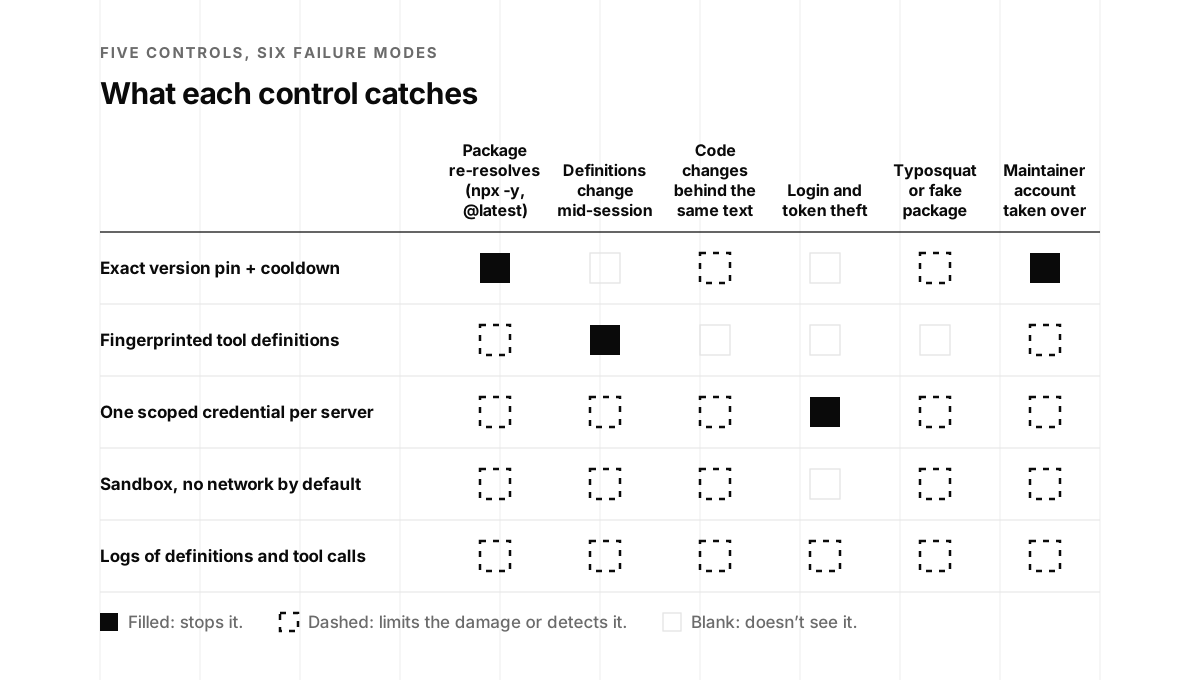
Read the matrix against the receipts. postmark-mcp and the AntV wave are package problems, so the pin and the cooldown stop them, and the sandbox and the credential map decide how much a bad version could reach. Deadbugz changed its definitions mid-session, which only a fingerprint stops. The Python SDK flaw was token theft, which per-server credentials contain and an upgrade fixes. Plugin4Shell beat the pin, which is why verifying what landed is part of the pin. Code that changes behind unchanged text is the fingerprint’s blind spot, the one OWASP warned about, and the matrix shows the other rows covering for it: the pin keeps a local package from moving, while the credential, the sandbox and the logs limit and record what a changed remote server can do.
That last row of the matrix is the one that turns the other four into evidence. The NSA asks that “All tool and model invocations should be logged, including the exact parameters, identities involved, and (where feasible) cryptographic hashes of results or output” (NSA, May 2026). The CSA’s note on Deadbugz recommends logging the tool definitions each session loads as well as the calls, which is how you’d know afterward what your agent was told (Cloud Security Alliance, August 2026). OpenTelemetry’s semantic conventions for MCP, still marked as in development, give those events standard names such as mcp.method.name and gen_ai.tool.name (OpenTelemetry). Three alerts cover most of what this post describes: a notifications/tools/list_changed message, a tool name a server has never used before, and a new outbound domain. Claude Code will add MCP server and tool names to its telemetry if you set OTEL_LOG_TOOL_DETAILS=1 (Claude Code docs).
For a startup, the useful version is small. Record a hash of the tool definitions each session loads, every tool call with the server, the tool and the identity behind it, and every outbound domain a server reaches. OWASP suggests alerting on “new tools being called, admin-level queries, abnormal call frequency,” and sending MCP logs to the same place as the rest of your security alerts (OWASP Cheat Sheet Series). Gateways do a lot of this for you. Cloudflare’s MCP portals log each request’s time, status, server, capability and duration (Cloudflare docs), and Docker’s gateway logs calls by default while recording only the tool name and the shape of the arguments (Docker MCP Gateway), which keeps secrets out of the log itself. When a buyer asks how you’d know if an approved server changed, these are the records you point to. The same records feed the tool-call gate in our post on agent authorization, which decides what each approved tool may do on each call.
Simon Willison made the case for MCP on exactly these grounds in September, answering an essay arguing the protocol was a mistake. He wrote it for teams that want something more careful than a full terminal agent with unfettered internet access, which he files under you only live once (YOLO), and his list maps neatly onto the four controls.
"If you want to operate something that's less YOLO than that, you'll find yourself wanting:
1. Control over exactly which external services it can access
2. A way to handle authentication that doesn't allow the agent to directly access API keys
3. A sensible UI to allow users to connect and authenticate further services
4. Strong audit logging for what's going on"
simonw (Simon Willison), commenting on Hacker News, September 2026, in a thread with more than 300 points
The question in your next enterprise security review
Picture the call. You’re three weeks from signing the biggest customer you’ve ever had, procurement has your order form, and the buyer’s security reviewer sends over a questionnaire with a new section on AI. One question in it is about MCP. SecurityPal, drawing on what it describes as thousands of real security reviews, lists “What model control points (MCPs) are in place?” among the questions buyers actually ask (SecurityPal, March 2026). Look at that expansion of the acronym. The person asking may not have a settled definition yet, which is an opening for the vendor who answers with a clear one and the evidence behind it.
The calendar matters too. SecurityPal reports that questionnaires “now average nearly 100 questions” and that “August, September, and October are the busiest months for security questionnaires” (SecurityPal, September 2026). You’re reading this in the middle of the season.
The buyer’s side has also written down what it expects. In an open letter to suppliers, JPMorganChase’s CISO, Patrick Opet, wrote that “‘Secure and resilient by design’ must go beyond slogans,” and that it “requires continuous, demonstrable evidence that controls are working effectively, not simply relying on annual compliance checks” (JPMorganChase, April 2025). Microsoft’s supplier requirements, version 12 from March 2026, say that a supplier “must demonstrate continuous monitoring of AI Systems and adapt and update the AI Systems as new risks emerge,” and they require suppliers to notify Microsoft when an AI product’s functionality changes (Microsoft, March 2026). If your product calls MCP servers, the servers you call are part of that monitoring.
Buyers ask for continuous evidence because point-in-time reviews have a long record of missing what matters. In a 2019 Gartner survey of more than 250 legal and compliance leaders, 83 percent of organizations had identified third-party risks after due diligence and before recertification, and 92 percent of the leaders said the material ones “could not have been identified through due diligence” (Gartner, August 2019). Verizon’s 2026 breach report found third-party involvement in 48 percent of breaches, “up from 30% last year” (Verizon, 2026). An MCP server that changes after review is that same problem moving at release speed.
The audit standard for MCP is arriving at the same time. The Coalition for Secure AI (CoSAI), whose contributors include people from Google, Anthropic, Amazon, IBM and Cisco, published version 2.0 of its MCP security paper in draft, dated August 12 and announced on September 25, with four assurance levels from Sandbox to Regulated. For tool schema integrity, Level 2 says “SHOULD: pin trusted tool definitions and alert on changes,” and Level 3, production, says “MUST: cryptographically pin approved tool definitions; changes require review and re-approval.” A proposed annex on evidence per level lists a “tool-definition hash manifest” among the artifacts a reviewer could ask for, and the paper’s reasoning sounds like this post: “Continuous verification is critical: a server deployed securely on Tuesday may be compromised via an upstream dependency update by Thursday” (CoSAI, August 2026; announcement, September 2026). The NSA asks for “a clear inventory of all deployed MCP agents and tools, along with versioning, patch history, and known security concerns” (NSA, May 2026).
Hacker News has been a good window into the other side of the table. In a September thread about who runs MCP in production, one commenter said their company now uses it for virtually all of its software and infrastructure providers, and then added:
"it's become a hard requirement in our buy bechmark. No MCP = NOGO"
Eldodi, commenting on Hacker News, September 2026, in a thread with nearly 200 points
The people who approve servers are under pressure too, and they’re looking for vendors who make the approval easy. One of them got tired enough of the queue to build a tool for it.
"Part of my job is to approve / reject MCP servers based on how secure they are and whether they are suitable for use in an enterprise environment. I was tired of my team being called the bottleneck to AI adoption, so I set out to automate the whole process."
mavzer, who built Canopii's MCP server index, commenting on Hacker News, July 2026, in the monthly "What are you working on?" thread
And the decision about which servers employees may connect is moving to the buyer’s information technology (IT) team, which is exactly what enterprise-managed authorization is built for.
"As an employee at Acme, I shouldn't decide to link my Acme Google Drive data to Claude or ChatGPT, that should be the decision of my IT Department."
maxwellg, commenting on Hacker News, June 2026, in a thread with more than 270 points
"I do security review for my company. I suspect this is a means of containing OAuth redirect vulnerabilities. We basically needed to do the same thing with our MCP server."
SkyPuncher, on Figma limiting which MCP clients may connect, commenting on Hacker News, October 2026, in a thread with more than 180 points
Founders who sell MCP servers are hearing the same thing from the buyer’s side of the deal. This one, from a Y Combinator company, is the clearest account I’ve found of what it costs when the answer isn’t ready.
One of our enterprise customers banned all installations of our MCP server.
Michael Sukkarieh · Co-founder @ Sourcebot (YC F25) · March 17, 2026
Their security team realized that a lot of devs using our MCP server were storing API keys in plain text on their machines. We had to build a server-side hosted MCP with OAuth 2.1 before they could use Sourcebot at all.
At the time I thought this was a one-off, but it wasn't. We've heard similar requirements from multiple teams since. Enterprise security orgs are starting to look at what MCPs are doing on dev machines, and plain-text credentials on developer laptops is an easy thing to flag.
If you're building MCP servers and want to be used by enterprises, OAuth-based auth with a server-side hosted option is not optional. It's the minimum bar you need to clear before real usage can happen.
The big companies answer these questions with whole teams. Microsoft’s CISO organization runs the catalog and drift pauses described earlier. Cloudflare’s employees need sign-off before they ship an internal server: “When an employee wants to expose an internal resource via MCP, they first get approval from our AI governance team, and then they copy a template, write their tool definitions, and deploy” (Cloudflare, April 2026). Block went further: “all MCP servers used internally are authored by our own engineers” (Block, April 2025). A twenty-person startup can’t staff any of that, and it can produce the same evidence anyway, because the evidence is six files.
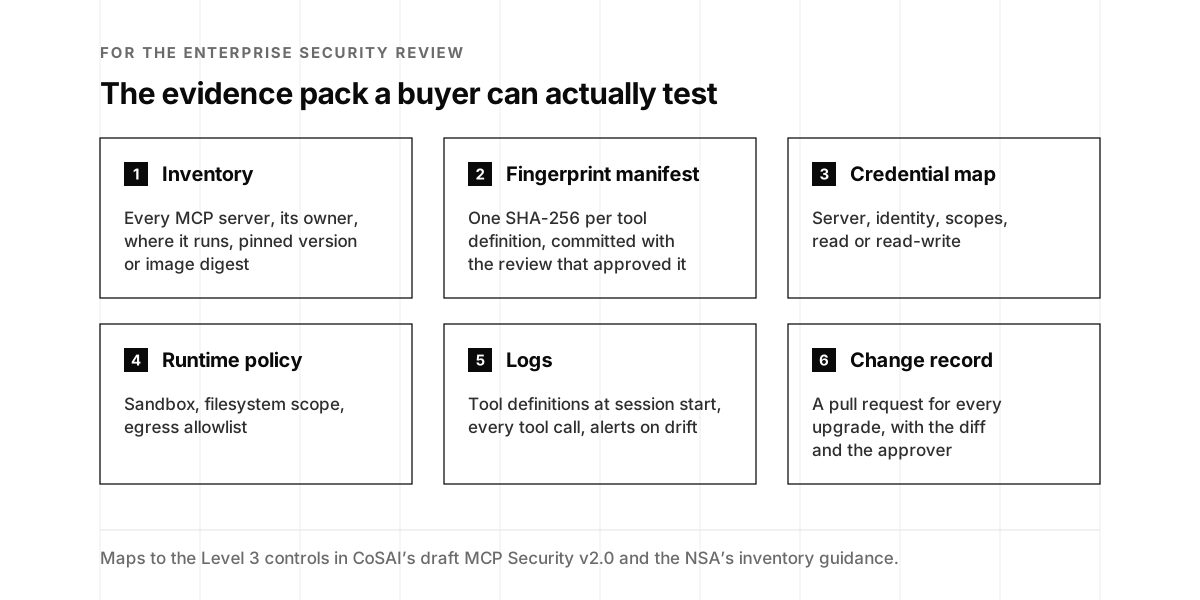
When the MCP question comes, answer it with the pack. Name the level you operate at, hand over the inventory and the manifest, and offer to walk the reviewer through one change record from end to end. The written answer can be four sentences long, and here’s a template you can adapt once the work is real:
We keep an inventory of every MCP server our product and our engineers use, each with an owner and an exact version or image digest, and upgrades go through pull request review after a 72-hour cooldown. We fingerprint every approved tool definition with SHA-256 and check the fingerprints at every connection, so a changed tool is held for review before our agents can use it. Each server has its own credential, scoped read-only unless the job requires writes, with no shared secrets in configuration files. Local servers run sandboxed with network access denied by default, and tool definitions and tool calls are logged to our security monitoring.
In my experience, a reviewer who can test your answer moves you to the next stage faster than any policy document can. Our sales support team joins these calls as your security team for exactly that reason. The questionnaire is also usually the opening act for a security exhibit that rides along with the contract, which my co-founder Sasha Sinkevich covers in The Security Exhibit Your Startup Signed Last Quarter.
Thirty days to an answer you can show
One engineer can put all four controls in place in four weeks of focused work, and a weekly habit keeps them running afterward.
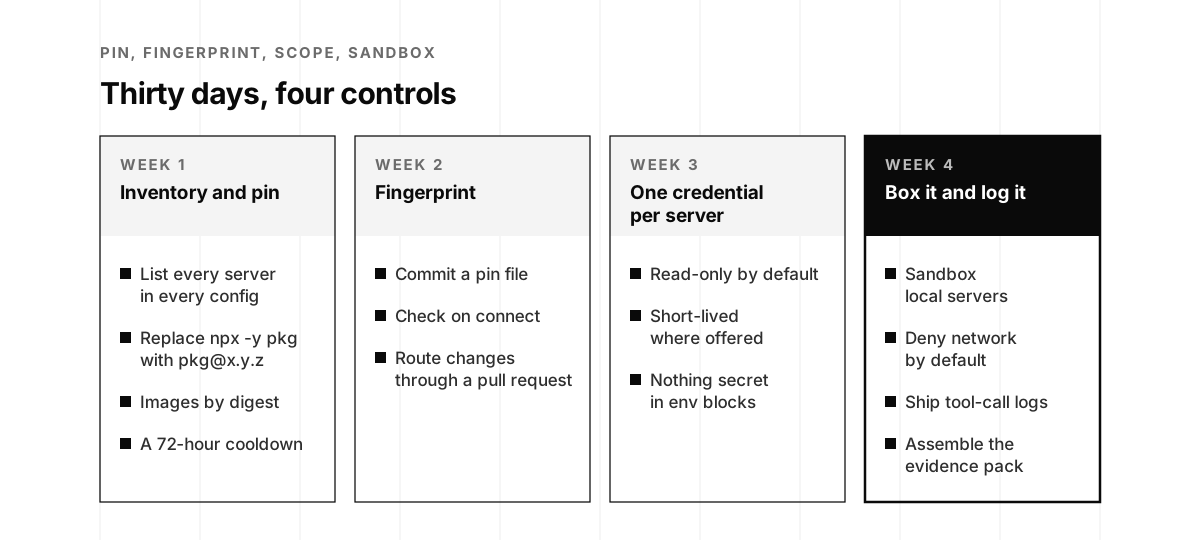
Week one: inventory and pin. List every MCP server in every configuration your company uses, in the product and on engineers’ laptops, with an owner for each. Replace every unversioned launch line with an exact version, reference container images by digest, and set a 72-hour cooldown for upgrades. In our experience that’s a day or two of work, most of it spent finding configurations you didn’t know existed.
Week two: fingerprint. Generate a pin file of tool-definition hashes, check it every time a server connects, and route every change through a pull request with a readable diff. Grade the changes so harmless rewording rides along and new tools wait for a person. Budget a day to build it and an hour a week to run it.
Week three: one credential per server. Issue a separate token for each server, read-only by default and short-lived where the service allows it, and move every secret out of shared env blocks into the operating system’s keychain or a secrets manager. Write the result down as a credential map. That’s typically one to two days, plus a rotation for anything that was shared.
Week four: box it and log it. Run local servers in a sandbox with network access denied by default and a short allowlist per server. Send tool definitions and tool calls to wherever your security alerts already go, and set the three alerts from the matrix section. Then assemble the evidence pack. Two or three days gets you there.
What Microsoft and Cloudflare built with dedicated teams, a startup gets with a pin file, a hash file, a credential map and a sandbox. The difference is scale, and your buyer’s reviewer cares about the evidence, which looks the same at both sizes.
If you’d like a hand with the first week, our Secure MCP Program starts with a free MCP exposure review. We map every agent and MCP server you run, the credential each one holds and what each can reach, then help you pin, scope and box them, highest-impact connections first. If a buyer’s AI security review is already sitting in your inbox, our AI Access Control Audits map everything your AI tools can reach, cut it to least privilege and leave you with evidence a reviewer accepts. And if you haven’t heard the conversation that started this, Yash Kosaraju on episode 104 is about thirty-eight minutes well spent.
Deadbugz waited three calls because three calls is about how long any of us looks before deciding. A fingerprint keeps looking after you’ve decided, at every connection, for as long as the server runs, and it speaks up the moment the thing you approved stops being the thing you’re running.
Approve a hash, not a name.
MCP server security and drift, frequently asked questions
- What is an MCP rug pull?
- An MCP rug pull is when a Model Context Protocol server changes its tool definitions after a user or a security team has approved it, so a tool that looked harmless at review starts carrying different instructions. Invariant Labs named the attack on April 1, 2025 and recommended that clients pin the server version and use a hash or checksum to verify tool descriptions before running them. The protocol allows a server's tool list to change over time and only recommends that servers announce changes, so a hostile server can change quietly. The fix is to fingerprint every approved tool definition and hold any change until a person reviews it.
- What was the Deadbugz campaign?
- Deadbugz is a malicious MCP server campaign that Pillar Security disclosed on August 12, 2026. On August 10, one GitHub account opened 23 pull requests in 74 minutes that added a server called productivity-suite to other people's projects. The server offered two harmless tools, counted tool calls per client, and after three calls changed its tools/list and prompts/get responses to tell the agent to look for SSH keys, Amazon Web Services credentials, shell history and Kubernetes configuration, and to hide the activity. Pillar found none of the pull requests merged, and no victims have been reported. It shows how a review that tries a server a few times can miss what it does later.
- What was the MCP Python SDK OAuth flaw disclosed in September 2026?
- On September 28, 2026, Cycode disclosed that the official MCP Python SDK could hand OAuth credentials to a malicious server. By answering the first discovery request with a 404, the server pushed the client onto an older discovery path that skipped the issuer check, then pointed the login page at the real provider and the token exchange at itself. The client sent the authorization code, client secret and PKCE verifier to the attacker, who could redeem them for a token with the user's scopes. Versions 1.9.1 through 1.29.1 and 2.0.0 through 2.1.1 are affected. Versions 1.30.0 and 2.2.0, released September 7, fix it. Cycode rates it 7.5 on the CVSS scale.
- Do MCP clients ask again when an approved server's tools change?
- Most don't, according to their own documentation as of October 2026. Claude Code fetches the updated tool list when a server sends a list_changed notification, and Microsoft Copilot Studio reflects tool changes automatically. VS Code asks again when a server from outside the workspace changes its configuration, skips that prompt for servers in a trusted workspace's own configuration, and describes no prompt for changed tools. AWS AgentCore Gateway keeps a cached tool list until you sync it, and OpenAI's app directory locks a reviewed metadata snapshot while tool calls still reach the live server. The strictest default is Windows MCP bundles, where a server must not change its tools, descriptions or schemas at runtime. Microsoft's own security team snapshots tool metadata on connect and pauses risky actions when it drifts.
- How do I pin an MCP server to a version?
- Put the exact version in the launch command. For npm packages, change npx -y package to npx -y package@1.2.3, because an unversioned command can pick up a newer release on a later launch, and npm assumes yes to its install prompt when standard input isn't a terminal, which is how MCP clients start local servers. For Python, use uvx package@1.2.3, since a bare uvx keeps whatever was latest on each machine's first run and a team drifts apart. Reference container images by their sha256 digest. Then verify what actually landed, wait 24 to 72 hours before adopting a new release, and update deliberately through a pull request.
- How do you fingerprint MCP tool definitions?
- Fetch the server's tools/list response and, for each tool, take the fields the model sees: name, title, description, inputSchema, outputSchema, annotations and _meta, plus the server's instructions. Serialize them as canonical JSON using RFC 8785, which sorts keys and removes whitespace so the same definition always produces the same bytes, then hash the result with SHA-256. Commit those hashes in a pin file next to your MCP configuration. On every connection and every list_changed notification, recompute and compare. Run matching tools, queue harmless rewording for the next review, and hold new tools, new parameters, hidden characters, credential paths or new web addresses until a person approves them.
- Does the official MCP Registry review the servers it lists?
- It doesn't promise a security review. The registry's documentation says it focuses on namespace authentication and metadata hosting and relies on the broader ecosystem for security scanning of server code. Namespace authentication proves who published a server name, through a GitHub account or a domain the publisher controls, and published version metadata can't be edited afterward. That tells you nothing about what the code does or what a remote server will return tomorrow. In August 2026, OX Security found a Shai-Hulud worm payload delivered through a registry listing called V.A.P.E, and the registry delisted it on August 21, twelve days after the public report. Keep your own allowlist with pinned versions.
- What does one credential per MCP server mean in practice?
- Every server gets its own token, issued for that server alone, with the narrowest scope the job needs: read-only by default, limited to named repositories or projects, and short-lived where the service allows it. The MCP authorization specification already requires that servers accept only tokens issued for them and never pass a client's token through to another service. Keep secrets out of env blocks in shared configuration files and use the operating system keychain or a secrets manager. The payoff arrives during an incident, when one compromised server means rotating one credential. Astrix found that 53 percent of open source MCP servers rely on static keys or personal access tokens.
- What is the safest way to run a local MCP server?
- Run it in a sandbox that denies network access by default and can't read your home directory, then allow only the domains and folders the server needs. Docker's MCP Gateway runs servers in containers that don't inherit your environment, scopes secrets to each server and can block network access. Anthropic's sandbox-runtime denies all network access until you allow a domain, and VS Code can sandbox local servers on macOS and Linux. The stdio transport by itself doesn't restrict file, network or credential access. Pair the sandbox with a pinned version, because a malicious update can still misuse whatever access the sandbox allows, such as a legitimate email API.
- What will an enterprise security review ask about MCP?
- Expect four questions. Which MCP servers do your product and your engineers use, who owns each one, and how are versions pinned? How would you notice if an approved server changed its tools or its code? What can each server's credential reach, and is it read-only? Where do servers run, and what can they send out? Expect reviewers to draw on the NSA's May 2026 guidance, which asks for an inventory with versioning and patch history, and on CoSAI's MCP Security framework, whose production level requires cryptographically pinned tool definitions. A startup that hands over a pin file, a hash manifest, a credential map and logs answers with evidence.
- Won't pinning and fingerprinting slow our team down?
- Only if every change interrupts someone. One developer's measurement across 109 third-party MCP servers and 522 upgrades found that a strict pin stops on 45 percent of upgrades, that none of 616 description edits carried an attack signal, and that grading the changes would have interrupted 3 upgrades in 522. So route updates through a pull request the way dependency bots already do, let harmless rewording ride along, and stop only for new tools, new parameters, hidden characters, credential paths or new web addresses. Popular MCP servers ship roughly weekly, so the habit to build is updating on purpose a few times a month, with a readable diff.
- What is the CoSAI MCP Security framework?
- The Coalition for Secure AI, an OASIS Open project with contributors from Google, Anthropic, Amazon, IBM, Cisco and others, published version 2.0 of its Model Context Protocol security paper as a draft dated August 12, 2026 and announced it on September 25. It defines four cumulative assurance levels, from Sandbox to Regulated, with testable controls at each. For tool schema integrity, Level 2 says teams should pin trusted tool definitions and alert on changes, Level 3 says they must cryptographically pin approved definitions and require review and re-approval for changes, and Level 4 requires signed manifests. A proposed annex on evidence per level lists a tool-definition hash manifest among the artifacts a reviewer could ask for.