
Enabled Isn't Enforced: 5 Questionnaire Answers That Quietly Cost You the Deal
Your next security questionnaire will ask whether MFA is enabled. The deal turns on whether anything can still sign in without it. Here are five answers that look true but aren't, the precise wording that closes faster, a ten-minute check for each, and a pre-send checker that drafts the answers with you.
The short answer
Every security questionnaire has a version of the same question: do you use multi-factor authentication (MFA)?
Almost every startup answers yes, and almost every one of them means it. MFA is turned on in the identity provider. People get the prompt on their phones. Somebody took a screenshot for the SOC 2 audit.
But the buyer isn’t asking whether MFA exists somewhere in your company. They’re asking whether anything can still sign in without it. Those are different questions, and the space between them is where deals slow down, renewals get awkward and, once in a while, an insurer goes back and reads the application.
Mike Faas, a virtual chief information security officer who answers these questionnaires for founder-led companies, put it in two sentences on LinkedIn in August:
“Every form you fill out asks whether MFA is enabled. Not one of them asks whether anything can still authenticate without it.”
Mike Faas, on LinkedIn, August 24, 2026
He wrote it about a password spray campaign in June that walked past MFA at companies that had configured it on purpose. We’ll get to that campaign in a minute.
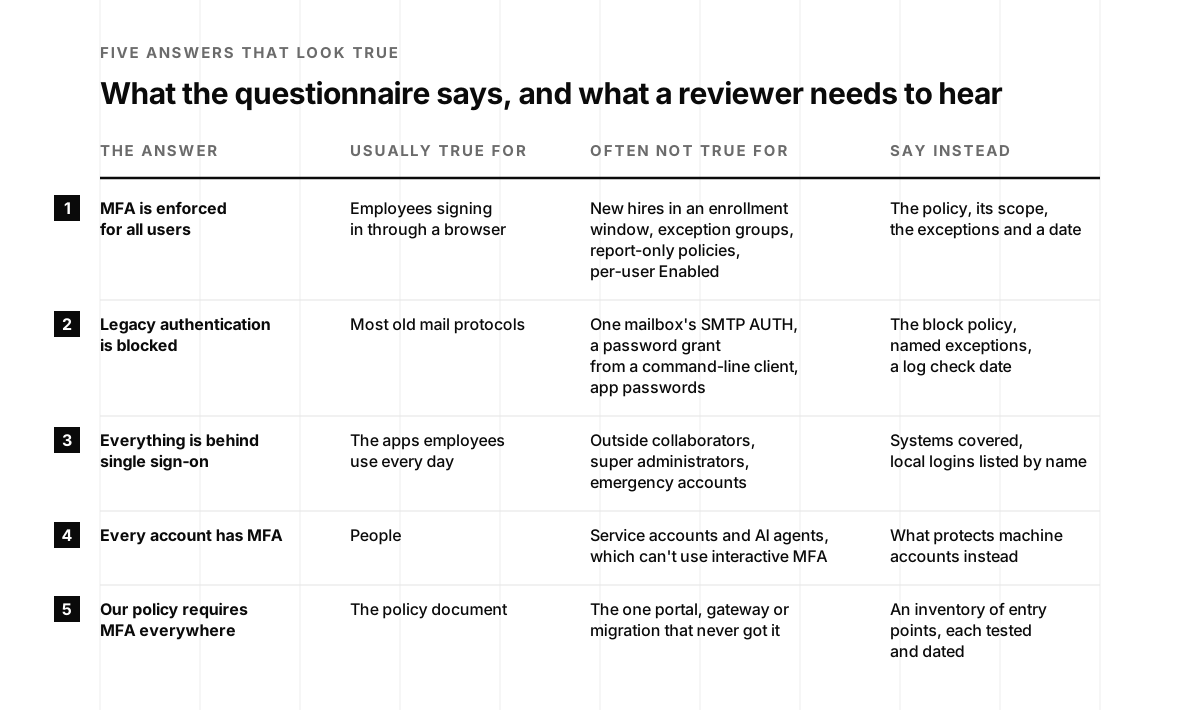
This post is a checklist for the five answers that most often look true and aren’t. For each one you’ll get why it looks true, the precise wording a reviewer trusts, and a ten-minute check you can run before you hit send:
- “MFA is enforced for all users.” Usually true for the browser. Often not true for new hires, exception groups, report-only policies or per-user settings stuck in “Enabled”.
- “Legacy authentication is blocked.” Usually true for most mail protocols. Often not true for one mailbox, one command-line client or one token flow nobody thinks of as legacy.
- “Everything is behind single sign-on.” Usually true for employees. Often not true for outside collaborators, super admins and emergency accounts.
- “Every account has MFA, including service accounts.” Never literally true, because service accounts and AI agents can’t do MFA. The honest answer describes what protects them instead.
- “Our policy requires MFA on every external system.” True as a policy. The question is whether every door matches it.
Founders have opinions about these forms, and fair enough:
Enterprise sales are so fun
Safi (@safishamsii) · October 6, 2026
Like yes sir, permit me to assiduously populate that byzantine security questionnaire with every scintilla of superfluous particularity your procurement apparatus so ardently desiderates.
None of this means you should be nervous about questionnaires. It means a precise answer is a competitive advantage. Reviewers read hundreds of these. The vendor whose answers come with a scope, an exception list and a date is the one whose review closes in a week instead of a quarter.
At the end there’s a pre-send checker that turns your real settings into draft answers, flags the ones to fix first and exports them. If you’re new to questionnaires, start with What Is a DDQ?, which explains the formats and the process. This post picks up where its section on why accuracy matters more than speed leaves off.
The insurer asked “requires”
In March 2022, an Illinois electronics manufacturer called International Control Services (ICS) applied for a cyber insurance policy with Travelers. Question 60 on the application read: “Indicate whether the Applicant requires multi-factor authentication for: a. Administrative or privileged access”. ICS answered “Yes”, and signed an attestation listing where MFA was required, from email and all remote access to every admin path into directory services, backups, network gear and servers (complaint, Travelers v. International Control Services).
The attestation itself said what was at stake: “The controls described above and listed below are the minimum controls that must be in place in order to be eligible for a Cyber policy.” The signature line said the answers were true “after reasonable inquiry”.
Then ICS had a ransomware attack. In its July 2022 complaint, Travelers alleged that at the time of the application, “ICS only utilized MFA to protect its firewall, and did not use MFA to protect any other digital assets.” The case never reached a ruling on the merits. On August 26, 2022, ICS agreed to let the court enter a judgment rescinding the policy, which left it without the coverage it had bought (Lockton).
I tell founders about this case because of one word. The insurer didn’t ask whether ICS had MFA. It asked whether ICS required it, everywhere listed. ICS had MFA. It was on the firewall. Somebody probably believed the answer was close enough.
Your customer’s security questionnaire isn’t an insurance application, and a customer reviewer isn’t looking for a reason to deny a claim. But the same reading applies, and the people who answer these for a living say so out loud. Here’s Josh Mason of Charting Cyber in July:
“The form said MFA everywhere. Reality was MFA on email, but not the VPN and not the backup console. Nobody lied. The person filling it out just didn't know the exceptions.”
Josh Mason · Principal at Charting Cyber · July 27, 2026
“Nobody lied” is the important part. In almost every case I’ve seen, the person who wrote the answer believed it. The gap lives in the exceptions nobody listed: the service account the rollout skipped, the console that predates the identity provider, the contractor who never moved to single sign-on. Max Clark, an independent IT advisor, described exactly that after a renewal call in June: the client’s questionnaire said “MFA enforced”, and “turned out their MFA rollout had skipped service accounts” (Max Clark on LinkedIn). His summary is the best one-line version of this post I’ve read: “The form used to be a form. Now it’s evidence.”
81 million tries at a door with no prompt
Here’s the campaign Mike Faas was writing about, and it’s the clearest 2026 example of enabled versus enforced I know.
Between June 12 and June 26, a threat actor sprayed passwords at Microsoft accounts from a block of internet addresses. Huntress, which watched it unfold across its customers, counted more than 81 million login attempts in those two weeks and “78 user accounts being compromised across 64 organizations” (Huntress, June 30, 2026). The researchers named it after the hosting provider the traffic came from, LSHIY.
The interesting part isn’t the volume. It’s the door. The attackers didn’t sign in through a browser, where an MFA prompt would have stopped them. They “replayed validated credentials via the OAuth ROPC (Resource Owner Password Credentials) flow”, aimed at the Azure command-line client. ROPC is an old token request that sends a username and password straight to the token endpoint. There’s no page to show a prompt on.
And most of these companies had MFA. Huntress found that in 15 of the 23 businesses hit on June 22, MFA was configured and didn’t trigger. Some had required it for specific apps rather than all of them: “In some cases MFA was enforced for specific apps instead of “All Cloud Apps."" Others had scoped it to certain groups, or only to sign-ins from untrusted locations. Two had their policy in report-only mode, which records what would have happened and enforces nothing. Eight had no MFA policy at all.
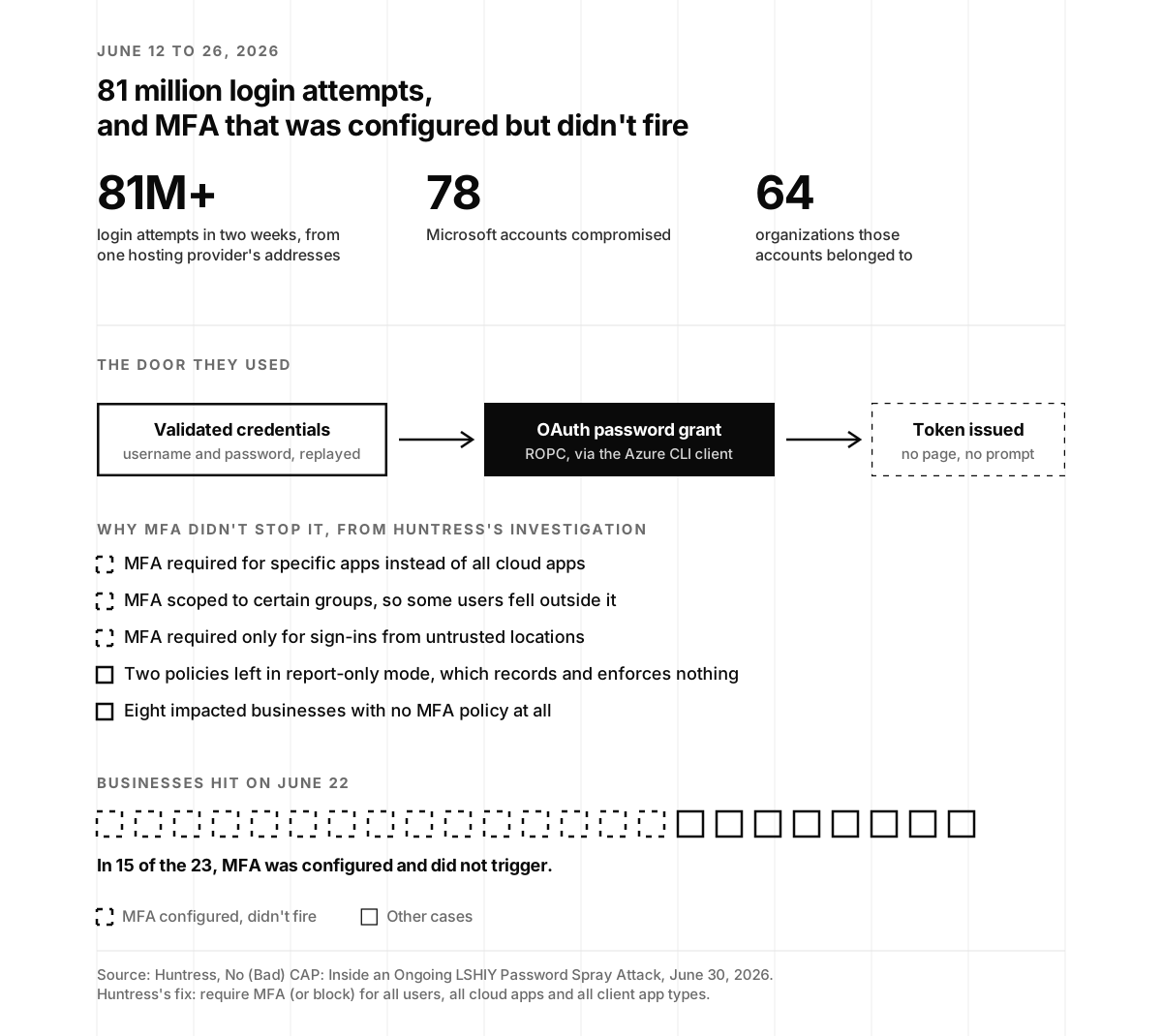
Huntress’s recommendation is worth copying word for word into your own policy: “Businesses setting up CAPs should require MFA (or block) for All Users, All Cloud Apps, and All Client App types, unconditionally”. CAP is a Conditional Access policy, Microsoft’s rule engine for sign-ins. The researchers also suggest restricting the Azure command-line client for people who aren’t administrators. The Hacker News covered the campaign in July if you want the shorter version (The Hacker News).
Now picture the security questionnaire each of the companies with MFA answered last year. “Do you enforce MFA for all users?” Yes. True for the browser. True for the phone app. Not true for one token flow on one client, which is all a spray needs.
That’s the pattern for all five answers below. The answer is true for the path everyone uses and untrue for a path nobody thought about.
Answer 1: “MFA is enforced for all users”
Why it looks true. You turned MFA on. Every identity provider has a screen that says so. But each of them also has a setting that reads as on without stopping a password-only sign-in, and most of those settings exist for good reasons, like giving new hires time to enroll.
Here’s what that looks like in the platforms startups actually run:
- Microsoft Entra ID, per-user MFA. The legacy per-user page has three states: Disabled, Enabled and Enforced. A user in the Enabled state “can still use their password for legacy authentication”, and legacy authentication “continues to work until the registration process is completed” (Microsoft Learn). Microsoft’s own advice is to skip per-user settings and use Conditional Access instead.
- Microsoft Entra ID, Conditional Access. A policy can exist, look right and enforce nothing. In report-only mode, “Users aren’t prompted for multifactor authentication or blocked by report-only policies” (Microsoft Learn). Microsoft-managed policies even arrive that way: “The policy is automatically created in your tenant in a Report-only state” (Microsoft Learn).
- Google Workspace. There’s a checkbox to “Allow users to turn on 2-Step Verification” and a separate enforcement setting. Enforcement can include a new-user enrollment period from 1 day to 6 months, and “During this period, users can sign in with just their passwords.” Google also lets you put people in a group where 2-Step Verification isn’t enforced, and says plainly that “it’s not recommended as a standard practice” (Google Workspace Help).
- Okta. Enrollment policies decide whether people must enroll a factor. Separate app sign-in rules decide what each app requires, and one of the options is “Any 1 factor type”, which “allows users to provide any single factor to access the app” (Okta). Required enrollment plus a one-factor app rule is enrolled, not enforced.
- AWS IAM Identity Center. If a user has no MFA device yet, one of the four options is “Allow them to sign in” (AWS). The default makes them register, but it’s worth a look.
Spot the settingSix settings that read as “MFA on.” Open each one to see what it actually enforces.
Microsoft Entra IDPer-user MFA state: Enabled
What it enforcesRegistration is pending. Until the user finishes, they “can still use their password for legacy authentication.”
Microsoft Entra IDConditional Access policy: Report-only
What it enforcesNothing yet. Every sign-in is evaluated and logged, but nobody is prompted and nothing is blocked.
Google WorkspaceAllow users to turn on 2-Step Verification: checked
What it enforcesPeople can turn it on. Nobody has to until enforcement is on as well.
Google WorkspaceNew user enrollment period: 6 months
What it enforcesNothing for new hires until the window closes. Until then they can sign in with just a password.
OktaAuthenticator enrollment: Required. App rule: Any 1 factor type
What it enforcesEveryone has enrolled a second factor. That app still accepts any single factor, including a password.
Any identity providerMFA policy assigned to: selected apps or selected groups
What it enforcesMFA for those apps and groups. Everything outside them can sign in without it, which is how the June spray got through.
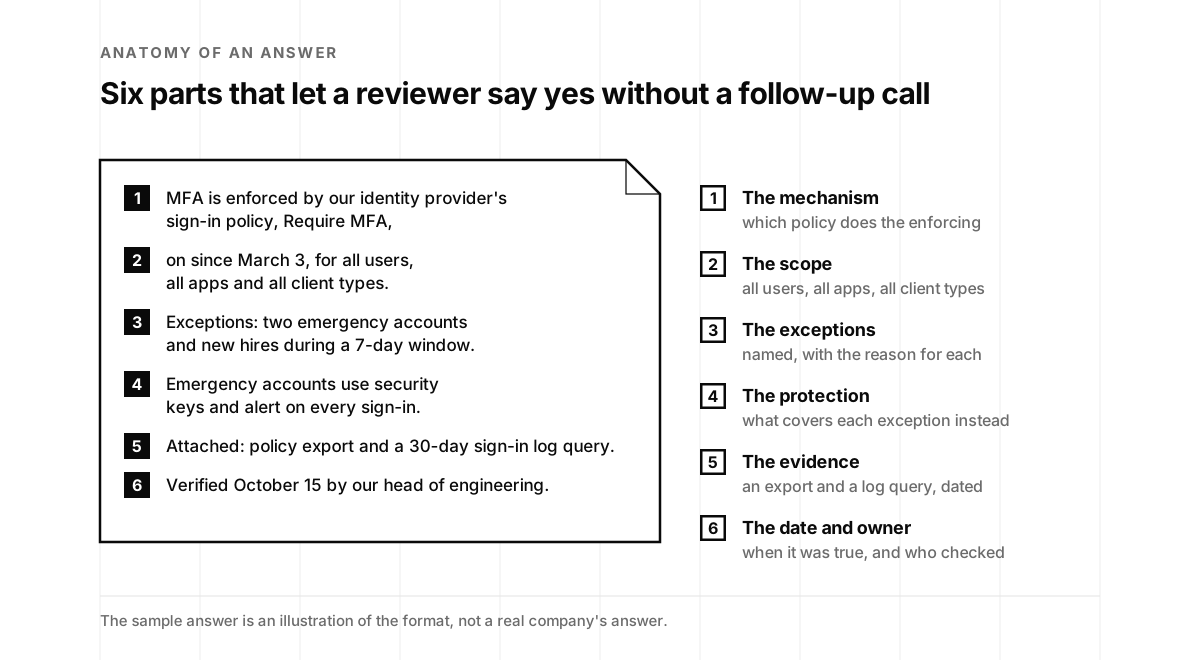
What to say instead. A reviewer trusts an answer that names the mechanism, the scope, the exceptions and the date. Something like:
MFA is enforced by our identity provider’s sign-in policy [policy name], on since [date], for all users, all applications and all client types. Exceptions: two emergency access accounts, which use passkeys, alert on every sign-in and are tested quarterly, and new employees during a 7-day enrollment window. Last verified [date]: no single-factor interactive sign-ins in the past 30 days.
That’s longer than “Yes.” It’s also the answer that ends the conversation instead of starting one. Microsoft does this in its own reporting: its November 2025 Secure Future Initiative report says it “Enforced phishing-resistant MFA for 99.6% of Microsoft employees and devices” (Microsoft). Not “all.” A number, a definition and a date.
The ten-minute check. In Microsoft Entra ID, open your Conditional Access policies and confirm every MFA policy is set to On, not Report-only or Off, and targets all users and all cloud apps. Then open the per-user MFA page and look for anyone still sitting in Enabled. In Google Workspace, confirm enforcement is on for every organizational unit, note the new-user enrollment period, and check for exception groups. In Okta, read each app’s sign-in rules for “Password” or “Any 1 factor type”. On GitHub, filter your members by two-factor status for Insecure and Disabled, and do the same for outside collaborators.
If you run Microsoft, this ten-minute video is the fastest way to see why per-user MFA and Conditional Access behave so differently:
A word on which MFA. Reviewers at larger buyers now ask a second question: is it phishing-resistant? Text messages and push approvals count as MFA, and they’ve been talked around: in Uber’s 2022 incident a contractor kept receiving push requests until “Eventually, however, the contractor accepted one” (Uber), and in 2023 an attacker who reached a Retool employee’s Google account got every authenticator code synced to it (Retool). Passkeys and security keys are the strong answer, for administrators at minimum. If that’s new territory, our post on device-bound credentials explains the difference, and Jasson Casey of Beyond Identity made the case on episode 92 of the podcast. Salesforce ran the biggest version of this answer when it required MFA from every customer in February 2022, with text, email and phone codes excluded. Taher Elgamal, its chief technology officer for security at the time, told us on episode 61 that the push had “an over eighty percent success” and then named the catch: “that was authentication into Salesforce, not the 89 other things that people need to log into.” Enforced on one application is still enabled on the other eighty-nine.
Answer 2: “Legacy authentication is blocked”
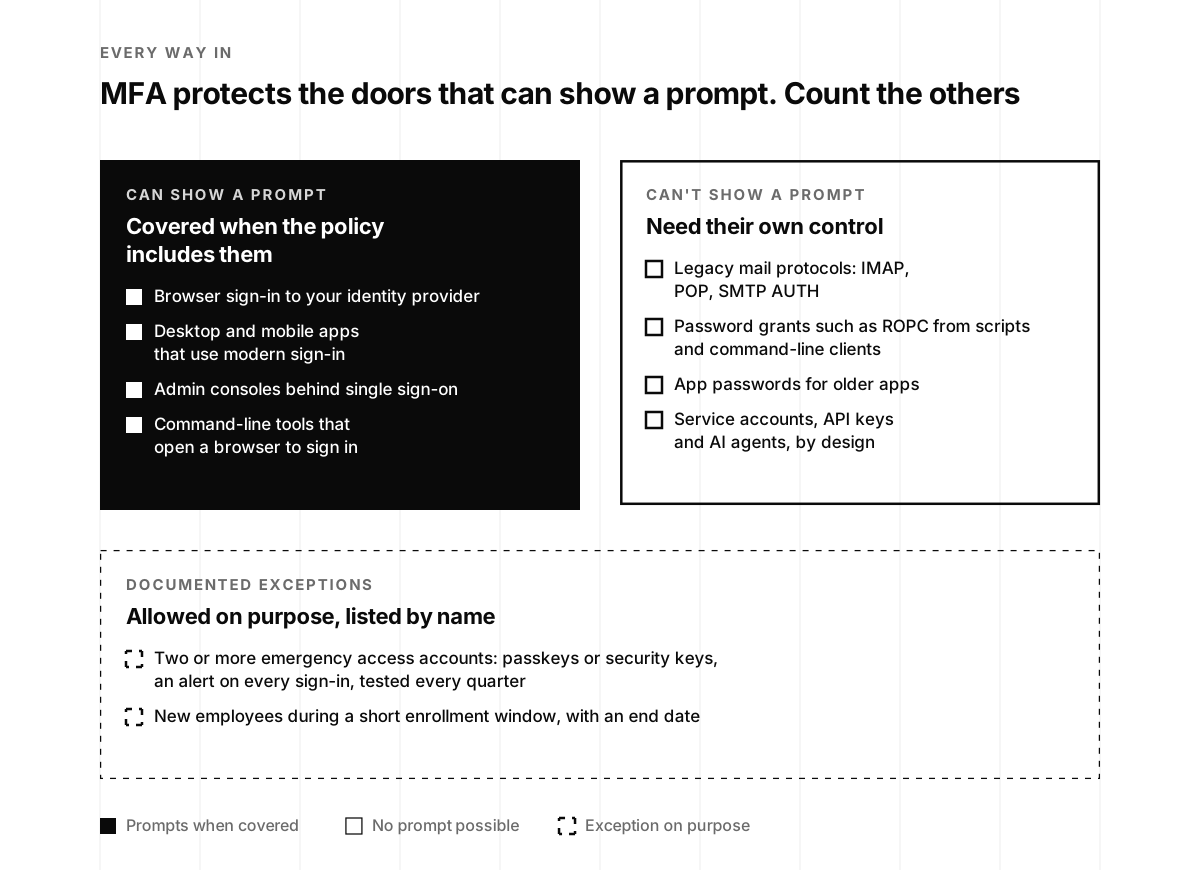
Why it looks true. Microsoft turned off basic authentication for most Exchange Online protocols back in 2022, so a lot of people assume the problem is gone. Microsoft’s documentation says “Basic authentication is now disabled in all tenants” for protocols like POP, IMAP and Exchange ActiveSync (Microsoft Learn). Google turned off its password-only “Less Secure Apps” sign-in for Workspace accounts as of May 1, 2025 (Google Workspace Updates).
But “legacy” covers more than old mail clients, and several paths are still open by default or by exception:
- SMTP AUTH. Microsoft’s own page says “Although SMTP AUTH is currently available, Microsoft has announced plans to retire Basic authentication for SMTP AUTH in Exchange Online” (Microsoft Learn). Under the updated timeline, it’s turned off by default for existing tenants at the end of December 2026 and can be turned back on, and Microsoft plans to announce a final removal date in the second half of 2027 (heise). Until then, the scanner or the invoicing tool that sends mail is often using it.
- Per-mailbox overrides. You can disable SMTP AUTH for the whole tenant and still have it on for one mailbox, because “The mailbox setting takes precedence over the organization setting” (Microsoft Learn).
- Token flows that take a password. The ROPC grant from the June campaign doesn’t look like legacy authentication on a slide, and Microsoft recommends against it, but it’s how that spray reached accounts whose MFA covered only the browser.
- App passwords. In Microsoft’s per-user model, older apps used by an Enforced user need an app password (the docs say “Apps require app passwords”), and an app password is a password.
- A policy that blocks it in report-only mode. Microsoft’s own recipe for the “Block legacy authentication” policy ends with setting it to Report-only to test first (Microsoft Learn). Plenty of tenants never flip it to On.
This isn’t a niche concern. Microsoft says that “more than 97 percent of credential stuffing attacks use legacy authentication and more than 99 percent of password spray attacks use legacy authentication protocols” (same page). The June campaign shows the mechanism still works.
What to say instead.
Legacy authentication is blocked by Conditional Access policy [name], on since [date], for all users and all client types. SMTP AUTH is disabled tenant-wide; one mailbox used by our [scanner or billing tool] still uses it and moves to OAuth or a relay service by [date]. The Azure command-line client is restricted to administrators. Last verified [date]: no legacy-protocol sign-ins in the past 30 days.
The ten-minute check. In the Microsoft Entra admin center, open the sign-in logs, add the Client App filter and select every legacy authentication protocol, then repeat on the non-interactive sign-ins tab, which is where a lot of service traffic shows up. Run Get-TransportConfig | Format-List SmtpClientAuthenticationDisabled in Exchange Online PowerShell, then check for mailboxes with their own SmtpClientAuthenticationDisabled setting. Confirm the block-legacy-authentication policy is On. If you’re on Google Workspace, review which accounts still use app passwords.
"Being prepared to do this kind of credential rotation takes discipline and preparation"
tptacek, on Hacker News, February 2024, on Cloudflare's Thanksgiving 2023 incident write-up
Answer 3: “Everything is behind single sign-on”
Why it looks true. Single sign-on (SSO) is set up, and the employees you see every day use it for everything. It’s a great control. It’s also a control with a few doors built into it on purpose.
- GitHub spells out the three states in its own documentation: SSO “can be disabled, enabled but not enforced, or enabled and enforced.” Until you enforce it, “Members can still access the organization’s resources before authentication with your IdP” (GitHub Docs). And even when it’s enforced, “SSO authentication is not required for outside collaborators” (GitHub Docs).
- Google Workspace super administrators don’t go through your identity provider at the Admin console. They “must enter their full Google administrator account email address and associated Google password” (Google Workspace Help). That’s sensible, since it’s how you fix a broken SSO setup, but it means the strongest accounts in your company sign in with a Google password and whatever second factor you gave them.
- Slack lets organization admins exclude “members and guests from SSO sign-in” (Slack Help Center).
- Emergency access accounts exist precisely so you can get in when SSO is down, and Microsoft recommends you have “two or more” of them (Microsoft Learn).
Higher education reviewers have already written this into their questionnaire. The HECVAT’s issue tracker clarified in April that answering not applicable to a login question “is only acceptable if SSO is the only way to log in” (EDUCAUSE HECVAT tracker).
Single sign-on is a rite of passage for every B2B startup. Michael Grinich, the founder of WorkOS, which sells it to them, turned the whole trip into a game this summer:
I built "The Oregon Trail" for b2b startups 🤠🦬🏞
Michael Grinich (@grinich) · August 14, 2026
Ford the SAML River. Survive the 320-question security questionnaire. Hunt bugs with pitch decks.
Your party can die of burnout, scope creep, or a crypto side-project.
Play now: enterprise-trail.com
What to say instead.
SSO through [identity provider] is enforced for [list of systems]. Local password sign-in remains for [Google super administrators, who use security keys] and two emergency access accounts, which alert on every use. Outside collaborators: [number], each required to use two-factor authentication. Systems not yet behind SSO: [system], moving by [date].
The ten-minute check. On GitHub, open your organization’s security settings and confirm “Require SAML SSO authentication for all members” is checked, then count your outside collaborators. In Google Workspace, list your super administrators and their second factor. For each of your top ten SaaS tools, open the authentication settings and look for a “password login allowed” or “SSO optional” switch. Write down what you find, with the date.
Answer 4: “Every account has MFA, including service accounts”
Why it looks true. Your MFA policy targets “All users”, and in the identity provider’s language, service accounts are users too.
This is the one answer that’s never literally true, and that’s fine. Machines can’t tap a phone. Microsoft says workload identities “Can’t perform multifactor authentication” (Microsoft Learn). Google says “Service accounts do not require 2SV, but the admin account they impersonate must be enrolled” (Google Workspace Help). Snowflake’s service users “cannot enroll in MFA”, and Snowflake now has a separate user type for AI agents, described as “User is an automated AI agent that interacts with its own identity and privileges” (Snowflake). Microsoft’s guidance for AI agents is direct about the questionnaire problem this creates: “Agents can’t satisfy interactive controls like MFA,” and “Audit broad policies (like “All users must use MFA”) to ensure they don’t unintentionally block agent flows” (Microsoft Learn).
Even the platforms’ own MFA mandates stop at machines. Microsoft’s mandatory MFA for the Azure portal and command-line tools covers people, and says “Workload identities, such as managed identities and service principals, aren’t impacted by either phase of this MFA enforcement” (Microsoft Learn).
So the honest question isn’t whether service accounts have MFA. It’s what protects them instead, and two well-known incidents show why reviewers care:
- Okta, October 2023. An attacker reached Okta’s customer support system through a service account. “The username and password of the service account had been saved into the employee’s personal Google account,” and the incident touched 134 customers (Okta Security).
- Cloudflare, November 2023. After that Okta breach, Cloudflare rotated its credentials but “failed to rotate one service token and three service accounts (out of thousands)”, which “were not rotated because mistakenly it was believed they were unused.” It then rotated more than 5,000 production credentials (Cloudflare).
"Probably safer to rotate the credentials and then schedule it for deletion later."
phyzome, on Hacker News, February 2024, replying in the thread on Cloudflare's write-up
The newest version of this answer involves AI. Mukesh Bhakar described a common security review in September: a prospect asks whether AI processes customer data and whether the SOC 2 report covers it, and somewhere in the honest answer is “the service account calling the model API is holding a long-lived key nobody owns”, one that’s “not rotated, not in the access review” (Mukesh Bhakar on LinkedIn). If your agents and integrations run on keys, those keys belong in this answer, and our 30-minute AI credential inventory is the fastest way to find them. If several agents share one key, Your Agents Share One API Key shows how to split it and who should sign for each one.
What to say instead.
MFA is enforced for all human users. Non-human identities ([number] service principals, [number] API keys, [number] AI agent identities) can’t use interactive MFA. Each has a named owner, least-privilege permissions and, where supported, network restrictions. They authenticate with [workload identity federation, key pairs or short-lived tokens]; remaining long-lived secrets rotate every [number] days and are listed in our credential inventory, last reviewed [date]. No person signs in with a service credential.
The ten-minute check. Download your AWS credential report and look at the access key “last rotated” and “last used” columns. In Snowflake, list users whose type is LEGACY_SERVICE or who still have a password. In Microsoft Entra ID, list app registrations with client secrets and their expiry dates. On GitHub, find shared or bot accounts, which GitHub says need two-factor too: “You will also need to enable two-factor authentication for unattended or shared access accounts” (GitHub Docs).
“What got me was a conversation after, almost in passing - turned out their MFA rollout had skipped service accounts. Nobody flagged it because nobody asked.”
Max Clark · Independent IT advisory · June 24, 2026
Answer 5: “Our policy requires MFA on every external system”
Why it looks true. The policy exists. Somebody wrote it, leadership approved it, and it’s in the trust center. The question a reviewer is really asking is whether every internet-facing door matches it, and the public record is full of companies where the policy was real and one door wasn’t.
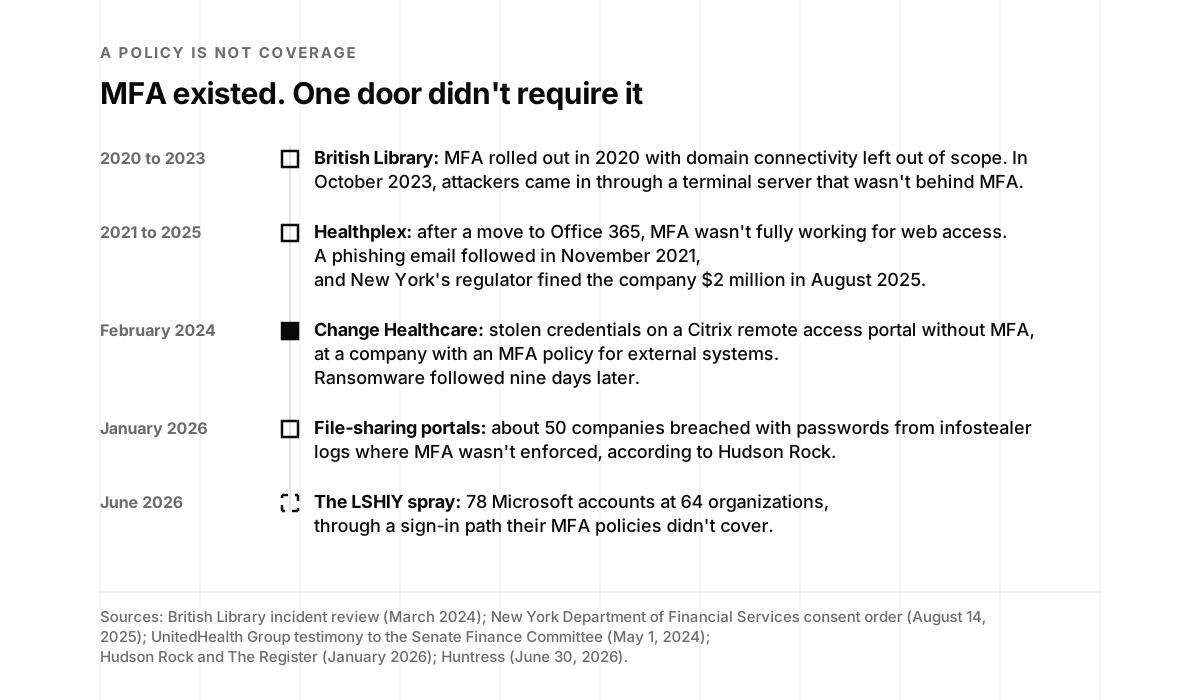
- Change Healthcare, 2024. UnitedHealth Group’s chief executive, Andrew Witty, told the Senate in written testimony that on February 12, “criminals used compromised credentials to remotely access a Change Healthcare Citrix portal,” and that “The portal did not have multi-factor authentication” (UnitedHealth Group testimony). At the hearing he described “an enforced policy across the organization to have multi-factor authentication on all of our external systems, which is in place,” and a server that “was not protected by MFA.” Senator Ron Wyden’s reply was the whole lesson in one line: “We heard from your people that you had a policy, but you all weren’t carrying it out” (TechCrunch).
- The British Library, 2023. Its own review says “MFA was introduced across the Library in 2020,” but connectivity to its domain was left “out of scope for MFA implementation” for reasons of practicality and cost. The lesson it published: “The Library had MFA in place for all end-user technologies, but not on certain supplier endpoints” (British Library).
- Healthplex, 2021 to 2025. New York’s financial regulator fined Healthplex, a dental insurance management company, $2 million in August 2025, in part because after a move to Office 365 it “failed to ensure that the MFA function was” “completely operational for those accessing O365 from an external web browser” (New York Department of Financial Services). A migration is exactly when a working control quietly stops working.
- About 50 companies, January 2026. Hudson Rock tied a run of file-sharing portal breaches to passwords from infostealer logs at organizations that “did not enforce MFA”. In Hudson Rock’s telling, there were no exploits involved, “just a password” (Hudson Rock). Hudson Rock sells infostealer intelligence and the victims weren’t individually confirmed, but Progress Software, which makes one of the platforms involved, said the compromises “appear to have involved the use of valid credentials in environments where multi-factor authentication was not enforced” (The Register).
What to say instead.
Our policy requires MFA on all internet-facing access, and we verify it against an inventory of [number] entry points: our identity provider, VPN, remote access gateways, admin consoles, file sharing and vendor support access. As of [date], [number] of [number] enforce MFA; [one legacy portal] sits behind [a compensating control] and is retired on [date].
The ten-minute check. List every page on the internet where someone can type a password into something of yours: the identity provider, the VPN, remote desktop or Citrix gateways, admin consoles, file sharing, the support tool your vendors use to reach you. Try each one with a test account that has no second factor. Write down the result and the date. That list, with dates, is the best attachment you can send with this answer.
Four more answers worth a second look
MFA gets the attention, but the same pattern hides in a handful of other answers. Each of these is usually true in the way you meant it and untrue in the way a reviewer reads it.
- “All activity is logged.” In AWS, CloudTrail’s event history is on by default, and it’s “the past 90 days of management events” only. For anything longer, AWS says to “create an event data store or a trail” (AWS). Say what’s logged, where it goes, how long you keep it and who reviews it.
- “Customer data is encrypted at rest.” Since January 5, 2023, Amazon S3 encrypts new objects by default (AWS), so this answer is nearly free. The question behind it is who holds the keys and who can read the data, and an older database can make “all data” untrue: Amazon RDS instances can only be encrypted when they’re created (AWS).
- “We don’t train on your data.” True at the major model providers by default, and still worth stating precisely, because retention is a separate promise. OpenAI, for example, says it “may securely retain API inputs and outputs for up to 30 days to provide the services and to identify abuse” unless you qualify for zero data retention (OpenAI). Say which providers, what they keep and for how long. Some buyers will want the technical version of that promise too, and on episode 75 Jonathan Mortensen of Confident Security explains inference built so the provider can’t see the prompts at all.
- “We delete customer data within 30 days.” True for your primary database, maybe. Check your backups, logs and every subprocessor’s own deletion window before you promise a number.
Our security exhibit guide walks through how answers like these end up in the contract you sign, which is the best reason to get them exactly right.
A green check is a definition
A lot of startups answer the MFA question from their compliance dashboard. The test is green, so the answer is yes. That’s reasonable, and the compliance platforms are good at this. It’s also worth knowing what each green check actually checked, because the platforms are refreshingly candid about it in their own help pages:
- Vanta’s Office 365 test “checks that MFA is enabled for Office 365 (Entra) users via the “isMfaRegistered” field” (Vanta Help Center). Registered is the operative word. In Microsoft’s current registration report, that field means a user has registered a strong method, and Microsoft notes that “The method may not necessarily be allowed by the authentication methods policy” (Microsoft Graph). Neither says whether a sign-in requires it. Vanta’s Google Workspace test goes the other way: “Global enforcement alone does not mean the user has completed setup” (Vanta Help Center).
- Drata’s identity provider test says “MFA must be required (not just available)”, which is exactly the right standard. It also says that “If Security Defaults are enabled in your tenant, Drata marks all users as MFA-compliant, regardless of other settings,” and that MFA layered through a system Microsoft’s API can’t see “may not be detected” (Drata Help Center).
- Secureframe explains why a test can be green with no evidence behind it: “Some tests pass when the setting does not exist, so you can see Pass with little or no visible evidence in Secureframe.” Its advice is the right advice for every platform: “Validate in the source system whether the relevant setting/policy exists” (Secureframe Help Center).
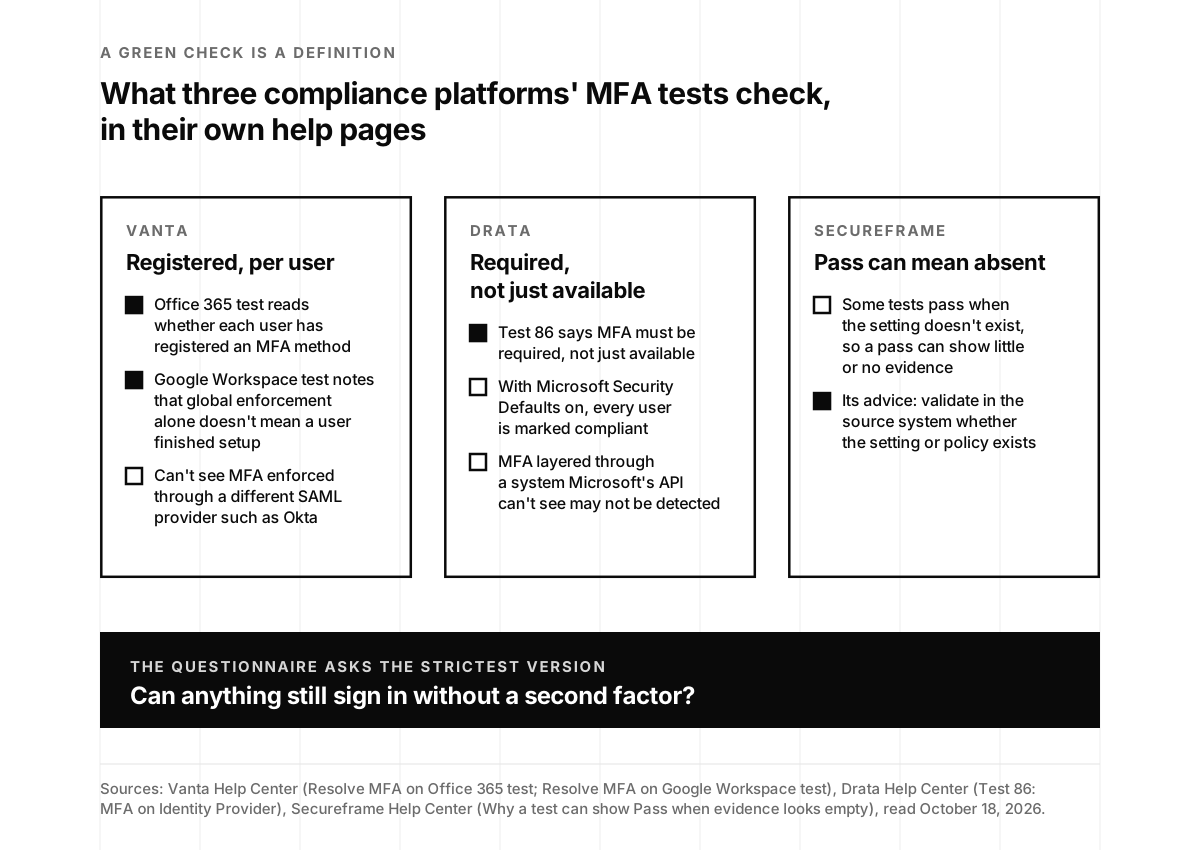
None of that is a knock on the tools. Every test has to pick a definition, and these are reasonable ones. The point is that “the test is green” and “MFA is enforced for every sign-in path” are two different claims, and the questionnaire asks the second one. Use the dashboard to find problems fast, and use the identity provider to answer the question.
Every answer has an as-of date
Here’s the part that makes all five answers easier: a questionnaire answer isn’t a fact about your company. It’s a fact about your company on a particular day. The buyer files it and reads it for a year. In a survey Drata published in September, of 309 IT and security leaders and practitioners in the US, UK and Canada, 76 percent said they reassess critical vendors once a year at most (Drata, International Security Journal), so whatever you send has to stay true until they ask again.
That’s why the best answer you can give isn’t a perfect environment. It’s an environment you check on a schedule, with answers that carry the date of the last check. FedRAMP, the federal government’s cloud security program, now puts this better than anyone. Its 20x overhaul, announced in 2025, says security should be “continuously enforced, monitored, and reported”, not staged for a point-in-time audit, and that “Continuous evidence of what is happening is stronger than a policy saying it should happen” (FedRAMP 20x).
Daniel Marashlian co-founded Drata after living the other version. At his previous company, selling to universities, the same question kept stalling deals: “it kept coming back to the extremely long security questionnaires, or ‘let me see your SOC 2 report.’” When he joined us on the podcast, he described the part nobody enjoys:
“I don’t think anyone’s excited about having meetings, collecting screenshots, and getting evidence of how I effectively operate a security control in my business. That’s not the fun part.”
Daniel Marashlian, co-founder and chief technology officer of Drata, on episode 64
His fix was to let systems produce the proof themselves, and in August he put the idea in two lines on Drata’s blog: “Integrations over screenshots. Continuous monitoring over point-in-time scrambles.” (Drata). You don’t need a platform to get most of the benefit. You need a habit, and a reason to keep it. Here’s the reason: auditors don’t grade the month before the audit. They sample the whole period. One CPA firm puts it plainly: “auditors spread samples across the entire period rather than clustering them recently” (CertPro), and its list of common exceptions includes “MFA is not enforced for all required systems” (CertPro). Thomas Ptacek made the same point years ago about Type 2 audits: “you can’t travel back in time to close a gap you had last year” (Fly.io).
The good news is that the habit compounds. Lazarus Alliance, a CPA firm, published data from 75 of its own SOC 2 examinations between January 2025 and June 2026: 71 percent had at least one exception, and access control and user provisioning was the most common area, at 51 percent. But renewals had exceptions 60 percent of the time, against 84 percent for first-time examinations, and the firm flagged “Screenshots without dates, system identifiers, or context” as a common reason evidence fell short (Lazarus Alliance). It’s one firm’s data, and it points the same way as everything else: the second year is calmer than the first because the evidence already exists.
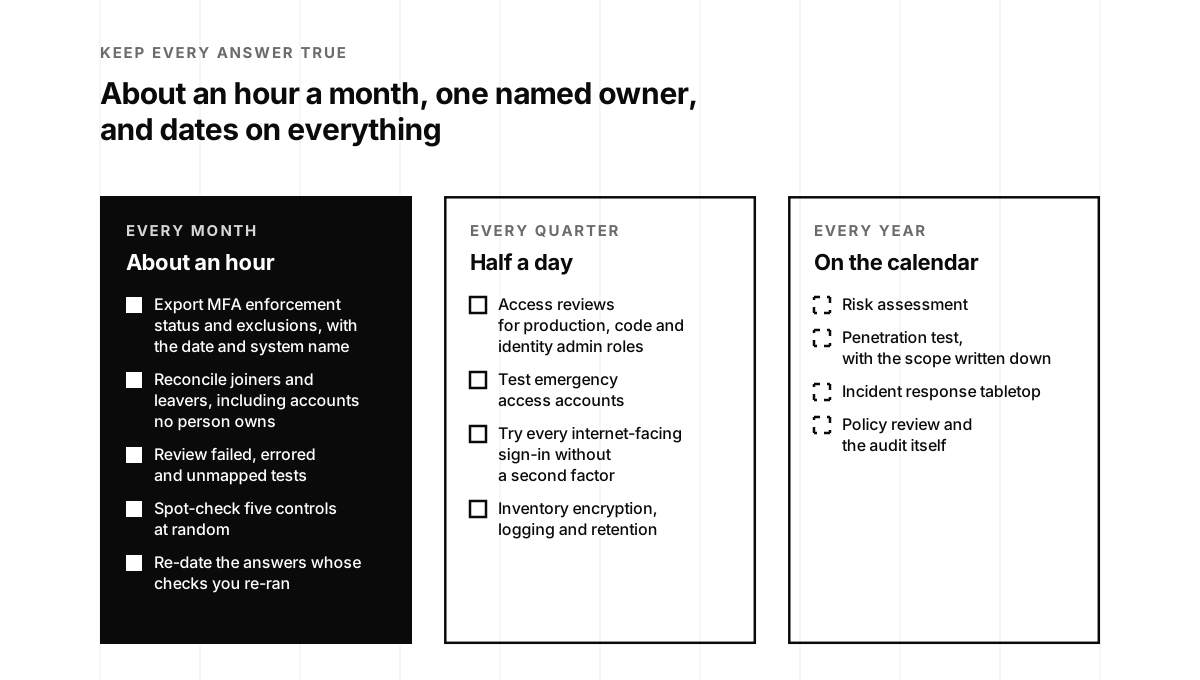
Here’s the monthly hour we set up for clients, and it fits a team of one:
- Export the identity provider’s enforcement status and exclusions, with the date and system name on the file. Note any new exception and who approved it.
- Reconcile joiners and leavers against the identity provider, the cloud accounts, the code host and your top five SaaS tools. Include accounts that aren’t linked to a person.
- Review your compliance platform’s failed tests, and its errored and unmapped ones, which may not move the readiness score. Drata’s own help pages note that draft tests aren’t included in its metrics and that unmapped tests don’t affect readiness scores (Drata Help Center).
- Spot-check a few controls at random. IANS gives companies this exact advice for checking their own trust page and questionnaire answers: “Pick 5–10 controls at random and verify that the underlying evidence actually exists and is current” (IANS).
- Sweep the answer library. For any control that changed or failed this month, flag the matching questionnaire and trust center answers, and re-date the ones you re-checked.
Ayoub Fandi, who writes The GRC Engineer newsletter, has the rule I’d tape to the answer library: “A ruling is only as fresh as its fastest input.” And the fix: “Date the assumption, and name the input it rests on” (The GRC Engineer).
"Pick some sort of standard, for example CAIQ and have an always-up-to-date version of it."
temikus, on Hacker News, June 2023, answering "How small startups deal with long security questionnaires from clients?"
People who’ve done this describe it as smaller than they feared. Answering a solo founder’s question on Hacker News in May, one commenter who had been through it wrote: “I spent a probably 5 hours a month the first year,” and in later years, “it’s all set up, very little until audit time” (Hacker News). That’s the trade: a steady hour a month instead of a scramble every spring, and answers you can send the day a questionnaire arrives.
If you want the engineering version of this habit, AJ Yawn’s talk at fwd:cloudsec is the best short introduction to what’s now called GRC engineering:
Our SOC 2 readiness checklist and the seven-day plan in The Week After Your SOC 2 Report Lands are both built around the same idea: make the evidence once, keep it current, and let the audit and the questionnaires read from it.
When AI drafts the answers
More and more startups use AI to draft questionnaire answers, and they should. The tools are good and the time savings are real. But an AI draft answers from whatever it’s given, and that makes everything above more important, not less.
Travis Hayes, a cybersecurity and IT executive, asked the question I’d want every reviewer to ask, on October 13:
“When their AI answers your security questionnaire, who is attesting?”
“When a person writes ‘Yes, MFA is enforced for all administrative access,’ a person is standing behind that statement.”
Travis Hayes · Cybersecurity and IT executive · October 13, 2026
The vendors who build these tools say the same thing in their own documentation, which I respect. Drata, in an October 15 post: “Generative AI is built to generate text that sounds right” (Drata). Conveyor’s FAQ names the usual cause of a wrong answer: “The most common culprit is uploading multiple versions of the same document or content that hasn’t been refreshed” (Conveyor). SafeBase, now part of Drata, tells customers to prune their library: “If it’s older than a year, it’s time to archive it” (SafeBase). And Vanta, which says its AI-generated answers are “accepted up to 95% of the time”, footnotes that “Customer results may vary based on the information available in the knowledge base” (Vanta).
Read those together and the lesson is simple. The model is only as current as your evidence. If your answer library says “MFA is enforced for all users” and your identity provider says three people are still in Enabled, the AI will confidently write the library’s version.
So the rule is the one we wrote about in Who Signs for the Agent?: the AI drafts, a named person signs. Give that person the as-of dates, the exception list and the evidence. Then a fast answer and a true answer are the same answer.
Signing only works if the signer reads. Yash Kosaraju, the chief information security officer of Andreessen Horowitz, explained why on our podcast, talking about the approval prompts in AI tools:
That’s why the checker below drafts five answers instead of fifty: five the person who signs will actually read.
Run the pre-send check
Pick what’s true today for each of the five answers. The checker tells you which ones you can send as written, which need a qualifier, which to fix first and which to find out about, and it drafts the wording with brackets for your policy names, counts and dates. Five minutes, start to finish.
The pre-send check: five answers, drafted from what's enforced
Choose what's true today. Every answer updates as you go, with the evidence to attach and the ten-minute check for your identity provider.
Everything here runs in your browser and is saved only in this browser. The drafts are starting points: fill in each bracket from your own systems, have the person who signs the questionnaire read every answer, and leave contract wording to your counsel.
Got it. Someone who answers these questionnaires for a living will reply with what they'd tighten first.
Something went wrong. Email hello@ysecurity.io and we'll look at it by hand.
Before you hit send
Here’s the whole post as a checklist. Run it on the next questionnaire before it leaves the building.
- Read every “yes” as “requires, everywhere, today.” If it’s true only for the browser, or only for employees, say who it’s true for.
- Confirm enforcement in the identity provider itself, not the compliance dashboard: policies On, scoped to all users, all apps and all client types.
- List the exceptions by name, with the reason and what protects each one. Emergency accounts, new-hire windows and service accounts are normal. Unlisted ones are the problem.
- Check the sign-in logs for legacy and single-factor sign-ins over the last 30 days, interactive and non-interactive.
- Count the doors. Every internet-facing sign-in page, tested without a second factor, with a date.
- Describe machines honestly. Service accounts and agents can’t do MFA. Say what they use instead and who owns each one. If you ship agents, expect five more questions about them; we answer those in the five agent questions your first enterprise buyer will ask.
- Put a date on every answer, and tie it to the check that proves it.
- Attach evidence instead of essays: a dated policy export, a log query, an inventory.
- Let AI draft and a person sign. The signer reads every answer against current evidence.
- Offer a call. When a reviewer has more than a handful of follow-ups, thirty minutes with someone who can speak as a peer to their security team usually closes it faster than another round of email.
That last one is a big part of what our sales support team does every week: we answer questionnaires, join the security calls and keep the answer library current so the next one goes faster. If you’d like a second set of eyes on a questionnaire before it goes out, book fifteen minutes and bring it with you.
Enabled versus enforced, frequently asked questions
- What is the difference between MFA being enabled and MFA being enforced?
- Enabled means the option exists or a user has been signed up for it. Enforced means a sign-in can't succeed without the second factor. Microsoft's own documentation shows the gap: a user in the legacy per-user Enabled state can still use their password for legacy authentication until they finish registering. A Conditional Access policy in report-only mode evaluates sign-ins but enforces nothing. Google Workspace can let new users sign in with just a password for up to six months during an enrollment window. A questionnaire answer should describe what's enforced, for whom, and with which exceptions.
- How should we answer a security questionnaire if MFA isn't enforced everywhere?
- Precisely, with dates. Say which policy enforces MFA, which users and apps it covers, which accounts are excluded and why, what protects those accounts instead, and when you last checked. If a gap is closing, say when. A dated, qualified answer is easier for a reviewer to accept than a blanket yes, and it doesn't come back to haunt you after a forensic review.
- What is legacy authentication, and why does it get around MFA?
- Legacy authentication is any sign-in path that sends a username and password without a way to ask for a second factor: older mail protocols such as IMAP, POP and basic SMTP AUTH, app passwords, and token flows like OAuth's Resource Owner Password Credentials (ROPC) grant. Microsoft says more than 99 percent of password spray attacks it analyzed used legacy authentication protocols. In June 2026, Huntress tracked a password spray aimed at Microsoft's Azure command-line client that made more than 81 million login attempts and compromised 78 accounts. The attackers replayed working passwords through the ROPC flow, often at companies whose MFA policies didn't cover that path.
- Do service accounts need MFA?
- They can't use it. Microsoft says workload identities can't perform multifactor authentication, Google says service accounts don't require 2-Step Verification, and Snowflake's service users can't enroll in MFA. That's expected. What a reviewer wants to know is how those accounts are protected instead: a named owner, short-lived credentials such as workload identity federation or key pairs, least-privilege scopes, network restrictions where supported, rotation, and no person using a service credential to sign in by hand.
- Does a SOC 2 report prove that MFA is enforced?
- It shows what the auditor tested during the report period, within the report's scope. An auditor will often sample evidence across the period, and unenforced MFA shows up on auditors' lists of common exceptions. But a questionnaire asks about today and often about systems outside the report's scope, so answer it from current evidence, not from last year's report.
- Does a green MFA check in our compliance platform mean we're covered?
- It means the test passed by its own definition. Vanta's Office 365 test reads whether users have registered an MFA method. Drata marks every user compliant when Microsoft's Security Defaults are on, and notes that MFA layered through a system Microsoft's API can't see may not be detected. Secureframe says some tests pass when a setting doesn't exist. Read what each test checks, then confirm enforcement in the identity provider itself.
- What is Conditional Access report-only mode?
- A Microsoft Entra setting that evaluates a Conditional Access policy during sign-in and records what would have happened, without enforcing it. Microsoft's documentation says users aren't prompted for multifactor authentication or blocked by report-only policies. It's a good way to test a policy before turning it on. It isn't enforcement, and a tenant can carry report-only policies for months without anyone noticing.
- Is it okay to use AI to fill out security questionnaires?
- Yes, as a drafting tool, with a named person who reads and signs every answer. The tools are good and they save real time, but they draft from whatever documents you give them, and stale or conflicting documents are the most common cause of wrong answers. Keep your answer library current, point the tool at current evidence, and have the person who signs know what each answer claims.
- What happens if a security questionnaire answer turns out to be wrong?
- It depends on the contract, and answers are often attached to it. In insurance, the stakes can be the whole policy: in Travelers v. International Control Services, an insurer sought to rescind a cyber policy after alleging that the company's yes to requiring MFA was untrue, and in August 2022 a court rescinded the policy in a judgment the company agreed to. Write what's true, qualify what's partial, date every answer, and have counsel read any answer that becomes a warranty.
- How often should we update our security questionnaire answers?
- Tie every answer to a check you run on a schedule, and re-date the answer when you run it. A monthly hour of evidence work is enough for most startups: export the identity provider's enforcement status and exceptions, reconcile joiners and leavers, review failed and errored tests in your compliance platform, spot-check a few controls, and flag any answer whose underlying check changed.
- What evidence should we attach to an MFA answer?
- A dated export or screenshot that shows the enforcing policy is on, its scope (all users, all apps, all client types), the list of exclusions with the reason for each, and a sign-in log query showing no single-factor interactive sign-ins over the last 30 days. Undated screenshots are a common reason evidence falls short in audits, so attach evidence with a date and a system name on it.
- Is the pre-send checker free, and what does it send?
- Yes. It runs in your browser and saves only in your browser. Nothing you choose is sent unless you use the optional email form, which sends your email, your identity provider and the status of each of the five answers (ready, qualify, fix first or find out), never the answer text or anything you typed.